
1. Product Overview
The Medistrom Pilot-24 Lite is a compact and reliable 95Wh battery backup power supply designed for 24V CPAP machines. It provides portable power for various situations, including travel, camping, and power outages. This battery is TSA-approved and FAA-compliant, making it an ideal companion for users requiring continuous positive airway pressure (CPAP) therapy on the go.

Figure 1.1: Key features of the Medistrom Pilot-24 Lite battery, highlighting its compact design, 95Wh capacity, quick recharge time (2-3 hours), USB output (19000mAh), and suitability for travel and outdoor use. It is also TSA approved.
Key Features:
- Off-Grid CPAP Power: Delivers reliable portable power for 24V CPAP machines.
- High Capacity: 95Wh battery with LG industrial-grade cells for long-lasting power.
- Travel Friendly: TSA-approved and FAA-compliant at 1.3 lbs (560g), fitting easily into carry-ons.
- Quick Recharge: Recharges in 2-3 hours with a compatible AC adapter.
- USB Output: Includes a USB port (19000mAh) to charge other electronic devices like phones.
- Durable Design: Built with a tough aluminum case for rugged environments.
- Integrated Flashlight: Features a built-in LED flashlight for convenience.
2. What's Included
Upon unboxing your Medistrom Pilot-24 Lite, please ensure all the following components are present:

- Medistrom Pilot-24 Lite Battery
- Product Manual & Quick Start Guide (English, French, Spanish)
- Short Charging Adapter and Output Cable for ResMed AirMini
- Output Cable for AirSense 10
Note: Cables for other CPAP machines (other than AirSense 10 and AirMini) must be purchased separately.
3. Setup
3.1 Charging the Pilot-24 Lite Battery
Before initial use, fully charge your Pilot-24 Lite battery. The battery can be charged using your CPAP machine's AC power cable or other compatible adapters.

Figure 3.1: Charging the Pilot-24 Lite with an AirMini AC Power Cable.

Figure 3.2: Charging the Pilot-24 Lite with an AirSense 10 AC Power Cable.
The charge time will vary based on the wattage of the charger used:
- AirSense 10 AC Adapter: 2-3 hours
- ResMed AirMini AC Adapter: 7-9 hours
- Medistrom 90W AC Adapter (separate purchase required): 2-3 hours (recommended for faster charging, especially for ResMed AirMini users)
- Car Charger (separate purchase required): 3-5 hours
- 50W Solar Panel (separate purchase required): 3-3.5 hours
3.2 Connecting to Your CPAP Machine
Use the appropriate DC output cable provided (or purchased separately) to connect the Pilot-24 Lite to your 24V CPAP machine.

Figure 3.3: Ports on the Medistrom Pilot-24 Lite, including DC Out for CPAP connection.
4. Operating Modes
The Medistrom Pilot-24 Lite supports various operating modes to suit your power needs.
4.1 Travel Mode
Power your CPAP machine directly from the Medistrom Pilot-24 Lite when on the go, without an external power source.
Figure 4.1: Travel Mode setup for ResMed AirMini.
Figure 4.2: Travel Mode setup for ResMed AirSense 10.
4.2 Backup Mode (Uninterruptible Power Supply - UPS)
In Backup Mode, the CPAP machine continues to run seamlessly on the Pilot-24 Lite battery's power if the main power supply is interrupted. This requires a higher-capacity AC adapter (such as the Medistrom 90W AC Adapter or the AirSense 10 AC Adapter) for optimal performance.

Figure 4.3: Backup Mode setup for ResMed AirMini.
5. Compatibility
The Pilot-24 Lite is compatible with various 24V CPAP machines. Cables for ResMed AirMini and AirSense 10 are included. For other machines, specific cables must be purchased separately.
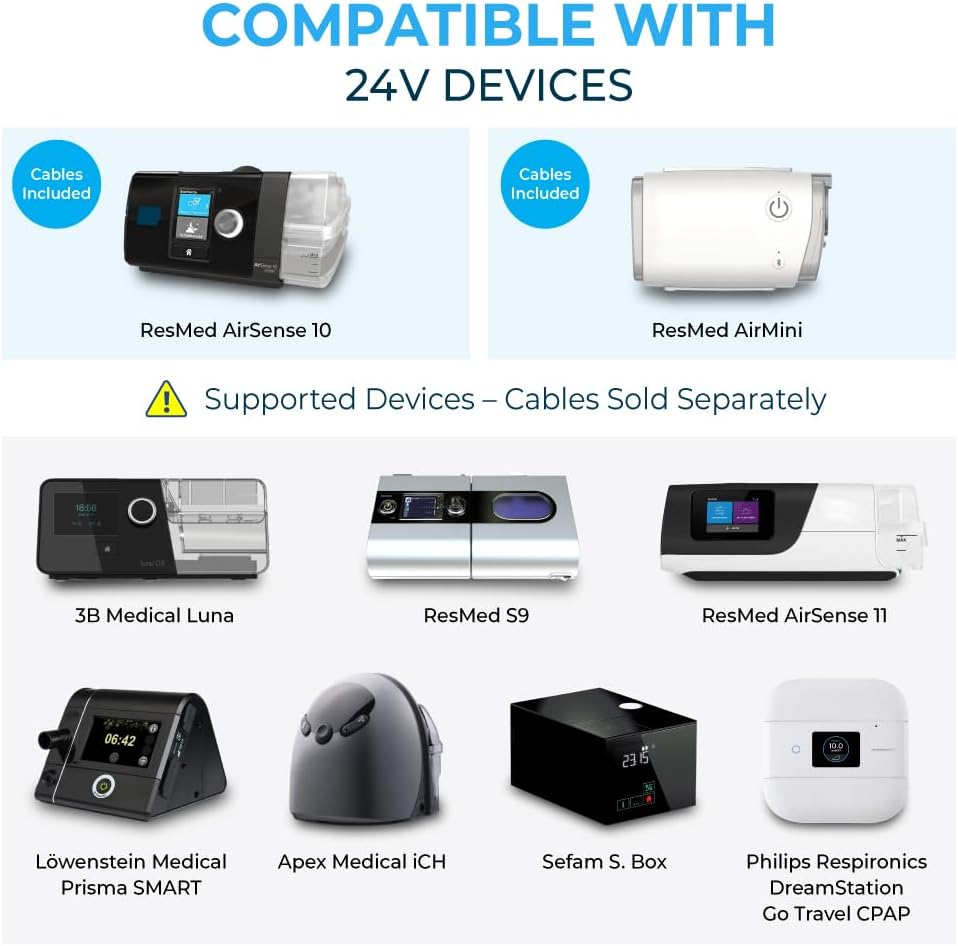
Figure 5.1: Compatible 24V CPAP devices.
Included Cables:
- ResMed AirMini
- ResMed AirSense 10
Cables Sold Separately for:
- ResMed AirSense 11
- ResMed S9
- 3B Medical Luna
- Löwenstein Medical Prisma SMART
- Apex Medical iCH
- Sefam S. Box
- Philips Respironics DreamStation Go Travel CPAP
6. Maximizing Battery Life
To achieve the maximum runtime of 8-16 hours, it is essential to disable the humidifier and heated tubing features on your CPAP machine. Runtime varies by pressure setting and device model.

Figure 6.1: Estimated runtime with humidifier and heated tubing disabled.
Using the humidifier or heated tubing will significantly reduce battery runtime to approximately 2-4 hours.
Steps to Maximize Battery Life for ResMed AirSense 10/11:
- Connect your heated tubing and water reservoir/humidifier to your CPAP device.
- Turn on your AirSense 10/11. You should see two options: My Options and Sleep Report.
- Use the dial or touch screen to select My Options.
- Before making changes, it is recommended to write down your current settings for Climate Control, Humidity Level, and Tube Temperature, in case you want to restore them later.
- Next, go to Climate Control. Set this option to Manual in order to disable both the humidifier and heated tubing.
- Next, go to Humidity Level. If it's set to a number between 1-8, turn the dial all the way to the left until you see Off, then press the dial to confirm. For the AirSense 11, press Off and then press OK by tapping the screen.
- Finally, scroll down to Tube Temperature. Turn the dial all the way to the left until you see Off, then press the dial to confirm. For the AirSense 11, press Off and then press OK by tapping the screen.
For other CPAP models, please check your machine's instruction manual for specific settings.
7. Specifications
Detailed technical specifications for the Medistrom Pilot-24 Lite Battery.

8. Additional Charging Options
Expand your charging capabilities with separately purchased accessories.

Figure 8.1: Car Charger and 50W Solar Panel for Pilot-24 Lite (sold separately).
- Car Charger: Allows you to charge the Pilot-24 Lite from your vehicle's 12V outlet.
- 50W Solar Panel: Provides an eco-friendly charging solution for outdoor and off-grid use.
9. Safety Information
Please read and understand all safety instructions before using the Medistrom Pilot-24 Lite Battery. Failure to follow these instructions may result in electric shock, fire, or serious injury.
- Do not expose the battery to extreme temperatures, direct sunlight, or moisture.
- Do not disassemble, crush, puncture, or short-circuit the battery.
- Use only approved charging cables and adapters.
- Keep out of reach of children.
- If the battery shows signs of damage, overheating, or leakage, discontinue use immediately and contact support.
- Dispose of the battery according to local regulations.
10. Troubleshooting
If you encounter any issues with your Medistrom Pilot-24 Lite, please refer to the following common troubleshooting tips:
- Battery Not Charging: Ensure the charging cable is securely connected to both the battery and the power source. Verify that the power source is active. Try a different compatible charging adapter if available.
- CPAP Not Powering On: Check that the DC output cable is firmly connected to both the Pilot-24 Lite and your CPAP machine. Ensure the battery has sufficient charge (check the indicator lights). Confirm your CPAP machine is compatible with 24V power.
- Short Runtime: Verify that the humidifier and heated tubing features on your CPAP machine are disabled, as these significantly reduce battery life. Check your CPAP pressure settings; higher pressures consume more power.
- USB Device Not Charging: Ensure the USB cable is properly connected. Confirm the USB device is compatible with 5V, 2.5A output.
- Flashlight Not Working: Press and hold the flashlight button for a few seconds to activate it.
If the problem persists after attempting these steps, please contact Medistrom customer support.
11. Warranty and Support
Medistrom is committed to providing high-quality products. The Pilot-24 Lite battery is built with advanced technology and medical-grade safety standards.
Warranty Information:
For specific warranty details, including coverage period and terms, please refer to the warranty card included with your product or visit the official Medistrom website. Keep your proof of purchase for warranty claims.
Customer Support:
If you have any questions, require technical assistance, or need to report an issue, please contact Medistrom support:
- North America: 1-888-600-6876
- Europe: +44-800-086-8376
- Australia: 1-800-146-338
- Email: support@medistrom.com
You can also visit the Medistrom Store on Amazon for more product information and accessories.


