
symcode MJ-6708L-wired
Symcode Bluetooth 2D Barcode Scanner User Manual
Model: MJ-6708L-wired
Your comprehensive guide to setup, operation, and maintenance.
Introduction
The Symcode MJ-6706DA Handheld 2D Bluetooth Barcode Scanner is designed for efficient and accurate data capture. This manual provides detailed instructions for its proper use, ensuring optimal performance and longevity.

Image: The Symcode Bluetooth 2D Barcode Scanner, shown in white, accompanied by its USB charging and data cables. This illustrates the primary components included with the device.
Package Contents
Please verify that all items are present in your package:
- Barcode Scanner (Model: MJ-6706DA-Blue)
- Charging Cord
- User Manual
Setup and Connection
Charging the Scanner
Before first use, fully charge the scanner. Connect the provided charging cord to the scanner and a compatible USB power source. A full charge takes approximately 2.5 hours and provides up to 30 hours of continuous scanning.
Connection Modes
The Symcode barcode scanner supports three connection methods:
- USB Wired Mode: Connect the scanner directly to your computer using the USB cable. The cable serves both for charging and data transmission.
- 2.4G Wireless Mode: Insert the 2.4G USB dongle into your computer. The scanner will automatically pair. This mode offers a transmission distance of up to 200m in barrier-free environments and 30m in obstacle environments.
- Bluetooth Mode: Pair the scanner with Bluetooth-enabled devices such as smartphones, tablets, or computers. No driver installation is required for Bluetooth connection.

Image: Illustration of the three connection modes: USB wired, Bluetooth, and 2.4G wireless. The wired mode shows the scanner connected to a laptop via USB. The Bluetooth mode shows the scanner next to a smartphone. The 2.4G wireless mode shows the scanner with a USB dongle inserted into a laptop.

Image: A visual representation of the 2.4G wireless transmission mode, indicating the use of a USB dongle, and the USB wired transmission mode, showing the direct cable connection.
Compatibility
The scanner is compatible with various operating systems, including Windows 11/10/8/7/XP, Mac OS, iOS, Android, and Linux. It can connect to smartphones, computers, POS systems, iPhones, and iPads.

Image: This graphic highlights the scanner's broad compatibility across major operating systems (iOS, Android, Windows, Mac OS, Linux) and provides its physical dimensions (165mm/6.5in height, 78mm/3.1in width).

Image: A visual comparison of the scanner's wireless transmission range: up to 200m (656ft) in barrier-free environments and 30m (98ft) in environments with obstacles.
Operating Instructions
Scanning Modes
The scanner offers two primary data upload modes:
- Instant Upload Mode: Data is transmitted to the connected device immediately after each scan.
- Offline Storage Mode: The scanner can store up to 10,000 codes internally. Data is saved to the scanner's memory and can be uploaded to a computer later by scanning a specific setup code.

Image: This graphic explains the two data upload modes: Instant Upload Mode, where data is sent immediately after scanning, and Offline Storage Mode, which allows storing up to 50,000 codes internally before uploading.
Supported Barcode Types
The Symcode scanner is capable of decoding a wide range of 1D and 2D barcodes, even if they are partially damaged, dirty, or poorly printed. Supported types include:
- 1D Barcodes: UPC/EAN, UPC/EAN with Supplemental, UCC/EAN 128, Code 39, Code 39 Full ASCII, Trioptic Code 39, Code 128 Full ASCII, Codabar, Interleaved 2 of 5, Discrete 2 of 5, Code 93, MSI, Code 11, RSS variants, Chinese 2 of 5, and extended ASCII support for Code 128 barcodes.
- 2D Barcodes: PDF417, QR Code, Data Matrix, Aztec, Hanxin.
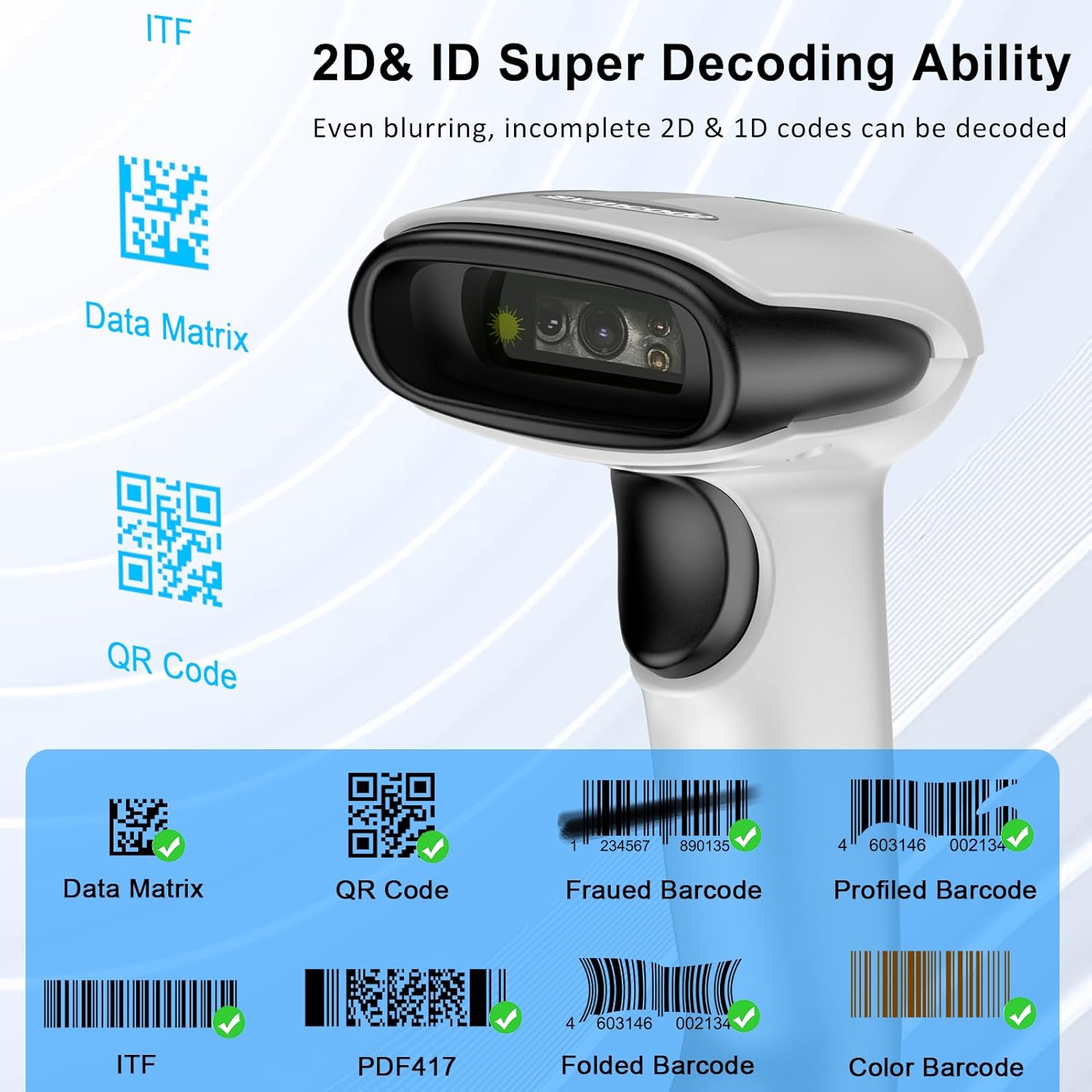
Image: A visual representation of the scanner's decoding capabilities for various 2D and 1D barcodes, including Data Matrix, QR Code, ITF, PDF417, and examples of frauded, profiled, folded, and color barcodes.
Customized Configuration Options
The scanner offers over 180 configuration options to tailor its functionality to your needs. These include:
- Scanning Modes: Hands-free intelligent sensor mode or trigger scan mode.
- Feedback: Vibration or buzzer settings.
- Data Handling: Data storage or instant upload mode.
- Keyboard Languages: Support for multiple keyboard layouts.
- Data Formatting: Adding or hiding prefixes/suffixes, including date and time.
- Keyboard Emulation: Ability to add keyboard keys/combinations to the scanning operation.
Maintenance
Cleaning
To maintain optimal performance, regularly clean the scanner's lens and exterior. Use a soft, lint-free cloth. For stubborn dirt, slightly dampen the cloth with water or a mild, non-abrasive cleaner. Avoid using harsh chemicals or abrasive materials.
Battery Care
The scanner is equipped with a 2000mAh Lithium Polymer battery. To prolong battery life:
- Avoid fully discharging the battery frequently.
- Store the scanner in a cool, dry place when not in use for extended periods.
- Recharge the battery promptly when the low battery indicator appears.
Durability
The Symcode barcode reader is constructed with strong ABS material, providing superior durability. It is designed to withstand drops of up to 8 ft (2.4 m) onto concrete floors. The integrated housing also protects the scanner from heavy dust, making it suitable for various working conditions.
Troubleshooting
This section addresses common issues you might encounter with your Symcode barcode scanner.
Scanner Not Responding
- Check Battery: Ensure the scanner is sufficiently charged. Connect it to the charging cable and allow it to charge for at least 15 minutes.
- Power Cycle: Turn the scanner off and then on again.
- Connection: Verify the connection mode. If using wireless, ensure the dongle is properly inserted or Bluetooth is paired. Try reconnecting.
Unable to Scan Barcodes
- Barcode Type: Confirm that the barcode type is supported by the scanner.
- Barcode Quality: Ensure the barcode is clear, not excessively damaged, dirty, or poorly printed.
- Distance/Angle: Adjust the distance and angle between the scanner and the barcode.
- Lighting: Ensure adequate lighting, but avoid direct glare on the barcode.
- Configuration: If you have customized settings, ensure they are not interfering with basic scanning. A factory reset (refer to the included user manual for specific barcode) might be necessary if settings are misconfigured.
Wireless Disconnection Issues
- Range: Ensure the scanner is within the effective wireless range (200m barrier-free, 30m with obstacles for 2.4G; typical Bluetooth range).
- Interference: Minimize interference from other wireless devices.
- Re-pair: For Bluetooth, try unpairing and re-pairing the device. For 2.4G, remove and reinsert the USB dongle.
Specifications
| Feature | Detail |
|---|---|
| Model Number | MJ-6708L-wired |
| Input Voltage | DC5V±0.25v |
| Current | 25 mA (work); 95 mA (instantaneous) |
| Decoding Speed | 100 times / sec |
| Wireless Range (2.4G) | 200m (barrier-free); 30m (obstacles) |
| Charging Time | 2.5 Hours |
| Battery Life | 30 Hours (continuous scanning) |
| Battery Type | 1 Lithium Polymer battery (2000mAh) |
| Product Dimensions | 5.5 x 3.7 x 2.4 inches (165mm x 78mm) |
| Item Weight | 10.2 ounces |
| Connectivity Technology | Bluetooth 6.0, Wireless 2.4G, USB Cable |
| Decoding Ability | 1D, 2D (QR, DataMatrix, PDF417, Aztec, Hanxin, etc.) |
| CPU | 32Bit |
Typical Applications
The Symcode barcode scanner is versatile and suitable for various environments requiring efficient barcode scanning:
- Retail Shops
- Supermarkets
- Pharmacies
- Warehouses and Inventory Management
- Logistics and Shipping
- Libraries
- Point-of-Sale (POS) Systems

Image: Examples of typical usage scenarios for the barcode scanner, including a retail shop, a supermarket, and a pharmacy, demonstrating its adaptability across different business environments.
Warranty and Support
For any technical assistance, troubleshooting beyond this manual, or warranty inquiries, please contact Symcode customer support. Many users have reported positive experiences with their customer support for configuration and operational queries.
Visit the official Symcode store for more information and resources: Symcode Store
Related documentsMJ-6708L-wired


Ask a question about this manual
Ask about setup, troubleshooting, compatibility, parts, safety, or missing instructions. Manuals+ will review the question and use this page’s manual context to help answer it.