
TIMEX TW2R67900
Timex Expedition MK1 40mm Watch TW2R67900 Instruction Manual
1. Introduction
This manual provides essential instructions for the proper setup, operation, and maintenance of your Timex Expedition MK1 40mm Silver Dial Watch, model TW2R67900. This timepiece features a durable aluminum case with a stainless steel back, a silver dial with Arabic numerals, and a quartz movement with chronograph and date functions. It is designed for everyday wear with a comfortable olive green fabric strap and offers water resistance up to 30 meters.
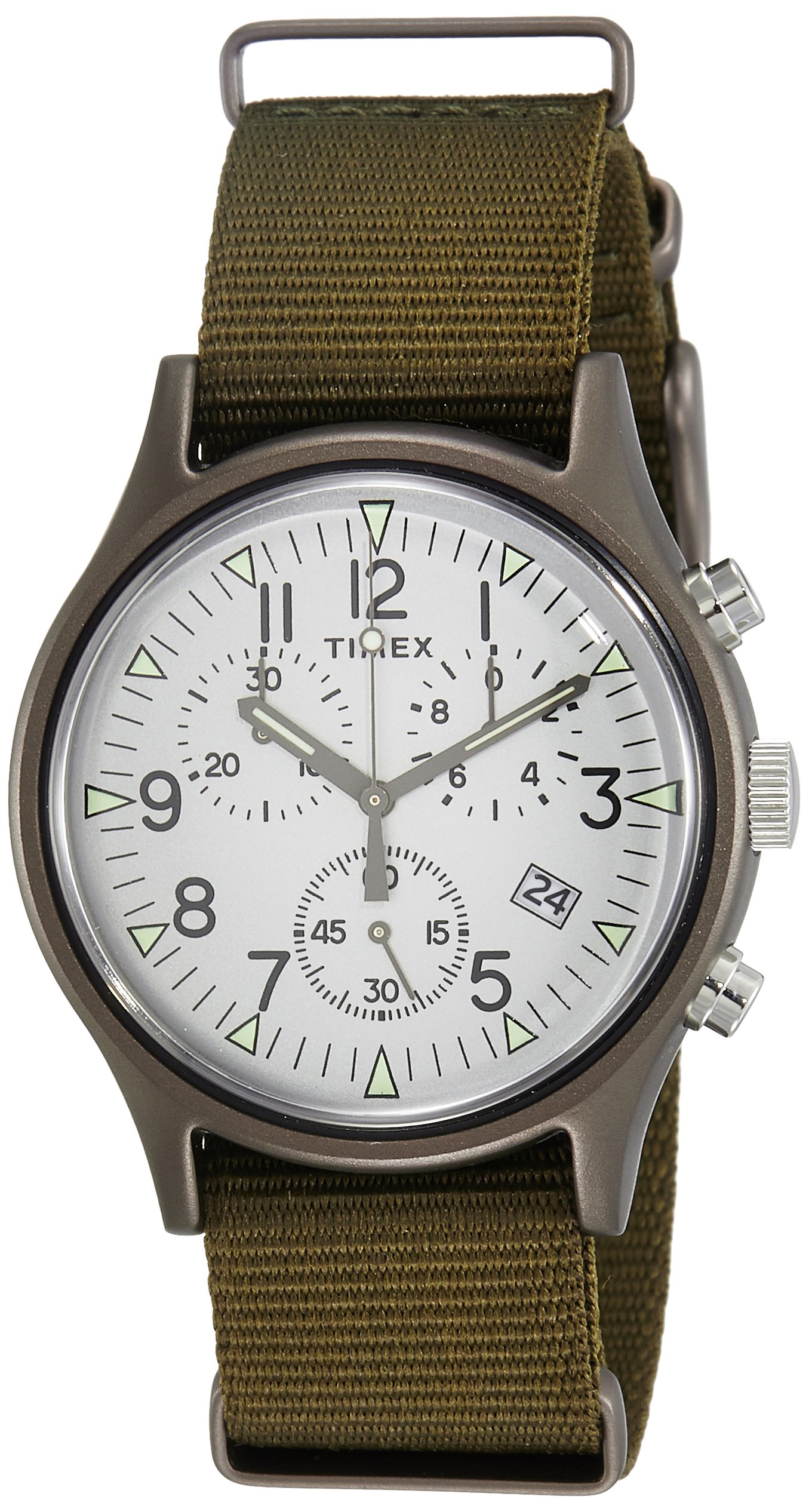
Image 1.1: Front view of the Timex Expedition MK1 40mm watch, showcasing its silver dial, Arabic numerals, and olive green fabric strap.
2. Setup
2.1 Setting the Time and Date
- Pull out the crown: Gently pull the crown (the knob on the right side of the watch case) to position 2 for setting the date, or to position 3 for setting the time.
- Set the date: If in position 2, turn the crown clockwise or counter-clockwise until the correct date appears in the date window.
- Set the time: If in position 3, turn the crown to move the hour and minute hands. Ensure you set the correct AM/PM by observing if the date changes as you pass midnight.
- Push in the crown: Once the time and date are set, push the crown back into position 1 (normal operating position) to start the watch.
2.2 Activating the Watch
Your watch is powered by a CR2032 battery, which is included. If the watch is not running, ensure the crown is fully pushed in. If the watch still does not operate, the battery may need to be activated or replaced. Consult a professional for battery replacement.

Image 2.1: Side profile of the watch, highlighting the crown and chronograph pushers used for setting and operating functions.
3. Operating the Watch
3.1 Reading the Time and Date
The watch displays time using central hour and minute hands, with a small seconds sub-dial. The date is shown in a dedicated window on the dial.
3.2 Using the Chronograph Function
The Timex Expedition MK1 features a chronograph (stopwatch) function. The two pushers located above and below the crown control this feature.
- Start/Stop: Press the top pusher to start the chronograph. Press it again to stop.
- Reset: While the chronograph is stopped, press the bottom pusher to reset the chronograph hands to zero.
3.3 Water Resistance
This watch is water resistant to 30 meters (3 ATM). This means it is suitable for everyday use and can withstand splashes or brief immersion in water. It is not suitable for swimming, showering, or diving. Avoid operating the crown or pushers when the watch is wet or submerged to prevent water ingress.
4. Maintenance and Care
4.1 Cleaning Your Watch
To maintain the appearance of your watch, wipe the case and crystal with a soft, dry cloth. For the fabric strap, a mild soap solution and a soft brush can be used, followed by rinsing with clean water and air drying. Ensure the watch case does not get excessively wet during strap cleaning.
4.2 Battery Replacement
The watch uses one CR2032 battery. When the watch stops running or the chronograph functions become erratic, the battery may need replacement. It is recommended to have the battery replaced by a qualified watch technician to ensure proper sealing and maintain water resistance.

Image 4.1: Rear view of the watch, illustrating the stainless steel case back and the attachment of the olive green fabric strap.
4.3 Storage
When not in use, store your watch in a cool, dry place away from direct sunlight and extreme temperatures. The original packaging box can be used for safe storage.

Image 4.2: The Timex watch box, suitable for storing the timepiece when not in use.
5. Troubleshooting
- Watch not running: Ensure the crown is fully pushed into position 1. If it still does not run, the battery may be depleted and require replacement.
- Incorrect time/date: Refer to Section 2.1 "Setting the Time and Date" to correctly adjust the watch.
- Chronograph hands not resetting to zero: This may indicate a need for calibration or a battery issue. Consult a professional watch technician.
- Condensation under crystal: If condensation appears, it may indicate a loss of water resistance. Avoid further contact with water and seek professional service immediately.
6. Specifications
| Feature | Detail |
|---|---|
| Model Number | TW2R67900 |
| Brand | TIMEX |
| Movement Type | Quartz |
| Display Type | Analog |
| Case Material | Aluminum with Stainless Steel Back |
| Case Diameter | 40 mm |
| Case Thickness | 13 mm |
| Dial Color | Silver |
| Dial Glass Material | Acrylic, Glass |
| Band Material | Fabric (Nylon) |
| Band Color | Green |
| Clasp Type | Tang Buckle |
| Water Resistance Depth | 30 Meters (3 ATM) |
| Battery Type | 1 x CR2032 (included) |
| Additional Features | Arabic Numerals, Chronograph |
7. Warranty and Support
7.1 Warranty Information
Warranty details for your Timex watch are typically provided with the purchase documentation. Please refer to the warranty card or leaflet included in your watch packaging for specific terms, conditions, and duration of coverage. Keep your proof of purchase for warranty claims.
7.2 Customer Support
For further assistance, technical support, or service inquiries, please visit the official Timex website or contact their customer service department. Contact information can usually be found on the Timex website or in your watch's packaging.
Related documentsTW2R67900

Ask a question about this manual
Ask about setup, troubleshooting, compatibility, parts, safety, or missing instructions. Manuals+ will review the question and use this page’s manual context to help answer it.