
Product Overview
The Scosche BTFM3 BTFREQ is a versatile car kit designed to enhance your in-car audio and communication experience. It combines a Bluetooth hands-free system, a digital FM transmitter, and a 10-watt USB car charger into a single, convenient device. This unit allows you to wirelessly stream music, make hands-free calls, and charge your mobile devices while on the go.

Figure 1: Scosche BTFM3 BTFREQ Universal Bluetooth Hands-Free Car Kit.
Key Features:
- Bluetooth Car Kit: Make hands-free calls from your Bluetooth enabled smartphone.
- FM Transmitter Adapter: Wirelessly stream music from the adapter to your vehicle's FM stereo.
- Fast Charging: The 10-watt 2.1Amp USB port on the 12V car charger quickly charges your device.
- Convenient Design: Flexible neck allows you to position the LCD screen to your preferred view.
- Voice Activation: Supports voice activation for answering calls.
- One-Touch Access: Features one-touch access for Siri™ and Google Voice™.
- DSP Echo Cancellation: Ensures clear conversations during calls.
Setup Instructions
1. Powering On and Initial Placement:
Insert the Scosche BTFM3 into your vehicle's 12V power outlet (cigarette lighter socket). The device will power on automatically. Adjust the flexible neck to position the LCD screen for optimal viewing.

Figure 2: The adjustable neck allows for proper viewing angle.
2. FM Frequency Pairing:
- Tune your vehicle's FM radio to an unused, clear frequency. An unused frequency will typically have static or no broadcast.
- On the BTFM3, press the 'CH' (Channel) button. The frequency display will begin to flash.
- Use the forward (>>) and back (<<) buttons to adjust the BTFM3's frequency to match the clear frequency on your car radio.
- Once matched, press the 'CH' button again to confirm the selection.
3. Bluetooth Pairing:
- Ensure Bluetooth is enabled on your mobile device.
- Search for Bluetooth devices and select "Scosche BTFM3" from the list.
- Once paired, the BTFM3's display will indicate a successful connection, and you can begin streaming audio.
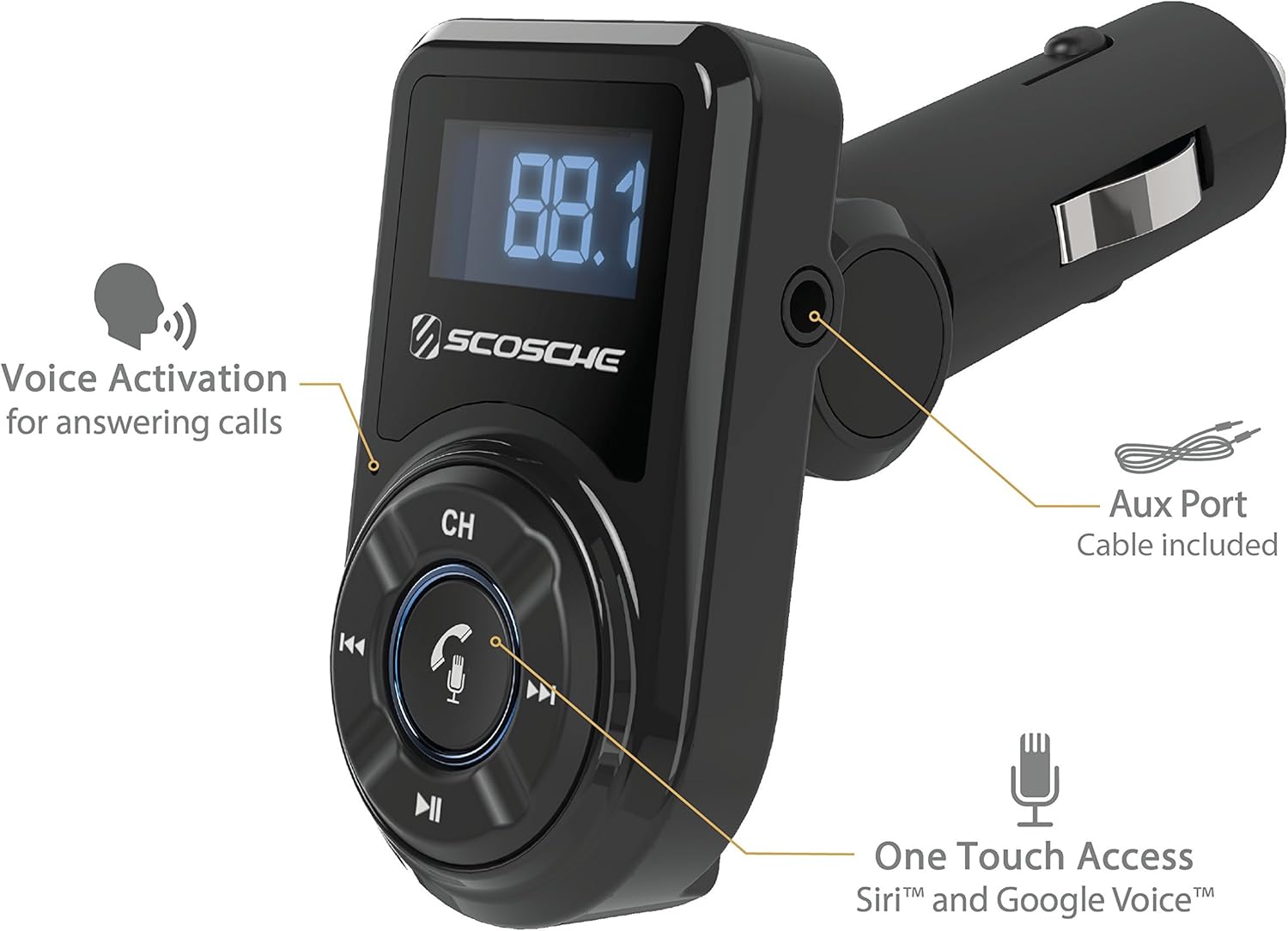
Figure 3: Key features including Voice Activation, Aux Port, and One Touch Access.
Operating Instructions
Playing Music:
- After successful Bluetooth pairing and FM frequency matching, play music from your mobile device. The audio will transmit to your car's FM stereo.
- Use the play/pause (>||) button on the BTFM3 to control playback.
- Use the forward (>>) and back (<<) buttons to skip tracks.
- Alternatively, connect your device directly to the BTFM3 via the 3.5mm Aux Port for wired audio transmission.

Figure 4: The BTFM3 allows you to play music and make calls wirelessly to your car stereo, with DSP Echo Cancellation for clear conversations.
Making and Receiving Calls:
- To answer an incoming call, press the Phone/Voice Assistant button (center button with phone/microphone icon).
- To end a call, press the Phone/Voice Assistant button again.
- To activate your mobile device's voice assistant (Siri™ or Google Voice™), press and hold the Phone/Voice Assistant button.

Figure 5: Labeled controls for Channel, Phone/Voice Assistant, Back, Forward, and Play/Pause.
Charging Devices:
- The BTFM3 features a 10-watt (2.1 Amp) USB-A port for charging your mobile devices.
- Connect your device's USB charging cable to the USB port on the BTFM3.
Maintenance
To ensure optimal performance and longevity of your Scosche BTFM3, follow these maintenance guidelines:
- Keep the device clean by wiping it with a soft, dry cloth. Avoid using harsh chemicals or abrasive cleaners.
- Ensure the 12V power outlet in your vehicle is free of debris to maintain a secure connection.
- Store the device in a cool, dry place when not in use for extended periods.
Troubleshooting
If you encounter issues with your Scosche BTFM3, consider the following common solutions:
- No Power/Display Off: Ensure the BTFM3 is securely plugged into the 12V power outlet. Check your vehicle's fuse for the 12V outlet if necessary.
- Static/Poor Audio Quality: Try changing the FM frequency on both the BTFM3 and your car radio to find a clearer, unused station. Ensure there are no strong local radio stations broadcasting on or near your selected frequency. Adjust the volume on both your mobile device and car stereo.
- Bluetooth Disconnection/Unable to Pair: Turn off and on Bluetooth on your mobile device. Forget the "Scosche BTFM3" device from your mobile device's Bluetooth settings and attempt to re-pair. Ensure the BTFM3 is within range of your mobile device.
- Charging Issues: Verify that your USB charging cable is not damaged and is properly connected to both the BTFM3 and your device. Try a different USB cable or device to isolate the issue.
Specifications
| Feature | Detail |
|---|---|
| Product Dimensions | 1.75 x 4.38 x 7.1 inches |
| Item Weight | 3.87 ounces (0.11 Kilograms) |
| Model Number | BTFM3 |
| Power Source | Corded Electric (12V Car Outlet) |
| USB Output | 10-watt (2.1 Amp) USB-A Port |
| Connectivity Technology | Bluetooth, FM Transmitter, 3.5mm Aux Port |
| Color | Black |
Safety Information
For safe and proper use of this device:
- Avoid using this device near other wireless devices to minimize interference.
- Handle batteries with care, avoiding contact with battery terminals to prevent short circuits or damage.
- Use this device in conditions between -20°C and 60°C to ensure optimal performance and avoid damage from extreme temperatures.
Warranty and Support
The Scosche BTFM3 BTFREQ Universal Bluetooth Hands-Free Car Kit comes with a 3-year warranty.
For detailed information and further assistance, please refer to the official user manual available in PDF format: User Manual (PDF).
You can also visit the official Scosche Store for more products and support: Scosche Brand Store.


