
PowerLocus P2
PowerLocus P2 Bluetooth Over-Ear Headphones Instruction Manual
Model: P2 | Brand: PowerLocus
Product Overview
The PowerLocus P2 Bluetooth Over-Ear Headphones offer a premium audio experience with versatile connectivity options. Designed for comfort and durability, these headphones are perfect for travel, sports, and everyday use. They feature high-definition stereo sound, deep bass, and noise reduction technology for an immersive listening experience.
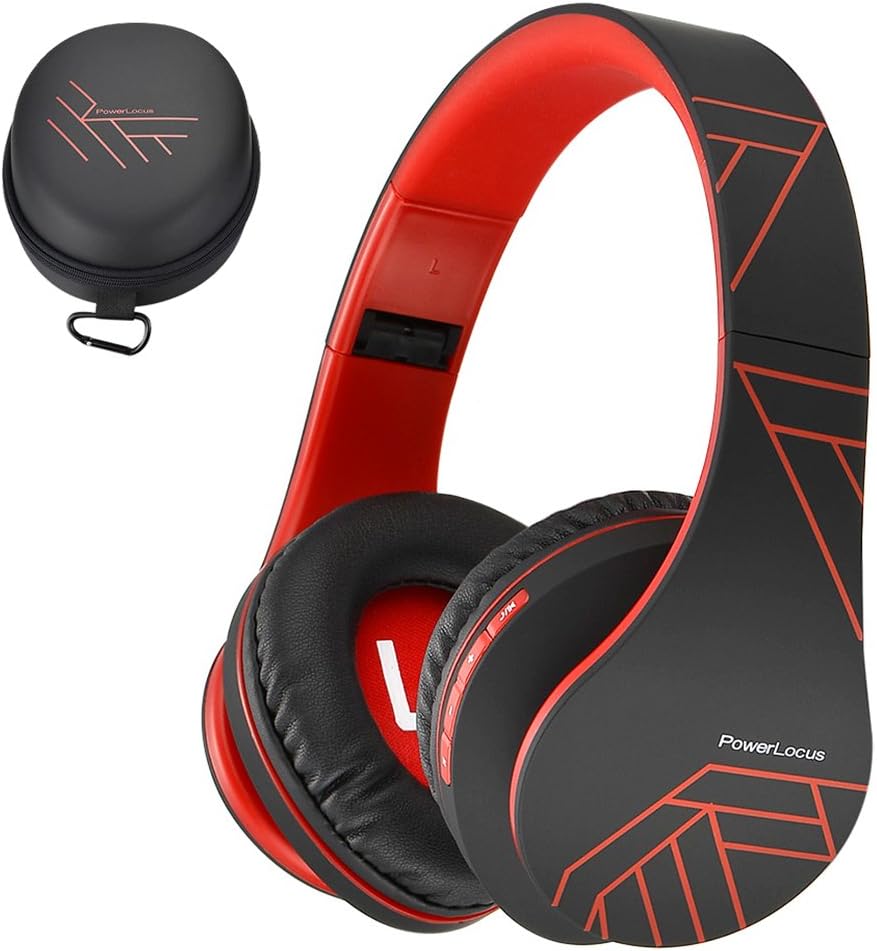
Figure 1: PowerLocus P2 Headphones and Protective Case (Black/Red)
What's Included
- 1x PowerLocus P2 Wireless Over-Ear Headphones
- 1x USB-C Charging Cable
- 1x 3.5mm Audio Cable
- 1x Protective Carrying Case
- 1x User Manual

Figure 2: All included components in the PowerLocus P2 package.
Product Features
- High-Definition Stereo Sound: Equipped with 40mm audio drivers for deep bass and dynamic power sound, ensuring superior audio quality.
- Noise Reduction Technology: Advanced software and noise reduction for clear audio and hands-free communication via the built-in microphone.
- Comfortable Design: Foldable and stretchable over-ear design with super soft memory-protein foam leather earmuffs and headband for optimum comfort during extended wear.
- Versatile Connectivity: Supports Bluetooth 5.3 for wireless connection and includes a 3.5mm jack for wired use when battery is low or for non-Bluetooth devices.
- Multi-functional: Features include Micro SD/TF card support and FM radio functionality.
- Portable: Comes with a durable protective case for easy and safe transport.

Figure 3: Key features of the PowerLocus P2 Headphones.
Setup and Operation
Charging the Headphones
Before first use, fully charge your PowerLocus P2 headphones. A full charge takes approximately 2.5 hours and provides up to 15 hours of playtime.
- Locate the USB-C charging port on the headphone earcup.
- Connect the provided USB-C charging cable to the headphone port.
- Plug the other end of the USB-C cable into a compatible USB power source (e.g., laptop, wall adapter not exceeding 5V).
- The LED indicator light will be RED while charging.
- When fully charged, the RED LED light will disappear.
Video 1: Instructions on how to charge the PowerLocus P2 Over-Ear Headphones. This video demonstrates plugging the USB-C cable into the headphone and a power source, showing the LED indicator light behavior during charging.
Bluetooth Pairing
Follow these steps to pair your PowerLocus P2 headphones with a Bluetooth-enabled device:
- Ensure the headphones are powered off.
- Slide the On/Off button to the "On" position. The LED indicator will flash blue/red, indicating pairing mode.
- On your device (smartphone, tablet, laptop), enable Bluetooth and search for available devices.
- Select "PowerLocus P2" from the list of available devices.
- Once connected, the LED indicator on the headphones will turn solid blue.
Video 2: Guide on how to connect PowerLocus P2 headphones via Bluetooth. The video shows the power switch, the flashing blue/red LED in pairing mode, and the solid blue LED once connected to a device.
Wired Mode
To use the headphones in wired mode, simply connect the provided 3.5mm audio cable to the headphone's audio jack and the other end to your audio source. This mode works even if the headphone battery is depleted.
Controls Overview
The PowerLocus P2 headphones feature intuitive controls located on the earcup for easy management of your audio and calls.

Figure 4: Detailed diagram of headphone controls.
- Play/Pause Button: Press to play or pause music.
- Volume Up/Next Song: Short press for volume up, long press for next song.
- Volume Down/Previous Song: Short press for volume down, long press for previous song.
- M Button: Mode switch (e.g., Bluetooth, FM Radio, Micro SD).
- On/Off Switch: Powers the headphones on or off and initiates Bluetooth pairing.
- Built-in Microphone: For hands-free calls.
Maintenance and Care
- Keep the headphones clean by wiping them with a soft, dry cloth.
- Avoid exposing the headphones to extreme temperatures, humidity, or direct sunlight.
- Store the headphones in the provided protective case when not in use to prevent scratches and damage.
- Do not use abrasive cleaners or solvents on the headphones.
- Avoid dropping the headphones or subjecting them to strong impacts.

Figure 5: Folding and storing headphones in the premium carry case.
Troubleshooting
| Problem | Possible Cause | Solution |
|---|---|---|
| Headphones not turning on. | Low battery. | Charge the headphones fully. |
| Cannot pair via Bluetooth. | Headphones not in pairing mode; device Bluetooth off; too far from device. | Ensure headphones are flashing blue/red. Turn device Bluetooth off/on. Move closer to device (within 36 feet). |
| No sound or low volume. | Volume too low on headphones or device; incorrect audio source selected. | Increase volume on both headphones and device. Check audio source connection (Bluetooth or 3.5mm cable). |
| Sound distortion. | Weak Bluetooth signal; audio file quality. | Move closer to the paired device. Try a different audio file. |
Specifications
| Feature | Detail |
|---|---|
| Model Name | P2 |
| Connectivity Technology | Wireless (Bluetooth 5.3), Wired (3.5mm Jack) |
| Bluetooth Range | Up to 36 Feet |
| Battery Life | Up to 15 Hours Playtime |
| Charging Time | 2.5 Hours |
| Audio Driver Size | 40 mm |
| Frequency Response | 20 Hz - 20,000 Hz |
| Impedance | 32 Ohm |
| Noise Control | Sound Isolation |
| Item Weight | 6.2 ounces (175 Grams) |
| Dimensions | 3.8 x 6 x 8.1 inches |
| Special Features | Foldable, Built-in Mic, Micro SD/TF, FM Radio, Multipoint Pairing |
Warranty and Support
PowerLocus provides a 24-month warranty for the P2 headphones, ensuring customer satisfaction. For any inquiries or support, please contact PowerLocus customer service. They offer 24/7 customer support to assist with any issues or questions you may have.
Visit the official PowerLocus Store for more information and support: PowerLocus Store
Related documentsP2


Ask a question about this manual
Ask about setup, troubleshooting, compatibility, parts, safety, or missing instructions. Manuals+ will review the question and use this page’s manual context to help answer it.