Introduction
This user manual provides detailed instructions for the LeadsaiL Wireless Mouse (Model LX002-SILVER). This portable, slim, and cordless computer mouse is designed for efficient and quiet operation across various platforms, offering adjustable sensitivity and an ergonomic design for comfortable use.
What's in the Box
- 1 x LeadsaiL Wireless Mouse
- 1 x USB Nano Receiver
- 1 x User Manual (this document)
Note: 1 AA battery is required and is not included in the package.
Key Features
- Efficient 2.4GHz Wireless Transmission: Provides a powerful and reliable connection with high anti-interference performance, offering up to 15 meters (50 feet) transmission distance. The mini USB receiver supports plug-and-play functionality.
- Adjustable DPI Settings: Easily switch between 800, 1200, and 1600 DPI to adjust cursor sensitivity according to your activity and preference.
- Silent Click Design: Mute clicks allow you to concentrate on your work without disturbing others.
- Ergonomic Shape: Slim, sweat-resistant, and skin-friendly finish designed for maximum comfort and support during extended use. Features thoughtful ring and little finger rests.
- Longer Lifespan & Power Saving: Tested for over 5,000,000 keystrokes for enhanced durability. The mouse features a power-saving sleep mode that activates after 15 minutes of inactivity. Press any button to wake it up.
- Wide Compatibility: Compatible with Windows XP, Windows 7, Windows 8, Windows 10, Windows 2000 Server, Mac OS X, Linux, and Chrome OS.
Setup Guide
- Insert Battery:
Locate the battery compartment on the underside of the mouse. Open the cover and insert one AA battery, ensuring correct polarity (+/-). Close the battery cover securely.
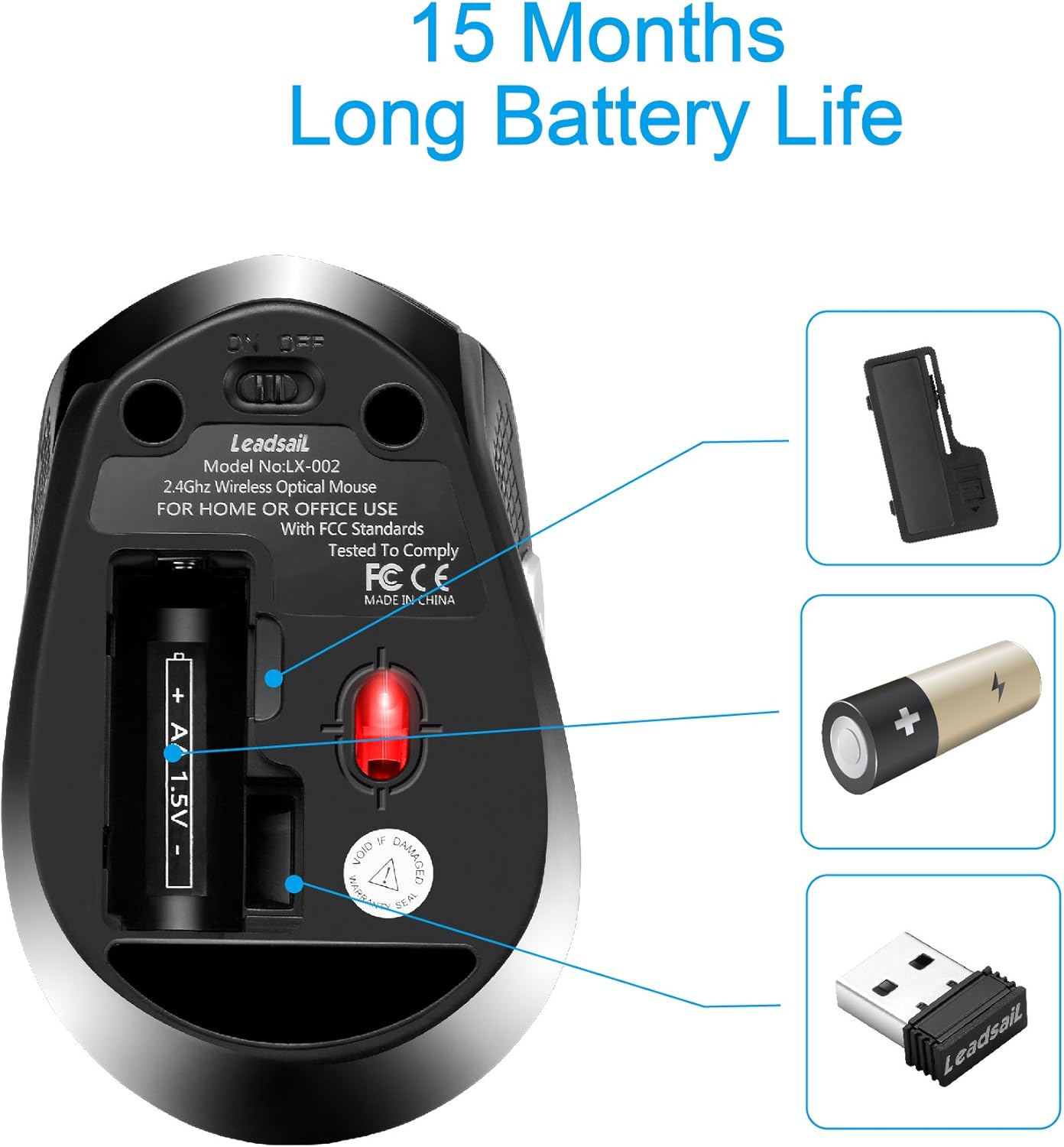
Image: Underside of the mouse with the battery compartment open, showing where to insert the AA battery and store the USB receiver.
- Retrieve USB Receiver:
The mini USB receiver is conveniently stored inside the battery compartment of the mouse for safekeeping during travel or non-use. Gently pull it out.
- Connect Receiver to Computer:
Plug the USB Nano receiver into an available USB port on your laptop, desktop PC, or MacBook. The system should automatically detect and install the necessary drivers (plug and play).

Image: A LeadsaiL wireless mouse in use next to a laptop, illustrating the 2.4G lag-free wireless connection via the USB receiver plugged into the laptop.
- Power On the Mouse:
Slide the ON/OFF switch located on the bottom of the mouse to the "ON" position. The mouse is now ready for use.
Operating Instructions
- Basic Navigation: Move the mouse across a flat surface to control the cursor on your screen.
- Left Click: Use the left button for selecting items, opening files, or confirming actions.
- Right Click: Use the right button to open context menus or access additional options.
- Scroll Wheel: Use the scroll wheel to navigate up and down through documents and web pages. The scroll wheel also functions as a middle click button.
- Side Buttons: The mouse features two side buttons. These typically function as "Page Forward" and "Page Backward" for convenient web browsing or document navigation.
- DPI Adjustment: Press the DPI button (located behind the scroll wheel) to cycle through the available DPI settings (800, 1200, 1600). This changes the cursor's speed and sensitivity.

Image: The LeadsaiL mouse with an overlay indicating its 1600 DPI high precision capability and adjustable DPI levels.

Image: The LeadsaiL mouse emphasizing its silent click feature, designed to allow users to work without disturbing others, illustrated by a sleeping baby in the background.
Compatibility
The LeadsaiL Wireless Mouse offers broad compatibility with various operating systems and hardware platforms:
- Operating Systems: Windows XP, Windows 7, Windows 8, Windows 10, Windows 2000 Server, Mac OS X, Linux, Chrome OS.
- Hardware Platforms: PC, Linux, Mac (including MacBook Pro/Air, HP, Dell, Lenovo, Acer).

Image: The LeadsaiL mouse surrounded by logos of compatible operating systems including Windows 7, 8, 10, XP, Vista, Mac OS, and Linux, highlighting its wide compatibility.
Maintenance
- Cleaning: Use a soft, dry cloth to clean the mouse. For stubborn dirt, a slightly damp cloth can be used, but ensure no moisture enters the device.
- Battery Replacement: When the mouse performance degrades (e.g., erratic cursor movement), it's likely time to replace the AA battery. Follow the "Insert Battery" step in the Setup Guide.
- Storage: When not in use for extended periods, turn off the mouse using the ON/OFF switch to conserve battery life. Store the USB receiver inside the mouse's battery compartment.
Troubleshooting
| Problem | Possible Cause | Solution |
|---|---|---|
| Mouse not responding. | Mouse is off, low battery, or receiver not connected. | Ensure mouse is ON. Replace battery. Re-insert USB receiver into a different USB port. |
| Erratic or jumping cursor. | Low battery, dirty optical sensor, or interference. | Replace battery. Clean the optical sensor on the bottom of the mouse. Move mouse closer to receiver or away from other wireless devices. |
| Lag or delayed response. | Interference, distance from receiver, or surface issues. | Reduce distance between mouse and receiver (max 15m). Ensure no large metal objects are between mouse and receiver. Use on a suitable, non-reflective surface. |
| DPI button not changing sensitivity. | Temporary software glitch. | Try restarting the computer or re-plugging the USB receiver. |
Specifications
- Model: LX002-SILVER
- Connectivity: 2.4GHz Wireless (USB Receiver)
- Movement Detection: Optical
- DPI Levels: 800, 1200, 1600 DPI (Adjustable)
- Buttons: 6 Buttons (Left, Right, Scroll Wheel/Middle, DPI, Forward, Backward)
- Power Source: 1 x AA Battery (not included)
- Average Battery Life: Up to 12 months
- Operating Range: Up to 15 meters (50 feet)
- Dimensions (LxWxH): 4.09 x 2.6 x 1.49 inches
- Weight: 2.89 ounces
- Keystroke Lifespan: 5,000,000 times
- Compatibility: Windows XP/7/8/10/Vista, Mac OS X, Windows 2000 Server, Linux, Chrome OS

Image: The LeadsaiL mouse with its dimensions (4.09 x 2.60 x 1.49 inches) highlighted, emphasizing its ergonomic grip designed for comfortable hand-feeling.
Official Product Video
Video: An official product video from LeadsaiL-US showcasing the features and usage of the LeadsaiL Slim Less Noise Wireless Computer Mouse.
Warranty and Support
For warranty information or technical support, please refer to the contact details provided on the product packaging or visit the official LeadsaiL website. Keep your purchase receipt for warranty claims.


