
1. Introduction
This manual provides essential information for setting up, operating, maintaining, and troubleshooting your Casper F600.7200-4L45T-G 15.6-inch laptop. Please read this manual thoroughly before using your device to ensure proper function and longevity.
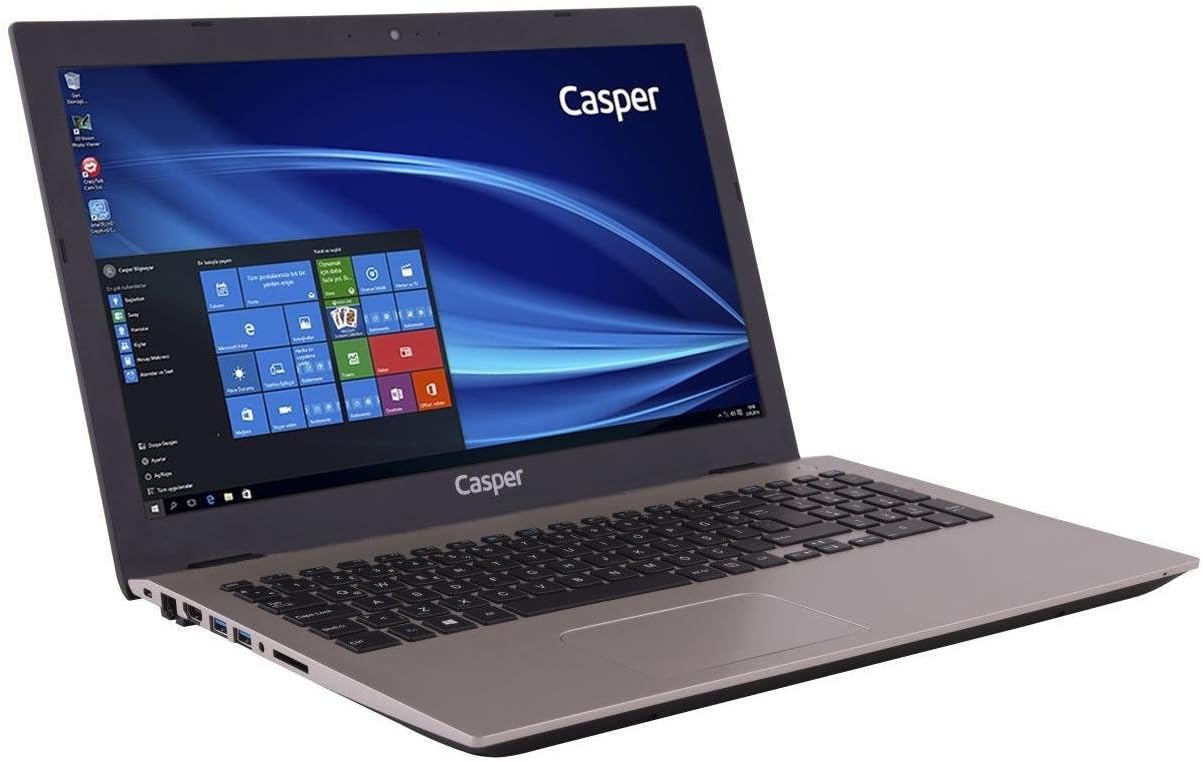
The Casper F600.7200-4L45T-G laptop is equipped with an Intel Core i5-7200U processor, NVIDIA GeForce 940MX graphics, 4GB DDR4 RAM, and a 500GB HDD, running on Windows 10. It is designed for general computing tasks, offering a balance of performance and portability.

2. Package Contents
Verify that all items listed below are included in your product package:
- Casper F600.7200-4L45T-G Laptop
- Charging Adapter
- Power Cable
3. Setup
3.1. Initial Power-On
- Unpack the laptop and all accessories from the box.
- Connect the charging adapter to the laptop's power input port.
- Plug the power cable into a wall outlet.
- Open the laptop lid and press the power button, typically located above the keyboard or on the side.
- Follow the on-screen instructions to complete the initial Windows 10 setup.
3.2. Connecting the Power Adapter
The power adapter connects to the dedicated power input port on the side of the laptop. Ensure the connection is secure to provide stable power and charge the battery.

4. Operating Your Laptop
4.1. Keyboard and Touchpad
The laptop features a full-sized keyboard and an R-type touchpad for navigation. The touchpad supports multi-touch gestures for enhanced control within Windows 10.
- Keyboard: Standard QWERTY layout with function keys (Fn) for brightness, volume, and other system controls.
- Touchpad: Use single-finger taps for left-click, two-finger taps for right-click, and two-finger scrolling for navigation.

4.2. Ports and Connections
The laptop provides various ports for connecting external devices and peripherals.
- Left Side Ports: Includes the power input, USB 2.0 ports, and an optical drive bay (note: this model does not include an optical drive).
- Right Side Ports: Features USB 3.0 ports, an HDMI output, an Ethernet port, and audio jacks.

4.3. Display
The 15.6-inch HD LED display offers a resolution of 1366 x 768 pixels. Adjust brightness using the function keys on the keyboard.
5. Maintenance
5.1. Cleaning
- Use a soft, lint-free cloth to clean the screen and exterior surfaces.
- For stubborn marks, slightly dampen the cloth with water or a screen-safe cleaner.
- Avoid spraying liquids directly onto the laptop.
- Regularly clean the keyboard and touchpad to prevent dust buildup.
5.2. Battery Care
- To maximize battery life, avoid fully discharging the battery frequently.
- Store the laptop in a cool, dry place when not in use for extended periods.
- If storing for a long time, ensure the battery is charged to about 50%.
6. Troubleshooting
This section addresses common issues you might encounter with your laptop.
- Laptop does not power on:
Ensure the power adapter is securely connected to both the laptop and a working power outlet. Check if the power outlet is functional. Try a different power adapter if available. - Screen is blank:
Check if the laptop is powered on. Adjust screen brightness using the function keys. Connect an external monitor to check if the display output is working. - Keyboard or touchpad not responding:
Restart the laptop. Ensure no external devices are interfering. Check device manager for driver issues in Windows. - Slow performance:
Close unnecessary applications. Check for background updates. Ensure sufficient free space on the hard drive. Run a virus scan. - Battery not charging:
Verify the power adapter connection. Check the charging indicator light. If the issue persists, the battery or adapter may require service.
7. Technical Specifications
| Feature | Specification |
|---|---|
| Brand | Casper |
| Model Number | F600.7200-4L45T-G |
| Product Dimensions | 3.83 x 2.55 x 2.1 cm; 2.82 Kilograms |
| Color | Gold |
| Screen Size | 15.6 Inches |
| Screen Resolution | 1366 x 768 |
| Processor Brand | Intel |
| Processor Type | Core i5-7200U |
| Processor Speed | 3.1 GHz (Max Turbo) |
| Number of Processors | 2 |
| RAM Size | 4 GB |
| Memory Technology | DDR4 SDRAM |
| Hard Drive Size | 500 GB |
| Hard Disk Description | HDD |
| Graphics Coprocessor | NVIDIA GeForce 940MX |
| Graphics Card Memory Size | 2 GB |
| Connectivity Type | Bluetooth |
| Wireless Type | Bluetooth |
| USB 2.0 Ports | 1 |
| USB 3.0 Ports | 2 |
| HDMI Ports | 1 |
| Optical Drive Type | No |
| Operating System | Windows 10 |
| Average Battery Life | 8 Hours |
| Item Weight | 2.82 Kilograms |
8. Warranty and Support Information
For warranty details and technical support, please refer to the documentation provided with your purchase or visit the official Casper website. Keep your proof of purchase for warranty claims.
If you encounter issues not covered in this manual, contact Casper customer support for assistance.