
Introduction
This manual provides detailed instructions for the safe and effective use of your VTech VM350 No WiFi Video Baby Monitor. Please read all instructions carefully before use and retain this manual for future reference. The VTech VM350 offers secure, private local viewing with no internet required, making it ideal for privacy-conscious parents.
Key Features
- Crystal-Clear 5" High-Resolution Display with 2X Zoom: See every precious smile and movement in vibrant full color by day; automatic infrared night vision delivers bright, glare-free greyscale images at night – zoom in 2x for close-up details from the comfort of your bed or kitchen.
- Ultra-Long Battery Life & 1000ft Range for All-Day Freedom: Up to 12 hours of video monitoring or 21 hours audio-only on a single charge; reliable 1000ft range lets you tackle chores, relax in the yard, or move around multi-story homes without losing connection.
- Private & Secure – No WiFi, No Apps, No Hacking Risks: Trusted by families for over 30 years, uses encrypted 2.4GHz FHSS technology for direct, interference-free transmission – only you can see and hear your baby, with guaranteed privacy.
- Soothe Your Baby from Anywhere with 2-Way Talk & Lullabies: Hear your little one clearly and talk back instantly to comfort them; play 5 calming melodies or 4 ambient sounds remotely to help them drift off to sleep peacefully.
- Smart Sound Activation, Visual Alerts & Power-Saving Mode: Screen auto-turns on when baby cries (adjustable VOX sensitivity); 9-level sound indicator lights keep you visually alerted even on mute – saves battery while ensuring you never miss a moment.

VTech VM350 monitor and camera highlighting key features like 5-inch screen, 2-way talk, temperature sensor, 1000ft range, sound indicator, sound activation, and automatic night vision.
Package Contents
- 1 Parent Video Unit
- 1 Baby Unit (Camera)
- 2 Power Adapters
- User's Manual (this document)
Setup
1. Connecting the Baby Unit (Camera)
Place the baby unit in your baby's room on a flat surface or mount it on a wall. Ensure it is out of reach of your baby and at least 3 feet (1 meter) away from the crib. Plug the power adapter into the baby unit and a power outlet.

The VTech baby unit (camera) showing its adjustable base for optimal placement.
2. Connecting the Parent Unit (Monitor)
Plug the power adapter into the parent unit and a power outlet. The parent unit has a rechargeable battery for portable use, but it should be charged for at least 12 hours before initial use.
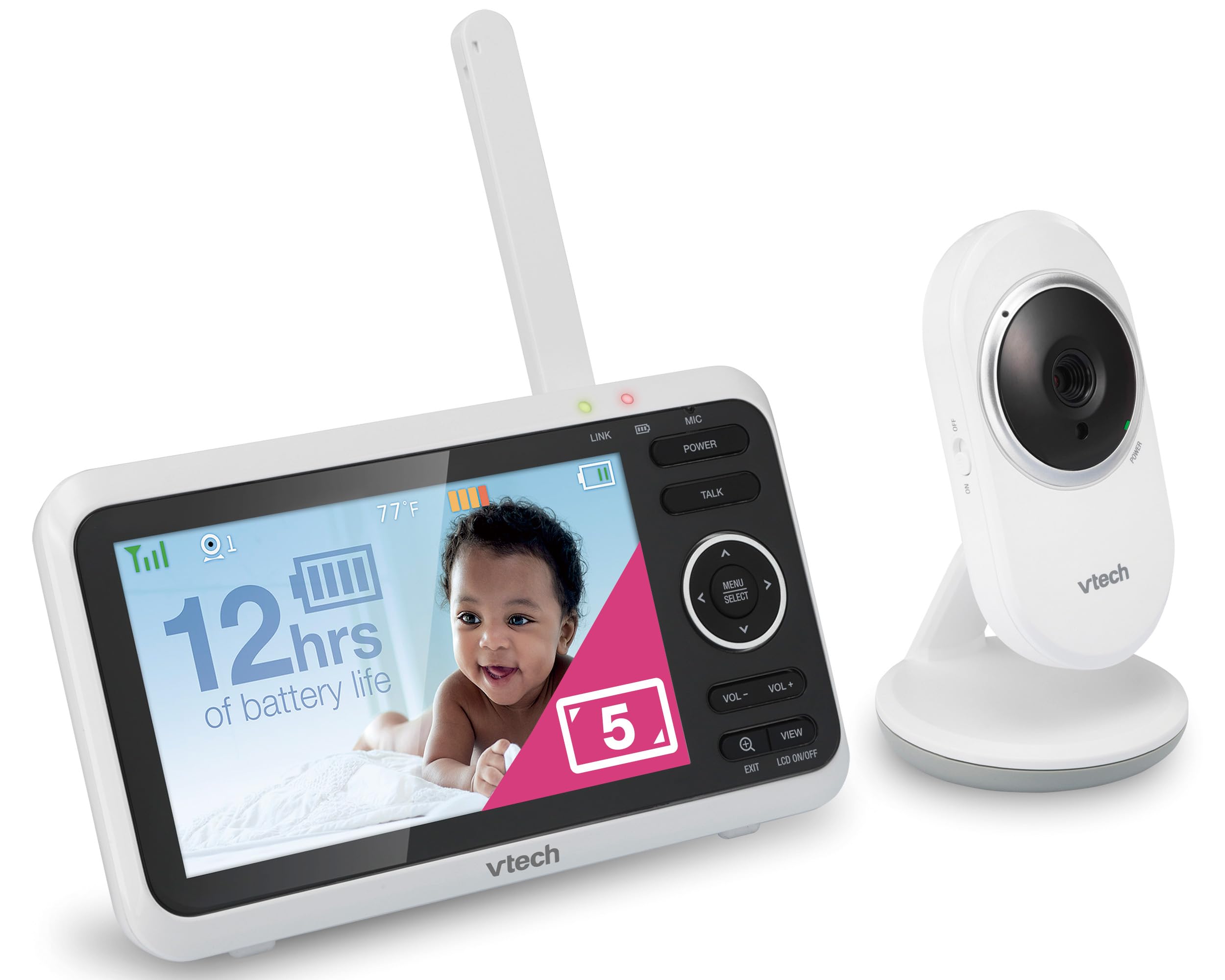
VTech VM350 Parent Unit and Baby Unit side-by-side, illustrating the complete monitoring system.
Operating the Monitor
1. Power On/Off
Press and hold the POWER button on the parent unit to turn it on or off.
2. Screen Display and Navigation
The 5-inch high-resolution screen displays live video from the baby unit. Use the directional arrows (MENU/SELECT) to navigate through menu options.

Close-up of the VTech VM350 parent unit screen displaying a baby, with a 5-inch LCD label and 2x zoom feature highlighted.
3. Adjusting Volume and Brightness
Use the VOL+ and VOL- buttons to adjust the speaker volume. Brightness can be adjusted via the menu settings.
4. 2X Digital Zoom
Press the zoom button (magnifying glass icon) to zoom in on the video feed for a closer look at your baby.
5. Two-Way Talk-Back Intercom
Press and hold the TALK button on the parent unit to speak to your baby through the baby unit's speaker.

A person holding the VTech VM350 parent unit, with a baby visible on screen, demonstrating the two-way talk feature.
6. Lullabies and Soothing Sounds
Access the menu to select from 5 calming melodies or 4 ambient sounds to play through the baby unit.

VTech VM350 baby unit (camera) placed near a crib with musical notes floating, indicating the lullaby feature.
7. Automatic Infrared Night Vision
The baby unit automatically detects low light conditions and activates infrared night vision, providing clear black-and-white video.

Comparison image showing standard night vision (grainy) versus VTech's night vision (clearer) of a baby in a crib.
8. Temperature Sensor
The parent unit displays the temperature detected by the baby unit, helping you ensure your baby's room is comfortable.

Close-up of the VTech VM350 parent unit screen showing a baby, with the room temperature (77°F) displayed prominently.
9. Sound Activation Mode (VOX)
In sound activation mode, the screen automatically turns on when the baby unit detects sound above a set sensitivity level. This conserves battery life.

VTech VM350 parent unit screen showing a baby, with a sleeping person in the background, illustrating the sound activation feature.
10. Extended Range
The monitor offers a range of up to 1,000 feet, allowing you to move freely around your home or yard while staying connected.

An illustration of a multi-story house showing the VTech VM350 camera and monitor maintaining connection across different rooms and floors.
11. Battery Life
The parent unit provides up to 12 hours of video streaming or 21 hours of audio-only monitoring on a single charge.

An infographic showing 12 hours of video streaming and 21 hours of audio-only mode for the VTech VM350 monitor's battery life.
Maintenance
- Cleaning: Clean the monitor and camera with a soft, damp cloth. Do not use cleaning sprays or solvents.
- Battery Care: To prolong battery life, fully charge the parent unit before first use and when the low battery indicator appears.
- Storage: If storing the product for an extended period, remove the battery from the parent unit and store it in a cool, dry place.
Troubleshooting
No Link / Out of Range
Ensure both units are powered on and within range. Move the parent unit closer to the baby unit. Check for obstructions like thick walls or other electronic devices that might cause interference.
No Picture / Black Screen
The screen might be in sound activation mode (VOX). Make a sound near the baby unit to activate the screen. Check if the baby unit is powered on and properly connected.
Poor Picture Quality
Adjust the brightness setting on the parent unit. Ensure the baby unit's lens is clean and free from obstructions. Move the units closer to each other to improve signal strength.
Static or Interference
Move the baby monitor away from other electronic devices (e.g., cell phones, Wi-Fi routers, microwaves) that may cause interference. Try repositioning the units.
Specifications
| Feature | Detail |
|---|---|
| Screen Size | 5 Inches |
| Connectivity Technology | Wireless (2.4GHz FHSS) |
| Range | Up to 1000ft |
| Battery Life (Video) | Up to 12 Hours |
| Battery Life (Audio-only) | Up to 21 Hours |
| Special Features | 2-Way Audio, Night Vision, Temperature Sensor, Lullabies, Sound Activation |
| Mounting Type | Wall Mount |
| Power Source | Battery Powered |
| Model Number | VM350 |
| Manufacturer | VTech |
Warranty and Support
For warranty information and technical support, please refer to the official VTech website or contact customer service. Keep your purchase receipt as proof of purchase.
Online Support: www.vtechbabycare.com
Email Support: support@vtechbabycare.com
Product Videos
Video Description: An overview of the VTech VM350 baby monitor, showcasing its 5-inch full-color display, automatic night vision, and other key functionalities. This video provides a visual guide to the product's features and benefits.
Video Description: This video highlights the extended battery life of the VTech VM350 monitor, demonstrating its capability for up to 12 hours of video streaming, ideal for all-day monitoring.


