
1. Introduction
Thank you for purchasing the LIHAN Dual USB Car Charger with Voltage Meter. This device is designed to provide convenient and efficient charging for your USB-powered devices while on the go, along with the added functionality of monitoring your vehicle's battery voltage. Please read this manual thoroughly before use to ensure proper operation and safety.
2. Product Features
- Dual USB Charging Ports: Simultaneously charge two devices.
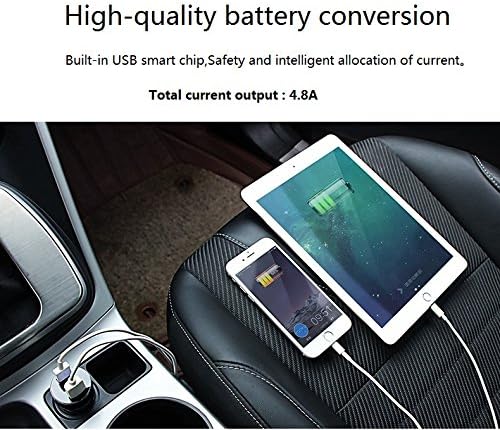
- 4.8A Total Output: Provides efficient charging for smartphones, tablets, and other USB devices.
- Integrated Voltage Meter: Digital LED display shows your car battery's voltage in real-time.
- Universal Compatibility: Compatible with 12V-24V vehicle power outlets.
- Compact Design: Slim profile minimizes obstruction.
- Safety Features: Built-in safeguards against overcurrent, overcharging, and overheating.


3. Package Contents
Please check the package for the following items:
- 1 x LIHAN Dual USB Car Charger with Voltage Meter
- 2 x USB Charging Cables (may vary by package)
4. Safety Information
To prevent injury or damage to your device, please observe the following safety precautions:
- Do not disassemble or modify the charger.
- Keep the charger away from water, moisture, and extreme temperatures.
- Avoid dropping or subjecting the charger to strong impacts.
- Do not use the charger if it appears damaged.
- Ensure the car's power outlet is clean and free of debris before inserting the charger.
- Unplug the charger when not in use or when leaving the vehicle for extended periods.
5. Setup
Setting up your LIHAN Dual USB Car Charger is straightforward:
- Locate your vehicle's 12V or 24V cigarette lighter socket.
- Insert the LIHAN car charger firmly into the cigarette lighter socket. Ensure it is fully seated for a stable connection.
- Once connected, the LED display on the charger will illuminate, showing your vehicle's current battery voltage.

6. Operating Instructions
6.1 Charging Devices
- After inserting the car charger into the cigarette lighter socket, connect your USB charging cable to one of the charger's USB ports.
- Connect the other end of the USB cable to your device (e.g., smartphone, tablet).
- Your device should begin charging automatically. You can charge two devices simultaneously using both USB ports.
6.2 Monitoring Vehicle Voltage
The integrated LED display continuously shows your vehicle's battery voltage. This feature helps you monitor the health of your car battery and charging system.
- Normal Voltage (Engine On): Typically between 13.2V and 14.7V.
- Normal Voltage (Engine Off): Typically between 12.2V and 12.8V.
- Low Voltage Warning: If the voltage drops below 11.5V (for 12V systems) or 23.1V (for 24V systems), it may indicate a weak battery or an issue with the charging system.


7. Maintenance
To ensure the longevity and optimal performance of your car charger:
- Cleaning: Use a soft, dry cloth to wipe the charger. Do not use liquid cleaners or abrasive materials.
- Storage: When not in use, store the charger in a cool, dry place away from direct sunlight and extreme temperatures.
- Inspection: Periodically check the charger and your vehicle's cigarette lighter socket for any signs of damage or corrosion.
8. Troubleshooting
If you encounter issues with your LIHAN car charger, refer to the following common problems and solutions:
| Problem | Possible Cause | Solution |
|---|---|---|
| Charger not powering on/no voltage display. | Loose connection, vehicle socket issue, blown fuse in vehicle. | Ensure charger is fully inserted. Test with another vehicle socket. Check vehicle's fuse box for a blown fuse related to the cigarette lighter. |
| Device not charging. | Faulty USB cable, device issue, charger not receiving power. | Try a different USB cable. Test the charger with another device. Ensure the charger is properly seated and powered on. |
| Voltage display is inaccurate. | Minor calibration difference, vehicle electrical interference. | Small variations (e.g., 0.1-0.2V) are normal. If significantly off, contact support. Ensure no other high-power devices are drawing excessive current from the same circuit. |
| Charger gets hot during use. | Normal operation, excessive load. | Some warmth is normal. If it becomes excessively hot, unplug immediately and reduce the number of devices being charged or check for short circuits in cables. |
9. Specifications
- Model Number: LHCC1039
- Input Voltage: 12V - 24V DC
- Total USB Output: 4.8 Amps
- Number of USB Ports: 2
- Product Dimensions: 2.08 x 1.3 x 1.3 inches
- Item Weight: 0.8 ounces
- Color: Black
- Manufacturer: INTRO UNIOIN ELECTRONICS CO LIMITED


10. Warranty and Support
For warranty information or technical support, please refer to the product packaging or contact the manufacturer directly. Keep your purchase receipt as proof of purchase.