
GPS Tracking Mart GL300MA
User Manual
GTM Queclink GL320MG 4G GPS Tracker with 1010 Extended Battery Pack
Model: GL300MA
1. Introduction
This manual provides comprehensive instructions for the GTM Queclink GL320MG 4G GPS Tracker bundled with the 1010 Extended Battery Pack. This specialized package is designed for various tracking applications, including law enforcement, private investigation, and equipment management, offering real-time location tracking with extended battery life.
The GL320MG is a versatile 4G real-time multi-purpose GPS tracker, and the 1010 extended battery pack enhances its operational duration with a robust, waterproof casing and a high-capacity 10,000 mAh battery.
2. Product Overview

Image: The complete GTM Queclink GL320MG GPS Tracker system, including the tracker unit, the 1010 extended battery pack in its waterproof case, and a mobile phone displaying the GPS tracking map interface.

Image: A detailed view of the Queclink GL320MG GPS tracker unit, highlighting its compact design and indicator lights for GPS, Power, and Cellular status.
2.1. GTM GL320MG Multi-purpose GPS Tracker
- Multi-constellation GNSS: Supports GPS, GLONASS, and Beidou systems for accurate positioning.
- Emergency Button: Features a thumb-sized button with haptic feedback for confirmed emergency alerts or instant geo-fence setting.
- Power Management: Low power consumption with long standby time; can connect to external DC power or battery.
- Motion Detection: Internal 3-axis accelerometer for power saving and motion detection.
- Water-resistant: Designed to withstand exposure to water.
- Connectivity: Supports 4G GSM, LTE CAT-M1 (eMTC), LTE CAT-M2 (NB-IoT) across various bands for worldwide cellular operation.
2.2. GTM 1010 Flat Battery Pack

Image: The individual components of the 1010 Extended Battery Pack, including the Pelican 1010 waterproof case, the 10,000 mAh Li-Polymer battery, and the charging adapter.

Image: The GL320MG GPS tracker unit securely placed inside the Pelican 1010 waterproof case, demonstrating how the system is assembled for use.
- Protective Case: Pelican 1010 case, crushproof, dustproof, and watertight (IP67 rated, submersible up to 1 meter for 30 minutes).
- Strong Magnet: Integrated strong magnet for secure mounting.
- High Capacity Battery: Compact 3.7V rechargeable 10,000 mAh Li-Polymer battery.
- Extended Tracking: Allows extended tracking up to 8 weeks, depending on reporting frequency and environmental factors.
- Easy Open Latch: For convenient access.
- Rubber Liner: Provides extra protection and doubles as an O-ring seal.
3. Package Contents
Upon opening your package, please verify that all the following items are included:
- GTM Queclink GL320MG 4G GPS Tracker
- Pelican 1010 Waterproof Case with Strong Magnet
- 10,000 mAh Li-Polymer Battery Pack
- USB-Type C Battery Connector Cable
- Battery Charger Adapter (Wall Plug)
- Mini Screwdriver
- Screws
- SIM Card (pre-installed, no separate purchase needed)

Image: An illustration detailing the components included with the GL320MG GPS tracker, such as the tracker unit, wall plug, charging cable, mini screwdriver, and screws.

Image: An illustration showing the components of the 1010 Flat Battery Pack, including the battery, connector cable, charger adapter, and magnetic case.
4. Setup and Activation
To begin using your GPS tracker, follow these steps for setup and activation:
- Charge the Battery: Before first use, ensure the 10,000 mAh battery pack is fully charged using the provided charger. Connect the USB-Type C cable to the battery pack and the charger to a power outlet.
- Assemble the Device: Place the GL320MG GPS tracker inside the Pelican 1010 waterproof case. Connect the tracker to the 10,000 mAh battery pack using the provided connector cable. Ensure the connections are secure.
- Purchase Subscription Plan: The tracking service requires a subscription. Visit the official GPS Tracking Mart shop page to purchase your desired subscription plan.
- Activate the Device: After completing the checkout process for your subscription, you will typically be automatically redirected to the device activation page. If not, manually navigate to gpstrackingmart.com/gps-tracking-device-activation/.
- Fill Out Activation Form: Complete the device activation form with the required information.
- Confirmation: Once activated, you will receive a confirmation email providing access to your tracking map and online portal.

Image: A visual guide outlining the steps for activating the GPS tracking device, including purchasing a subscription and accessing the activation portal.
5. Operation
Once activated, your GTM Queclink GL320MG tracker will begin reporting its location based on your chosen subscription plan's frequency. You can monitor the device's location and manage settings through the online tracking portal.
5.1. Monitoring Location
Access your tracking map via the online portal or a compatible mobile application. The map displays the real-time location of your device, historical routes, and other relevant data.
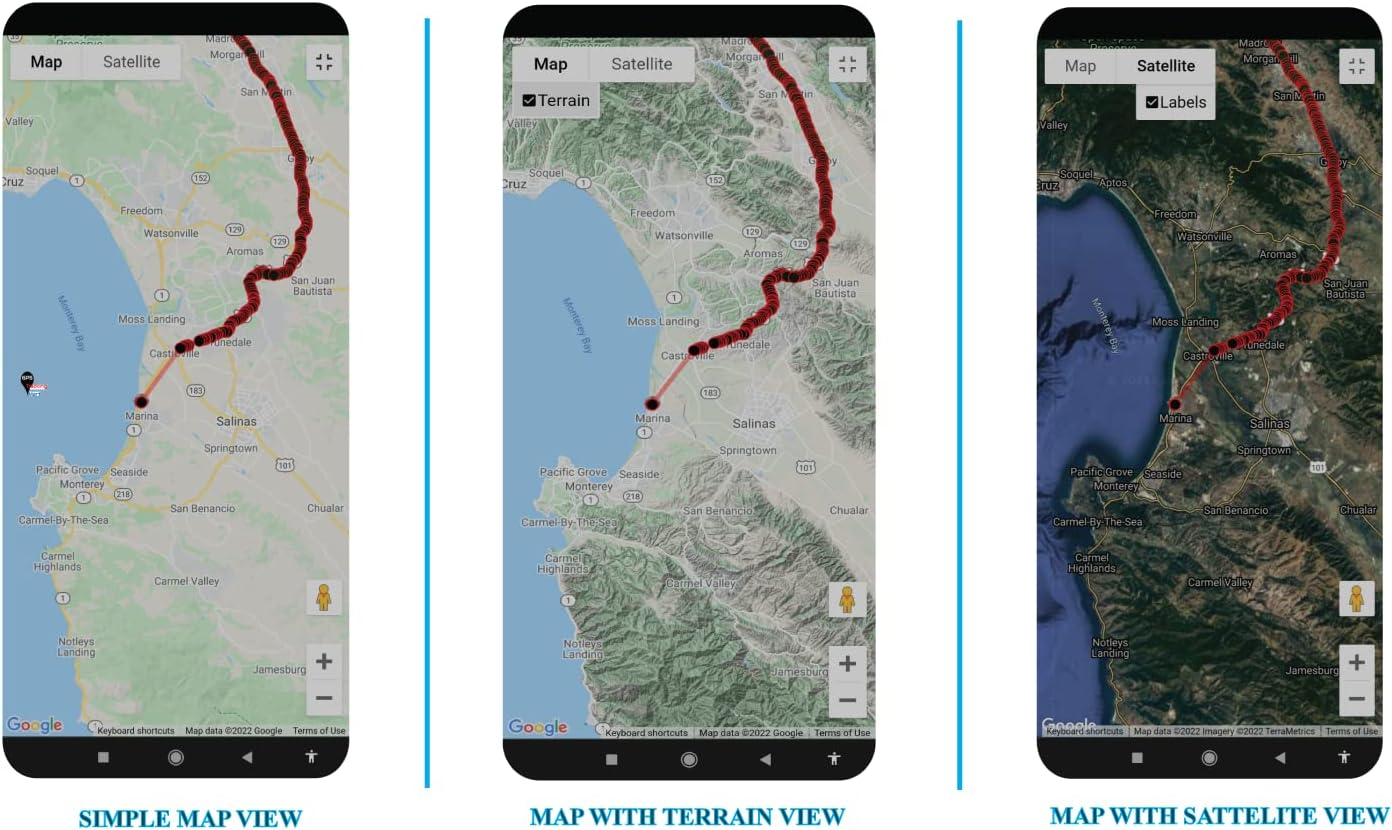
Image: A comparison of different map views available on the tracking platform, including a simple map view, a map with terrain overlay, and a satellite view, providing various perspectives for location monitoring.
5.2. Using the Emergency Button
The GL320MG features a thumb-sized button. Depending on your configuration, pressing this button can:
- Send an emergency alert to pre-defined contacts.
- Instantly set a geo-fence around the current location.
Refer to your online portal settings for specific button functionalities and how to configure them.
5.3. Power Saving and Motion Detection
The built-in 3-axis accelerometer allows for intelligent power management. The device can detect motion and adjust its reporting frequency to conserve battery life when stationary, extending operational time.
6. Technical Specifications
| Feature | Specification |
|---|---|
| Product Dimensions (Case) | 5.88 x 4.06 x 2.12 inches (14.9 x 10.3 x 5.4 cm) |
| Item Model Number | GL300MA (GL320MG series) |
| Tracker Weight | 93g (3.28oz) |
| Tracker Dimensions | 77.9 x 39.9 x 26.7 mm (3.07"L x 1.57"W x 1.05"H) |
| Internal Tracker Battery | Li-Polymer, 2600 mAh |
| Extended Battery Pack Capacity | 10,000 mAh (3.7V rechargeable) |
| Water Resistance (Tracker) | IPX5 Compliant |
| Water Resistance (Case) | IP67 Compliant (submersible under 1 meter for up to 30 minutes) |
| Charging Voltage | 5V DC (Tracker), 3.7V (Battery Pack) |
| Operating Temperature | -20C ~ +60C |
| Wireless Communication | 4G (LTE CAT-M1, LTE CAT-M2, GSM) |
| GNSS Type | u-blox All-in-One GNSS receiver (GPS, GLONASS, Beidou) |
| Standby Time (Tracker Only) | Without reporting: 480 hours 5 minutes reporting: 260 hours 10 minutes reporting: 300 hours |
| Standby Time (with 1010 Battery Pack) | Up to 8 weeks (depending on reporting frequency) |
| Human Interface Input | Buttons |
| Connectivity Technologies | USB |
7. Troubleshooting
If you encounter issues with your GTM Queclink GL320MG GPS Tracker, consider the following common troubleshooting steps:
- No Location Data: Ensure the device is in an area with good cellular and GPS signal coverage. Check if the battery is charged and the device is powered on. Verify your subscription is active.
- Device Not Powering On: Confirm the battery pack is fully charged and properly connected to the tracker. Check the charging cable and adapter for damage.
- Inaccurate Location: Ensure the device has a clear line of sight to the sky for optimal GPS reception. Avoid placing it in enclosed metal containers or deep indoors.
- Short Battery Life: Review your reporting frequency settings in the online portal; more frequent reporting consumes more battery. Ensure the battery pack is fully charged before deployment.
- Activation Issues: Double-check the activation URL and ensure all required information is correctly entered on the activation page.
For persistent issues or advanced troubleshooting, please contact customer support.
8. Warranty and Support
8.1. Warranty Information
Specific warranty details for your GTM Queclink GL320MG GPS Tracker and 1010 Extended Battery Pack are typically provided at the time of purchase or can be found on the manufacturer's official website. Please retain your proof of purchase for warranty claims.
8.2. Customer Support
For additional assistance, technical support, or inquiries regarding your device or service, please use the following contact information:
- Online User Manual: For the most up-to-date user manual and resources, visit gpstrackingmart.com/user-manual
- Email Support: sales@gpstrackingmart.com
Ask a question about this manual
Ask about setup, troubleshooting, compatibility, parts, safety, or missing instructions. Manuals+ will review the question and use this page’s manual context to help answer it.