
1. Introduction
Thank you for purchasing the EZON Running Watch TO37A11. This digital sports watch is designed to help you monitor your heart rate accurately during various activities, from treadmill running to outdoor cycling. It features a clear 1.22-inch display, calorie estimation, stopwatch, and alarm functions, all within a durable 5ATM water-resistant design. This manual provides detailed instructions to ensure you get the most out of your device.

Figure 1: EZON Running Watch TO37A11 with included heart rate chest strap.
2. Safety Information
- Do not attempt to open or modify the watch. Unauthorized modifications can void your warranty and cause damage.
- Keep the watch away from extreme temperatures, direct sunlight, and strong magnetic fields.
- Clean the watch and chest strap regularly with a soft, damp cloth. Avoid using harsh chemicals or abrasive cleaners.
- If you experience skin irritation, discontinue use and consult a doctor.
- This device is not a medical device and should not be used for diagnostic or treatment purposes. Consult a healthcare professional for any health-related concerns.
3. Package Contents
Please check that all items are present in your package:
- EZON Running Watch TO37A11
- Heart Rate Chest Strap
- Charging Cable
- Instruction Manual (English)
4. Product Overview
The EZON Running Watch TO37A11 features a clear display and intuitive button layout for easy operation during your workouts.
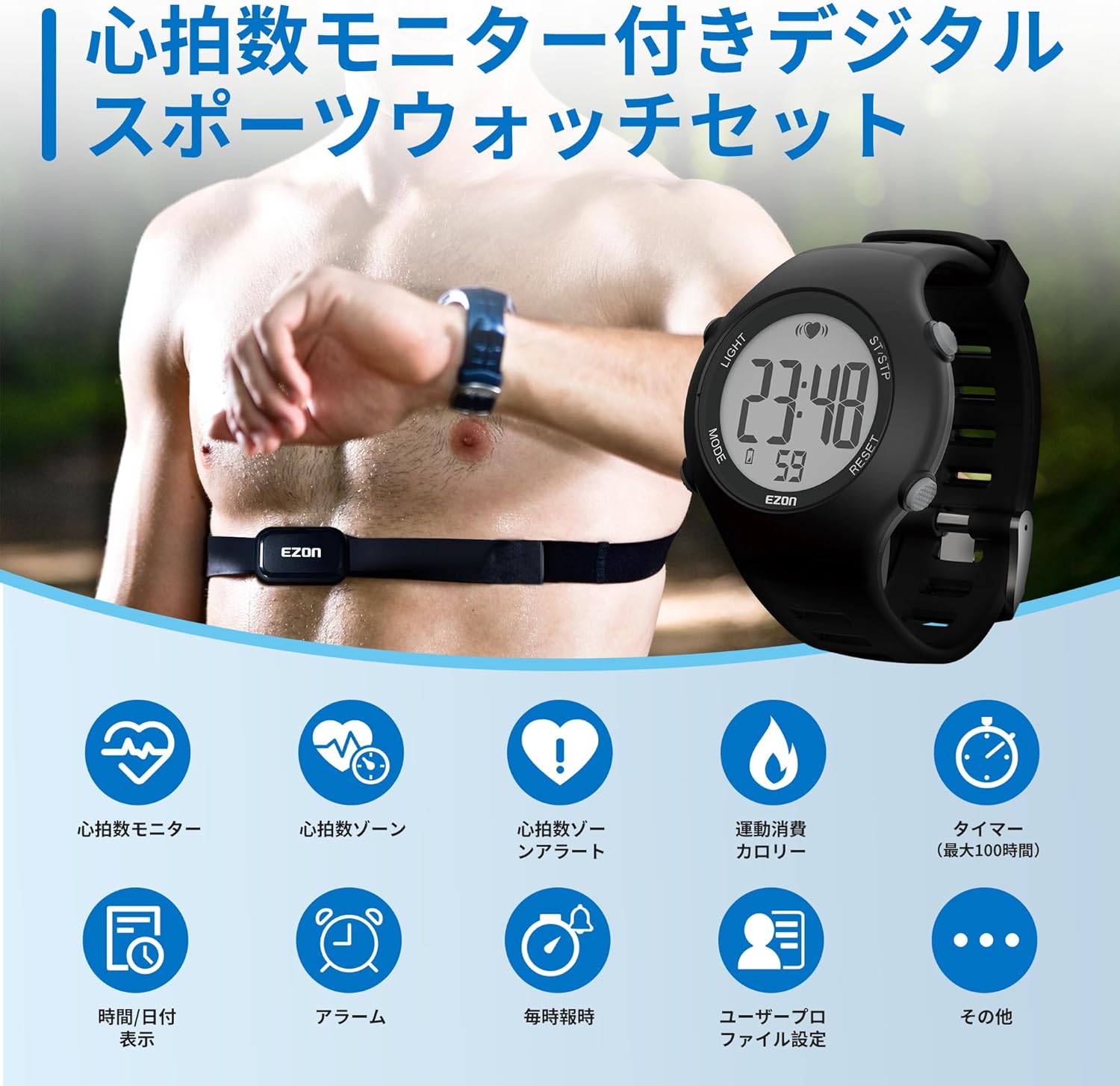
Figure 2: Front view of the EZON Running Watch TO37A11.
4.1 Watch Components
- LIGHT Button: Activates backlight.
- MODE Button: Cycles through different modes (Time, Alarm, Chronograph, User Settings, Running).
- SET Button: Enters settings menu or confirms selections.
- ST/STP Button: Starts/stops functions (e.g., stopwatch, running timer).
- RESET Button: Resets values or exits menus.
- Display: 1.22-inch large display for clear visibility.
- Heart Rate Sensor (on chest strap): Detects heart rate signals.
5. Setup
5.1 Initial Power On
For first-time use, press and hold all four side buttons simultaneously until the screen lights up. Release the buttons to complete the startup process.
5.2 Charging
Before initial use, ensure the watch is fully charged. Connect the charging cable to the watch's charging port and a USB power source. The battery icon on the display will indicate charging status. A full charge is recommended for optimal performance.
Video 1: Demonstrates the charging process and initial setup steps for the watch.
5.3 Time and Date Setting
To set the time and date:
- Press the MODE button to navigate to the Time mode.
- Press and hold the SET button to enter the settings menu.
- Use the ST/STP and RESET buttons to adjust values (e.g., hour, minute, year, month, day).
- Press the SET button to confirm each setting and move to the next.
- Select your correct time zone city code from the list provided in the quick start guide or product documentation.
- Choose between 12-hour or 24-hour format.
- Set the date format (e.g., MM/DD or DD/MM).
- Press the MODE button to exit the settings.
5.4 User Profile Setup
Accurate personal data ensures precise heart rate and calorie calculations. To set up your user profile:
- From the Time mode, press the MODE button until you reach the User Profile setting.
- Press and hold the SET button to enter the profile settings.
- Input your gender, age, and weight using the ST/STP and RESET buttons.
- Select your preferred unit system (e.g., Kilograms/Centimeters or Pounds/Inches).
- Press SET to confirm each entry.
- Press MODE to exit.
5.5 Heart Rate Chest Strap Setup
The chest strap is essential for accurate heart rate monitoring. Follow these steps to wear it correctly:
- Connect the elastic chest strap to the heart rate sensor module.
- Adjust the strap length for a comfortable but snug fit around your chest, just below your pectoral muscles. It should not be too tight.
- Moisten the rubber electrode pads on the back of the sensor with water or electrode gel to ensure good contact with your skin.
- Position the heart rate chest strap on your chest with the EZON logo facing up and centered.
- Ensure the electrodes are flat against your skin.

Figure 3: Step-by-step guide for wearing the heart rate chest strap.
6. Operating Instructions
6.1 Basic Navigation
Use the MODE button to cycle through the main functions: Time, Alarm, Chronograph, User Settings, and Running Mode. The LIGHT button activates the backlight for better visibility in low light conditions.

Figure 4: The watch features a clear display and simple operation.
6.2 Heart Rate Monitoring
Once the chest strap is correctly worn and moistened, the watch will automatically detect your heart rate. Your real-time heart rate (BPM) will be displayed on the watch screen. This feature provides accurate and reliable heart rate measurements for various activities.

Figure 5: Real-time heart rate displayed on the watch during exercise.
Video 2: Shows the heart rate monitoring feature in action.
6.3 Heart Rate Zone Alert
The watch allows you to customize safe heart rate zones based on your personal data. If your heart rate exceeds or falls below your set safe range, the watch will emit a beep sound every 10 seconds to alert you, helping you prevent overexertion or inefficient training.

Figure 6: Visual representation of heart rate zone alerts.
Understanding your heart rate zones can optimize your training:

Figure 7: Heart rate training zones and their effects.
6.4 Calorie Estimation
When paired with the heart rate chest strap, the watch displays your heart rate and estimated calorie consumption during exercise. This helps you track the effectiveness of each workout, whether it's walking, running, or hard training.

Figure 8: Calorie consumption displayed on the watch.
6.5 Stopwatch (Chronograph)
The built-in stopwatch function allows for precise timing with 0.01-second accuracy. It can record up to 50 laps, making it useful for managing and organizing your training courses.
Video 3: Demonstrates the stopwatch function and lap recording.
6.6 Alarm
Set daily alarms to help you manage your schedule. The alarm function can be turned on or off, and you can set the hour, minute, and second. The watch also features an hourly chime function.
Video 4: Shows how to set and manage alarms.
6.7 Running Mode / GPS
To start a running session:
- Navigate to the Running Mode using the MODE button.
- The watch will search for a GPS signal. This may take 30-40 seconds initially. For subsequent runs, it typically takes 5-10 seconds. Ensure you are in an open area for better GPS reception.
- Once "READY" appears, press ST/STP to start your run. The display will show elapsed time, distance, and pace.
- Press ST/STP again to pause your run. Press RESET to stop and save the workout.
Video 5: Illustrates starting a running session and GPS acquisition.
6.8 Workout Data Review
After completing a workout, you can review your detailed exercise data directly on the watch. Navigate to the "DATA" or "HISTORY" section (check your watch's specific menu for exact naming) to view metrics such as distance, average pace, and calorie consumption.
Video 6: Demonstrates how to review workout data after a session.
7. Maintenance
7.1 Cleaning
Regular cleaning helps maintain the watch's appearance and functionality. Wipe the watch and chest strap with a soft, slightly damp cloth. Do not use harsh detergents or solvents. Ensure the charging contacts are clean and dry before charging.
7.2 Battery Replacement
The watch and chest strap use CR2032 batteries, offering approximately 365 days of use without frequent charging. Battery replacement is simple: the watch requires a small Phillips screwdriver, and the heart rate sensor can be replaced with a coin. Refer to the detailed instructions in the quick start guide for specific steps.
7.3 Water Resistance (5ATM)
The watch has a 5ATM water resistance rating, suitable for outdoor enthusiasts and ensuring durability in humid conditions. This means it can withstand splashes, rain, and brief immersion in water. However, for optimal maintenance, avoid pressing buttons underwater and remove the watch before showering or swimming.

Figure 9: The watch is designed with 5ATM water resistance.
8. Troubleshooting
| Problem | Possible Cause | Solution |
|---|---|---|
| Watch does not power on. | Low battery or initial startup required. | Charge the watch fully. For first-time use, press and hold all four side buttons simultaneously until the screen lights up. |
| Inaccurate heart rate readings. | Chest strap not properly worn, electrodes not moistened, or poor contact with skin. | Ensure the chest strap is snug and the electrodes are moistened and making good contact with your skin. Check battery in chest strap. |
| GPS signal acquisition is slow or fails. | Obstructed view of the sky, indoor location, or initial GPS search. | Move to an open outdoor area with a clear view of the sky. Initial GPS search can take 30-40 seconds. Remain still during acquisition. |
| Display is dim or unresponsive. | Low battery or extreme temperature. | Charge the watch. Ensure the watch is used within its recommended operating temperature range. |
9. Specifications
- Model Number: TO37A11
- Brand: EZON
- Color: Black
- Material: Rubber
- Display Size: 1.22 inches
- Product Dimensions: 24.27 x 4.27 x 1.23 cm
- Item Weight: 99 g
- Battery Life: Approximately 1 year (CR2032 battery)
- Water Resistance: 5ATM
- Gender Target: Men, Running, Ladies, Heart Rate Monitor
- Style: One-piece
10. Warranty Information
EZON products are manufactured to high quality standards. This product comes with a standard manufacturer's warranty against defects in materials and workmanship. Please retain your proof of purchase for warranty claims. For specific warranty terms and conditions, please refer to the warranty card included in your package or contact EZON customer support.
11. Customer Support
If you have any questions, concerns, or require assistance with your EZON Running Watch TO37A11, please visit the official EZON website or contact our customer support team. Contact details can typically be found on our website or in the product packaging.
Official Website: EZON Store on Amazon.co.jp

