
Altec Lansing Baby Boom
Altec Lansing Baby Boom Wireless Bluetooth Speaker User Manual
Model: Baby Boom | ASIN: B07C2P1RCB
Introduction
The Altec Lansing Baby Boom is a compact, durable, and portable wireless Bluetooth speaker designed for on-the-go music enjoyment. Featuring IP67 waterproof and shockproof capabilities, it is built to withstand various environments, including floating on water. This manual provides essential information for setting up, operating, and maintaining your speaker to ensure optimal performance.
Key Features
- Small yet loud sound: Delivers clear true wireless stereo sound with deep bass.
- Durable and rugged build: IP67 waterproof, shockproof, snowproof, and floats on water.
- Portable and easy to carry: Compact and lightweight design with a carabiner clip for attachment.
- Extended battery life: Up to 10 hours of music playback on a single charge.
- Wide compatibility: Connects with Android, iOS, laptops, PCs, and tablets via Bluetooth up to 30 feet.
What's in the Box
Upon unboxing your Altec Lansing Baby Boom speaker, you should find the following items:
- Altec Lansing Baby Boom Wireless Bluetooth Speaker
- USB Charging Cable
- Carabiner Clip
- User Manual (this document)
Setup
1. Charging the Speaker
Before first use, fully charge your Baby Boom speaker. Connect the included USB charging cable to the speaker's charging port and plug the other end into a USB power source (e.g., computer USB port, USB wall adapter, power bank). The charging indicator light will illuminate during charging and turn off when fully charged. A full charge provides up to 10 hours of playback time.
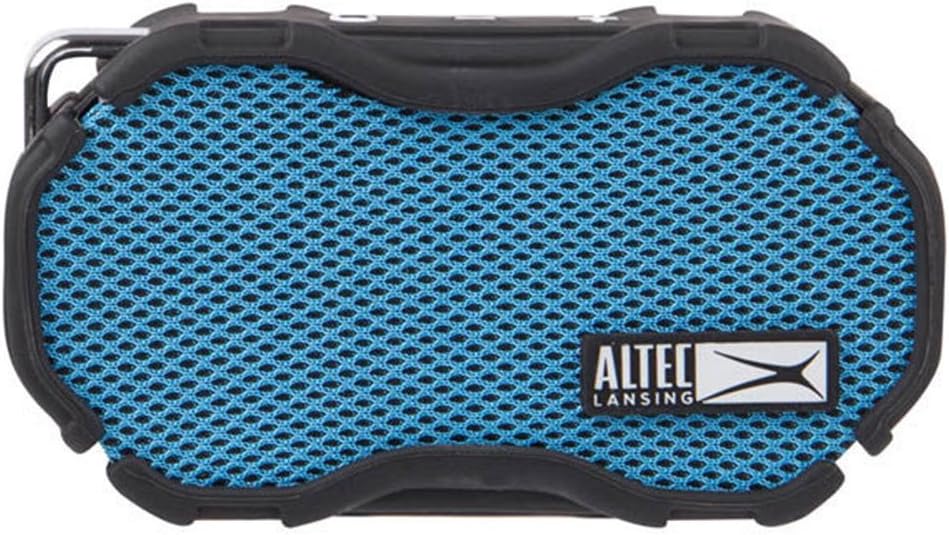
Image: Front view of the Altec Lansing Baby Boom speaker, highlighting the blue mesh grille and the Altec Lansing logo. The charging port is typically located on the side or back.
2. Powering On/Off
To power on the speaker, press and hold the Power button (usually marked with a circle and a vertical line) located on the top panel until you hear an audible tone and the LED indicator lights up. To power off, press and hold the Power button again until the speaker turns off.

Image: Top-side view of the Altec Lansing Baby Boom speaker, clearly showing the power button and volume controls on the top panel.
3. Bluetooth Pairing
- Ensure the speaker is powered on and in pairing mode (the Bluetooth indicator light will typically flash).
- On your device (smartphone, tablet, laptop), enable Bluetooth and search for available devices.
- Select "Baby Boom" or "Altec Lansing Baby Boom" from the list of found devices.
- Once paired, the speaker will emit an audible confirmation, and the Bluetooth indicator light will become solid.
- The speaker will automatically attempt to reconnect to the last paired device when powered on.
Operating Instructions
Music Playback and Volume Control
- Play/Pause: Press the Play/Pause button (often integrated with the power button or a separate button) once to play or pause music.
- Volume Up: Press the '+' button to increase volume.
- Volume Down: Press the '-' button to decrease volume.
- Next Track: Press and hold the '+' button to skip to the next track.
- Previous Track: Press and hold the '-' button to go to the previous track.
Answering Calls
When a call comes in, the music will pause. Press the Play/Pause button once to answer the call. Press it again to end the call. To reject a call, press and hold the Play/Pause button.
Using the Carabiner Clip
The included carabiner clip allows you to easily attach the speaker to backpacks, belt loops, or other gear, making it convenient for travel and outdoor activities.

Image: Side view of the Altec Lansing Baby Boom speaker, showing the attached carabiner clip for portability.
Maintenance
- Cleaning: Use a soft, damp cloth to clean the speaker's exterior. Do not use harsh chemicals or abrasive cleaners.
- Water Exposure: While the speaker is waterproof (IP67 rated) and floats, ensure the charging port cover is securely closed before exposing it to water. After water exposure, dry the speaker thoroughly, especially the charging port, before charging.
- Storage: Store the speaker in a cool, dry place away from extreme temperatures and direct sunlight when not in use for extended periods.
- Battery Care: To prolong battery life, avoid fully discharging the battery frequently. Charge the speaker regularly, even if not in constant use.
Troubleshooting
| Problem | Possible Cause | Solution |
|---|---|---|
| Speaker will not turn on. | Battery is depleted. | Charge the speaker using the provided USB cable. |
| Cannot pair with Bluetooth device. | Speaker is not in pairing mode; device Bluetooth is off; speaker is too far from device. | Ensure speaker is in pairing mode (flashing LED). Turn Bluetooth on your device. Move speaker closer to device (within 30 ft). Forget speaker from device's Bluetooth list and re-pair. |
| No sound or low sound. | Volume is too low on speaker or device; speaker is not connected. | Increase volume on both the speaker and your connected device. Ensure the speaker is successfully paired. |
| Sound cutting in and out. | Interference; device too far; low battery. | Move speaker closer to the device. Avoid obstacles between speaker and device. Charge the speaker. Avoid strong Wi-Fi signals or other Bluetooth devices nearby. |
| Speaker not charging. | Faulty cable or power source; charging port is wet or obstructed. | Try a different USB cable or power source. Ensure the charging port is dry and free of debris. |
Specifications
| Feature | Detail |
|---|---|
| Model Name | Baby Boom |
| Speaker Type | Portable |
| Special Feature | Portable, Waterproof |
| Recommended Uses | Music, Pool, Camping |
| Compatible Devices | Smartphone, Tablet, Laptop |
| Controller Type | Battery Powered |
| Color | Cobalt Blue |
| Battery Life | 6 Hours |
| Included Components | carabineer clip |
| Waterproof Rating | True (IP67) |
| Maximum Range | 30 Feet |
| Control Method | Touch |
| Wireless Communication | Bluetooth |
| Speaker Size | 12.9 Centimeters |
| Power Source | Battery Powered |
| Woofer Diameter | 5 Centimeters |
| Number of Batteries | 1 Lithium Ion (included) |
| Audio Driver Type | Dynamic Driver |
| Number of Microphones | 1 |
| Manufacturer | Sakar International, Inc. |
| UPC | 021331415974 |
| Speaker Max Output Power | 3 Watts |
| Connectivity Technology | USB |
| Audio Output Mode | Stereo |
| Mounting Type | Freestanding |
Warranty and Support
The Altec Lansing Baby Boom speaker comes with a Limited Warranty. For detailed warranty information, product registration, and technical support, please visit the official Altec Lansing website or contact their customer service. You can find more information at Altec Lansing Store on Amazon.
Related documentsBaby Boom


Ask a question about this manual
Ask about setup, troubleshooting, compatibility, parts, safety, or missing instructions. Manuals+ will review the question and use this page’s manual context to help answer it.