
Introduction
This manual provides essential information for the safe and efficient operation, maintenance, and troubleshooting of your Force1 Velocity H102 RC Boat. Please read this manual thoroughly before using the product.
What's in the Box
- Velocity Green Boat
- 2 x 3.7 V 800mAh Li-Ion Rechargeable Batteries
- 2.4GHz Remote Transmitter
- USB Charging Cable
- Nut
- Spanner
- Boat Stand
- Spare Propeller
- Waterproof Ring
- Instruction Manual

Figure 1: Package Contents. This image displays all items included with your Force1 Velocity H102 RC Boat, such as the boat, remote, batteries, and tools.
Setup
1. Charging the Boat Batteries
- Connect the 3.7V 800mAh Li-Ion rechargeable boat battery to the USB charging cable.
- Plug the USB charging cable into a compatible USB power source (e.g., computer USB port, USB wall adapter).
- The charging indicator light will show the charging status. A full charge takes approximately 120 minutes.
- Do not overcharge the batteries. Disconnect once fully charged.

Figure 2: Charging the Boat Battery. The image shows the boat's rechargeable battery connected to a USB charging cable.
2. Installing Boat Batteries
- Carefully open the top hatch of the boat.
- Connect the charged battery to the boat's power connector.
- Ensure the waterproof ring is properly seated to prevent water ingress.
- Securely close the top hatch.

Figure 3: Boat Battery Installation. This image illustrates the internal compartment of the boat where the battery is connected.
3. Installing Remote Control Batteries
- The remote control requires 3 x AA size batteries (not included).
- Open the battery compartment on the back of the remote control.
- Insert the batteries, observing correct polarity (+/-).
- Close the battery compartment.
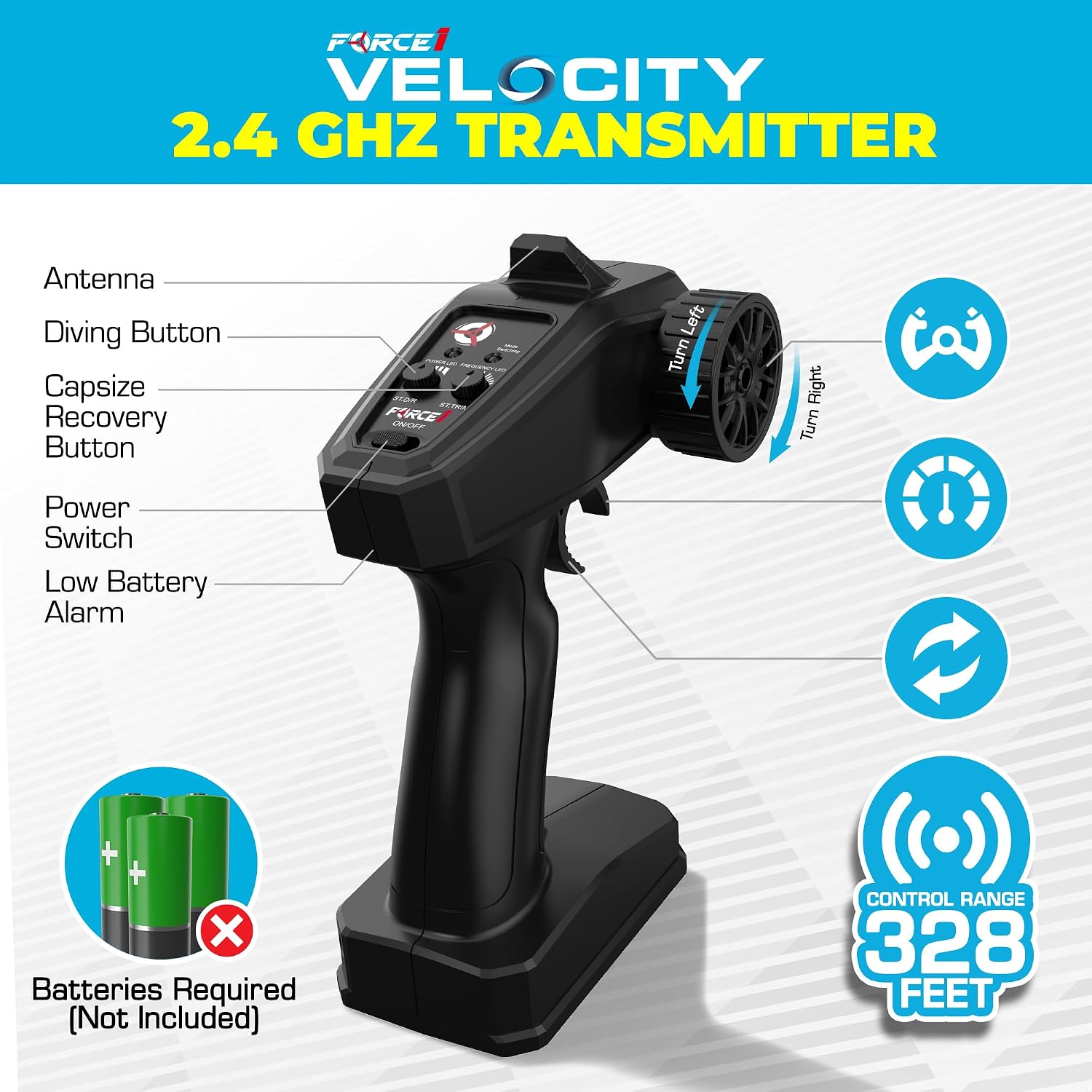
Figure 4: Remote Control. This image shows the remote control unit, which requires AA batteries for operation.
Operating Instructions
1. Powering On and Pairing
- Place the boat in freshwater. The boat will only activate when in contact with water.
- Turn on the remote control. The power LED on the remote will illuminate.
- The boat and remote will automatically pair. Once paired, you are ready to operate.
2. Basic Controls
- Forward/Reverse: Use the throttle trigger on the remote control.
- Left/Right: Use the steering wheel on the remote control.
- Trim Adjustment: Use the L/R Trim buttons to fine-tune steering if the boat veers off course.

Figure 5: Boat in Action. The RC boat is shown moving quickly on the water surface.
3. Special Features
- Underwater Diving: Press the 'Dive' button on the remote to initiate an underwater maneuver. The boat will briefly submerge and resurface.
- Capsize Recovery: If the boat flips over, press the 'Capsize Recovery' button on the remote. The boat will automatically right itself.
- Low Battery Alert: The remote control will emit an alert sound when the boat's battery is low, indicating it's time to return the boat to shore for recharging.
- Out of Range Alert: The remote will alert you if the boat is approaching the edge of its 100-meter signal range.

Figure 6: Underwater Diving Feature. This image captures the boat during an underwater dive.
4. Operating Environment
The Force1 Velocity H102 RC Boat is designed for use in freshwater environments such as pools and lakes with low surface debris. It is not suitable for saltwater use.
Video 1: Force1 Velocity Fast Remote Control Boat for Pools and Lakes. This video demonstrates the Force1 Velocity RC boat operating in a pool and lake, showcasing its speed and maneuverability in freshwater environments.
Maintenance
1. After Each Use
- Remove the boat from the water and turn off the remote control.
- Open the boat's hatch and remove the battery. Allow the internal compartment to air dry completely.
- Wipe down the exterior of the boat with a soft, dry cloth to remove any water or debris.
- Ensure the waterproof seal is clean and free of any foreign particles.
2. Propeller Care
- Regularly inspect the propeller for any damage or entanglement from weeds or fishing lines.
- Use the provided spanner to tighten the propeller nut if it becomes loose.
- Replace damaged propellers with the spare provided or purchase new ones from authorized retailers.
Troubleshooting
| Problem | Possible Cause | Solution |
|---|---|---|
| Boat does not power on in water | Battery not connected, low battery, or not in water. | Ensure battery is charged and connected. Place boat in water. |
| Boat loses signal or stops responding | Out of range, remote control battery low, or interference. | Bring boat closer to remote. Replace remote batteries. Avoid areas with strong interference. |
| Boat does not move forward/backward | Propeller obstructed or damaged. | Check propeller for debris. Replace if damaged. |
| Boat flips over frequently | Operating in rough water or incorrect trim. | Use capsize recovery. Adjust trim. Operate in calmer water. |
For further assistance, please refer to the full instruction manual or contact Force1 customer support.
Specifications
- Model Number: H102
- Product Dimensions: 14.44 x 10.75 x 4.9 inches
- Item Weight: 7.5 ounces
- Batteries: 2 x 3.7V 800mAh Lithium-Ion (included for boat), 3 x AA (not included for remote)
- Recommended Age: 14 years and up
- Control Frequency: 2.4GHz
- Control Range: Up to 100 meters (328 feet)
- Charge Time: Approximately 120 minutes
- Play Time: Approximately 12 minutes per battery
Warranty and Support
For warranty information and customer support, please visit the official Force1 website or contact their customer service department. Keep your purchase receipt as proof of purchase.
You can find more information and products from Force1 at their official store: Force1 Store on Amazon.


