
1. Introduction
This manual provides essential information for the setup, operation, maintenance, and troubleshooting of your MSI GV62 8RD-034 gaming laptop. Please read this manual thoroughly before using your device to ensure proper function and longevity.
2. Package Contents
Verify that all items are present in your product packaging:
- MSI GV62 8RD-034 Gaming Laptop
- Power Adapter
- User Manual (this document)
3. Product Overview
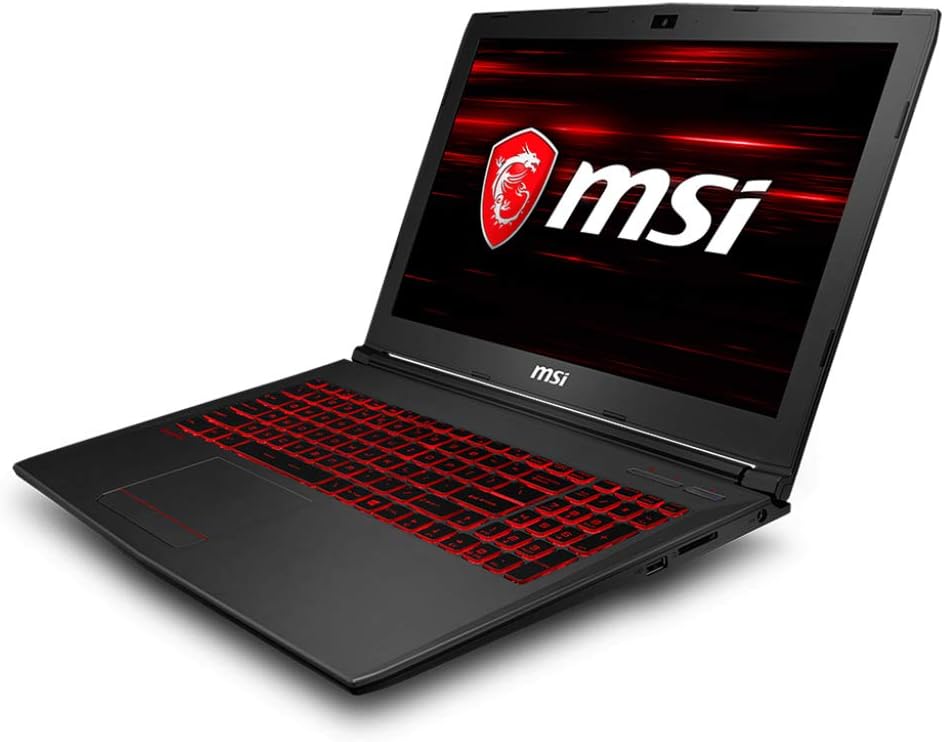
The MSI GV62 8RD-034 is a 15.6-inch gaming laptop designed for performance and portability. It features an Intel Core i7-8750H processor, NVIDIA GeForce GTX 1050Ti graphics, and a SteelSeries red backlit keyboard.
3.1. Key Features
- Display: 15.6" Full HD eDP IPS-Level 45% NTSC display.
- Processor: Intel Core i7-8750H (6 Cores, 2.2 - 4.1GHz).
- Graphics: NVIDIA GeForce GTX 1050Ti with 4GB GDDR5.
- Memory: 8GB DDR4 2400MHz RAM (expandable up to 32GB).
- Storage: 128GB SSD + 1TB (5400RPM) HDD.
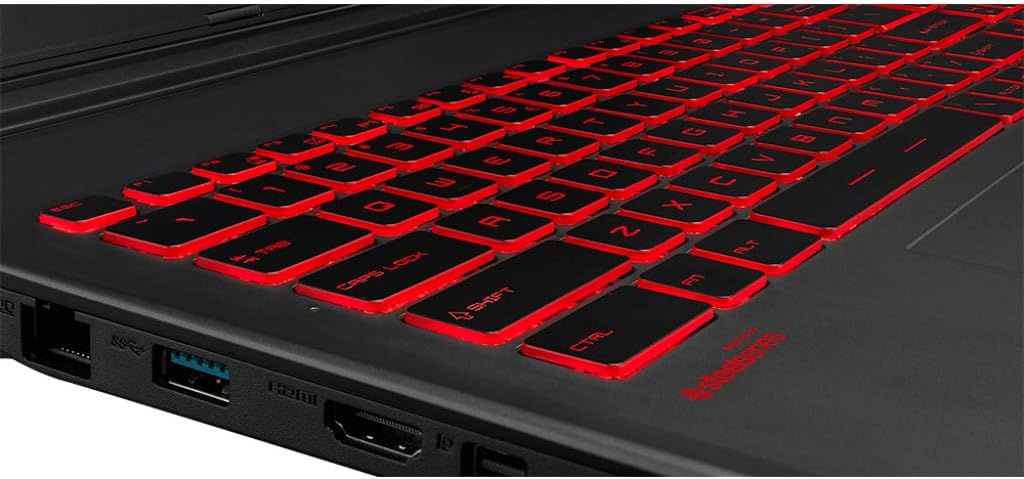
- Keyboard: SteelSeries Red Backlit Customizable Keyboard.
- Audio: Nahmic 3 Audio.
- Operating System: Windows 10 Home (64-bit).
3.2. Laptop Views



4. Setup
4.1. Initial Power On
- Connect Power: Plug the power adapter into the laptop's power input port, then connect it to a power outlet.
- Open Lid: Carefully open the laptop lid.
- Power On: Press the power button, typically located above the keyboard, to turn on the laptop.
- Initial Configuration: Follow the on-screen instructions to complete the Windows 10 setup, including language, region, network connection, and user account creation.
4.2. Driver and Software Updates
It is recommended to update drivers and software after initial setup for optimal performance and security.
- Windows Updates: Navigate to Windows Settings > Update & Security > Windows Update and check for available updates.
- Graphics Drivers: Download and install the latest NVIDIA GeForce drivers from the official NVIDIA website.
- MSI Utilities: Check the official MSI website for any specific utility software or driver updates for your model.
5. Operating Your Laptop
5.1. Keyboard Functions
The SteelSeries keyboard features red backlighting and customizable functions. Utilize the Fn key in combination with function keys (F1-F12) for quick access to various settings:
- Fn + Fx: Adjust display brightness, volume, keyboard backlight, and other system functions. Refer to the keyboard legends for specific functions.
5.2. Storage Management
Your laptop includes a 128GB SSD and a 1TB HDD. For optimal performance, install the operating system and frequently used applications on the SSD (C: drive) and store larger files and games on the HDD (D: drive).
- Default Download Location: Configure your browser and application settings to save downloads to the D: drive to preserve space on the C: drive.
5.3. Connecting Peripherals
The laptop is equipped with various ports for connecting external devices:
- USB Ports: 1x USB 2.0, 3x USB 3.0 for connecting mice, keyboards, external drives, etc.
- HDMI: For connecting to external displays or TVs.
- Ethernet: For wired network connection.
- Audio Jacks: For headphones and microphones.
6. Maintenance
6.1. Cleaning
- Screen: Use a soft, lint-free cloth lightly dampened with water or a screen cleaner. Avoid harsh chemicals.
- Keyboard and Chassis: Use a soft cloth. For dust in crevices, use compressed air.
6.2. Cooling System
The laptop's cooling system is crucial for performance. Keep vents clear and consider using a laptop cooling pad, especially during extended gaming sessions, to manage heat and improve longevity.
- Dust Removal: Periodically use compressed air to clear dust from the cooling vents.
6.3. Battery Care
To maximize battery lifespan:
- Avoid fully discharging the battery frequently.
- If storing the laptop for an extended period, ensure the battery is charged to around 50-60%.
- If the battery experiences issues holding a charge, consult MSI's support resources for potential battery calibration procedures.
7. Troubleshooting
7.1. Common Issues and Solutions
- Laptop not powering on:
Ensure the power adapter is securely connected to both the laptop and a working power outlet. Try a different outlet if available.
- Poor performance or overheating:
Check that cooling vents are not obstructed. Clean dust from vents using compressed air. Ensure all drivers, especially graphics drivers, are up to date. Consider using a laptop cooling pad.
- Battery not charging or holding charge:
Verify the power adapter is functioning correctly. If the issue persists, a battery calibration might be necessary. Refer to MSI's official support for instructions on battery calibration for your specific model.
- Trackpad issues (e.g., no two-finger scroll):
Ensure trackpad drivers are installed and up to date. Check Windows settings for trackpad gestures and enable them if necessary.
- Low audio volume or poor sound quality:
Check volume levels in Windows and any application-specific settings. Ensure audio drivers are updated. For an enhanced experience, consider using external headphones or speakers.
8. Specifications
| Feature | Detail |
|---|---|
| Model Name | MSI GV62 8RD-034 |
| Display | 15.6 Inches, 1920x1080 Pixels (Full HD eDP IPS-Level 45% NTSC) |
| Processor | Intel Core i7-8750H (2.2 GHz, up to 4.1 GHz, 6 Cores) |
| Graphics Card | NVIDIA GeForce GTX 1050 Ti with 4GB GDDR5 |
| RAM | 8 GB DDR4 (2400MHz), Max Memory 32GB |
| Storage | 128GB SSD + 1TB HDD (5400 RPM) |
| Operating System | Windows 10 Home |
| Keyboard | SteelSeries Red Backlit Customizable Keyboard |
| Wireless Connectivity | 802.11 ac Wi-Fi, Bluetooth v5 |
| Ports | 1x USB 2.0, 3x USB 3.0, HDMI, Gb LAN |
| Audio | Nahmic 3 Audio |
| Item Weight | 4.8 pounds |
| Product Dimensions | 1 x 1 x 1 inches |
| Batteries | 1 Lithium Ion battery required |
9. Warranty and Support
For warranty information, technical support, and additional resources, please visit the official MSI website or contact MSI customer service. Keep your purchase receipt for warranty claims.
You can find more information and support on the MSI Brand Store on Amazon.


