
microSHIFT TS39-8
microSHIFT TS39 Thumb-Tap Shifters User Manual
Model: TS39-8
1. Introduction
This manual provides essential information for the installation, operation, and maintenance of your microSHIFT TS39 Thumb-Tap Shifters. Designed for reliable performance, these shifters are compatible with most Shimano mountain drivetrains, offering precise gear changes for an enhanced cycling experience.
2. Product Features
- Durable body construction for long-lasting use.
- Ergonomic shift levers designed for comfortable and efficient operation.
- Integrated display window for clear gear indication.
- Includes shift cables for immediate installation.
- Compatible with Shimano mountain systems (6, 7, 8, 9 Speed).
- Left shifter supports triple chainring setups.
- Available in 3x7 Speed and 3x8 Speed configurations.
3. Package Contents
Upon opening the package, verify that all components are present:
- 1x microSHIFT TS39 Left Thumb-Tap Shifter
- 1x microSHIFT TS39 Right Thumb-Tap Shifter
- 2x Shift Cables (pre-installed or included separately)

Figure 3.1: Front view of the microSHIFT TS39 Thumb-Tap Shifters, showing the display windows and shift levers.
4. Setup and Installation
Proper installation is crucial for optimal performance and safety. If you are unsure about any step, it is recommended to seek assistance from a qualified bicycle mechanic.
4.1 Tools Required
- Hex key set (typically 4mm, 5mm)
- Cable cutters
- Cable crimps
- Grease (for cable housing ends)
4.2 Installation Steps
- Remove Old Shifters (if applicable): Loosen the clamp bolts on your existing shifters and slide them off the handlebars. Disconnect old shift cables from derailleurs.
- Position New Shifters: Slide the microSHIFT TS39 shifters onto your handlebars. Position them comfortably, ensuring easy access to the shift levers and brake levers. The display window should be clearly visible. Tighten the clamp bolts securely, but do not overtighten.
- Route Shift Cables: Route the included shift cables through the appropriate cable housing and along your bicycle frame to the front and rear derailleurs. Ensure smooth routing without sharp bends that could impede cable movement.
- Connect to Derailleurs: Attach the shift cables to your front and rear derailleurs according to the derailleur manufacturer's instructions. Ensure proper cable tension.
- Adjust Derailleurs: Perform fine-tuning adjustments to your front and rear derailleurs to ensure smooth and precise shifting across all gears. This typically involves adjusting limit screws and barrel adjusters.
- Secure Cable Ends: Once adjustments are complete, trim any excess cable length, leaving approximately 2-3 cm beyond the derailleur anchor bolt. Install cable crimps on the trimmed ends to prevent fraying.
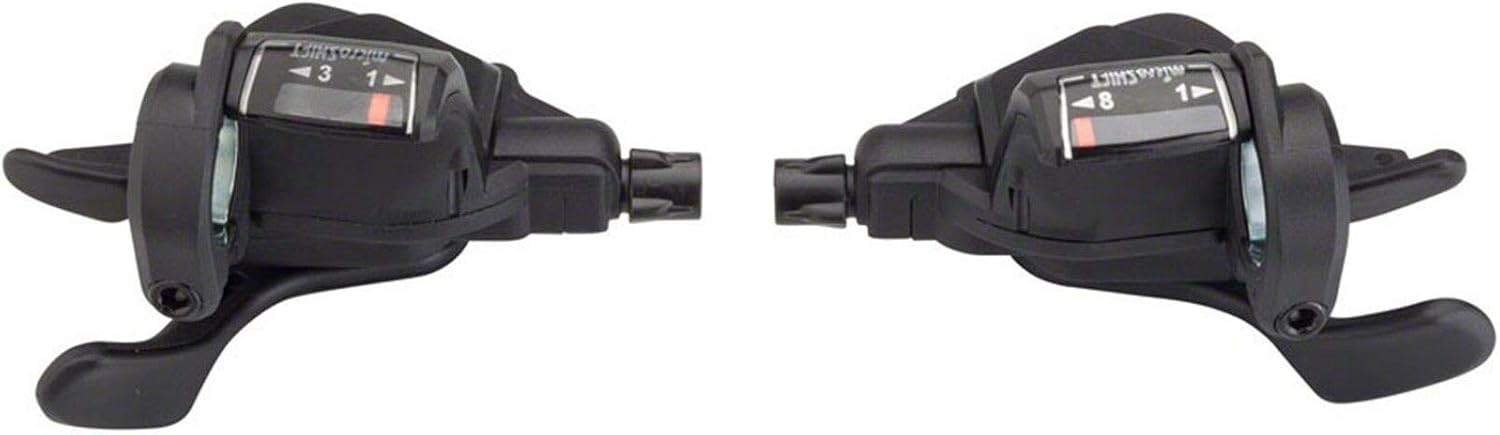
Figure 4.1: Side view of the microSHIFT TS39 Thumb-Tap Shifters, illustrating the cable exit point and ergonomic lever design.
5. Operating Instructions
The microSHIFT TS39 shifters utilize a thumb-tap mechanism for intuitive gear changes.
5.1 Shifting Up (Higher Gear)
To shift to a higher gear (smaller cog on the rear, larger chainring on the front), press the larger lever with your thumb. The display window will indicate the current gear position.
5.2 Shifting Down (Lower Gear)
To shift to a lower gear (larger cog on the rear, smaller chainring on the front), press the smaller lever with your thumb. The display window will update to show the new gear.
Important: Always pedal lightly when shifting gears to ensure smooth transitions and prevent damage to your drivetrain components.
6. Maintenance
Regular maintenance will prolong the life and ensure the smooth operation of your shifters.
- Cleaning: Wipe down the shifters regularly with a damp cloth to remove dirt and grime. Avoid using harsh chemicals.
- Cable Inspection: Periodically inspect shift cables for fraying, rust, or kinks. Replace damaged cables immediately.
- Cable Lubrication: Apply a small amount of bicycle-specific lubricant to the exposed sections of the shift cables and where they enter the housing. This reduces friction and improves shifting performance.
- Bolt Check: Ensure all mounting bolts are securely tightened.
7. Troubleshooting
| Problem | Possible Cause | Solution |
|---|---|---|
| Difficulty shifting gears | Incorrect cable tension, dirty/frayed cables, misaligned derailleur. | Adjust cable tension using barrel adjusters. Clean or replace cables. Adjust derailleur limit screws and B-tension screw. |
| Shifter feels stiff or sticky | Lack of lubrication, dirt ingress. | Lubricate shift cables and internal shifter mechanism (if accessible). Clean thoroughly. |
| Gears skip or jump | Bent derailleur hanger, worn chain/cassette, incorrect cable tension. | Inspect derailleur hanger for straightness. Check chain and cassette for wear. Fine-tune cable tension. |
If problems persist after attempting these solutions, consult a professional bicycle mechanic.
8. Specifications
| Attribute | Value |
|---|---|
| Brand | microSHIFT |
| Model Number | TS39-8 |
| Shifter Style | Thumb-Tap (Trigger) |
| Speed Compatibility | 3 x 7 Speed, 3 x 8 Speed |
| Derailleur Compatibility | Shimano Road & Mountain (6, 7, 8, 9 Speed) |
| Shift Mechanism | Cable Actuated |
| Color | Black |
| Weight (Pair) | 242g (approx. 8.5 oz) |
| Product Dimensions | 7"L x 7"W (approximate) |
| UPC | 657993146514 |
9. Warranty and Support
microSHIFT products are manufactured to high standards. For specific warranty information, please refer to the documentation included with your purchase or visit the official microSHIFT website. For technical support or inquiries, please contact the retailer where you purchased the product or the microSHIFT customer service department.
For more information, you may visit the microSHIFT Brand Page on Amazon.
Related documentsTS39-8


Ask a question about this manual
Ask about setup, troubleshooting, compatibility, parts, safety, or missing instructions. Manuals+ will review the question and use this page’s manual context to help answer it.