
1. Introduction
The Kaise SK-7660 is a compact digital clamp meter designed for measuring both AC and DC currents up to 400A. It offers a wide range of measurement capabilities, including 10 measurements across 5 items, making it suitable for various electrical testing needs. Its small jaw design allows for easy clamping in confined spaces and around intricate wiring. The SK-7660 features true effective value (True RMS) measurement for accurate readings of distorted waveforms and automatic zero adjustment for DC current measurements. The ergonomic rubber casing ensures a comfortable grip, and test leads can be conveniently secured to the side of the unit.
2. Safety Information
Warning: Improper use of this meter can cause damage, shock, injury, or death. Read and understand this instruction manual before operating the meter.
- Always adhere to local and national safety codes.
- Do not use the meter if it appears damaged or if the test leads are compromised.
- Ensure test leads are in good condition, free from cracks or breaks in the insulation.
- Do not exceed the maximum input limits specified for each measurement function.
- Always turn off power to the circuit before connecting or disconnecting the clamp meter, especially for current measurements.
- Wear appropriate personal protective equipment (PPE), such as safety glasses and insulated gloves, when working with electrical circuits.
- Avoid touching exposed conductors or circuit components while power is applied.
- Do not operate the meter in wet environments or explosive atmospheres.
3. Product Overview
3.1 Key Features
- Easy-to-use compact design for portability.
- Comprehensive measurement capabilities: 10 measurements across 5 items.
- Small jaw opening (maximum φ27 mm) for clamping in narrow spaces and inset wiring.
- True effective value (True RMS) for accurate measurement of distorted waveforms.
- Automatic zero adjustment for DC current measurements upon power-on.
- Ergonomic rubber construction for a comfortable and secure grip.
- Integrated storage for test leads on the side of the main unit.
3.2 Components
Familiarize yourself with the main components of the SK-7660 Digital Clamp Meter:
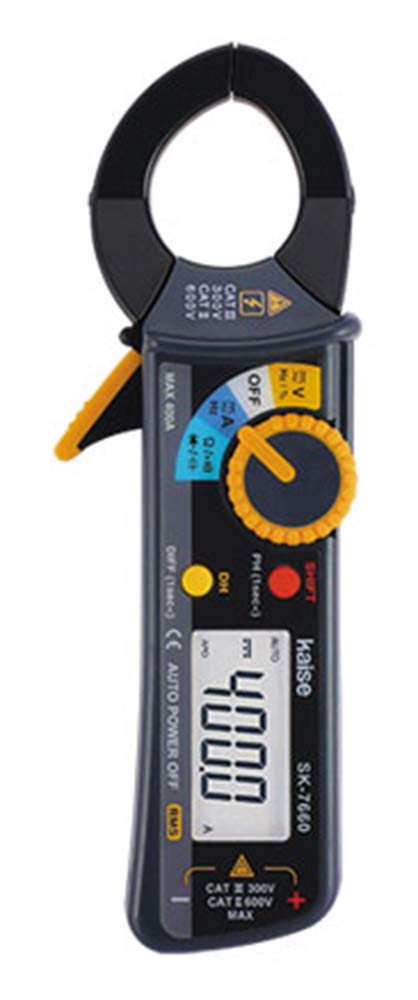
This image displays the front view of the Kaise SK-7660 Digital Clamp Meter. It highlights the LCD screen, the rotary function selector dial, the trigger for opening the clamp jaws, and the input terminals for test leads. The compact design and rubberized casing are visible.
- Clamp Jaws: Used to encircle a single conductor for non-contact current measurement.
- Trigger: Squeeze to open the clamp jaws.
- Function Dial: Rotary switch to select measurement functions (e.g., ACV, DCV, ACA, DCA, Resistance).
- LCD Display: Shows measurement readings, units, and indicators.
- Input Jacks: Terminals for connecting test leads for voltage, resistance, and other measurements. Typically includes a COM (common) jack and a VΩmA jack.
- HOLD Button: Freezes the current reading on the display.
- ZERO Button: Used to zero out the display for DC current measurements to eliminate residual magnetic fields.
4. Setup
4.1 Battery Installation
The Kaise SK-7660 requires two 1.5V R03 (AAA) batteries for operation.
- Ensure the meter is turned off by setting the function dial to the OFF position.
- Locate the battery compartment cover on the rear of the device.
- Use a suitable screwdriver to open the battery compartment cover.
- Insert two 1.5V AAA batteries, paying close attention to the correct polarity (+/-) as indicated inside the compartment.
- Replace the battery compartment cover and secure it with the screw.
Note: Replace batteries when the low battery indicator appears on the display to ensure accurate measurements.
5. Operating Instructions
5.1 Power On/Off
To power on the meter, rotate the function dial from the OFF position to any desired measurement function. To power off, rotate the function dial back to the OFF position.
5.2 AC/DC Current Measurement (ACA/DCA)
This function measures the current flowing through a conductor without breaking the circuit.
- Rotate the function dial to the AC A (Alternating Current Amperes) or DC A (Direct Current Amperes) range.
- For DC current measurements, press the ZERO button before clamping to eliminate any residual magnetic fields and ensure an accurate zero reading.
- Press the trigger to open the clamp jaws.
- Encircle only one conductor with the clamp jaws. Ensure the jaws are fully closed around the conductor.
- Read the current value displayed on the LCD.
Important: The clamp meter measures current through a single conductor. Clamping around multiple conductors carrying current in opposite directions will result in an inaccurate or zero reading.
5.3 AC/DC Voltage Measurement (ACV/DCV)
This function measures the voltage across two points in a circuit.
- Insert the black test lead into the COM input jack.
- Insert the red test lead into the VΩmA input jack.
- Rotate the function dial to the ACV (Alternating Current Volts) or DCV (Direct Current Volts) range.
- Connect the test leads in parallel across the component or circuit points where you want to measure the voltage.
- Read the voltage value displayed on the LCD.
5.4 Resistance Measurement (Ω) and Continuity Test
This function measures the electrical resistance of a component or checks for a continuous circuit path.
- Ensure the circuit or component to be tested is completely de-energized (power off).
- Insert the black test lead into the COM input jack.
- Insert the red test lead into the VΩmA input jack.
- Rotate the function dial to the Resistance (Ω) or Continuity mode.
- For resistance measurement, connect the test leads across the component.
- For continuity, touch the test leads to the two points you wish to check. An audible beep indicates a continuous circuit (low resistance).
- Read the resistance value (in Ohms) or observe the continuity indication on the LCD.
5.5 Data Hold Function
Press the HOLD button to freeze the current reading on the display. Press it again to release the hold function and resume live readings.
6. Maintenance
6.1 Cleaning
To clean the meter, wipe the casing with a dry, soft cloth. Do not use abrasive cleaners, solvents, or chemicals, as these may damage the casing or internal components.
6.2 Battery Replacement
When the low battery indicator appears on the display, replace the batteries promptly to ensure accurate measurements. Refer to section 4.1 Battery Installation for detailed steps.
6.3 Storage
If the meter is not to be used for an extended period, remove the batteries to prevent leakage and damage. Store the meter in a cool, dry place, away from direct sunlight, extreme temperatures, and high humidity.
7. Troubleshooting
If you encounter issues with your SK-7660, refer to the following common problems and solutions:
- No display or faint display:
- Check if the batteries are correctly installed.
- Replace the batteries with new ones.
- Ensure the function dial is not in the OFF position.
- Incorrect or unstable readings:
- Ensure the correct measurement function is selected for the task.
- For current measurements, verify that only one conductor is clamped within the jaws.
- For DC current, perform a zero adjustment using the ZERO button before measurement.
- Check test leads for damage or poor connection to the input jacks.
- Ensure the meter is not exposed to strong electromagnetic fields.
- No continuity beep:
- Ensure the circuit or component is de-energized.
- Check test leads for damage or open circuits.
- Verify that the continuity function is selected on the dial.
If the problem persists after attempting these solutions, contact customer support or a qualified technician.
8. Specifications
| Specification | Value |
|---|---|
| Display | 4000 count, maximum display 4050 |
| Sampling Rate | 3 times per second |
| Range Switching | Auto range |
| Measurement Conductor Diameter | Maximum φ27 mm (1.1 inches) |
| Power Supply | 2 x 1.5V R03 (AAA) batteries |
| Dimensions (H x W x D) | 170 mm x 58 mm x 27 mm (6.7 x 2.3 x 1.1 inches) |
| Weight | 160 g (5.6 oz) |
| Frequency Response (ACA) | 40Hz - 400Hz |
| Frequency Response (ACV) | 40Hz - 400Hz |
| Safety Standard | IEC-61010-1 CATIII 300V, CATII 600V EMC |
9. Accessories
The following accessories are typically included or compatible with the Kaise SK-7660:
- 100-63 Test Lead
- 1015 Carrying Case
- 2 x 1.5V R03 (AAA) Batteries (included)
- Instruction Manual
Optional Accessories:
- 793 Coil Type Contact Pins
- 940 Alligator Clip
10. Warranty and Support
Specific warranty information and detailed customer support contacts are not provided in the product description. For warranty claims, technical assistance, or further support, please refer to the retailer where the product was purchased or visit the official Kaise manufacturer's website for the most up-to-date information.


