
ANCEL VD500
ANCEL VD500 OBD2 Scanner Instruction Manual
Comprehensive guide for operating and maintaining your ANCEL VD500 diagnostic tool.
1. Introduction
The ANCEL VD500 is a versatile OBD2 scanner primarily designed for Volkswagen Group (VW, Audi, Skoda, SEAT) 12-volt 16-pin vehicles. It also supports general OBD II compliant vehicles manufactured 1996 or later. This manual provides detailed instructions for setup, operation, maintenance, and troubleshooting, enabling users to diagnose and resolve common vehicle issues efficiently.
2. What's in the Box
Upon opening the package, you should find the following items:
- 1*ANCEL VD500 for vw scan tool
- 1*Dust-proof bag
- 1*USB cable
- 1*User manual
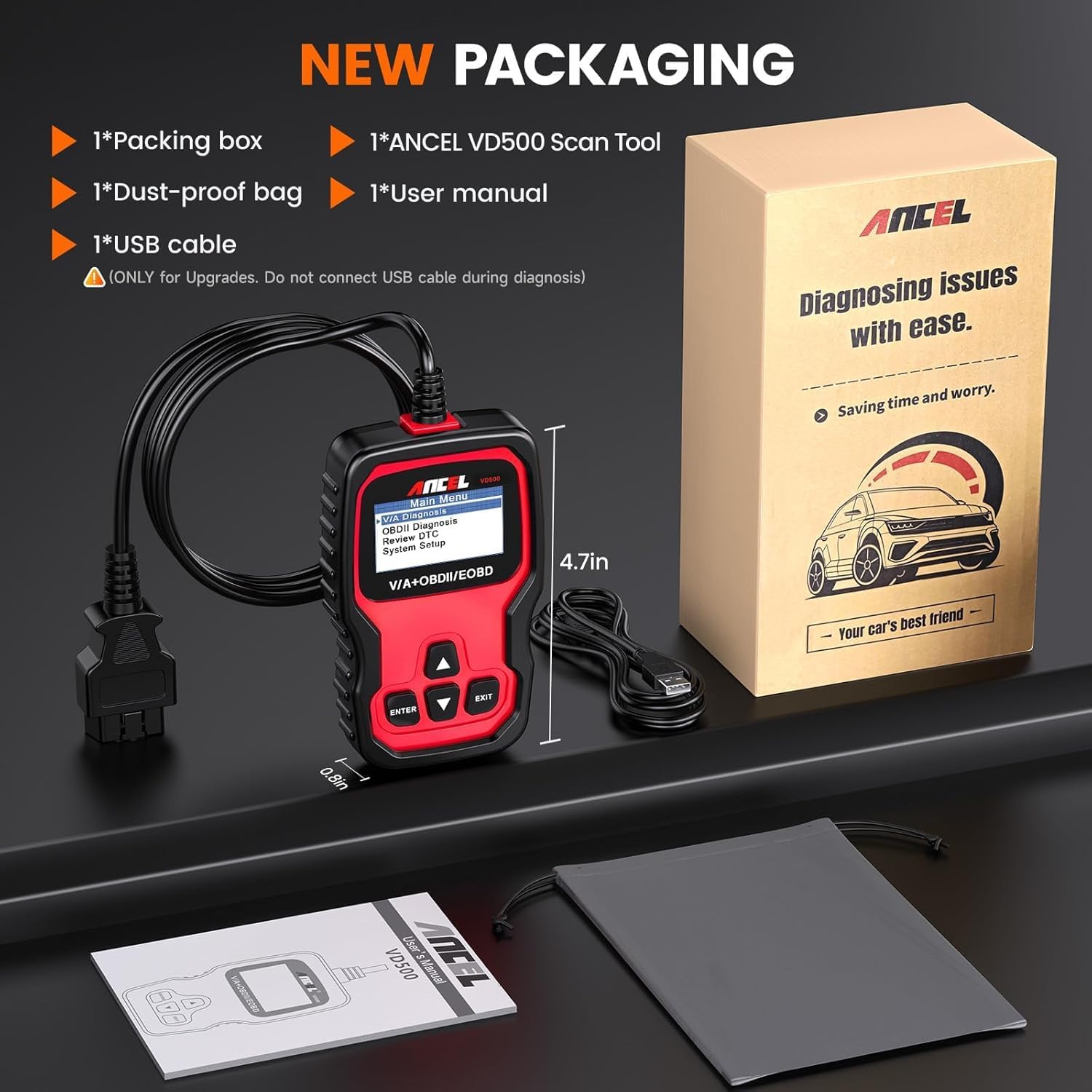
Figure 2.1: ANCEL VD500 package contents.
3. Setup
3.1 Connecting the Device
The ANCEL VD500 is a plug-and-play device, requiring no batteries or complex networking. Simply connect it to your vehicle's OBD2 port.
- Locate your vehicle's 16-pin OBD2 port. This is typically found under the dashboard on the driver's side.
- Ensure the vehicle's ignition is in the ON position (engine off for most diagnostic functions).
- Connect the VD500's OBD2 cable to the vehicle's OBD2 port. The device will power on automatically.

Figure 3.1: Connecting the ANCEL VD500 to the vehicle's OBD2 port.
Video 3.1: Demonstrates the simple plug-and-play connection of the ANCEL VD500 to a vehicle's OBD2 port.
4. Operating the ANCEL VD500
4.1 User Interface and Navigation
The VD500 features a clear display and intuitive button layout for easy navigation. Use the ENTER, EXIT, and arrow buttons to select options and confirm actions within the menu.

Figure 4.1: ANCEL VD500 user interface and navigation buttons.
Video 4.1: A detailed walkthrough of the ANCEL VD500's menu and navigation for VAG vehicles.
4.2 VAG Specific Functions (Volkswagen, Audi, Skoda, SEAT)
The VD500 offers advanced diagnostic and reset functions tailored for Volkswagen Group vehicles:
- Full System Diagnosis: Read and clear codes from various systems including Engine, ABS, Transmission, SAS (not all cars), ESP, TPMS, and other control modules.
- Oil Service Reset: Reset the oil service light after an oil change to ensure proper maintenance scheduling.
- Electronic Parking Brake (EPB) Reset: Safely retract and release brake calipers for brake pad replacement on vehicles with electronic parking brakes.
- Throttle Position Adaptation: Perform throttle body adaptation to ensure correct idle speed and smooth acceleration.

Figure 4.2: Special functions for VAG vehicles diagnosis.
Video 4.2: Overview of the all-in-one professional diagnostic capabilities of the ANCEL VD500 for VAG vehicles.
4.3 Standard OBD2 Functions (for non-VAG vehicles)
For other 1996 and newer OBD II compliant vehicles (non-Volkswagen), the VD500 can perform essential OBD2 functions:
- Read and Clear Fault Codes: Read current, pending, and permanent Diagnostic Trouble Codes (DTCs) and clear the Check Engine Light (CEL).
- Display Fault Code Definitions: Provides generic and manufacturer-specific definitions for DTCs.
- Retrieve VIN Information: Access the Vehicle Identification Number (VIN) for vehicle identification.

Figure 4.3: OBDII functions for most cars.
5. Software Updates and Language Options
The ANCEL VD500 offers free lifetime software updates to ensure compatibility with new vehicle models and to add new features. Keeping your device updated is crucial for optimal performance.
5.1 Updating the Software
- Visit the official ANCEL website: www.anceltech.com
- Navigate to the "Download" or "Support" section and select the VD500 model.
- Download the latest software update package to your computer.
- Connect the VD500 to your computer using the provided USB cable.
- Follow the on-screen instructions from the downloaded software to complete the update process.

Figure 5.1: ANCEL official website for software updates and language downloads.
Video 5.1: Step-by-step guide on how to perform a free lifetime software update for your ANCEL VD500.
5.2 Language Selection
The device supports English and German by default. Additional languages (Spanish, French, Italian) can be downloaded from the official website during the update process, allowing you to customize the interface to your preference.

Figure 5.2: Multiple language support on the ANCEL VD500.
6. Maintenance and Care
Proper maintenance ensures the longevity and reliable performance of your ANCEL VD500 scanner:
- Keep the device clean and free from dust, dirt, and moisture. Use a soft, dry cloth for cleaning.
- Store the scanner in its dust-proof bag in a cool, dry place when not in use.
- Avoid dropping the device or subjecting it to strong impacts, as this can damage internal components.
- Do not attempt to disassemble the device, as this will void the warranty and may cause irreparable damage.
7. Troubleshooting
7.1 Common Issues
- Device not powering on: Ensure the OBD2 cable is securely connected to the vehicle's OBD2 port and the ignition is in the ON position. Check the vehicle's battery voltage.
- "Vehicle does not support" message: This may occur for certain advanced functions if your specific vehicle model or year is not fully compatible with that particular function. Refer to the detailed compatibility list on the ANCEL website or contact support for clarification.
- Airbag light reset failure: While the VD500 can clear airbag codes, persistent issues may indicate an underlying hardware fault that requires professional diagnosis and repair by a qualified mechanic.
- VIN not readable: Some older or non-VAG vehicles may not fully support VIN retrieval via the standard OBD2 protocol.
7.2 Contacting Support
For further assistance, specific technical queries, or warranty claims, please visit the official ANCEL support website: www.anceltech.com. You can find FAQs, additional resources, and contact information for their customer service team.
8. Specifications
| Feature | Detail |
|---|---|
| Brand | ANCEL |
| Product Dimensions | 2.76"L x 0.87"W x 4.92"H |
| Operating System | Linux |
| Language | English (default), German, Spanish, French, Italian (downloadable) |
| Display Resolution | 64 x 64 |
| Item Weight | 12 ounces |
| Voltage | 12 Volts |
Related documentsVD500


Ask a question about this manual
Ask about setup, troubleshooting, compatibility, parts, safety, or missing instructions. Manuals+ will review the question and use this page’s manual context to help answer it.