
JHS A016-10KR/B1
JHS A016-10KR/B1 Smart Portable Air Conditioner User Manual
Model: A016-10KR/B1 | Brand: JHS
Important Safety Information
Caution:
- Before first use: Allow the unit to sit UPRIGHT for at least 24 hours if your unit has NOT been stored and transported in an UPRIGHT position. This allows the refrigerant to settle properly, preventing potential damage to the AC unit.
- Use on a stable and flat surface: DO NOT turn on the AC power if the floor of the house is not flat, which may cause strenuous vibration and could damage internal components.
- 3-minute compressor delay protection: To protect the compressor, it will not put out cooling air instantly if restarted within 3 minutes of being powered off. Cool air will not be exhausted from the unit during this delay.
- LCDI Plug Test: Always finish the test of the LCDI plug by referring to the safety instructions before using the JHS air conditioner.
Product Overview
The JHS A016-10KR/B1 is a versatile 3-in-1 portable air conditioner, offering cooling, fan, and dehumidifier functions. It is designed for easy mobility and smart control.

Figure 1: Front view of the JHS A016-10KR/B1 Portable Air Conditioner.
Key Features:
- Smart Control via Mobile App: Control the unit remotely using the JHS Smart app.
- Multi-Function Appliance: Combines air conditioning, 2-speed fan, and dehumidifier functions.
- Portable Design: Equipped with all-direction stainless casters and handles for easy movement between rooms.
- Quick Installation: Designed for simple setup with included exhaust hose and window kit.
- Digital LED Display: Provides clear temperature and setting information.
Package Contents
Before beginning installation, ensure all items listed below are present in your package:
- 1 x JHS A016-10KR/B1 Portable Air Conditioner Unit
- 1 x Remote-control (AAA R03 1.5V*2 batteries not included)
- 1 x Window kit
- 1 x Exhaust hose
- 1 x Drainage kit
- 1 x User-friendly manual (this document)
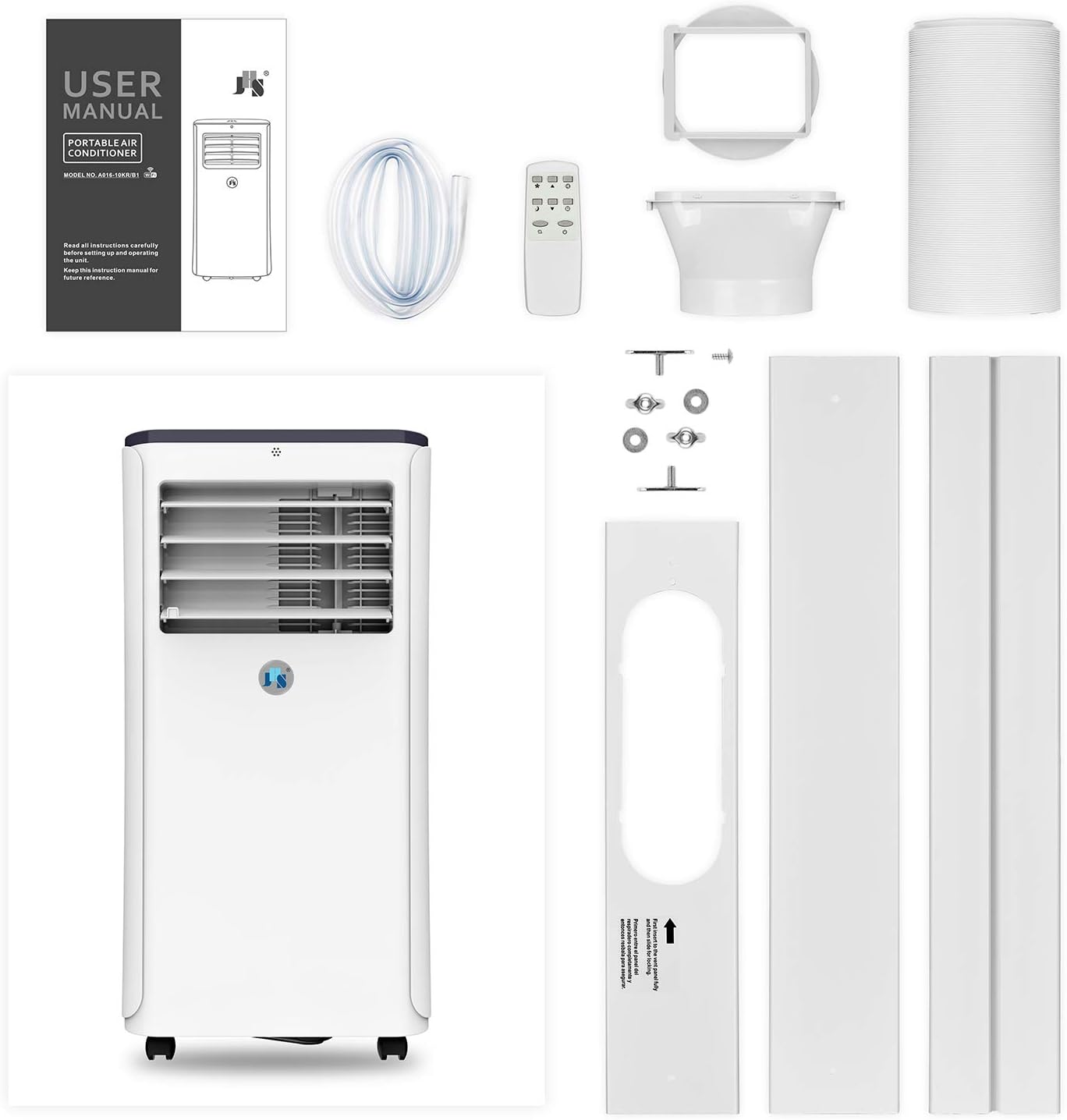
Figure 2: All components included in the JHS A016-10KR/B1 package.
Setup and Installation
The JHS portable air conditioner is designed for quick and non-permanent installation. Follow these steps for proper setup:
- Positioning the Unit: Place the unit on a stable and flat surface. Ensure it is upright for at least 24 hours before initial power-on to allow refrigerant to settle.
- Connecting the Exhaust Hose: Attach the exhaust hose to the designated port on the back of the unit.
- Window Kit Installation: Install the extendable window kit into your window opening. The kit is adjustable for windows between 9 and 57 inches. Insert the other end of the exhaust hose into the window kit opening to vent hot air outside.
- Power Connection: Plug the unit into a 115V/60Hz power outlet. Ensure the LCDI plug test is completed as per safety instructions.

Figure 3: Proper setup of the portable AC unit with the exhaust hose vented through a window.
Video Guide: Setup and Operation
Video 1: A detailed guide on setting up and operating the JHS 10,000 BTU Smart Portable Air Conditioner with Wi-Fi functionality.
Operating Instructions
The unit can be operated via the digital LED display on top, the remote control, or the JHS Smart mobile app.
Control Panel Overview:

Figure 4: The digital LED control panel, showing various function icons and temperature display.
- Power Button: Turns the unit ON/OFF.
- Mode Selection: Cycle through Cool, Fan, and Dehumidifier modes.
- Temperature Adjustment: Use the up/down arrows to set desired temperature (61°F ~ 88°F / 16°C ~ 31°C).
- Fan Speed: Adjust fan speed (2 speeds available).
- Timer: Set a 24-hour ON/OFF programmable timer.
- Wi-Fi Indicator: Shows Wi-Fi connection status.
Using the JHS Smart (Wi-Fi) App:
For remote control and advanced features, download and install the JHS Smart app.
- Ensure Connectivity: Your mobile device must be connected to your Wi-Fi router, and the router should have internet access.
- Download App: Scan the QR Code on the control panel or search "JHS smart" in the App Store (for iOS) or Google Play (for Android).
- Registration: Open the JHS smart app and follow the registration process to create an account.
- Connect Device: Follow in-app instructions to connect your portable AC unit to the app. Once connected, you can control all functions remotely.

Figure 5: Controlling the JHS portable AC unit via the JHS Smart mobile application.
Maintenance
Regular maintenance ensures optimal performance and longevity of your JHS portable air conditioner.
Filter Cleaning:
The unit features a 3-in-1 filter that effectively filters large dust and bacteria. It is reusable and easy to remove and wash.
- Remove Filter: Locate the filter on the back of the unit and carefully pull it out.
- Clean Filter: Wash the filter with warm, soapy water. Rinse thoroughly and allow it to air dry completely before reinserting.
- Reinstall Filter: Slide the dry filter back into its slot.

Figure 6: The 3-in-1 filter system, designed for easy removal and cleaning.
Drainage:
The unit features auto-evaporation drainage, meaning most condensed water is evaporated and expelled with the exhaust air. However, in high humidity environments, manual drainage may be required.
- Auto-Evaporation: The unit is designed to self-evaporate condensed water, reducing the need for frequent manual drainage.
- Manual Drainage: If the unit indicates a full water tank or if you prefer manual drainage, connect the provided drainage hose to the lower drainage port on the back of the unit and direct it to a suitable drain or container.
Troubleshooting
This section provides solutions to common issues you might encounter with your JHS portable air conditioner.
| Problem | Possible Cause | Solution |
|---|---|---|
| Unit does not turn on. | No power, LCDI plug tripped, unit not upright for 24 hours. | Check power connection. Reset LCDI plug. Ensure unit has been upright for 24 hours before first use. |
| Unit not cooling effectively. | Dirty air filter, exhaust hose not properly installed, room size too large, windows/doors open. | Clean the air filter. Ensure exhaust hose is securely connected and vented outside. Close all windows and doors. Ensure room size is within recommended area (220-300 sq.ft max). |
| Unit is noisy or vibrating. | Unit not on a flat surface, internal components loose. | Place the unit on a stable and flat surface. If noise persists, contact customer support. |
| Water leakage. | Drainage plug loose, unit not draining properly. | Ensure drainage plug is securely closed if not using continuous drainage. Check drainage hose for kinks or blockages if using manual drainage. |
| Wi-Fi control not working. | Mobile device not connected to Wi-Fi, app not registered, unit not paired. | Ensure your phone is connected to Wi-Fi. Re-register or re-pair the device in the JHS Smart app. |
If you encounter issues not listed here or if problems persist, please contact JHS customer support.
Specifications
| Feature | Detail |
|---|---|
| Model Number | A016-10KR/B1 |
| Cooling Capacity | 10,000 BTU |
| Estimated Cooling Area | 220 sq.ft max (up to 300 sq.ft) |
| Power Supply | 115V/60Hz |
| Maximum Power Consumption | 1050W/9.3A |
| Refrigerant | Eco-friendly CFC free green R-410A |
| Digital Thermostat Control Range | 61°F ~ 88°F (16°C ~ 31°C) |
| Timer | 24-hour ON/OFF programmable timer |
| Dehumidifying Capacity | 50.7 pints/day |
| Drainage | Auto-evaporation or manual |
| Air Flow (at high speed) | 205 CFM |
| Air Louvers | Auto 2-way directional |
| Noise Level | ≤ 54dBA |
| Display Panel | LED |
| Unit Dimensions (D×W×H) | 12.6" × 14.6" × 28.8" (32cm × 37cm × 73.2cm) |
| Extendable Exhaust Hose Max Length | 59 in. (150 cm) |
| Extendable Window Kit Range | 9-57 in. (22.8-144.8 cm) |
| Power Cord Length | 60 in. (152.4 cm) |
| Unit Weight | 53 lbs (24 kg) |

Figure 7: Detailed dimensions of the JHS A016-10KR/B1 unit.
Warranty and Support
- Warranty: The JHS A016-10KR/B1 comes with a 1-year warranty.
- Certifications:
- Electronic plug: LCDI, UL certified
- Component: RoHS compliant
- Machine: CSA certified
- Customer Support: For any difficulties or inquiries, please do not hesitate to contact the JHS support team. Refer to the contact information provided in your original purchase documentation or on the official JHS website.
Related documentsA016-10KR/B1


Ask a question about this manual
Ask about setup, troubleshooting, compatibility, parts, safety, or missing instructions. Manuals+ will review the question and use this page’s manual context to help answer it.