
1. Introduction
This manual provides essential information for the safe and efficient operation of your Walfront DC Motor Speed Controller. This single-phase asynchronous motor speed controller is designed for 24V, 36V, and 90V DC motors. It features high-quality electronic circuits and integrated components for durability, offering small size, high precision, a wide speed control range, low power consumption, and long lifespan. It enables feedback constant speed and stepless speed adjustment for single-phase asynchronous motors, making it suitable for various industrial applications.
2. Product Overview
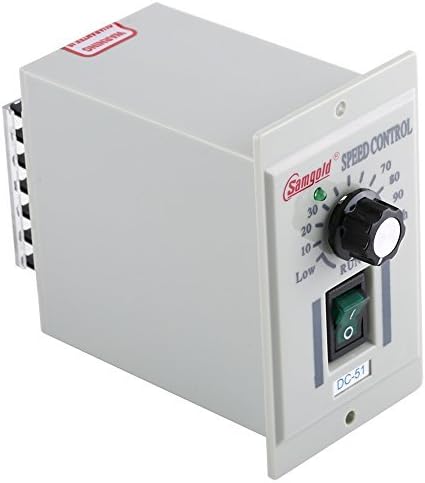
Figure 2.1: The Walfront DC Motor Speed Controller. This compact unit, visibly branded 'Samgold' and labeled 'DC-51' on its front panel, features a prominent rotary knob for precise speed adjustment and a green toggle switch for power control. Terminal blocks are located on the side for electrical connections.
Key Features:
- Compatible with 24V, 36V, and 90V DC motors.
- Constructed with high-quality electronic circuits and integrated components for enhanced durability.
- Compact design with high precision control.
- Offers a wide range of speed control.
- Characterized by low power consumption and a long operational lifespan.
- Enables feedback constant speed and stepless speed adjustment.
3. Setup
Before connecting the speed controller, ensure that the power source is disconnected. Incorrect wiring can damage the device or connected motor.
- Identify Terminals: Locate the input (AC 110V) and output (DC motor) terminals on the speed controller. Refer to the labeling on the device for correct identification.
- Connect Power Input: Connect the AC 110V power supply to the designated input terminals. Ensure a secure connection.
- Connect DC Motor: Connect your 24V, 36V, or 90V DC motor to the output terminals. Observe correct polarity if specified by your motor's manufacturer.
- Secure Connections: Double-check all wiring connections to ensure they are tight and properly insulated to prevent short circuits.
- Initial Position: Before applying power, set the speed control knob to the 'Low' or minimum position.
Note: No relevant official product videos demonstrating the setup for this specific analog DC motor speed controller were found.
4. Operating Instructions
Follow these steps to operate your DC Motor Speed Controller:
- Power On: After completing the setup, connect the power supply to the AC 110V input. Flip the green toggle switch to the 'ON' position. The motor should start rotating at its minimum speed, or remain off if the speed knob is at zero.
- Adjust Speed: Slowly rotate the speed control knob clockwise to increase the motor's speed. Rotate it counter-clockwise to decrease the speed. Adjust until the desired operational speed is achieved.
- Monitor Performance: Observe the motor's operation to ensure stable and consistent speed.
- Power Off: To stop the motor, first reduce the speed to the minimum setting using the knob, then flip the green toggle switch to the 'OFF' position. Disconnect the power supply when not in use for extended periods.
5. Maintenance
Regular maintenance ensures the longevity and optimal performance of your speed controller.
- Cleaning: Periodically clean the exterior of the controller with a soft, dry cloth. Avoid using abrasive cleaners or solvents. Ensure no dust or debris accumulates around the ventilation openings.
- Inspection: Regularly inspect all wiring connections for looseness or damage. Check the housing for any signs of physical damage.
- Environment: Operate and store the controller in a dry, well-ventilated area, away from direct sunlight, excessive heat, moisture, and corrosive substances.
- Professional Service: Do not attempt to open or repair the unit yourself. Refer all servicing to qualified personnel.
6. Troubleshooting
If you encounter issues with your speed controller, refer to the following common troubleshooting steps:
- No Power:
- Ensure the power cord is securely plugged into a working AC 110V outlet.
- Check the power switch on the controller is in the 'ON' position.
- Verify the power outlet is functional by testing with another device.
- Motor Not Running:
- Confirm all motor connections are correct and secure.
- Ensure the speed control knob is not set to the absolute minimum (zero) position.
- Check the motor itself for any faults or damage.
- Inconsistent Speed:
- Verify the motor's voltage and current requirements are within the controller's specifications.
- Ensure the load on the motor is not exceeding its capacity or causing excessive strain.
- Check for any loose connections that might cause intermittent power.
- Overheating:
- Ensure the controller is in a well-ventilated area and not covered.
- Reduce the motor load if it is consistently running at its maximum capacity.
If these steps do not resolve the issue, contact customer support for further assistance.
7. Specifications
| Feature | Specification |
|---|---|
| Brand | Walfront |
| Model Number | Walfront6ux4yndzg3 |
| Compatible Motor Types | 24V, 36V, 90V DC Motors |
| Input Voltage | AC 110V (Variable) |
| Product Size | 18.51 x 10 x 7 cm |
| Weight | 300 g |
| UPC | 654936393004 |
| Display Type | LCD or LED (as per product variant) |
| Country of Origin | China |
8. Warranty and Support
Walfront products are manufactured to high-quality standards. This product comes with a standard manufacturer's warranty against defects in materials and workmanship. Please retain your proof of purchase for warranty claims.
For technical support, troubleshooting assistance, or warranty inquiries, please contact Walfront customer service through your retailer or the official Walfront website. Provide your product model number and purchase date when contacting support.

