
1. Introduction
Thank you for choosing the KING K 6280 Spectra Timed Oil-Filled Radiator. This manual provides essential information for the safe and efficient operation, maintenance, and troubleshooting of your new appliance. Please read these instructions carefully before use and retain them for future reference.
2. Important Safety Instructions
When using electrical appliances, basic precautions should always be followed to reduce the risk of fire, electric shock, and injury to persons, including the following:
- Read all instructions before using this heater.
- This heater is hot when in use. To avoid burns, do not let bare skin touch hot surfaces. Use handles when moving this heater.
- Extreme caution is necessary when any heater is used by or near children or invalids and whenever the heater is left operating and unattended.
- Always unplug the heater when not in use.
- Do not operate any heater with a damaged cord or plug or after the heater malfunctions, has been dropped or damaged in any manner. Return heater to authorized service facility for examination, electrical or mechanical adjustment, or repair.
- Do not use outdoors.
- Do not run cord under carpeting. Do not cover cord with throw rugs, runners, or similar coverings. Arrange cord away from traffic area and where it will not be tripped over.
- To disconnect heater, turn controls to off, then remove plug from outlet.
- Do not insert or allow foreign objects to enter any ventilation or exhaust opening as this may cause an electric shock or fire, or damage the heater.
- To prevent a possible fire, do not block air intakes or exhaust in any manner. Do not use on soft surfaces, like a bed, where openings may become blocked.
- A heater has hot and arcing or sparking parts inside. Do not use it in areas where gasoline, paint, or flammable liquids are used or stored.
- Use this heater only as described in this manual. Any other use not recommended by the manufacturer may cause fire, electric shock, or injury to persons.
- Always plug heaters directly into a wall outlet/receptacle. Never use with an extension cord or relocatable power tap (outlet/power strip).
3. Package Contents
Please check the package contents upon unpacking. If any items are missing or damaged, contact your retailer.
- KING K 6280 Spectra Oil-Filled Radiator
- Wheel Assembly (4 wheels)
- User Manual
4. Product Overview
Familiarize yourself with the components of your KING K 6280 Spectra radiator.
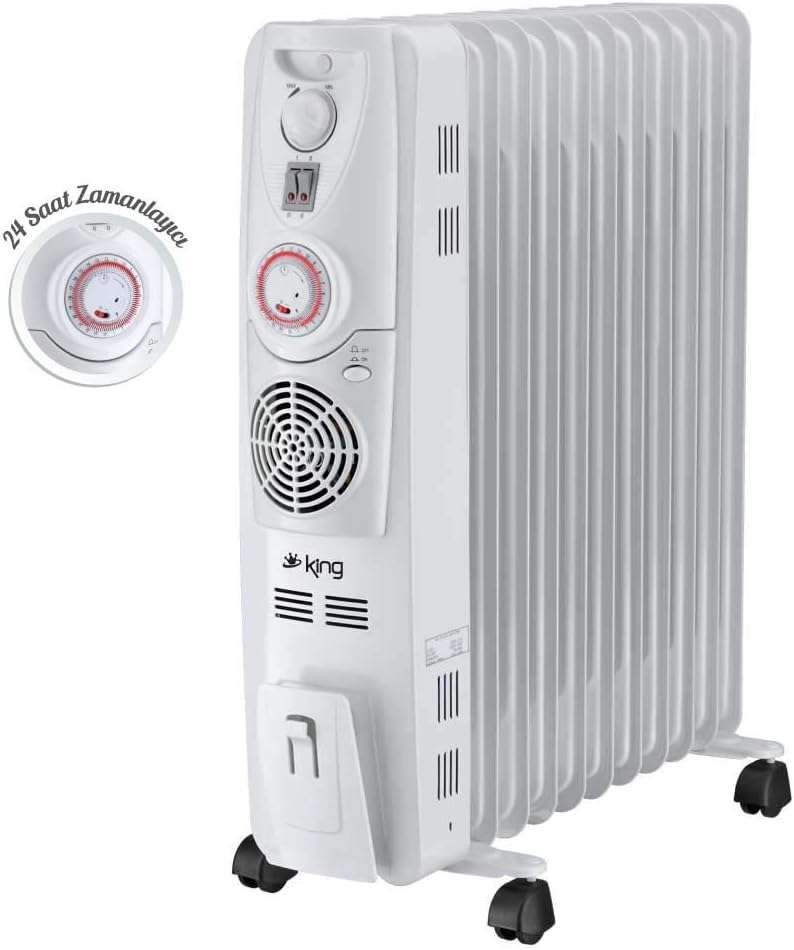
Image 1: The KING K 6280 Spectra oil-filled radiator, showcasing its main body, control panel, and a detailed view of the integrated 24-hour timer.

Image 2: A side perspective of the radiator, highlighting the control panel, heating fins, and the castor wheels for easy mobility.

Image 3: A direct front view of the radiator's control panel, showing the thermostat dial, power switches, 24-hour timer, and turbo fan grille.

Image 4: An aerial view of the radiator, illustrating the arrangement of its 11 heating fins and the integrated handle for convenient transport.
5. Setup
Before operating the radiator, follow these steps for proper setup:
- Unpack: Carefully remove the radiator from its packaging. Retain packaging for storage or in case of return.
- Attach Wheels: The radiator comes with 4 wheels for easy mobility. Turn the radiator upside down. Insert the wheel axles into the designated slots on the base of the radiator. Ensure they click securely into place.
- Positioning: Place the radiator on a firm, level surface. Ensure it is at least 90 cm (3 feet) away from walls, furniture, and curtains to allow for proper air circulation and prevent fire hazards. Do not place it directly under a power outlet.
- Power Connection: Ensure the radiator is switched off before plugging it into a grounded 220-240V AC power outlet. Do not use extension cords.
6. Operating Instructions
Your KING K 6280 Spectra radiator offers multiple heating options for optimal comfort.
6.1. Power On/Off
- Plug the radiator into a suitable power outlet.
- Use the main power switch(es) on the control panel to turn the unit on or off.
6.2. Heat Settings
The radiator features 3 different heat settings:
- Low Heat: Activates a portion of the heating elements for gentle warmth.
- Medium Heat: Activates more heating elements for increased warmth.
- High Heat (2500 Watt): Activates all heating elements for maximum warmth.
Select the desired heat setting using the power switches on the control panel. You can combine switches to achieve different power levels.
6.3. Thermostat Control
The adjustable thermostat allows you to maintain a desired room temperature.
- Turn the thermostat dial clockwise to increase the desired temperature or counter-clockwise to decrease it.
- The radiator will cycle on and off to maintain the set temperature.
6.4. 24-Hour Timer
The integrated 24-hour timer allows you to program the radiator to turn on and off automatically.
- Each segment on the timer dial represents 15 minutes.
- Push segments inwards for the periods you want the heater to be ON. Pull segments outwards for the periods you want the heater to be OFF.
- Rotate the dial to set the current time, aligning it with the arrow indicator.
- Ensure the timer bypass switch (if present) is set to the timer mode.
6.5. Turbo Fan Heater (400 Watt)
For rapid heating, activate the 400 Watt turbo fan heater.
- Locate the fan switch on the control panel.
- Switch it to the 'ON' position to engage the fan. The fan will distribute warm air more quickly.
- Switch it to the 'OFF' position when rapid heating is no longer required.
7. Maintenance and Cleaning
Regular maintenance ensures optimal performance and longevity of your radiator.
- Always unplug the radiator and allow it to cool completely before cleaning.
- Exterior Cleaning: Wipe the exterior surfaces with a soft, damp cloth. Do not use abrasive cleaners, solvents, or harsh chemicals, as these can damage the finish.
- Dust Removal: Use a vacuum cleaner with a brush attachment to remove dust from the fins and ventilation openings.
- Storage: If storing the radiator for an extended period, clean it thoroughly, cover it to protect from dust, and store it in a dry, cool place.
- No Internal Maintenance: The oil in the radiator is permanently sealed and never needs refilling. Do not attempt to open the radiator.
8. Troubleshooting
If you encounter issues with your radiator, refer to the following common problems and solutions:
| Problem | Possible Cause | Solution |
|---|---|---|
| Radiator does not turn on. | No power supply. Power switch is off. Thermostat set too low. Timer is off. | Check if the plug is securely in the outlet. Ensure the main power switch is ON. Increase the thermostat setting. Check timer settings; ensure it's not programmed to be off. |
| Radiator is not heating effectively. | Heat setting is too low. Thermostat set too low. Room is too large for the heater. | Select a higher heat setting. Increase the thermostat setting. Consider using additional heating or repositioning the radiator. |
| Radiator makes unusual noises. | Normal expansion/contraction sounds. Loose part (rare). | Minor clicking or crackling sounds are normal as the oil heats and cools. If noises are loud or persistent, discontinue use and contact customer support. |
| Turbo fan not working. | Fan switch is off. | Ensure the turbo fan switch is in the 'ON' position. |
If the problem persists after checking these points, please contact customer support.
9. Specifications
| Brand | KING |
| Model Number | K 6280 |
| Model Name | Spectra |
| Color | White |
| Power Output | 2500 Watt (Max) |
| Turbo Fan Heater | 400 Watt |
| Heating Elements | 11 Fins |
| Timer | 24-Hour Adjustable Timer |
| Heat Settings | 3 Different Heat Settings |
| Product Dimensions (L x W x H) | 52 x 13 x 65 cm |
| Weight | 14.92 Kilograms |
| Form Factor | 4 wheels, easy to move and park |
| Indoor/Outdoor Use | Indoor |
| Power Source | Corded Electric |
10. Warranty and Support
For warranty information and customer support, please refer to the warranty card included with your product or contact your local KING retailer. Keep your purchase receipt as proof of purchase.
For further assistance or inquiries, please visit the official KING website or contact their customer service department.

