
1. Introduction and Important Safety Information
This manual provides essential instructions for the safe and efficient operation, maintenance, and troubleshooting of your Dyson V7 Animal Cord-Free Bagless Handheld Stick HEPA Vacuum. Please read all instructions carefully before use and retain this manual for future reference.
Important Safety Warnings
- Always disconnect the appliance from the charger before cleaning or performing maintenance.
- Do not use with damaged cord or plug. If the appliance is not working as it should, has been dropped, damaged, left outdoors, or dropped into water, return it to a service center.
- Do not use to pick up water or other liquids.
- Do not pick up burning or smoking objects, such as cigarettes, matches, or hot ashes.
- Keep hair, loose clothing, fingers, and all parts of body away from openings and moving parts.
- Use only as described in this manual. Use only Dyson recommended attachments.
- Do not use without the clear bin and filters in place.
2. What's in the Box
Your Dyson V7 Animal vacuum comes with several components designed for various cleaning tasks. Please ensure all items are present.
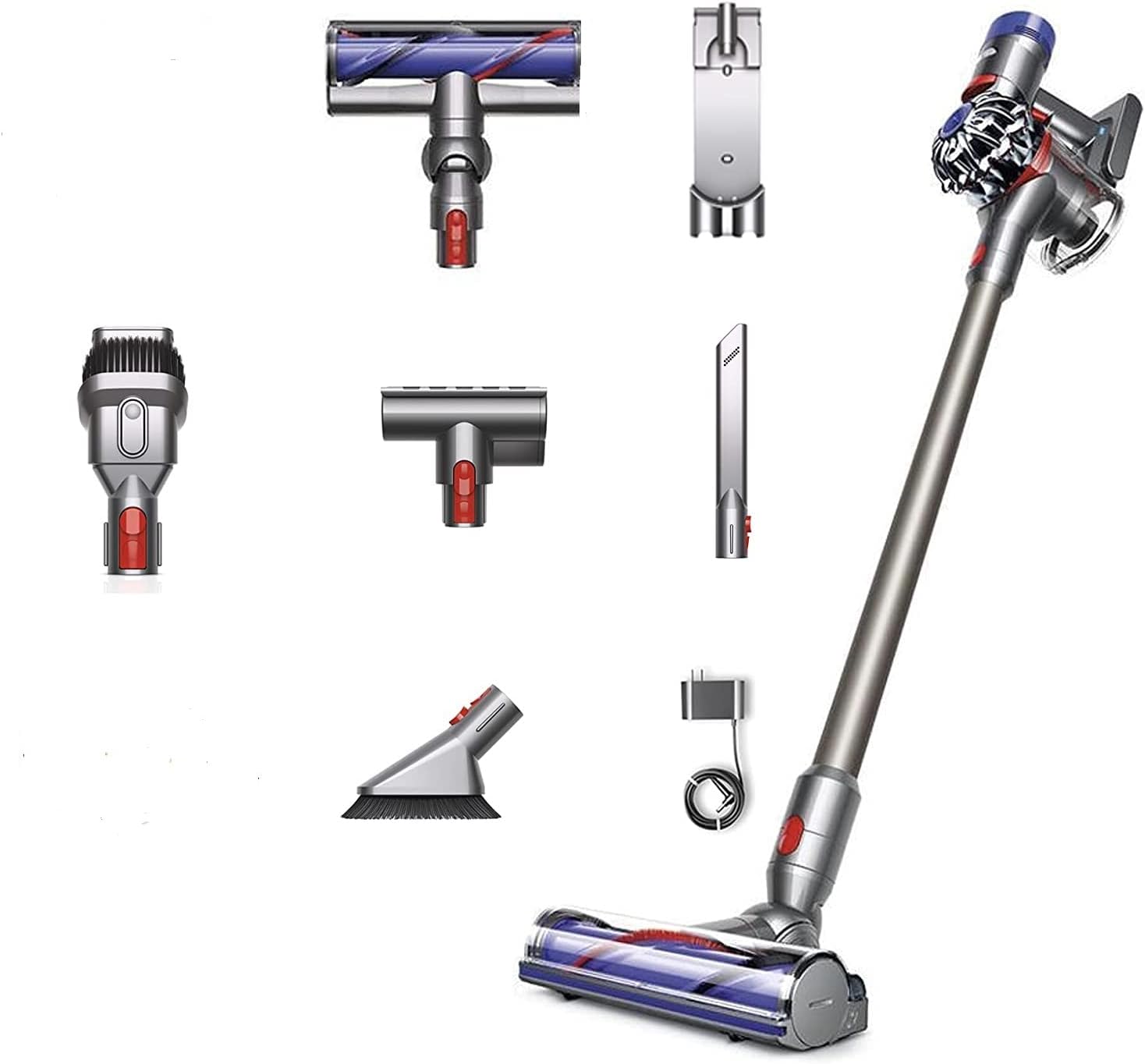
Image: The Dyson V7 Animal main unit, extension wand, charger, and various cleaning attachments including the Motorhead, Mini Motorized Tool, Combination Tool, and Crevice Tool.
Included Components:
- Dyson V7 Animal Main Unit (with motor and clear bin)
- Extension Wand
- Direct-drive cleaner head (Motorhead)
- Mini Motorized Tool
- Combination Tool (brush and wide nozzle)
- Crevice Tool
- Docking Station
- Charger
- HEPA Filter (pre-installed)
3. Assembly and Setup
Follow these steps to assemble your Dyson V7 Animal vacuum and prepare it for first use.
3.1 Assembling the Vacuum
- Attach the Wand: Align the extension wand with the main unit's intake and push until it clicks securely into place.
- Attach a Cleaner Head: Select your desired cleaner head (e.g., Direct-drive cleaner head) and align it with the end of the extension wand. Push until it clicks securely. For handheld use, attachments can be connected directly to the main unit.
3.2 Installing the Docking Station
The docking station allows for convenient storage and charging.
- Choose a suitable location near an electrical outlet.
- Secure the docking station to the wall using appropriate screws and anchors (not included). Ensure it is mounted at a height that allows the vacuum to hang freely.
- Connect the charger cable to the docking station.
4. Charging the Battery
Before first use, fully charge the vacuum's battery. The battery is a Lithium-Ion type.
- Connect the charger directly to the main unit or to the docking station if installed.
- Plug the charger into a wall outlet.
- The blue indicator light on the handle will illuminate during charging and turn off when fully charged.
- A full charge typically takes approximately 3.5 hours. The vacuum provides up to 30 minutes of fade-free suction in normal mode.
5. Operating Instructions
Learn how to effectively use your Dyson V7 Animal vacuum for various cleaning tasks.
5.1 Powering On/Off
- Press and hold the power trigger to start the vacuum. Release the trigger to turn it off.
5.2 Suction Modes
Your vacuum has two suction modes:
- Standard Mode: Provides up to 30 minutes of powerful, fade-free suction for everyday cleaning.
- MAX Mode: For more demanding tasks, slide the switch on the top of the main unit to 'MAX'. This provides increased suction for up to 7 minutes.
5.3 Using Attachments
Different attachments are designed for specific cleaning needs:
- Direct-drive cleaner head: Ideal for carpets and hard floors, driving bristles deep into carpet pile to remove ground-in dirt.
- Mini Motorized Tool: Removes pet hair and ground-in dirt from upholstery and confined spaces.
- Combination Tool: A wide nozzle and brush tool in one, for quick switching between cleaning and dusting tasks.
- Crevice Tool: Designed for precise cleaning around edges and narrow gaps.
6. Maintenance
Regular maintenance ensures optimal performance and extends the life of your Dyson V7 Animal vacuum.
6.1 Emptying the Clear Bin
Empty the bin as soon as the dirt reaches the MAX level mark. Do not overfill.
- Hold the vacuum over a trash can.
- Push the red lever down firmly until the bin base opens and the dirt empties.
- Close the bin base securely until it clicks into place.
6.2 Washing the Filter
Your vacuum has a washable HEPA filter. Wash the filter at least once a month, or more frequently if used heavily.
- Twist the filter counter-clockwise from the top of the main unit and lift it out.
- Wash the filter under cold running water until the water runs clear. Do not use detergents.
- Shake excess water from the filter and leave it to dry completely for at least 24 hours in a warm, dry place. Do not dry in a tumble dryer, microwave, or near a naked flame.
- Ensure the filter is completely dry before replacing it.
6.3 Clearing Blockages
If the vacuum loses suction, check for blockages.
- Turn off and disconnect the vacuum from the charger.
- Remove any attached tools or the wand.
- Inspect the main unit's intake, the wand, and the cleaner head for any obstructions.
- Clear any blockages carefully. Do not use sharp objects.
7. Troubleshooting
Refer to this section for solutions to common issues you might encounter.
| Problem | Possible Cause | Solution |
|---|---|---|
| Vacuum not turning on | Battery not charged; Trigger not held | Charge the battery fully; Ensure the trigger is held down during operation. |
| Loss of suction | Bin full; Filter dirty; Blockage | Empty the clear bin; Wash and dry the filter; Check for and clear blockages in the wand or cleaner head. |
| Battery not charging | Charger not connected properly; Faulty outlet | Ensure charger is securely plugged into both the vacuum and the wall outlet; Try a different outlet. |
| Cleaner head not spinning | Blockage in cleaner head; Brush bar jammed | Turn off and disconnect. Remove cleaner head and clear any hair or debris from the brush bar. |
8. Product Specifications
Key technical details for the Dyson V7 Animal Cord-Free Bagless Handheld Stick HEPA Vacuum.
- Brand: Dyson
- Model: V7 Animal
- Special Features: Bagless, HEPA filtration
- Filter Type: HEPA Filter
- Cordless: Yes
- Form Factor: Handheld / Stick
- Product Dimensions: 29"L x 10.5"W x 6"H
- Battery Type: Lithium-Ion
- Battery Life: Up to 30 minutes (standard mode)
- Noise Level: 78 dB
- Motor Horsepower: 0.47 horsepower
- Control Method: Touch (Push Button Trigger)
- Number of Speeds: 2 (Standard, MAX)
- Item Weight: 11.13 pounds
- Indoor/Outdoor Usage: Indoor
- UPC: 885609010809
9. Warranty and Support
Dyson products are engineered for performance and durability. For information regarding your product's warranty, please refer to the warranty card included with your purchase or visit the official Dyson website. For technical support, replacement parts, or service inquiries, please contact Dyson customer support directly.
Dyson Official Website: www.dyson.com


