
Wilo 4215517
Wilo YONOS PICO 25/1-8 (ROW) Circulator Pump User Manual
Model: 4215517
Introduction
This manual provides essential information for the safe and efficient operation, installation, and maintenance of your Wilo YONOS PICO 25/1-8 (ROW) circulator pump. Please read this manual thoroughly before installation and operation to ensure proper use and to prevent damage to the product or injury to persons.
The Wilo YONOS PICO 25/1-8 (ROW) is an energy-efficient circulator pump designed for heating and cooling systems.
Product Overview
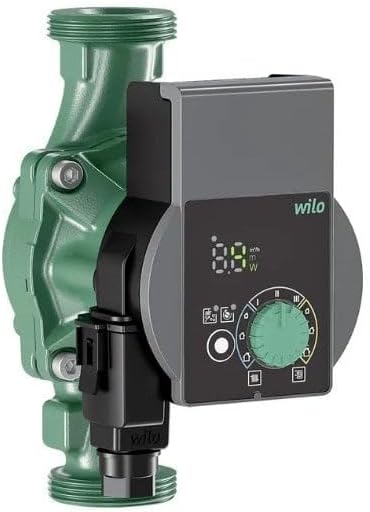
Image: The Wilo YONOS PICO 25/1-8 (ROW) circulator pump, featuring a green pump housing and a grey control unit with a digital display and a green rotary knob for settings adjustment.
The Wilo YONOS PICO 25/1-8 (ROW) is a high-efficiency pump designed for various applications in heating and cooling systems. Its compact design allows for easy integration into existing setups.
Key Features:
- Maximum ease of use: Intuitive controls for straightforward operation.
- Optimised energy efficiency: Achieved through EC engine technology, 0.1 m adjustment, and a power consumption display.
- Quick and easy installation: Designed for convenient setup and replacement.
- Easy maintenance and long running time: Built for durability and minimal upkeep.
- Highest operating safety: Ensures reliable performance through proven technology.
Safety Instructions
Always observe the following safety instructions to prevent personal injury and damage to the pump:
- Installation and maintenance must only be carried out by qualified personnel.
- Ensure the power supply is disconnected before any installation or maintenance work.
- Protect the pump from frost and extreme temperatures.
- Do not operate the pump dry.
- Refer to local regulations and standards for electrical connections.
Setup and Installation
Proper installation is crucial for the optimal performance and longevity of your Wilo YONOS PICO pump. Follow these steps carefully:
- Unpacking: Carefully remove the pump from its packaging. Inspect for any visible damage.
- Mounting Position: Install the pump in a horizontal position with the motor shaft horizontal. Ensure sufficient space for maintenance and ventilation.
- Pipe Connection: Connect the pump to the heating/cooling system pipes using appropriate fittings. Ensure all connections are watertight.
- Electrical Connection:
- Ensure the main power supply is off.
- Connect the pump to a 240V AC power source.
- Follow the wiring diagram provided with the pump or consult a qualified electrician.
- Ensure proper grounding.
- Filling and Venting: After installation, fill the system with water and vent the pump and system thoroughly to remove any trapped air. The pump may have an automatic venting function.
Operating Instructions
The Wilo YONOS PICO 25/1-8 (ROW) is designed for user-friendly operation. The control panel allows for easy adjustment of settings.
Control Panel Overview:
Image: Close-up of the control panel on the Wilo YONOS PICO pump, showing the digital display, a central green rotary knob, and various indicator lights and buttons for mode selection and power display.
- Digital Display: Shows current power consumption (W) and head (m).
- Rotary Knob: Used to select operating modes and adjust settings. Turn to navigate, press to confirm.
- Operating Modes: The pump offers various operating modes, typically including constant differential pressure (Δp-c), variable differential pressure (Δp-v), and constant speed. Refer to the symbols on the control panel for specific mode selection.
- Power Consumption Display: The display indicates the real-time power consumption of the pump, aiding in energy monitoring.
Starting the Pump:
- Ensure the system is filled and vented.
- Switch on the main power supply to the pump.
- The pump will typically start in a default mode. Use the rotary knob to select your desired operating mode and adjust the required head or speed.
Maintenance
Regular maintenance ensures the long-term reliability and efficiency of your Wilo YONOS PICO pump. Always disconnect power before performing any maintenance.
- Cleaning: Keep the pump and its surroundings clean. Avoid using abrasive cleaners.
- System Water Quality: Ensure the heating/cooling system water quality meets manufacturer specifications to prevent corrosion and deposits.
- Insulation: Check the insulation around the pump and pipes for any damage.
- Leak Checks: Periodically inspect all connections for leaks.
- Professional Inspection: It is recommended to have the pump and system inspected by a qualified technician annually.
Troubleshooting
This section provides solutions to common issues you might encounter with your Wilo YONOS PICO pump. For problems not listed here, contact qualified service personnel.
| Problem | Possible Cause | Solution |
|---|---|---|
| Pump does not start | No power supply; Air in pump; Motor blocked. | Check power connection and circuit breaker; Vent the pump and system; Contact service if motor is blocked. |
| Insufficient flow/heating | Air in system; Incorrect operating mode/setting; System pressure too low. | Vent the system; Adjust operating mode/setting; Check system pressure and refill if necessary. |
| Unusual noise/vibration | Air in pump/system; Cavitation; Loose mounting. | Vent the pump/system; Check system pressure; Secure mounting bolts. |
| Error code on display | Internal fault; Specific system issue. | Note the error code and consult the detailed troubleshooting guide (if available) or contact Wilo service. |
Specifications
Detailed technical specifications for the Wilo YONOS PICO 25/1-8 (ROW) circulator pump:
| Attribute | Value |
|---|---|
| Model Number | 4215517 |
| Brand | Wilo |
| Voltage | 240 Volts |
| Wattage | 1.8 watts |
| Maximum Pressure | 10 Bars |
| Product Dimensions (L x W x H) | 14.24 x 10.18 x 18 cm |
| Item Weight | 2 Kilograms |
| Colour | Green |
| Power Source Type | AC |
| Cooling Method | Liquid |
Warranty and Support
Wilo provides a warranty for its products. For specific warranty terms and conditions, please refer to the documentation provided with your purchase or visit the official Wilo website.
For technical support, spare parts, or service inquiries, please contact your local Wilo representative or authorized service partner. You can find contact information on the official Wilo website: www.wilo.com
When contacting support, please have your product model number (4215517) and serial number (if applicable) ready.
Related documents4215517


Ask a question about this manual
Ask about setup, troubleshooting, compatibility, parts, safety, or missing instructions. Manuals+ will review the question and use this page’s manual context to help answer it.