
Cloudray MYJG-150W
Cloudray MYJG-150W 220V CO2 Laser Power Supply Instruction Manual
Model: MYJG-150W | Brand: Cloudray
1. Introduction
This manual provides essential information for the safe and efficient installation, operation, and maintenance of your Cloudray MYJG-150W 220V CO2 Laser Power Supply. Please read this manual thoroughly before use and retain it for future reference. This power supply is designed for use with 130-150W CO2 laser tubes in laser engraving and cutting machines.
Safety Warnings
- High Voltage: This device operates with high voltage. Installation and maintenance should only be performed by qualified personnel.
- Laser Radiation: CO2 lasers produce invisible radiation. Always wear appropriate laser safety eyewear and ensure all safety interlocks are functional.
- Grounding: Ensure the power supply is properly grounded to prevent electrical shock.
- Water Cooling: Proper water cooling for the laser tube is critical. Ensure the water protection circuit is correctly connected and functioning before operating the laser.
2. Product Overview
The Cloudray MYJG-150W CO2 Laser Power Supply is engineered for stable and reliable performance, offering precise control and protection features for your laser system.
Key Features
- Versatile Compatibility: Compatible with 130-150W laser tubes from various manufacturers.
- Quick Response: Features fast response speed for efficient laser operation.
- Effortless Control: TTL level start and stop functionality for easy laser control.
- Safety Protections: Includes output open circuit protection, TTL signal indication, water through signal indication, and laser output indication.
- Manual Output Check: Convenient button for manually checking laser output.
- Real-time Monitoring: External ammeter with LCD screen for real-time current and status monitoring, with a trimmer potentiometer for precise adjustments.
Product Components

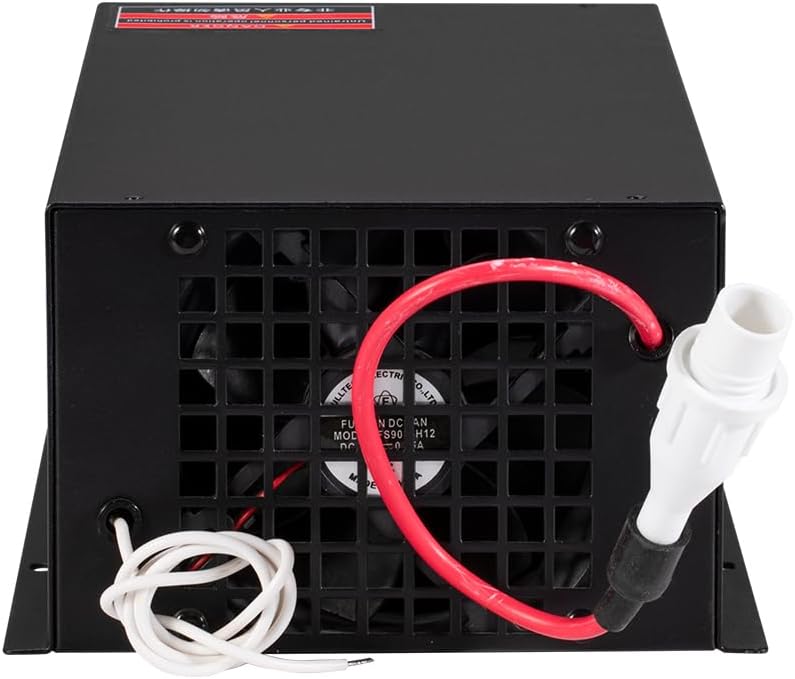


3. Specifications
The following table outlines the technical specifications for the Cloudray MYJG-150W CO2 Laser Power Supply:

| Category | Parameter | Value |
|---|---|---|
| Input | Input Voltage | AC230V / AC115V (This model is 220V) |
| AC Frequency | 47 ~ 440Hz | |
| Output | Max Output Voltage | 34KV |
| Max Output Current | 38mA | |
| General | Size (L x W x H) | 305 x 161 x 91 mm (14.96 x 7.87 x 5.91 inches) |
| Weight | 3.6 kg (9.13 pounds) | |
| Efficiency | 91% | |
| Performance | MTBF | ≥ 30000 hours |
| Response Speed | ≤ 1ms | |
| Voltage Range | High-Level | ≥ 3V |
| Low-Level | ≤ 0.7V | |
| Environment | Operating Temperature | -30° ~ +65°C |
| Cooling Method | Forced air cooling (fan cooling) |
4. Setup and Installation
Proper installation is crucial for the safe and optimal performance of your laser power supply. Always ensure the main power is disconnected before making any connections.
Wiring Connections
Refer to the wiring diagram below for correct connections. Ensure all connections are secure and insulated.

- AC Input: Connect the 220V AC power supply to the 'AC' terminals. Ensure proper grounding to the 'FG' terminal.
- High Voltage Output: Connect the 'LASER' terminal to the high voltage input of your CO2 laser tube. This connection carries extremely high voltage and must be handled with extreme caution and proper insulation.
- Control Signals: Connect the control signals (H, L, P, G, IN 5V, P) to your laser controller board.
- Water Protection: Connect the water protection sensor to the designated terminals to ensure the laser tube is adequately cooled during operation.
- Laser Signal Input: Connect the laser signal input as per your system requirements.
Physical Installation
Mount the power supply in a well-ventilated area, ensuring adequate clearance around the cooling fan. The dimensions are 305 x 161 x 91 mm. Secure the unit using appropriate fasteners.

5. Operating Instructions
Follow these steps for safe operation of your Cloudray MYJG-150W power supply:
- Pre-Operation Check: Before powering on, verify all wiring connections are correct and secure. Ensure the laser tube is properly installed and the water cooling system is operational and circulating water.
- Power On: Connect the main power. The external ammeter (if connected) should display the current status.
- Water Protection Check: Confirm the water protection signal is active (e.g., 'Water protection: ON' on the ammeter display). The laser will not fire if water protection is not engaged.
- Laser Output Test: Use the 'TEST' button on the power supply to briefly fire the laser and confirm output. Observe the ammeter for current readings.
- Normal Operation: Control the laser output via your laser controller board using TTL signals. Monitor the current output on the external ammeter during operation.
Ammeter Display and Adjustment
The external ammeter provides real-time feedback on the laser's operating current and status indicators. Use the trimmer potentiometer on the ammeter to fine-tune the current output as needed for your application.

Product Video Overview
Video 5.1: An overview of the Cloudray CO2 Laser Power Supply MYJG-150W 220V, demonstrating its features and appearance.
6. Maintenance
Regular maintenance ensures the longevity and consistent performance of your power supply.
- Cleaning: Periodically clean the exterior of the power supply, especially the cooling fan and ventilation grilles, to prevent dust buildup and ensure proper airflow. Disconnect power before cleaning.
- Connections: Regularly inspect all wiring connections for tightness and signs of wear or corrosion.
- Environment: Ensure the operating environment is within the specified temperature and humidity ranges to prevent damage.
7. Troubleshooting
If you encounter issues with your power supply, refer to the following common troubleshooting steps:
- No Power: Check the main power connection, circuit breaker, and ensure the power supply's indicator light is on.
- No Laser Output:
- Verify the water cooling system is running and the water protection signal is active.
- Check the laser tube connections and ensure the tube is not damaged.
- Confirm control signals from the laser controller are correctly sent to the power supply.
- Use the 'TEST' button on the power supply to isolate if the issue is with the power supply or the controller/laser tube.
- Unstable Output Current: Check for loose connections, ensure stable input voltage, and verify the laser tube is not nearing its end of life.
- Overheating: Ensure the cooling fan is operating correctly and ventilation is unobstructed. Reduce ambient temperature if necessary.
For persistent issues, contact Cloudray customer support for assistance.
8. Warranty and Support
Cloudray products are designed for quality and reliability. For warranty information, technical support, or service inquiries, please refer to the official Cloudray website or contact their customer service department. Ensure you have your product model and purchase details available when contacting support.
Related documentsMYJG-150W


Ask a question about this manual
Ask about setup, troubleshooting, compatibility, parts, safety, or missing instructions. Manuals+ will review the question and use this page’s manual context to help answer it.