
Elitech ECS-02CX
Elitech ECS-02CX Digital Temperature Controller User Manual
Model: ECS-02CX
1. Introduction
The Elitech ECS-02CX is a versatile digital temperature controller designed for precise temperature management in various applications, including refrigeration, coolrooms, and heating equipment. Featuring a clear red/blue LED display and intuitive controls, it offers reliable performance for maintaining desired temperature ranges. This manual provides essential information for the safe and effective installation, operation, and maintenance of your ECS-02CX controller.
2. Safety Information
Please read all safety warnings and instructions carefully before installing or operating the device. Failure to do so may result in electric shock, fire, or damage to the product.
- Ensure the power supply is disconnected before any wiring or maintenance.
- Installation and wiring should only be performed by qualified personnel.
- Do not expose the device to water or excessive humidity.
- Verify all connections are secure and correct before applying power.
- The compressor relay is rated for up to 30A, capable of directly driving a 1.5HP single-phase compressor. Ensure connected loads do not exceed this rating.
3. Product Overview
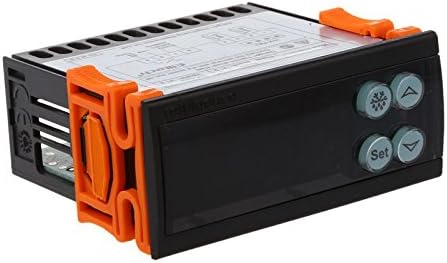
The Elitech ECS-02CX features a compact design with a clear digital display and user-friendly buttons for easy parameter setting. It includes dual-way sensor inputs for both cabinet temperature and defrost sensing.

4. Installation
Proper installation is crucial for the correct functioning and longevity of the ECS-02CX controller. Follow these steps carefully.
4.1 Mounting
The controller is designed for panel mounting. Ensure adequate space for ventilation and wiring connections. Secure the controller using the provided mounting clips.
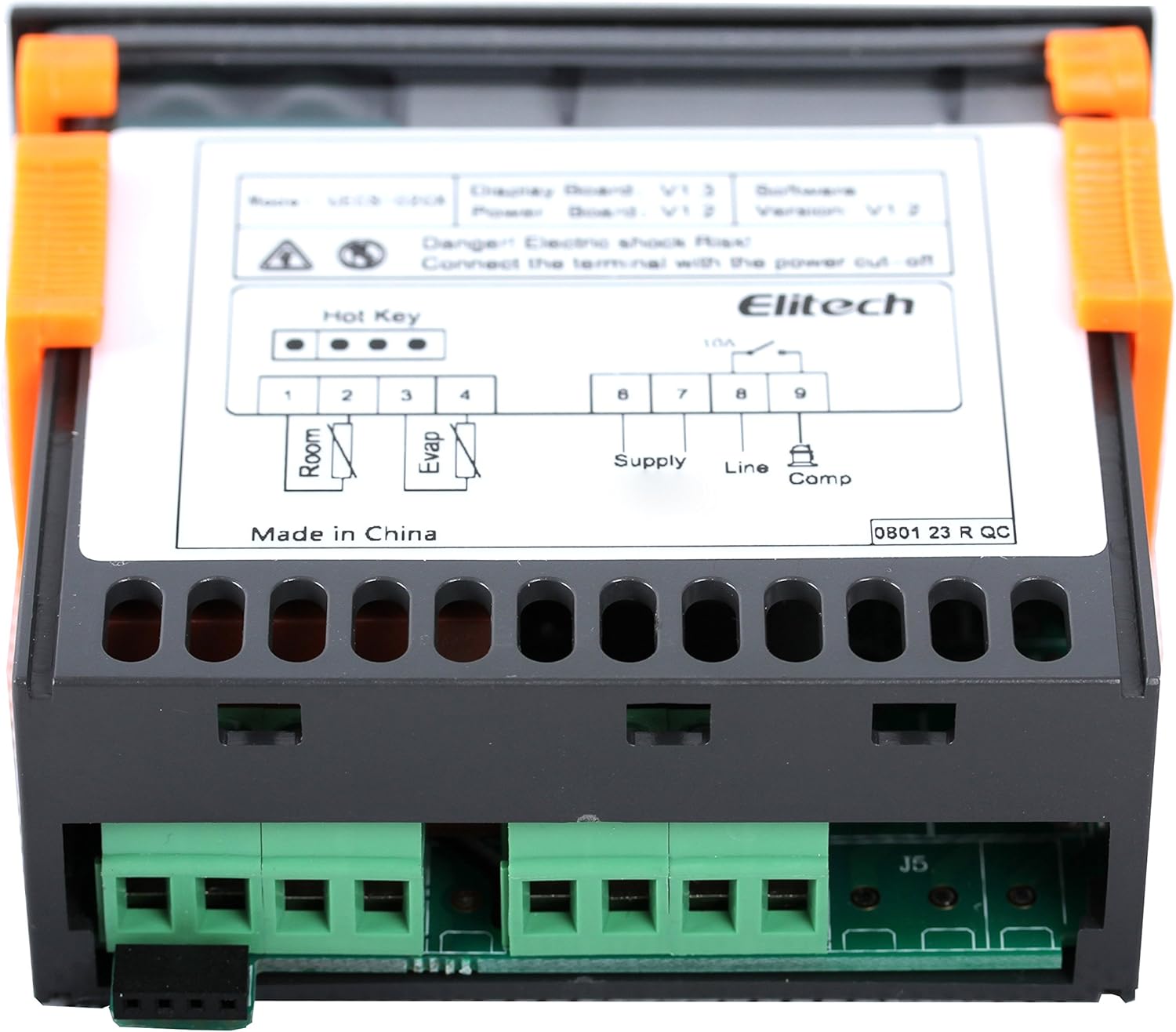
4.2 Wiring Diagram
Refer to the wiring diagrams below for correct electrical connections. Ensure all wires are properly insulated and secured.

Terminal Connections:
- Terminals 1 & 2: Room Temperature Sensor input.
- Terminals 3 & 4: Evaporator (Defrost) Sensor input.
- Terminals 6 & 7: Power Supply (220VAC, 50/60Hz).
- Terminal 8: Line input for compressor relay.
- Terminal 9: Compressor output.
5. Operation
The ECS-02CX features a user-friendly interface for setting and monitoring temperature parameters.
5.1 Display
The controller features a red/blue LED display that shows the current temperature and various parameter settings. The display area is designed for clear and intuitive readability.
5.2 Basic Settings
To access and modify parameters, typically press and hold the 'Set' button. Use the Up and Down arrow buttons to navigate through parameters and adjust values. Press 'Set' again to confirm and save changes.
Specific parameter codes and their functions are detailed in the full product manual provided by Elitech. Common parameters include setpoint temperature, differential, defrost cycle settings, and sensor calibration.
6. Maintenance
Regular maintenance ensures optimal performance and extends the lifespan of your ECS-02CX controller.
- Cleaning: Wipe the display and casing with a soft, dry cloth. Do not use abrasive cleaners or solvents.
- Connections: Periodically check all wiring connections to ensure they are secure and free from corrosion.
- Sensors: Ensure temperature sensors are clean and properly positioned for accurate readings.
- Ventilation: Ensure the controller has adequate ventilation to prevent overheating.
7. Troubleshooting
If you encounter issues with your ECS-02CX controller, refer to the following common problems and solutions.
| Problem | Possible Cause | Solution |
|---|---|---|
| Display is blank | No power, incorrect wiring, or internal fault. | Check power supply and wiring connections. If problem persists, contact support. |
| Temperature reading is inaccurate | Sensor fault, incorrect sensor placement, or calibration issue. | Check sensor connections and placement. Refer to the full manual for sensor calibration. Replace sensor if damaged. |
| Compressor not turning on/off | Incorrect setpoint/differential, wiring error, or relay fault. | Verify setpoint and differential settings. Check compressor wiring. Ensure load does not exceed relay capacity. |
| Error code displayed | Specific system fault. | Refer to the Elitech ECS-02CX full user manual for a list of error codes and their corresponding solutions. |
If you cannot resolve the issue using the information above, please contact Elitech customer support.
8. Specifications
Detailed technical specifications for the Elitech ECS-02CX Digital Temperature Controller.
| Feature | Specification |
|---|---|
| Model | ECS-02CX |
| Manufacturer | Elitech |
| Style | Digital |
| Display Type | Digital (Red/Blue LED) |
| Sensor Inputs | Dual-way (Cabinet Temperature, Defrost) |
| Compressor Relay | 30A (capable of driving 1.5HP single-phase compressor) |
| Typical Usage | Refrigerators, Coolrooms, Freezers, Heating Equipment |
| Item Weight | 500 Grams (0.5 Kilograms) |
| First Available Date | 23 March 2018 |
9. Warranty and Support
For warranty information and technical support, please refer to the official Elitech website or contact Elitech customer service directly. Keep your purchase receipt as proof of purchase for warranty claims.
Elitech Contact Information: Please visit the official Elitech website for the most up-to-date contact details and support resources.
Related documentsECS-02CX


Ask a question about this manual
Ask about setup, troubleshooting, compatibility, parts, safety, or missing instructions. Manuals+ will review the question and use this page’s manual context to help answer it.