
DJI CP.BX.00000028.01
DJI Zenmuse X7 Camera and 3-Axis Gimbal User Manual
Model: CP.BX.00000028.01
Brand: DJI
Product Overview
The DJI Zenmuse X7 is a compact Super 35 camera with an integrated 3-axis gimbal, engineered for high-end filmmaking. It delivers exceptional resolution and image quality, making it ideal for professional aerial cinematography when paired with the Inspire 2 drone.
Key features include a 24MP CMOS sensor with 14 stops of dynamic range, supporting 6K CinemaDNG and 5.2K Apple ProRes video formats. It also offers continuous RAW burst shooting at 20 fps for 24 MP stills. The Zenmuse X7 utilizes the DL-Mount, the world's first integrated aerial lens mount, allowing for quick interchangeability between compatible prime lenses.
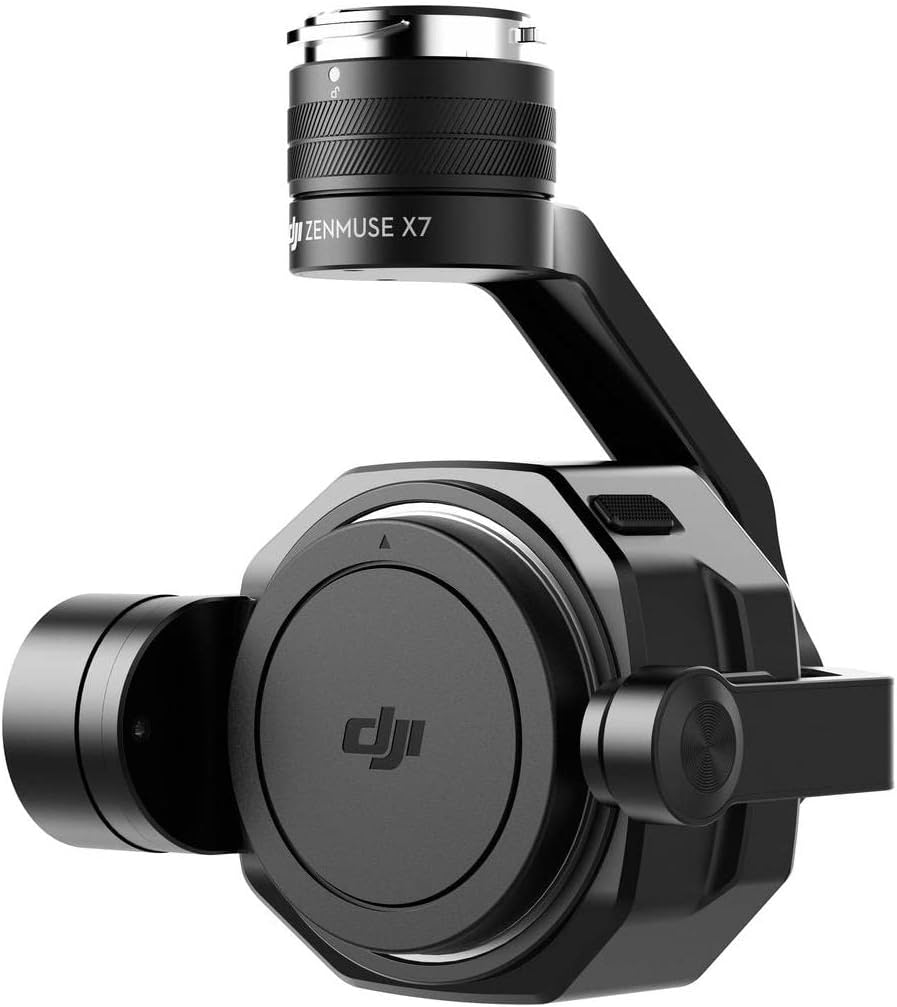
Figure 1: DJI Zenmuse X7 Camera and 3-Axis Gimbal assembled.
Setup
This section outlines the basic steps for setting up your Zenmuse X7 Camera and 3-Axis Gimbal. Ensure all components are handled with care.
1. Attaching the Lens
The Zenmuse X7 features a DL-Mount for quick lens changes. Align the red dot on the lens with the red dot on the camera body, then gently insert the lens and rotate clockwise until it locks into place. Ensure the lens is securely fastened before operation.

Figure 2: Exploded view illustrating the DL-Mount lens attachment mechanism.
2. Mounting the Gimbal and Camera to the Drone
The Zenmuse X7 is designed for seamless integration with compatible DJI drones, such as the Inspire 2. Carefully align the gimbal's mounting interface with the drone's gimbal port. Push firmly until you hear a click, indicating it is locked. Always verify the gimbal is securely attached before flight.

Figure 3: Front view of the Zenmuse X7 camera with a DL-Mount lens attached.
3. Inserting Storage Media
Insert a compatible Micro SD card into the designated slot on the camera. Ensure the card is inserted correctly and fully seated to prevent data loss during recording.
Operating Instructions
The Zenmuse X7 offers advanced capabilities for professional cinematography. Familiarize yourself with its features for optimal performance.
Video Recording
The camera supports high-resolution video recording formats:
- 6K CinemaDNG: 6016x3200 at various frame rates (23.976/24/25/29.97/30p), 12-bit, full FOV.
- 5.2K Apple ProRes: 4096x2160 (4K) at various frame rates (23.976/24/25/29.97/30p), 10-bit, HQ, full FOV.
- Additional formats include C4K (4096x2160) in CinemaDNG, ProRes, H.264, and H.265, as well as 2K (2048x1080) ProRes.
To achieve the highest quality raw footage, consider enabling the Apple ProRes license on your compatible drone.
Still Photography
Capture stunning 24MP still images. The camera supports continuous RAW burst shooting at 20 frames per second, ideal for capturing fast-moving subjects or creating time-lapses.
Dynamic Range
With 14 stops of dynamic range, the Zenmuse X7 preserves astonishing detail in both highlights and shadows, providing greater flexibility in post-production.
Maintenance
Proper maintenance ensures the longevity and optimal performance of your Zenmuse X7.
- Lens Cleaning: Use a soft, lint-free cloth and specialized lens cleaning solution to gently clean the lens surface. Avoid abrasive materials that could scratch the lens.
- Gimbal Care: Keep the gimbal free from dust and debris. Avoid applying excessive force to the gimbal motors or joints. If the gimbal experiences unusual movement or vibration, refer to the troubleshooting section.
- Storage: When not in use, store the camera and gimbal in a dry, cool environment, preferably in its original packaging or a protective case, to prevent damage from moisture or impact.
- Firmware Updates: Regularly check the official DJI website for firmware updates for both the Zenmuse X7 and your compatible drone. Keeping firmware up-to-date ensures optimal performance and access to new features.
Troubleshooting
This section addresses common issues you might encounter with your Zenmuse X7.
Gimbal Vibration or Unstable Footage
If you experience gimbal vibration or unstable footage, consider the following:
- Check Gimbal Balance: Ensure the camera and lens are properly balanced on the gimbal. Refer to your drone's manual for specific balancing procedures.
- Inspect for Damage: Carefully inspect the gimbal arms and motors for any visible damage or obstructions.
- Firmware: Verify that both the camera and drone firmware are updated to the latest versions.
- Recalibrate Gimbal: Perform a gimbal calibration through the DJI app. This can often resolve minor stability issues.
- Environmental Factors: Strong winds or extreme temperatures can affect gimbal performance. Operate within recommended environmental conditions.
Camera Not Recognized by Drone
If the drone does not recognize the Zenmuse X7:
- Re-attach Gimbal: Detach and re-attach the gimbal, ensuring it is securely locked into place.
- Check Connections: Inspect the electrical contacts on both the gimbal and the drone for any dirt or damage.
- Restart Devices: Power off both the drone and the remote controller, then restart them.
- Firmware Compatibility: Ensure that the firmware versions of the camera and drone are compatible. Update if necessary.
Specifications
| Feature | Detail |
|---|---|
| Model Number | CP.BX.00000028.01 |
| Sensor Size (Still) | 0.9 x 0.6" (23.5 x 15.7 mm) |
| Sensor Size (Video) | 0.9 x 0.5" (23.5 x 12.5 mm) max recording area |
| Lens Mount | DL-Mount |
| Photo Resolution | 24 Megapixels |
| Video Capture Resolution | Up to 6K (6016x3200) |
| Video Formats | CinemaDNG, Apple ProRes, H.264, H.265 |
| Dynamic Range | 14 Stops |
| Maximum Aperture | 2.8 Millimeters (for compatible lenses) |
| Flash Memory Type | Micro SD |
| Connectivity Technology | Bluetooth |
| Color | Black |
| Item Weight | 2.5 pounds |
| Product Dimensions | 2 x 6 x 4 inches |
Warranty and Support
DJI provides comprehensive support for its products. For detailed warranty information, please refer to the official DJI website or the warranty card included with your product.
Return Policy
This product is typically eligible for a 30-day return policy from the date of purchase. Please check with your retailer for specific return conditions and procedures.
Protection Plans
Extended protection plans may be available for purchase to cover your DJI Zenmuse X7. These plans offer additional coverage beyond the standard manufacturer's warranty. Options may include:
- 2-Year Protection Plan
- 3-Year Protection Plan
- Complete Protect (monthly subscription covering multiple eligible purchases)
For details on coverage, pricing, and terms, please consult the respective protection plan providers or your point of purchase.
Contact Support
For technical assistance, troubleshooting, or service requests, please visit the official DJI Support website or contact their customer service hotline. Keep your product model number (CP.BX.00000028.01) and purchase information readily available when contacting support.
Related documentsCP.BX.00000028.01


Ask a question about this manual
Ask about setup, troubleshooting, compatibility, parts, safety, or missing instructions. Manuals+ will review the question and use this page’s manual context to help answer it.