1. Introduction
This manual provides instructions for the installation, configuration, and operation of the Ubiquiti EdgeRouter 6P (ER-6P). The ER-6P is a high-performance router designed for advanced routing applications, offering robust features for network management and security. It is suitable for various networking environments requiring reliable and efficient data routing.
2. Package Contents
Verify that the following items are included in your package:
- Ubiquiti EdgeRouter 6P (ER-6P)
- External AC/DC Power Adapter, 60W (24V, 2.5A)

3. Product Overview
The EdgeRouter 6P features a compact, durable metal case and offers a range of ports for flexible network connectivity.
3.1 Front Panel

- (5) Gigabit RJ45 Routing Ports (eth0-eth4): These ports support 10/100/1000 Mbps Ethernet connections. Ports eth0-eth4 also support 24V Passive PoE output.
- (1) Gigabit SFP Port (eth5): This port supports 1 Gbps fiber connectivity for high-speed uplinks.
- Console Port: An RJ45 serial console port for command-line interface access.
- USB Port: A USB 3.0 port for future use or external storage.
- LED Indicators:
- Power LED: Indicates power status.
- PoE LEDs: Indicate 24V PoE status for each port (On/Off).
- Link/Activity/Speed LEDs: Indicate connection status and speed for each Ethernet port.

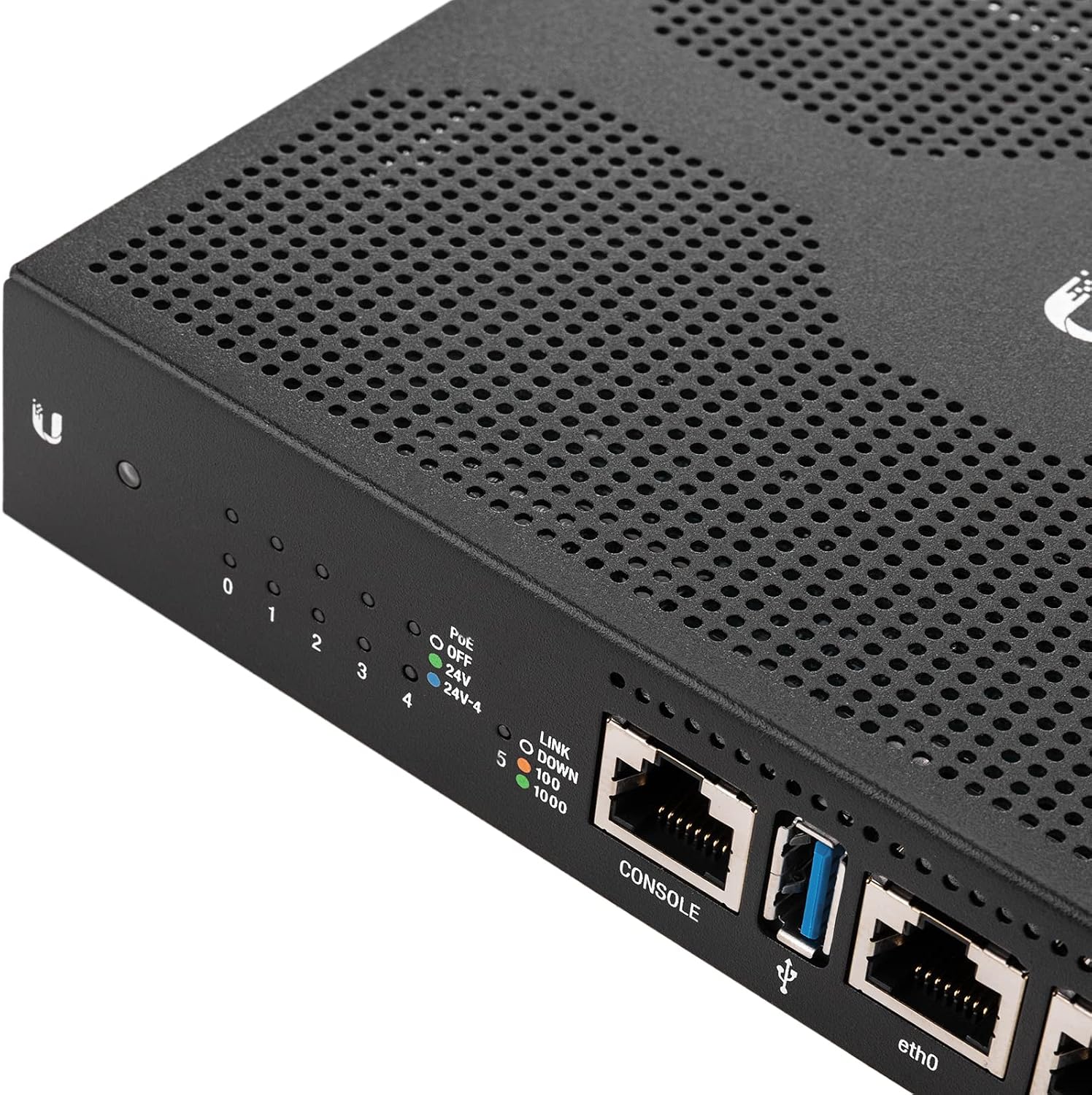

3.2 Rear Panel
- Power Input: Connect the included 24V, 2.5A power adapter here.
- Reset Button: Used to restore factory default settings.

4. Setup
4.1 Hardware Installation
- Connect Power: Connect the included 24V, 2.5A power adapter to the power input port on the router and then plug the adapter into a power outlet. The Power LED on the front panel will illuminate.
- Connect Network Cables:
- Connect your Internet source (e.g., modem) to one of the RJ45 ports (e.g., eth0).
- Connect your local network devices (e.g., computer, switch) to the other RJ45 ports.
4.2 Initial Configuration Access
To access the EdgeRouter's web interface for initial configuration:
- Ensure your computer is connected to one of the EdgeRouter's LAN ports.
- Configure your computer's Ethernet adapter to obtain an IP address automatically (DHCP).
- Open a web browser and navigate to the default IP address: 192.168.1.1.
- Log in using the default credentials:
- Username: ubnt
- Password: ubnt
- Follow the on-screen setup wizard to configure basic network settings, including changing default credentials for security.
5. Operating Instructions
The EdgeRouter 6P runs on EdgeOS, a sophisticated operating system that provides extensive control over network functions.
5.1 Network Configuration
- DHCP Server: Configure multiple DHCP servers to assign IP ranges across different subnets and interfaces. This allows for dynamic and static IP addressing control.
- Interfaces: Each port functions as an independent interface. Virtual Local Area Network (VLAN) interfaces can be configured for network segmentation.
5.2 Routing
Configure static routes and dynamic routing protocols to manage traffic flow efficiently within your network and to the Internet.
5.3 PoE Functionality
The RJ45 ports on the EdgeRouter 6P support 24V Passive PoE. This feature allows you to power compatible Ubiquiti airMAX products directly from the router, simplifying deployments by reducing the need for separate power injectors.
5.4 Security Features
- Firewall Policies: Define and organize rules to control network traffic based on your specific security requirements.
- Firewall Groups: Apply policies to groups filtered by IP address, network address, or port number for granular control.
- NAT Rules: Configure Network Address Translation (NAT) rules to modify packet addressing for source and destination traffic.
5.5 Monitoring Tools
The EdgeOS interface provides various tools to monitor network activity and devices, including Ping, Trace, Discover, Packet Capture, and Log Monitor. These tools assist in diagnosing network issues and understanding traffic patterns.
6. Maintenance
6.1 Firmware Updates
Regularly check for and install the latest firmware updates from the Ubiquiti website. Firmware updates often include performance improvements, new features, and security patches. Refer to the official Ubiquiti documentation for detailed instructions on performing firmware upgrades.
6.2 Factory Reset
To restore the EdgeRouter 6P to its factory default settings:
- Ensure the router is powered on.
- Use a paperclip or similar pointed object to press and hold the Reset button located on the rear panel for approximately 10 seconds.
- Release the button when the LEDs begin to flash. The router will reboot with factory default settings.
7. Troubleshooting
- No Power: Ensure the power adapter is securely connected to both the router and a working power outlet. Verify the power LED is illuminated.
- No Network Connectivity:
- Check all Ethernet cable connections.
- Verify that the Link/Activity LEDs on the connected ports are active.
- Confirm your computer's IP settings are correct (DHCP or static as configured).
- If unable to access the web interface, try a factory reset and reconfigure.
- Slow Performance:
- Ensure the latest firmware is installed.
- Check for network congestion or misconfigurations.
- Utilize the monitoring tools in EdgeOS to identify bottlenecks.
For more detailed troubleshooting, refer to the official Ubiquiti support documentation and community forums.
8. Specifications
| Model Name | EdgeRouter 6P |
| Item Model Number | ER-6P |
| Brand | Ubiquiti Networks |
| Connectivity Technology | Ethernet |
| Number of RJ45 Ports | 5 (Gigabit, with 24V PoE support) |
| Number of SFP Ports | 1 (Gigabit) |
| Throughput (64-byte packets) | 3.4 million packets per second |
| Throughput (256 bytes or larger) | 6 Gbps |
| PoE Support | 24V Passive PoE on RJ45 ports |
| Operating System | UBNT System (EdgeOS) |
| Processor | 4 Cores |
| Item Weight | 1.61 pounds (0.73 kg) |
| Product Dimensions (LxWxH) | 5.4 x 9 x 1.2 inches (13.7 x 22.9 x 3.0 cm) |
| Voltage | 24 Volts |
| Special Feature | Rack-mountable, Wall Mountable (with optional kit) |
| Included Components | ER-6P Router, External AC/DC Power Adapter |
9. Warranty and Support
For warranty information, technical support, and additional resources, please visit the official Ubiquiti Networks website. The website provides access to documentation, software downloads, and community forums where users can find assistance and share knowledge.


