
1. Introduction
The Wolf Guard W4Q Smart Alarm System is a comprehensive home security solution designed to provide robust protection for your property. This system integrates 4G and WiFi connectivity, allowing for remote control via a dedicated Android application and real-time alerts. It features an LCD screen for easy operation and includes a variety of sensors to detect intrusions and suspicious activity.
This manual provides detailed instructions for setting up, operating, and maintaining your Wolf Guard W4Q alarm system, ensuring optimal performance and security for your home or office.

Image: The Wolf Guard W4Q Smart Alarm System, highlighting its WiFi and 4G connectivity for intelligent home security.
2. Package Contents
Please verify that all items listed below are included in your package. If any components are missing or damaged, please contact customer support.
- 1 x W4Q Alarm Host (SIM card not included)
- 4 x HW-03D PIR Detectors
- 2 x YK-11 Remote Controls
- 4 x MC-03B Door/Window Sensors
- 1 x JD-05 Siren
- 2 x RFID Cards
- 1 x Power Adapter
- 1 x Bracket
- 1 x Screw Set
- 1 x User Manual

Image: A complete view of all components included in the Wolf Guard W4Q Smart Alarm System kit, including the main panel, sensors, remotes, siren, and RFID tags.
3. Product Overview
The Wolf Guard W4Q system consists of a central alarm host and various peripheral sensors and control devices.
3.1. W4Q Alarm Host
The W4Q alarm host is the central control unit of your security system. It features an LCD screen for displaying status and settings, a numeric keypad for input, and touch-sensitive buttons for various functions. It supports both 4G cellular and WiFi connectivity for reliable communication.
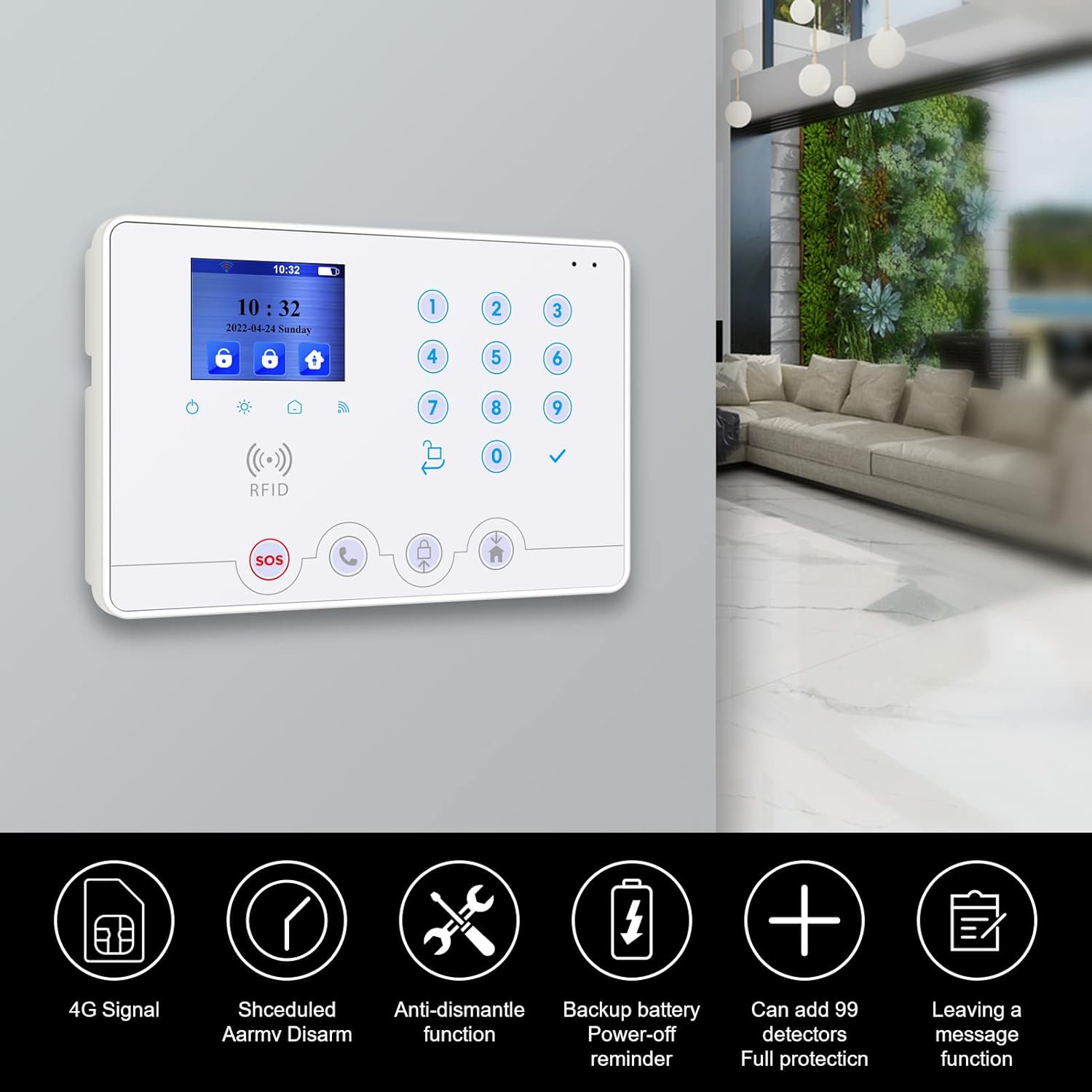
Image: The W4Q alarm host mounted on a wall, showcasing its LCD display, keypad, and various functional icons, along with key features like 4G signal, scheduled arm/disarm, anti-dismantle, backup battery, and expandability.
3.2. HW-03D PIR Detectors
These passive infrared (PIR) motion detectors are designed to detect movement within their detection zone. They are crucial for identifying suspicious activity in rooms. The HW-03D uses a low-noise infrared sensor for accurate detection.

Image: A diagram illustrating the detection pattern of the HW-03D PIR detector, showing how it senses human infrared rays for accurate motion detection in a room.
3.3. MC-03B Door/Window Sensors
The MC-03B sensors consist of two parts: a main unit and a magnetic strip. When installed on doors or windows, they detect unauthorized opening by sensing the separation of the two parts. This triggers an alarm if the system is armed.

Image: The two components of the MC-03B door/window sensor, showing the main unit and the magnetic strip, designed to detect forced entry.
3.4. YK-11 Remote Controls
The YK-11 remote controls provide convenient one-touch arming and disarming of the system, as well as an SOS panic button for emergencies.

Image: A hand holding the YK-11 remote control, displaying its arm, disarm, and SOS buttons for convenient system management.
3.5. RFID Cards
RFID cards offer a simple and quick way to arm or disarm the system by tapping them against the alarm host. This is particularly convenient for family members who may not use the app or remote control.

Image: An RFID card being tapped against the W4Q alarm host, demonstrating the ease of arming or disarming the system with a simple touch.
4. Setup
Follow these steps to set up your Wolf Guard W4Q Smart Alarm System.
4.1. Powering the Alarm Host
- Connect the provided power adapter to the W4Q alarm host and plug it into a standard wall outlet.
- The built-in battery will automatically begin charging. This battery provides backup power in case of a power outage.
4.2. SIM Card Installation (Optional)
For 4G cellular communication and SMS alerts, install a compatible SIM card (not included) into the designated slot on the alarm host. Ensure the SIM card is activated and has sufficient credit/data plan.
4.3. Sensor Placement and Installation
Proper placement of sensors is crucial for effective security.
4.3.1. HW-03D PIR Detectors
- Install PIR detectors in areas where intruders are likely to pass, such as hallways, living rooms, or near entry points.
- Mount them at a height of approximately 2.2-2.4 meters (7-8 feet) for optimal detection range (up to 12m detection distance, 110° horizontal angle).
- Avoid placing them directly facing windows, heat sources, or in direct sunlight, as this can cause false alarms.
- Ensure the included 1.5V AAA batteries are correctly inserted.
4.3.2. MC-03B Door/Window Sensors
- Attach the main unit of the MC-03B sensor to the door or window frame and the magnetic strip to the moving part (door/window).
- Ensure the gap between the two parts is no more than 15mm when the door/window is closed.
- The sensor comes with a built-in 3V button battery.
4.4. Adding and Pairing Devices
The system supports adding up to 99 detectors. Refer to the specific instructions in the full user manual for pairing new PIR detectors, door/window sensors, remote controls, and RFID cards with the W4Q alarm host. This typically involves putting the host into a pairing mode and triggering the sensor.
4.5. Mobile Application Setup
Download the official Wolf Guard application from your Android app store. Follow the in-app instructions to register an account and connect your W4Q alarm host to the application via WiFi. This enables remote control and push notifications.
5. Operating Instructions
Learn how to effectively use your Wolf Guard W4Q Smart Alarm System.
5.1. Arming and Disarming the System
- Remote Control (YK-11): Press the lock button to arm the system (away mode) or the unlock button to disarm.
- RFID Card: Tap an authorized RFID card against the designated RFID area on the alarm host. One tap typically arms, a second tap disarms.
- Mobile Application: Use the "Arm Away", "Arm Home", or "Disarm" functions within the Wolf Guard app.
- Keypad: Enter your user code on the alarm host keypad and press the arm/disarm button.
5.2. Alarm Notifications
In case of an alarm trigger, the system will notify you through multiple channels:
- Siren: The JD-05 siren will activate, emitting a loud 110 dB sound to deter intruders.
- Phone Call: The system can automatically dial up to 6 pre-set phone numbers and play an audio alert message.
- SMS Message: An SMS alert will be sent to configured phone numbers (requires SIM card).
- App Push Notification: Real-time alerts will be sent to your mobile device via the Wolf Guard app.
5.3. Advanced Features
- Scheduled Arm/Disarm: Configure specific times for the system to automatically arm or disarm, enhancing convenience and routine security.
- Anti-Dismantle Function: The alarm host is equipped with a tamper switch. If an attempt is made to remove or dismantle the host while armed, an alarm will be triggered.
- Door/Window Reminders: The system can alert you if any monitored doors or windows are left open when attempting to arm the system.
- 24-Hour Defense Zones: Certain zones (e.g., smoke detectors, gas leak detectors, or specific door sensors) can be configured as 24-hour zones, meaning they will trigger an alarm regardless of whether the system is armed or disarmed.
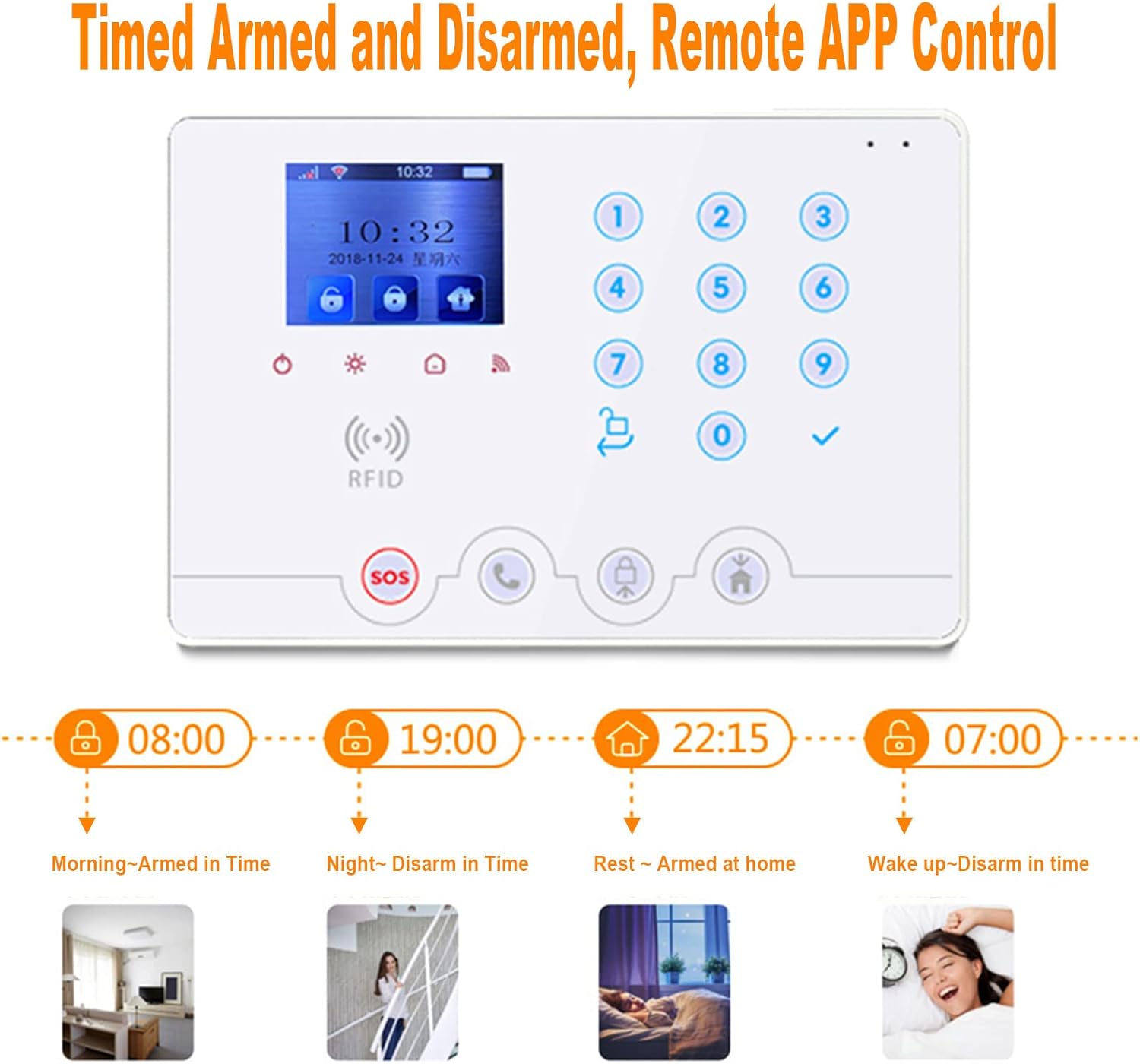
Image: A visual representation of the timed arm and disarm feature, showing examples like morning arming, night disarming, home arming for rest, and wake-up disarming, all controllable via the app.

Image: Two scenarios demonstrating system features: a reminder for unclosed doors/windows shown on a smartphone and the anti-dismantling alarm function of the main panel.
6. Maintenance
Regular maintenance ensures the longevity and reliability of your alarm system.
6.1. Battery Replacement
- HW-03D PIR Detectors: Replace the 4 x 1.5V AAA dry cell batteries when the low battery indicator appears on the detector or the alarm host.
- MC-03B Door/Window Sensors: These sensors use a built-in 3V button battery. Replace it when the system indicates a low battery for the sensor.
- Alarm Host Backup Battery: The W4Q host has a built-in rechargeable battery. Ensure it remains connected to the power adapter to keep the battery charged. The system will alert you if the backup battery is low or faulty.
6.2. Cleaning
Wipe the alarm host and sensors with a soft, dry cloth. Do not use abrasive cleaners or solvents, as they may damage the surfaces or internal components.
6.3. System Testing
Periodically test your alarm system (e.g., monthly) by triggering a sensor while the system is armed to ensure the siren activates and notifications are sent. Inform any monitoring service or contacts before testing to avoid false alarms.
7. Troubleshooting
This section addresses common issues you might encounter with your Wolf Guard W4Q Smart Alarm System.
| Problem | Possible Cause | Solution |
|---|---|---|
| System does not arm/disarm. | Incorrect code, dead remote battery, out of range, unclosed doors/windows. | Verify code. Replace remote battery. Move closer to host. Check all monitored entry points are closed. |
| False alarms. | Improper sensor placement, pets, strong air currents, low sensor battery. | Adjust PIR sensor angle/location. Ensure pets are not triggering sensors. Check for drafts. Replace sensor batteries. |
| No phone calls/SMS alerts. | No SIM card, SIM card not activated, insufficient credit, poor cellular signal, incorrect phone numbers configured. | Install/activate SIM. Recharge SIM. Check signal strength. Verify configured phone numbers in settings. |
| App control not working. | No WiFi connection, incorrect app settings, server issues. | Ensure alarm host is connected to WiFi. Check app settings and internet connection on your phone. Try restarting the app. |
| Siren not activating. | Siren not powered, not paired, faulty. | Ensure siren is powered. Re-pair siren with the alarm host. Contact support if still not working. |
8. Specifications
Detailed technical specifications for the Wolf Guard W4Q Smart Alarm System components.
8.1. W4Q Control Panel
- Input Voltage: AC 100V-240V ± 10%, DC 5V/2A
- Built-in Battery: Automatic recharge (Lithium metal)
- 4G Frequency: 850/900/1800/1900/2100 MHz
- Sound Level: 110 dB (siren)
- Control Method: Remote control, Smartphone App
- Connectivity: Wireless, WiFi, 4G
- Model Number: W4Q-4HW-4MC-2YK
- Weight: 1.8 kilograms
8.2. HW-03D PIR Detectors
- Sensor Type: Low-noise Passive Infrared Sensor
- Operating Voltage: DC 6V (4 x 1.5V AAA dry batteries, included)
- Transmission Distance: 80m (open space)
- Detection Distance: Max 12m
- Detection Angle: Horizontal 110°, Vertical 60°
- Coding Method: PT2262 or EV1527 (optional)
- Dimensions: 112 x 60 x 38 mm
8.3. MC-03B Door/Window Sensors
- Operating Voltage: DC 3V (built-in 3V button battery)
- Emission Frequency: 433/868 + 0.5 MHz
- Emission Distance: 80m (open space)
- Gap Distance: Max 15mm
- Coding Method: PT2262 or EV1527
9. Warranty & Support
For warranty information, technical support, or any inquiries regarding your Wolf Guard W4Q Smart Alarm System, please contact Wolf Guard customer service. Refer to the contact details provided with your product packaging or visit the official Wolf Guard website for the most up-to-date support information.
Please have your product model number (W4Q-4HW-4MC-2YK) and purchase details ready when contacting support.

