
Introduction
This manual provides detailed instructions for the setup, operation, and maintenance of your Movo MV-T1 Universal Mini Camera Tripod. Designed for versatility and durability, this tripod is compatible with a wide range of devices including DSLR cameras, mirrorless cameras, GoPro (adapter required), and smartphones (adapter required).
The MV-T1 features adjustable tripod legs, an extendable pole, and a mini ball head, offering flexibility for various shooting angles. Crafted from heavy-duty aluminum alloy, it supports loads up to 11 lbs (5 kg) with reliable balance and control.
What's in the Box
Upon unboxing your Movo MV-T1, you should find the following components:
- Movo MV-T1 Mini Tripod with integrated ball head
- Extension Tube
- Instruction Manual
- Happy/Not Happy Comment Card (for customer support)
- Protective Carrying Case
Video Description: An unboxing and setup guide for the Movo MV-T1 Mini Tripod, demonstrating how to assemble the components and attach a smartphone.
Setup & Assembly
- Attach the Ball Head: The mini ball head is typically pre-attached to the tripod. If detached, screw it securely onto the top of the tripod base.
- Adjust the Ball Head: Loosen the lock knob on the ball head to adjust the angle. Once the desired angle is achieved, tighten the knob to secure your device. Ensure it is firmly tightened to prevent movement.
- Attach the Extension Tube (Optional): If additional height is needed, screw the extension tube into the bottom of the ball head. Then, screw the combined ball head and extension tube assembly onto the tripod base. Ensure all connections are secure.
- Extend Tripod Legs: Fully extend the tripod legs outwards to maximize stability. The base of the tripod has indicators to show the wider, more stable leg position.
- Attach Your Device:
- For Cameras (DSLR/Mirrorless): Screw your camera directly onto the 1/4"-20 universal screw thread on the ball head.
- For Smartphones/GoPro: Attach a compatible smartphone or GoPro adapter (not included) to the 1/4"-20 universal screw thread on the ball head. Then, secure your device into the adapter.
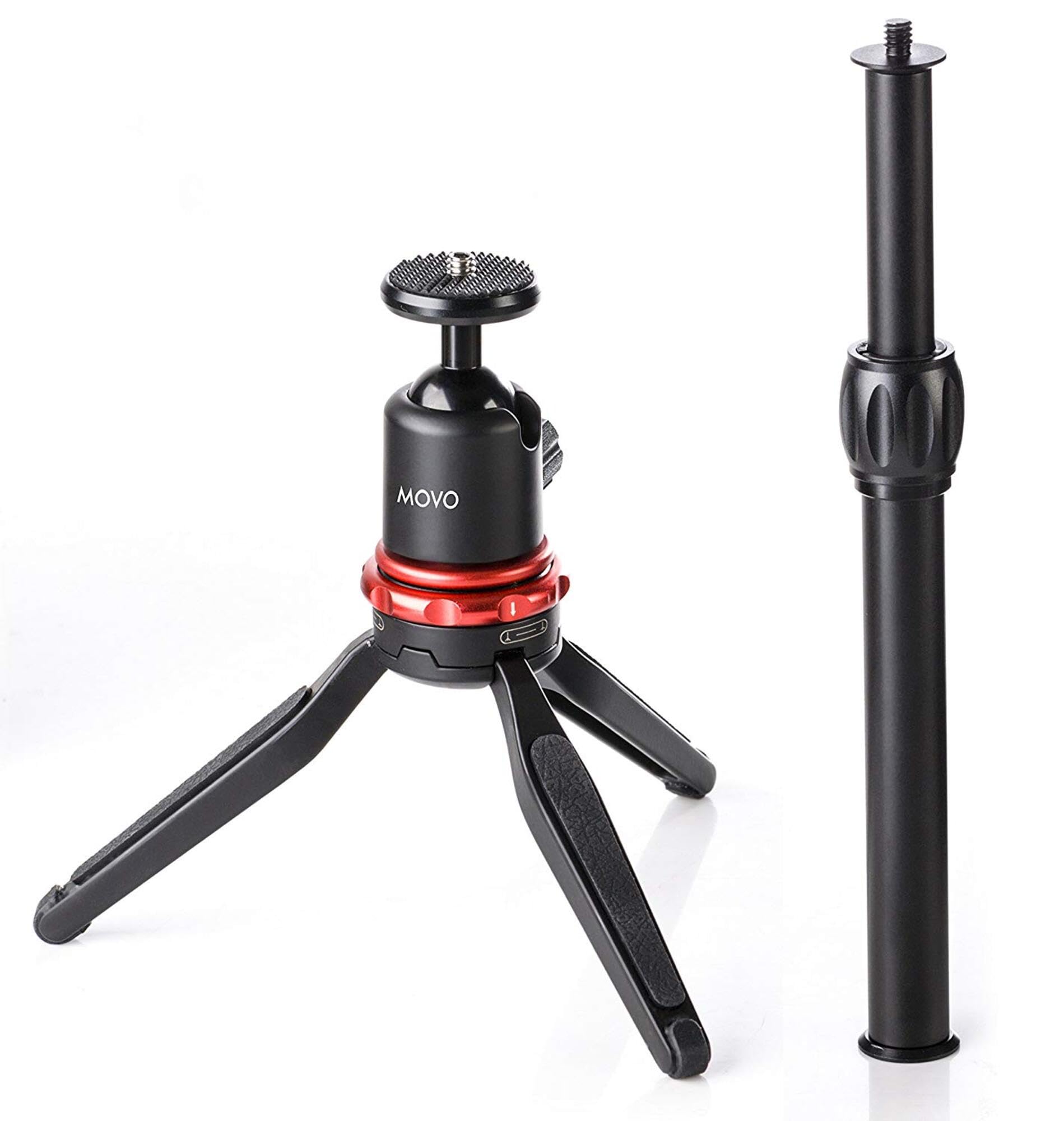
Image Description: The Movo MV-T1 Mini Tripod fully assembled with an extension pole and a smartphone mounted, demonstrating its compact yet versatile design.
Operating Instructions
The Movo MV-T1 is designed for ease of use and stability. Follow these guidelines for optimal performance:
- Stability: Always ensure the tripod legs are fully extended and locked into their widest position before mounting any device, especially heavier cameras. This prevents tipping.
- Adjusting Angle: Use the lock knob on the ball head to loosen and adjust your device to the desired angle. Re-tighten the knob firmly to prevent your camera or smartphone from shifting during use.
- Extension Pole: The extension pole provides additional height. Ensure it is securely screwed into both the ball head and the tripod base.
- Portability: When not in use, collapse the tripod legs and detach the extension pole and ball head if desired. Store all components in the provided protective carrying case for easy transport and to prevent loss or damage.
Maintenance
To ensure the longevity and optimal performance of your Movo MV-T1 Mini Tripod, follow these simple maintenance tips:
- Cleaning: Wipe down the tripod with a soft, dry cloth after each use to remove dust, dirt, or moisture. For stubborn grime, a slightly damp cloth can be used, followed by immediate drying. Avoid harsh chemicals or abrasive cleaners.
- Storage: Store the tripod in its protective carrying case in a cool, dry place away from direct sunlight and extreme temperatures. This protects it from environmental damage and keeps all components together.
- Inspection: Periodically check all screws, knobs, and joints for tightness. Re-tighten any loose parts to maintain stability and prevent accidental damage to your mounted equipment.
- Avoid Overloading: Do not exceed the maximum weight limit of 11 lbs (5 kg). Overloading can damage the tripod and potentially your camera or smartphone.
Troubleshooting
If you encounter any issues with your Movo MV-T1 Mini Tripod, consider the following common solutions:
| Problem | Possible Cause | Solution |
|---|---|---|
| Tripod is unstable or wobbles. | Legs not fully extended or locked; uneven surface; ball head not tightened. | Ensure legs are fully extended and locked. Place on a flat, stable surface. Tighten the ball head lock knob securely. |
| Device slips or changes angle. | Ball head lock knob is loose; device is too heavy. | Firmly tighten the ball head lock knob. Verify your device's weight does not exceed the 11 lbs (5 kg) limit. |
| Extension tube feels loose. | Not fully screwed into the ball head or tripod base. | Ensure the extension tube is tightly screwed into both the ball head and the tripod base. |
If you continue to experience issues, please refer to the "Warranty & Support" section for contact information.
Specifications
- Brand: Movo
- Model Name: MV-T1
- Model Number: MV-T1
- Color: Black
- Material: Heavy-Duty Aluminum Alloy
- Item Weight: 312 Grams
- Weight Limit: 11 Pounds (5 kg)
- Maximum Height: 16 Inches
- Minimum Height: 3 Inches
- Folded Size: 3 inches
- Tripod Head Type: Ball Heads
- Compatible Devices: Camera, GoPro (adapter required), iPhone 11 (smartphone adapter required), and other compatible devices.
- Special Feature: Portable
- UPC: 817711021183
Warranty & Support
The Movo MV-T1 Universal Mini Camera Tripod comes with a 1-Year Warranty. Movo is committed to providing reliable products and excellent customer service.
For any questions, comments, or support needs, please refer to the "Happy/Not Happy Comment Card" included in your product packaging for contact details. Our friendly US-Based support team is available to assist you.
You can also visit the official Movo website for further information and support resources: www.movophoto.com