1. Introduction
The Etac Turner PRO is a patient transfer aid designed to facilitate safe and easy sit-to-stand transfers for individuals with reduced mobility. This device assists both the user and caregiver by providing a stable platform and support handle, minimizing strain during transfers between sitting positions, such as from a bed to a wheelchair or toilet. It is suitable for use in various environments, including confined spaces.
This manual provides essential information for the safe assembly, operation, maintenance, and troubleshooting of your Etac Turner PRO. Please read all instructions carefully before use.

Image: The Etac Turner PRO Patient Transfer Aid shown next to its product packaging.
2. Safety Information
Always prioritize safety during transfers. Failure to follow these guidelines may result in injury to the user or caregiver.
- Weight Capacity: Do not exceed the maximum weight capacity of 440 lbs (200 kg).
- Caregiver Assistance: The Etac Turner PRO requires active participation from both the user and a caregiver. The user must have sufficient upper body strength to assist in standing.
- Stable Surface: Ensure the floor surface is level and clear of obstacles before and during transfer.
- Brakes: If transferring from a wheelchair, ensure the wheelchair brakes are engaged.
- Foot Placement: Ensure the user's feet are securely placed on the rotating disc.
- Handle Grip: The user must maintain a firm grip on the support handle throughout the transfer.
- Leg Supports: Adjust the leg supports to a comfortable and secure height for the user.
- Regular Inspection: Before each use, inspect the device for any signs of damage or wear. Do not use if damaged.
3. Components
The Etac Turner PRO consists of the following main components:
- Support Handle: Bright orange, high-contrast handle for user grip.
- Vertical Post: Connects the handle to the base.
- Angled Leg Supports: Padded and adjustable for user comfort and stability.
- Rotating Disc Base: Durable cast aluminum base with an anti-slip bottom, designed for smooth rotation.
- Wheels: Small wheels on the base for easy positioning by the caregiver.
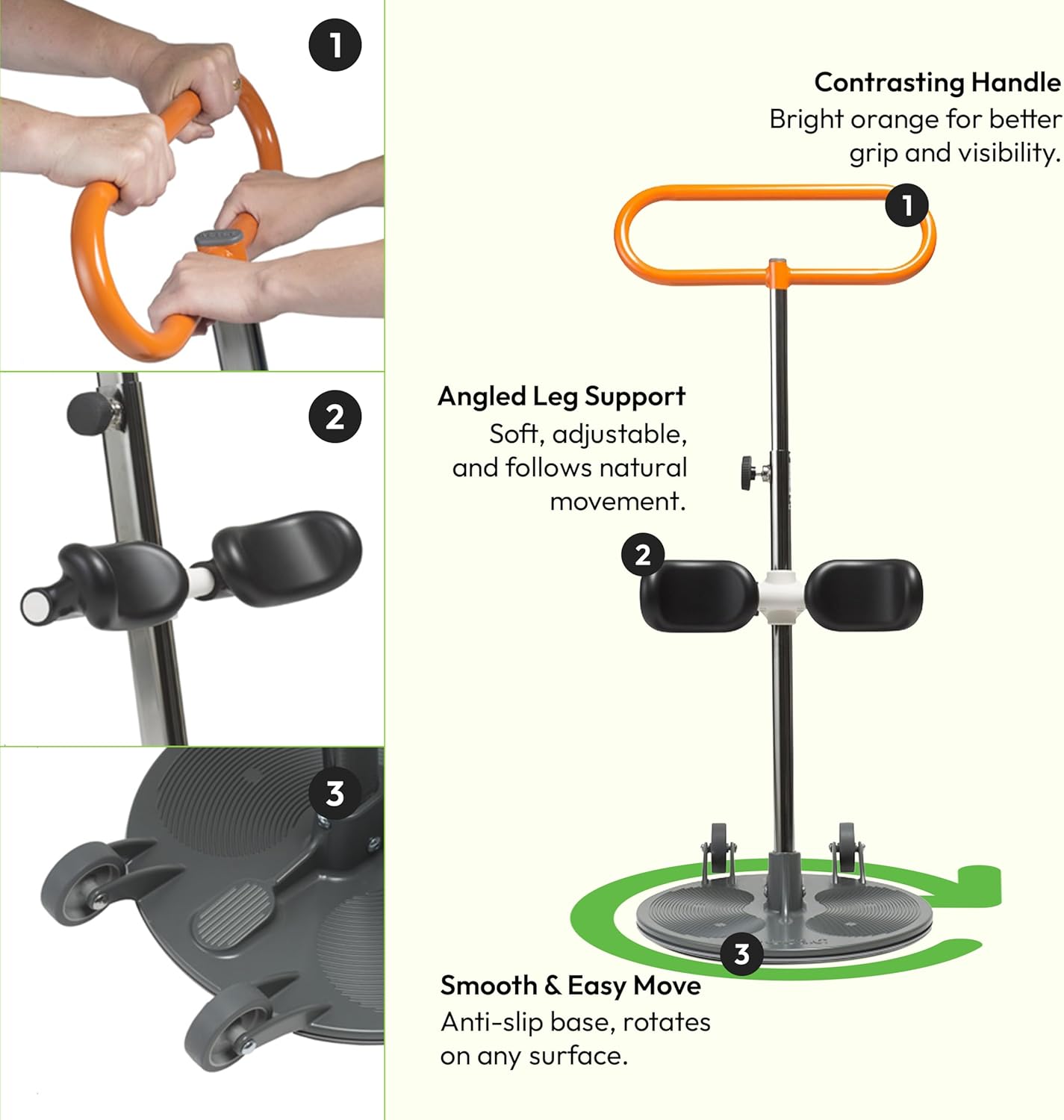
Image: Detailed view highlighting the contrasting handle, adjustable angled leg support, and the smooth rotating anti-slip base.
4. Setup and Assembly
The Etac Turner PRO requires minimal assembly. Follow these steps:
- Unpack all components from the box.
- Insert the vertical post into the base, ensuring it clicks securely into place.
- Attach the support handle to the top of the vertical post.
- Adjust the height of the leg supports using the adjustment knobs to suit the user's leg length. The padded supports should be positioned just below the user's knees when standing.
- Verify all connections are secure before initial use.
5. Operating Instructions
The Etac Turner PRO is designed for sit-to-stand transfers. Both the user and caregiver must work together for a safe transfer.
5.1 Preparing for Transfer
- Position the Etac Turner PRO directly in front of the user, ensuring the rotating disc is close to their feet.
- If transferring from a wheelchair, ensure the wheelchair brakes are engaged.
- The caregiver should stand behind the Etac Turner PRO, ready to assist and stabilize the device.
- Instruct the user to place their feet firmly on the rotating disc, with their heels against the back edge.
- Ensure the user grasps the orange support handle securely with both hands.

Image: User's hands gripping the high-contrast orange support handle.
5.2 Performing the Sit-to-Stand Transfer
- The caregiver should provide verbal cues and physical assistance as needed.
- Instruct the user to lean forward, using their upper body strength to push up from the chair and pull on the handle to initiate standing.
- As the user stands, the caregiver can gently push the Etac Turner PRO forward to assist with the standing motion.
- Once the user is in a standing position, the caregiver can rotate the device to orient the user towards the target seating surface (e.g., another chair, bed). The anti-slip base allows for smooth rotation on various floor types.
- Guide the user to slowly lower themselves onto the new seating surface, maintaining their grip on the handle until seated securely.

Image: A caregiver assists an elderly user in a sit-to-stand transfer using the Etac Turner PRO. The user holds the orange handle while the caregiver stabilizes the device.

Image: A diagram showing the user's muscles and spine engaged during the sit-to-stand motion with the Etac Turner PRO, emphasizing natural movement.
5.3 Portability and Storage
The Etac Turner PRO is lightweight and designed for easy transport and storage.
- To transport, the device can be easily lifted and carried.
- Its compact design allows it to fit into car trunks or be stored in small spaces.

Image: A person demonstrating the portability of the Etac Turner PRO by placing it into the trunk of a car.
6. Maintenance and Care
Proper maintenance ensures the longevity and safe operation of your Etac Turner PRO.
- Cleaning: Clean the device regularly with a mild detergent and water. Avoid abrasive cleaners or solvents. Wipe dry immediately.
- Inspection: Periodically check all bolts, screws, and connections to ensure they are tight. Inspect the rotating disc for smooth operation and the anti-slip bottom for wear.
- Storage: Store the device in a dry place, away from direct sunlight and extreme temperatures.
7. Troubleshooting
If you encounter issues with your Etac Turner PRO, refer to the following common problems and solutions:
- Difficulty Rotating:
- Ensure the floor surface is clean and free of debris.
- Check if the user's weight is evenly distributed on the disc.
- Inspect the rotating mechanism for any obstructions.
- Unstable During Transfer:
- Verify the user has a firm grip on the handle.
- Ensure the leg supports are adjusted correctly and providing adequate contact.
- Confirm the caregiver is actively stabilizing the device.
- Leg Supports Slipping:
- Tighten the adjustment knobs for the leg supports.
- Ensure the user's legs are positioned correctly against the pads.
If problems persist, contact Etac customer support for assistance.
8. Specifications
| Feature | Specification |
|---|---|
| Model Number | 57937 |
| Load Capacity | 441 Pounds (200 kg) |
| Item Weight | 17.6 pounds (8 kg) |
| Product Dimensions (L x W x H) | 29.5 x 20 x 5.6 inches (75 x 51 x 14 cm) |
| Material | Cast aluminum, powder coated steel, chrome |
| Assembly Required | Yes |
| Base Type | Leg |
9. Warranty and Support
For warranty information, product support, or to purchase replacement parts, please contact Etac customer service directly. Refer to the contact information provided with your purchase documentation or visit the official Etac website.
No official seller videos were found for embedding in this manual.


