
Gamechanger Audio PLUS Pedal
Gamechanger Audio Plus Pedal User Manual
Model: PLUS Pedal
1. Introduction
The Gamechanger Audio Plus Pedal is an innovative sustain effect pedal that brings piano-style sustain to electric guitars and other melodic instruments. It operates by sampling and continuously looping a portion of your instrument's signal, allowing you to sustain notes or chords indefinitely and layer new sounds on top. This manual provides essential information for setting up, operating, maintaining, and troubleshooting your Plus Pedal.
2. Setup
2.1 Power Requirements
The Plus Pedal requires a standard 9V DC center negative power supply with a minimum current output of 250 mA. Ensure your power supply meets these specifications to prevent damage to the unit and ensure proper operation. Power supply is not included with the pedal.
2.2 Connecting Your Pedal
Connect your instrument to the IN jack on the rear of the pedal. Connect the OUT jack to your amplifier or the next pedal in your signal chain. The Plus Pedal can be placed early in your pedal chain for optimal performance, as suggested by some users.

Figure 2.1: Rear view of the Plus Pedal, highlighting the input, output, and power connections. The 9VDC center negative power input is clearly visible, along with the IN, CLEAN OUT/FSW, and OUT jacks for audio connections.
2.3 Footswitch Connection (Optional)
For extended versatility, an optional footswitch can be connected to the CLEAN OUT/FSW jack. This allows for switching between Mix (Dry+Wet) and Split Modes (Wet) and offers a separate Dry Out, enhancing control over your sound.
3. Operating the Plus Pedal
The Plus Pedal features a unique piano-style sustain pedal mechanism and four control knobs for precise sound shaping.
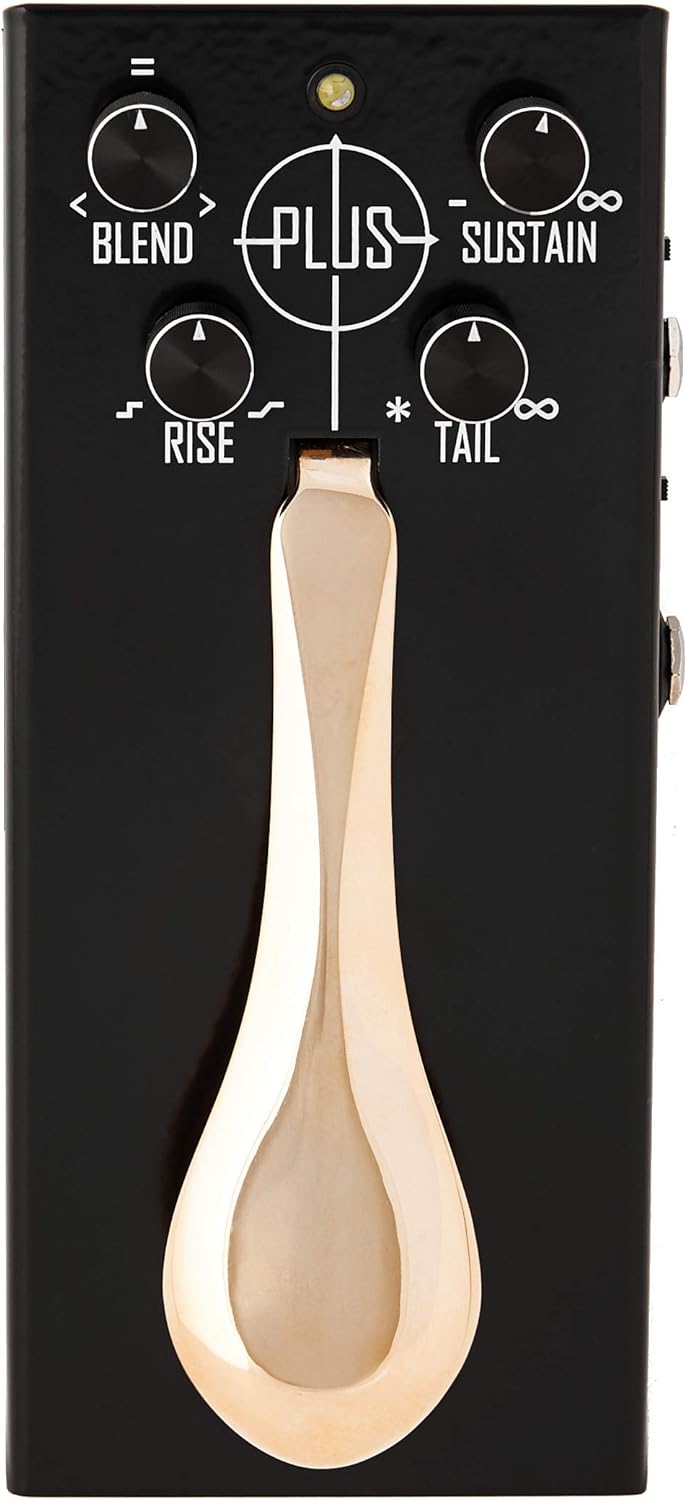
Figure 3.1: The top panel of the Plus Pedal, showing the main controls. The large, polished brass pedal is central, surrounded by the four rotary knobs for fine-tuning the sustain effect.
3.1 Basic Operation
- Engaging Sustain: Play a note or chord on your instrument, then press down on the piano-style pedal. The pedal will capture and sustain the sound.
- Layering: You can layer up to five different sounds by repeatedly playing notes/chords and pressing the pedal. Each new press adds a new layer to the sustained sound.
- Gradual Control: The pedal offers gradual control (off, half, full) and short tap (kill switch) functionality. A short half-press can remove the last recorded layer.
3.2 Control Knobs
- BLEND: Controls the mix between the dry (unaffected) signal and the wet (sustained) signal. Adjust to achieve the desired balance.
- SUSTAIN: Adjusts the duration of the sustained sound. Turn clockwise for longer sustain.
- RISE: Sets the fade-in speed of each new sustained layer. A lower setting results in a faster fade-in.
- TAIL: Sets the fade-out speed of the sustained layers when the pedal is released. A lower setting results in a faster fade-out.
3.3 Understanding the Sustain Algorithm
The Plus Pedal utilizes a unique algorithm that continuously records and analyzes the audio signal. It identifies the optimal portion of a note's decay phase to create a seamless circular micro-loop, resulting in a natural and organic sustain unlike typical granular synthesizers.
4. Maintenance
4.1 Cleaning
To maintain the aesthetic and functional integrity of your Plus Pedal, regularly wipe the exterior with a soft, dry cloth. Avoid using abrasive cleaners or solvents, as these may damage the finish or internal components. The brass pedal can be polished with a suitable brass cleaner if desired, following the cleaner's instructions.
4.2 Storage
Store the pedal in a cool, dry environment away from direct sunlight and extreme temperatures. When transporting, use a padded case to protect it from physical impact.
4.3 Construction Insights
The Plus Pedal features hand-cast brass components, contributing to its robust build and unique feel. Understanding the manufacturing process can provide insight into the durability and care of the pedal.
Video 4.1: "How it's made - PLUS Pedal" by Gamechanger Audio Official Store. This video provides a detailed look into the manufacturing process of the Plus Pedal, including the hand-casting and polishing of its brass components, offering valuable context on its build quality and durability.
5. Troubleshooting
If you encounter issues with your Plus Pedal, refer to the following common troubleshooting steps:
- No Power: Ensure the 9V DC power supply is correctly connected and meets the 250 mA minimum current requirement. Check the power outlet and the power supply unit itself.
- No Sound: Verify all audio cables are securely connected to the IN and OUT jacks. Test with different cables and ensure your instrument and amplifier are functioning correctly. Check the BLEND knob setting; if it's set to fully dry, you won't hear the sustained effect.
- Glitches or Unwanted Artifacts in Sustain: The quality of the sustained loop is highly dependent on the input signal. Ensure a clean, clear note or chord is played before engaging the pedal. Avoid pressing the pedal simultaneously with the attack of the note; instead, play the note and then press the pedal immediately after. Experiment with the RISE and TAIL settings to smooth out transitions.
- Unresponsive Pedal: Check for any physical obstructions around the piano-style pedal. Ensure the pedal mechanism moves freely.
If the issue persists after performing these checks, please contact Gamechanger Audio customer support for further assistance.
6. Specifications
| Feature | Specification |
|---|---|
| Brand | Gamechanger Audio |
| Model Number | PLUS Pedal |
| Item Weight | 2.64 pounds (1.2 Kilograms) |
| Product Dimensions | 27 x 14.7 x 9.9 inches |
| Power Source | Corded Electric |
| Voltage | 9 Volts DC (center negative, 250 mA minimum) |
| Body Material | Metal |
| Pedal Material | Brass |
| Color | Black |
| Signal Format | Analog |
| First Available | March 15, 2018 |
7. Warranty and Support
For detailed warranty information and customer support, please refer to the official Gamechanger Audio website or contact the Gamechanger Audio Official Store directly. You may also find additional resources and a comprehensive Instructions for Use (IFU) PDF document available online.
Official User Guide (PDF): Download PDF
Related documentsPLUS Pedal


Ask a question about this manual
Ask about setup, troubleshooting, compatibility, parts, safety, or missing instructions. Manuals+ will review the question and use this page’s manual context to help answer it.