
1. Introduction
Thank you for choosing the DEVAISE 3-Drawer File Cabinet. This mobile, metal filing cabinet is designed to provide secure and versatile storage for your home or office. It features a smart combination lock for enhanced security and is built with a durable steel structure. This manual provides essential information for the proper setup, operation, and maintenance of your new file cabinet.

Figure 1: DEVAISE 3-Drawer File Cabinet (White)
This image shows the overall design of the white DEVAISE 3-Drawer File Cabinet, highlighting its sleek appearance and the integrated digital combination lock on the top drawer.
2. Setup
2.1 Unpacking and Initial Inspection
Your DEVAISE file cabinet arrives largely pre-assembled, simplifying the setup process. Carefully remove all packaging materials and inspect the cabinet for any signs of damage during transit. Ensure all components, especially the casters, are present.
2.2 Attaching the Casters
The five casters are the only components requiring assembly. These casters allow for easy mobility of the cabinet. Two of the front casters are lockable for stability, and one anti-tipping wheel is included for safety.
- Carefully lay the file cabinet on its side on a soft, protective surface to avoid scratching the finish.
- Locate the five threaded holes on the bottom of the cabinet.
- Screw each caster into its corresponding hole until securely tightened. Ensure the two lockable casters are installed at the front of the cabinet.
- Gently return the cabinet to an upright position.

Figure 2: Product Dimensions and Caster Detail
This image provides a visual guide to the cabinet's dimensions and illustrates the location for caster installation, including a close-up of the casters themselves.
2.3 Safety Information
Always use the casters properly to prevent tipping. Be cautious when using the combination lock to avoid injury. Ensure the cabinet is placed on a stable, level surface, especially when drawers are open or the cabinet is loaded.
3. Operating Instructions
3.1 Smart Digital Lock System
The top drawer of your file cabinet is equipped with a smart combination lock, allowing you to secure your belongings without the need for physical keys. The lock operates with a four-digit code.
Setting Your Combination:
- Ensure the lock is currently unlocked.
- Press and hold the 'OK' button until the numbers illuminate.
- Enter your desired 4-digit code.
- Press 'OK' to confirm. The lock will beep to indicate successful programming.
Locking and Unlocking:
- To lock: Simply push the drawer closed. The lock will automatically engage.
- To unlock: Enter your 4-digit combination and press 'OK'. The lock will disengage, allowing you to open the drawer.

Figure 3: Digital Combination Lock Interface
This image provides a detailed view of the digital keypad and lock mechanism on the top drawer, illustrating the numbers and 'OK' button.
3.2 Drawer Functionality and Storage
The DEVAISE file cabinet features three distinct drawers designed for various storage needs:
- Top Drawer: This shallow drawer is ideal for stationery, pens, pencils, and other small office supplies. It includes an adjustable pencil tray for organization.
- Middle Drawer: A slightly deeper drawer suitable for general documents, notebooks, or personal items.
- Bottom File Drawer: This large, fully extending drawer is designed for hanging file folders. It includes an adjustable bar to accommodate Letter, Legal, and A4 size files.
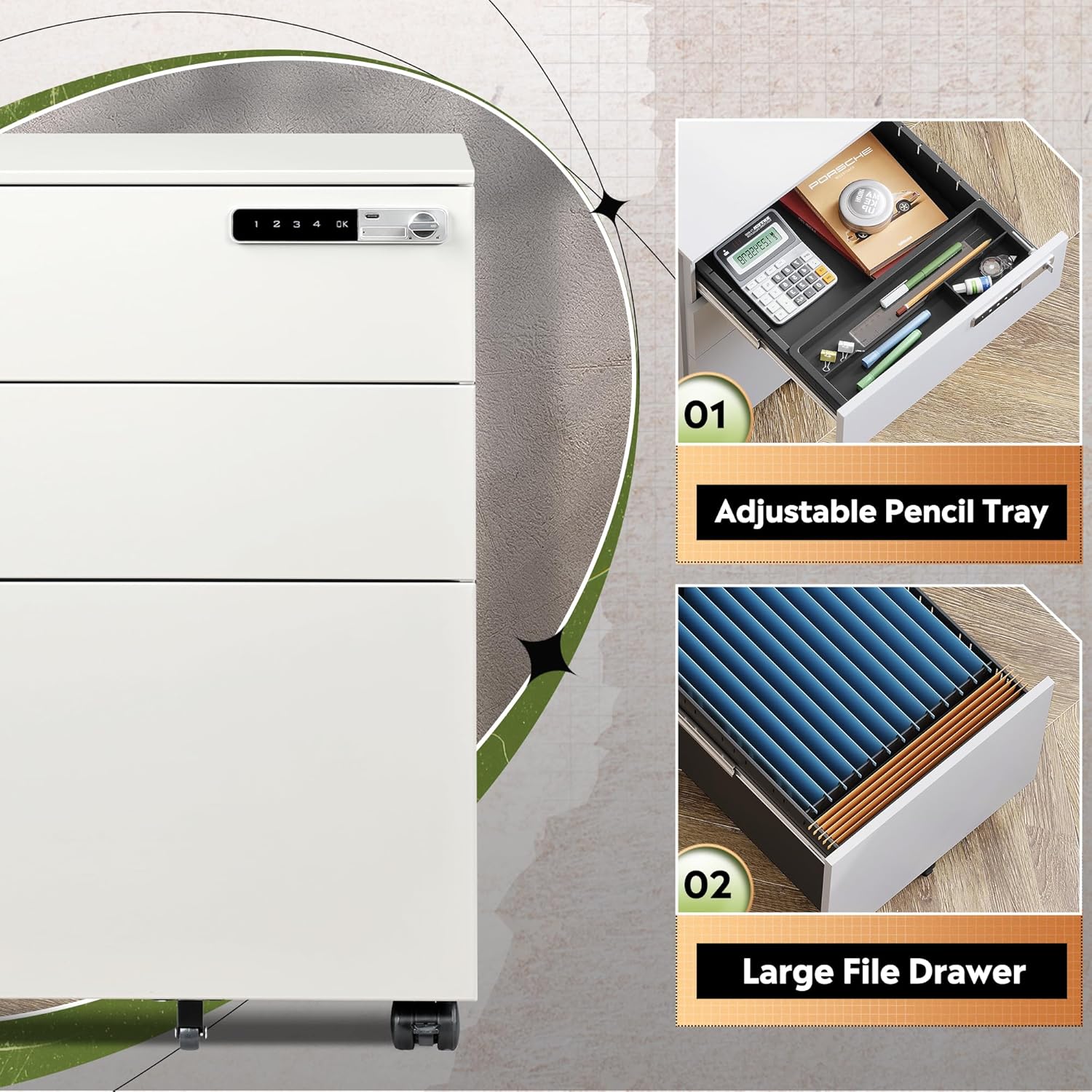
Figure 4: Internal Drawer Organization
This image displays the top drawer with its adjustable pencil tray and the bottom drawer configured for hanging file folders, demonstrating the cabinet's internal storage capabilities.

Figure 5: File Size Compatibility
This image illustrates the versatility of the bottom file drawer, showing how it can accommodate Letter, Legal, and A4 sized documents using hanging file folders.
4. Maintenance
4.1 Cleaning
To maintain the appearance of your file cabinet, wipe surfaces with a soft, damp cloth. Avoid using harsh chemicals or abrasive cleaners, as these can damage the finish. Dry thoroughly after cleaning.
4.2 Drawer Slides
The drawer slides are designed for smooth operation. If you notice any stiffness, a small amount of silicone-based lubricant can be applied to the slides. Do not use oil-based lubricants, as they can attract dust and debris.
4.3 Caster Care
Periodically check the casters for any accumulated debris (e.g., hair, lint) that might hinder their movement. Clean as necessary to ensure smooth rolling and prevent floor damage.
5. Troubleshooting
| Problem | Possible Cause | Solution |
|---|---|---|
| Digital lock not responding or not unlocking. | Low battery or incorrect code entered. |
|
| Drawers are stiff or difficult to open/close. | Accumulated dust/debris on slides or overloaded drawer. |
|
| Cabinet is unstable or tips easily. | Casters not locked, uneven surface, or excessive weight. |
|
6. Specifications
| Feature | Detail |
|---|---|
| Brand | DEVAISE |
| Model Number | OR-AJG-GGPB-WH-48H-N-1-FBA |
| Color | White |
| Product Dimensions | 17.2"D x 14.6"W x 23.7"H |
| Material Type | Steel |
| Item Weight | 39.7 Pounds |
| Weight Limit | 330 Pounds |
| Special Features | Lockable, Wheeled |
| Assembly Required | No (except casters) |
| Number of Drawers | 3 |
| Recommended Uses | Office, Home Office |
7. Warranty and Support
For warranty information or technical support, please contact DEVAISE directly. Refer to the product packaging or the official DEVAISE website for the most current contact details.
Manufacturer: DEVAISE
Online Store: Visit the DEVAISE Store on Amazon
It is recommended to retain your proof of purchase for warranty claims.


