
1. Introduction
This manual provides comprehensive instructions for the installation, operation, maintenance, and troubleshooting of the MOXA EDS-316 16-Port Unmanaged Ethernet Switch. Please read this manual thoroughly before using the device to ensure proper functionality and safety.
2. Safety Information
- Ensure the power supply voltage is within the specified range for the device.
- Do not expose the device to moisture or extreme temperatures.
- Avoid blocking ventilation openings to prevent overheating.
- Only qualified personnel should perform installation and maintenance.
- Disconnect power before cleaning or servicing the device.
3. Package Contents
Verify that your package contains the following items:
- MOXA EDS-316 Unmanaged Ethernet Switch
- Quick Installation Guide (if applicable)
- Warranty Card (if applicable)
- Terminal block for power input
If any items are missing or damaged, please contact your vendor immediately.
4. Product Overview
The MOXA EDS-316 is a robust 16-port unmanaged Ethernet switch designed for industrial applications. It features 16 10/100BaseT(X) ports, providing reliable network connectivity. Key features include:
- Relay output warning for power failure and port break alarm.
- Broadcast storm protection to maintain network stability.
- Wide operating temperature range for harsh environments.
4.1 Device Layout
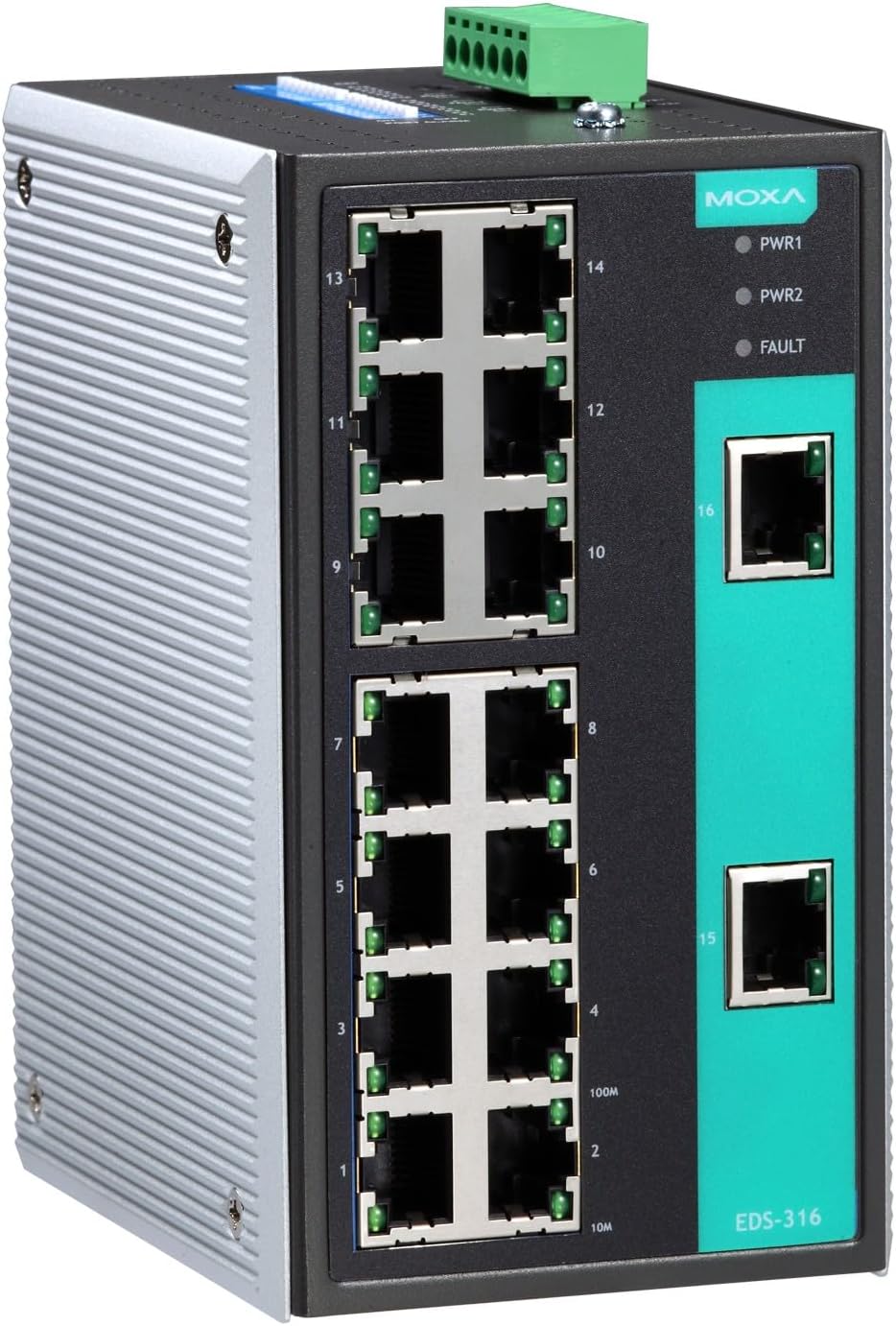
Figure 1: Front view of the MOXA EDS-316 Ethernet Switch, displaying the 16 RJ45 10/100BaseT(X) ports, power input terminals, and LED indicators for power (PWR1, PWR2) and fault status.

Figure 2: Angled front view of the MOXA EDS-316 Ethernet Switch, providing a clearer perspective of the port numbering (1-16) and the robust metal casing suitable for industrial environments.
5. Setup
5.1 Mounting the Switch
The EDS-316 is designed for DIN-rail mounting. Attach the DIN-rail kit to the rear of the switch, then snap the switch onto a standard DIN rail. Ensure it is securely fastened to prevent accidental dislodgement.
5.2 Power Connection
- Connect the power source to the terminal block located on the top of the switch. The EDS-316 supports redundant power inputs (PWR1, PWR2).
- Ensure the voltage is within the specified range (9.6 Volts DC).
- Verify that the power cables are securely connected.
5.3 Network Connection
Connect Ethernet cables from your network devices (e.g., computers, servers, other switches) to any of the 16 RJ45 10/100BaseT(X) ports on the front panel. The switch will automatically detect the speed and duplex mode of the connected devices.
6. Operating Instructions
6.1 Powering On
Once power is connected, the PWR1 and/or PWR2 LEDs on the front panel will illuminate, indicating that the switch is receiving power.
6.2 LED Indicators
- PWR1/PWR2 (Green): Lit when power input 1/2 is active.
- FAULT (Red): Lit when a power failure or port break alarm is detected.
- Link/Act (Green per port): Lit when a valid network link is established; blinks when data is being transmitted or received.
6.3 Network Operation
The EDS-316 is an unmanaged switch, meaning it operates automatically without requiring any configuration. Simply connect your devices, and the switch will facilitate communication between them.
7. Maintenance
7.1 Cleaning
Use a soft, dry cloth to clean the exterior of the switch. Do not use liquid or aerosol cleaners. Ensure the device is powered off before cleaning.
7.2 Environmental Considerations
Maintain the operating environment within the specified temperature and humidity ranges to ensure optimal performance and longevity of the device.
8. Troubleshooting
| Problem | Possible Cause | Solution |
|---|---|---|
| No power (PWR LEDs off) | No power input or faulty power supply. | Check power cable connections and power source. Verify power supply functionality. |
| FAULT LED is lit | Power failure or port break alarm. | Check power inputs. Inspect all connected network cables for breaks or disconnections. |
| No network link (Link/Act LED off) | Cable issue, device off, or incompatible settings. | Ensure the connected device is powered on. Check Ethernet cable for damage. Try a different port or cable. |
| Slow network performance | Network congestion, faulty cable, or device issue. | Check for broadcast storms (the switch has protection, but excessive traffic can still impact performance). Verify cable quality. Isolate problematic devices. |
9. Specifications
| Attribute | Value |
|---|---|
| Brand | Moxa |
| Model | EDS-316 |
| Number of Ports | 16 |
| Interface Type | RJ45, SFP |
| Data Transfer Rate | 1600 Megabits Per Second (Full Duplex) |
| Operating Temperature | 0 to 60°C |
| Case Material | Metal |
| Voltage | 9.6 Volts (DC) |
| Item Weight | 14.99 pounds |
| UPC | 750958427663 |
10. Warranty and Support
MOXA products are designed for reliability and performance. For warranty information, please refer to the warranty card included with your product or visit the official MOXA website. For technical support, contact your local MOXA distributor or the MOXA customer service team with your product model and serial number.


