
1. Introduction
This manual provides detailed instructions for the safe and effective use of your iProvèn DTR-1221A Digital Oral Thermometer. Please read all instructions carefully before use and retain this manual for future reference. This thermometer is designed for measuring human body temperature orally or rectally.

Image 1: iProvèn DTR-1221A Digital Oral Thermometer and Packaging
2. Safety Information
- Do not boil the thermometer.
- Do not drop the thermometer or expose it to heavy shock.
- Do not attempt to disassemble the thermometer.
- Keep the thermometer out of reach of children.
- Avoid taking temperature immediately after eating, drinking, or exercising. Wait at least 15 minutes.
- The thermometer is waterproof for cleaning purposes only; do not immerse it in water for extended periods.
- Consult a physician if you experience a fever, especially for infants and young children.
3. Product Features
The iProvèn DTR-1221A thermometer offers several features for convenient and accurate temperature measurement:
- Fast Reading: Provides temperature readings in approximately 10 seconds.
- Flexible Tip: Designed for comfort during use.
- Fever Alarm: An audible alarm indicates a detected fever.
- Smiley Indicators: Visual cues on the display to interpret temperature levels.
- Waterproof Design: Allows for easy cleaning and hygiene.
- Last Reading Memory: Stores the previous temperature measurement.
- Fahrenheit/Celsius Switch: Allows selection between °F and °C.
- Automatic Shut-off: Conserves battery life.
- Low Battery Alert: Indicates when the battery needs replacement.

Image 2: Key Features of the DTR-1221A Thermometer
4. Package Contents
Your iProvèn DTR-1221A Digital Oral Thermometer package includes:
- 1 x iProvèn DTR-1221A Digital Thermometer
- 1 x LR41 Battery (pre-installed)
- 1 x Hard Cover Case
- 1 x User Instructions (this manual)
5. Setup
5.1. Battery Installation
The thermometer comes with an LR41 battery pre-installed. If the battery needs replacement, follow these steps:
- Gently pull off the battery cover at the end of the thermometer.
- Remove the old battery and insert a new LR41 battery with the positive (+) side facing up.
- Replace the battery cover securely.
5.2. Fahrenheit/Celsius Switch
To switch between Fahrenheit (°F) and Celsius (°C):
- Ensure the thermometer is turned off.
- Press and hold the power button for approximately 3-5 seconds until the display changes from °F to °C or vice versa.
- Release the button. The selected unit will be saved for future use.
6. Operating Instructions
6.1. Taking a Temperature Measurement
- Press the power button to turn on the thermometer. A short beep will sound, and the display will show the last measured temperature for about 2 seconds.
- The display will then show "Lo" followed by the selected unit (°F or °C), indicating the thermometer is ready for measurement.
- Position the thermometer according to the desired measurement method:
Oral Measurement (Recommended for ages 4 and above)
- Place the flexible tip of the thermometer under the tongue, in one of the two heat pockets at the back of the mouth.
- Close your mouth and hold the thermometer in place.
Rectal Measurement (Recommended for children under age 4)
- Lubricate the flexible tip with a water-soluble jelly.
- Gently insert the lubricated tip approximately 0.5 inches (1.3 cm) into the rectum. Do not force the thermometer.

Image 3: Recommended Temperature Measurement Methods
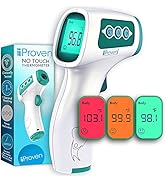
Image 4: Oral and Rectal Measurement Techniques
- Hold the thermometer in position until the measurement is complete. A series of beeps will sound, indicating the peak temperature has been reached and the reading is stable.
- Remove the thermometer and read the temperature displayed.
- Press the power button to turn off the thermometer, or it will automatically shut off after approximately 10 minutes of inactivity.
6.2. Interpreting Smiley Indicators
The thermometer features visual smiley indicators to help interpret temperature readings:
- Smiling Face: Indicates a normal temperature (typically below 99.0°F / 37.2°C).
- Neutral Face: Indicates a slightly elevated temperature (typically 99.1°F - 99.9°F / 37.3°C - 37.7°C).
- Frowning Face: Indicates an elevated temperature or fever (typically over 100.0°F / 37.8°C).

Image 5: Smiley Fever Indicator Guide
7. Maintenance and Cleaning
7.1. Cleaning the Thermometer
The iProvèn DTR-1221A is waterproof, allowing for easy cleaning. Follow these steps for proper hygiene:
- After each use, wipe the thermometer tip with a soft cloth and isopropyl alcohol (70% concentration) or wash with cold soapy water.
- Rinse the tip thoroughly with cool water.
- Dry the thermometer completely with a clean, soft cloth.
- Do not use abrasive cleaners or immerse the entire thermometer in water for extended periods.

Image 6: Cleaning the Thermometer
7.2. Storage
Store the thermometer in its included hard cover case in a cool, dry place, away from direct sunlight and extreme temperatures.
8. Troubleshooting
| Problem | Possible Cause | Solution |
|---|---|---|
| Thermometer does not turn on. | Dead battery. | Replace the LR41 battery (see Section 5.1). |
| Inaccurate readings. | Incorrect placement; measurement taken too soon after eating/drinking; axillary (armpit) use. | Ensure proper oral or rectal placement. Wait 15 minutes after eating/drinking. Do not use for axillary measurements as it is not reliable for this method. Ensure display shows "Lo" before measurement. |
| "Lo" or "Hi" displayed. | Temperature is outside the measurable range. | Ensure proper contact with the body. If the issue persists, consult a healthcare professional. |
| Loud alarm/beep. | Alarm volume is fixed. | The alarm volume is not adjustable. This is a design feature to ensure the completion beep is heard. |
9. Specifications
| Feature | Specification |
|---|---|
| Model Number | DTR-1221A (BD9635) |
| Product Dimensions | 5.12 x 0.79 x 0.43 inches |
| Weight | 1.45 ounces |
| Battery Type | 1 x LR41 (included) |
| Display Type | Digital |
| Measurement Time | Approx. 10 seconds |
| Accuracy | Up to 0.1/0.2 °F |
| Special Feature | High Accuracy, Flexible Tip, Fever Alarm |
| Color | Grey |
| Outer Material | Plastic |
| Product Care | Hand Wash Only |
10. Warranty and Support
iProvèn offers a 100-day refund or replacement policy for this product. For warranty claims or technical support, please contact iProvèn customer service. Refer to the product packaging or the official iProvèn website for the most current contact information.

