
1. Introduction
This manual provides essential information for the proper setup, operation, and maintenance of your Smartby RC2443802/01 Replacement Remote Control. This remote is designed to be fully compatible with various Sharp LCD TV models, including LC42SB48UT, LC42SB48, LC32SB28UT, LC47SB57UT, and LC-32S. It offers a hassle-free replacement solution, requiring no programming and functioning immediately upon battery insertion.
2. Setup: Battery Installation
The Smartby RC2443802/01 remote control requires two AAA batteries (not included) for operation. No programming is required; the remote will function immediately upon battery insertion.
Steps for Battery Installation:
- Locate the battery compartment on the back of the remote control.
- Press down on the latch and slide the battery cover downwards to open it.
- Insert two new AAA batteries, ensuring the positive (+) and negative (-) terminals align correctly with the markings inside the compartment.
- Slide the battery cover back into place until it clicks securely.

3. Operating Instructions
The Smartby RC2443802/01 remote control is designed for immediate use with compatible Sharp LCD TVs without any complex setup or programming. Simply point the remote at your television and press the desired button.
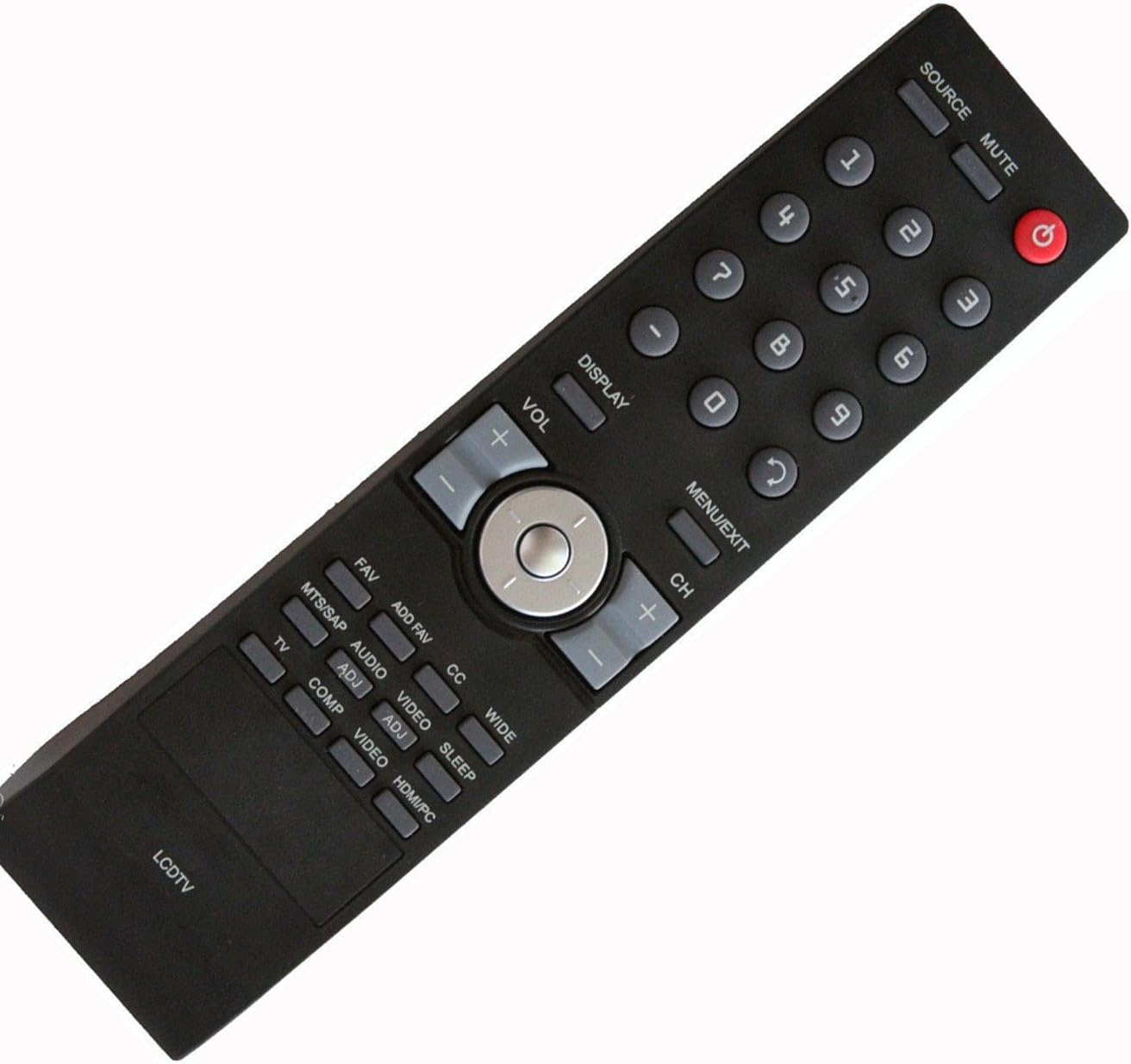
Key Functions:
- Power Button (●): Turns the TV on or off.
- Source/Input: Cycles through available input sources (HDMI, AV, Component, etc.).
- Mute: Mutes or unmutes the TV audio.
- Number Buttons (0-9): Directly select channels.
- Volume Up/Down (VOL +/-): Adjusts the sound volume.
- Channel Up/Down (CH +/-): Changes the TV channel.
- Menu/Exit: Accesses or exits the TV's on-screen menu.
- Display: Shows current channel information or other on-screen display data.
- Navigation Pad (Up/Down/Left/Right/OK): Navigates through menu options and confirms selections.
- Specific Function Buttons: Buttons like MTS/SAP, FAV, ADD FAV, AUDIO, CC, VIDEO, SLEEP, WIDE, HDMI/PC, COMP, TV are designed for specific Sharp TV functions. Refer to your TV's manual for detailed usage of these buttons.
4. Maintenance
Proper care and maintenance will extend the life of your remote control.
- Cleaning: Use a soft, dry cloth to clean the remote control. For stubborn dirt, slightly dampen the cloth with water or a mild, non-abrasive cleaner. Do not use harsh chemicals or abrasive materials.
- Battery Care: If the remote control will not be used for an extended period (e.g., one month or more), remove the batteries to prevent leakage and potential damage to the remote.
- Storage: Store the remote control in a cool, dry place, away from direct sunlight, extreme temperatures, and high humidity.
- Avoid Drops: Protect the remote from physical impact, as drops can damage internal components.
5. Troubleshooting
If you experience issues with your remote control, try the following troubleshooting steps:
| Problem | Possible Cause | Solution |
|---|---|---|
| Remote control is not working. | Batteries are dead or incorrectly inserted. | Replace batteries with new AAA batteries, ensuring correct polarity (+/-). |
| Remote control works intermittently. | Weak batteries or obstruction between remote and TV. | Replace batteries. Ensure there is a clear line of sight between the remote's infrared emitter and the TV's IR receiver. |
| Remote control does not respond to certain buttons. | Button malfunction or TV not compatible with specific function. | Ensure the remote is pointed directly at the TV. If the issue persists for a specific button, it might indicate a defect. Verify the TV model is listed as compatible. |
6. Specifications
- Model Number: RC2443802/01
- Brand: Smartby
- Compatible Devices: Sharp LCD TVs (LC42SB48UT, LC42SB48, LC32SB28UT, LC47SB57UT, LC-32S)
- Connectivity Technology: Infrared (IR)
- Max Number of Supported Devices: 1 (Television)
- Special Feature: Ergonomic design
- Product Dimensions: 8 x 2 x 1 inches
- Item Weight: 3.2 ounces
- Batteries Required: 2 x AAA (not included)
- Operating Distance: Stable performance up to 8 meters, available up to 10 meters.
7. Warranty and Support
Your Smartby RC2443802/01 Remote Control comes with a 30-day quality warranty. We offer hassle-free returns for any quality-related issues within this period.
For further assistance, troubleshooting, or warranty claims, please contact the seller or Smartby customer support through the platform where the purchase was made. Please have your order details and product model number (RC2443802/01) ready when contacting support.