
MeterTo 4105A
Victor 4105A Digital Earth Resistance Tester User Manual
Model: 4105A
1. Introduction
The Victor 4105A is a high-accuracy digital LCD ground earth resistance and current tester designed for precise measurements in various electrical systems. This instrument is full-featured, offers high accuracy, and provides convenient and reliable operation. Its dustproof and moisture-proof structure makes it suitable for field use. It can measure grounding resistance values of power systems, electrical equipment, and lightning protection equipment grounding systems, as well as AC voltage.
2. Safety Information
Always adhere to local and national safety regulations when operating this device. Failure to do so may result in injury or damage to the instrument.
- Do not operate the tester if it appears damaged or if the insulation is compromised.
- Ensure proper connection of test leads before performing any measurements.
- Avoid touching exposed conductors or terminals during testing.
- Do not exceed the maximum input ratings specified in the technical specifications.
- Replace batteries promptly when the low battery indicator appears to ensure accurate readings.
- Store the instrument in a dry, clean environment away from extreme temperatures.
3. Product Overview
The Victor 4105A features a clear LCD display and intuitive controls for ease of use.
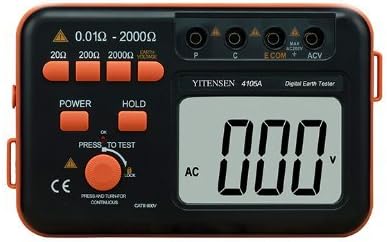
Figure 3.1: Front view of the Victor 4105A Digital Earth Resistance Tester, showing the LCD display, function buttons, rotary switch, and input terminals (P, C, ECOM, ACV).
3.1. Components and Controls
- LCD Display: 84.8×59.8mm display, maximum display "1999". Shows measurement readings and indicators.
- Power Button: Turns the device on and off.
- Hold Button: Freezes the current reading on the display.
- Press to Test Button: Initiates a measurement when pressed.
- Rotary Switch: Selects the measurement range (20Ω, 200Ω, or 2000Ω) and function.
- Input Terminals:
- P (Potential) Terminal: For potential electrode connection.
- C (Current) Terminal: For current electrode connection.
- ECOM (Earth Common) Terminal: For earth electrode connection.
- ACV (AC Voltage) Terminal: For AC voltage measurement.
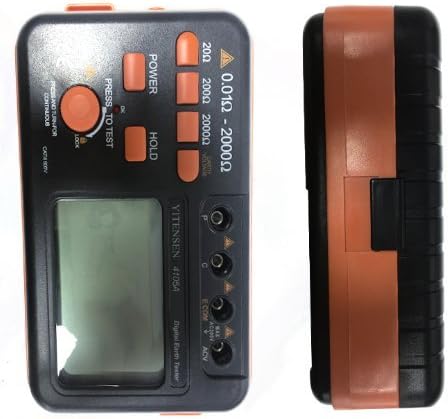
Figure 3.2: Side view of the Victor 4105A, highlighting its compact and robust design.

Figure 3.3: Back view of the Victor 4105A, showing the battery compartment cover and serial number label.

Figure 3.4: Included accessories for the Victor 4105A, typically comprising test leads (red, yellow, green) and earth rods, stored in a carrying bag.
4. Setup
4.1. Battery Installation
The Victor 4105A is powered by 8 x 1.5V LR alkalescence batteries. A low battery sign will be displayed when the battery level is low.
- Ensure the device is turned off.
- Locate the battery compartment on the back of the unit.
- Unscrew the battery compartment cover and remove it.
- Insert 8 x 1.5V LR batteries, observing the correct polarity (+/-) as indicated inside the compartment.
- Replace the battery compartment cover and secure it with the screws.
The device can also be connected to a power adapter (not included) for continuous operation.
5. Operating Instructions
5.1. Measuring Ground Resistance
To measure ground resistance, follow these steps:
- Prepare the Test Site: Ensure the area is safe and free from live circuits.
- Connect Test Leads:
- Connect the ECOM terminal to the earth electrode (the system under test).
- Connect the P (Potential) terminal to the potential auxiliary electrode.
- Connect the C (Current) terminal to the current auxiliary electrode.
Ensure auxiliary electrodes are driven into the ground at appropriate distances from the earth electrode and each other, typically in a straight line.
- Select Range: Turn the rotary switch to the desired ground resistance range (20Ω, 200Ω, or 2000Ω). Start with the highest range if the resistance is unknown.
- Power On: Press the "POWER" button to turn on the tester.
- Perform Measurement: Press and hold the "PRESS TO TEST" button. The LCD will display the ground resistance value.
- Read and Record: Read the stable value on the LCD. If the reading is "1", it indicates an over-range condition; switch to a higher range.
- Hold Reading (Optional): Press the "HOLD" button to freeze the displayed reading. Press it again to release.
5.2. Measuring AC Voltage
The Victor 4105A can also measure AC voltage up to 200V.
- Connect Test Leads: Connect the test leads to the ACV and ECOM terminals.
- Select ACV Function: Turn the rotary switch to the ACV position.
- Power On: Press the "POWER" button.
- Perform Measurement: Connect the test leads to the AC voltage source. The LCD will display the AC voltage value.
6. Maintenance
6.1. Cleaning
To maintain the instrument's performance and appearance:
- Wipe the casing with a damp cloth and mild detergent. Do not use abrasive cleaners or solvents.
- Ensure no liquid enters the instrument.
- Keep the display clean and free from scratches.
6.2. Battery Replacement
Replace batteries when the low battery indicator appears on the display to ensure accurate measurements. Refer to Section 4.1 for battery installation instructions.
6.3. Storage
When not in use for extended periods, remove the batteries to prevent leakage. Store the instrument in its carrying case in a cool, dry place, away from direct sunlight and extreme temperatures.
7. Troubleshooting
| Problem | Possible Cause | Solution |
|---|---|---|
| Display shows "1" (Over Range) | Measurement value exceeds selected range. | Switch to a higher measurement range. |
| No display or dim display | Low or dead batteries; incorrect battery installation. | Replace batteries; check battery polarity. |
| Inaccurate readings | Poor test lead connections; auxiliary electrodes not properly placed; environmental interference. | Ensure secure connections; reposition auxiliary electrodes; minimize external electrical noise. |
| Device does not turn on | No power; faulty power button. | Check batteries; if problem persists, contact support. |
8. Specifications
| Parameter | Value |
|---|---|
| Ground Resistance Range | 20Ω, 200Ω, 2000Ω |
| Ground Resistance Accuracy (20Ω) | 0.01Ω / ±(2%+0.1Ω) |
| Ground Resistance Accuracy (200Ω) | 0.1Ω / ±(2%+3dgt) |
| Ground Resistance Accuracy (2000Ω) | 1Ω / ±(2%+3dgt) |
| Ground Current (AC Current) Range | 200V |
| Ground Current (AC Current) Accuracy | 0.1V / ±(2.0%+6dgt) |
| Display | 84.8×59.8mm LCD, max display "1999" |
| Over Range Presentation | "1" on top number |
| Power Source | 8 x 1.5V LR alkalescence battery (can connect with power adapter) |
| Power Dissipation | <800mW during test |
| Work Environment Temperature | 0-40°C |
| Work Environment Humidity | 30%-80%RH |
| Product Size | 175(L)×110(W)×70(D)mm |
| Weight (include battery) | Approx. 680g |
9. Warranty and Support
For warranty information and technical support, please contact the manufacturer or your local distributor. Keep your purchase receipt as proof of purchase.
Manufacturer: MeterTo
For further assistance, please visit the MeterTo brand page on Amazon.
Related documents4105A

Ask a question about this manual
Ask about setup, troubleshooting, compatibility, parts, safety, or missing instructions. Manuals+ will review the question and use this page’s manual context to help answer it.