
Introduction
The CHOICEMMED CBP1K2 is a fully automatic digital blood pressure monitor designed for accurate and reliable measurement of systolic and diastolic blood pressure, as well as pulse frequency, using the oscillometric method. This device features a large display, a talking function for voice broadcast of readings, and memory storage for two users. It is intended for home use and is certified with European CE and USFDA approvals, ensuring high accuracy and quality standards.
This manual provides essential information for the safe and effective operation of your blood pressure monitor. Please read it thoroughly before first use and keep it for future reference.
Important Safety Information
- Consult your physician before using this device if you have any medical conditions. Self-diagnosis and treatment based on measurements can be dangerous.
- This device is intended for adult use only. Do not use on infants or children.
- Do not use this device in a moving vehicle.
- Avoid eating, drinking alcohol, smoking, exercising, and bathing for 30 minutes before measurement. Rest for at least 5 minutes before taking a measurement.
- Do not use the cuff on an arm with a wound or medical treatment.
- If you experience discomfort during measurement, press the START/STOP button to immediately deflate the cuff.
- Keep the device out of reach of children and pets.
- Use only authorized accessories and parts.
- Do not attempt to repair the device yourself. Refer to the troubleshooting section or contact support.
Product Components
The CHOICEMMED CBP1K2 package includes the following items:
- Blood Pressure Monitor Unit (CBP1K2)
- Arm Cuff
- AC Adapter
- Batteries
- User Manual (this document)

Image: Overview of the CHOICEMMED CBP1K2 Blood Pressure Monitor, showing the main unit, arm cuff, and power adapter.
Setup
1. Install Batteries
- Open the battery compartment cover on the back of the monitor.
- Insert the provided batteries, ensuring correct polarity (+/-).
- Close the battery compartment cover securely.
2. Connect AC Adapter (Optional)
The device can be powered by the included AC adapter. If using the adapter, batteries are not strictly necessary but can serve as a backup.
- Insert the adapter plug into the DC input jack on the side of the monitor.
- Plug the AC adapter into a standard electrical outlet.

Image: Illustration showing the AC adapter connected to the blood pressure monitor unit.
3. Apply the Arm Cuff
- Insert the air plug of the cuff into the air jack on the left side of the monitor.
- Remove tight-fitting clothing from your upper arm.
- Place the cuff on your bare upper arm, approximately 2-3 cm above the elbow joint. The air tube should run down the center of your arm.
- Ensure the cuff is snug but not too tight. You should be able to insert two fingers between the cuff and your arm.
- Sit comfortably with your feet flat on the floor, and your arm resting on a table so the cuff is at heart level.
Operating Instructions
Taking a Measurement
- Ensure the cuff is correctly applied and you are in a relaxed, seated position.
- Press the START/STOP button. The cuff will automatically inflate.
- Remain still and silent during the measurement.
- Once the measurement is complete, the cuff will deflate, and your systolic pressure, diastolic pressure, and pulse rate will be displayed on the large LCD screen.
- The device will also provide a voice broadcast of the readings if the talking function is enabled.
- The measurement will automatically be stored in the selected user's memory.
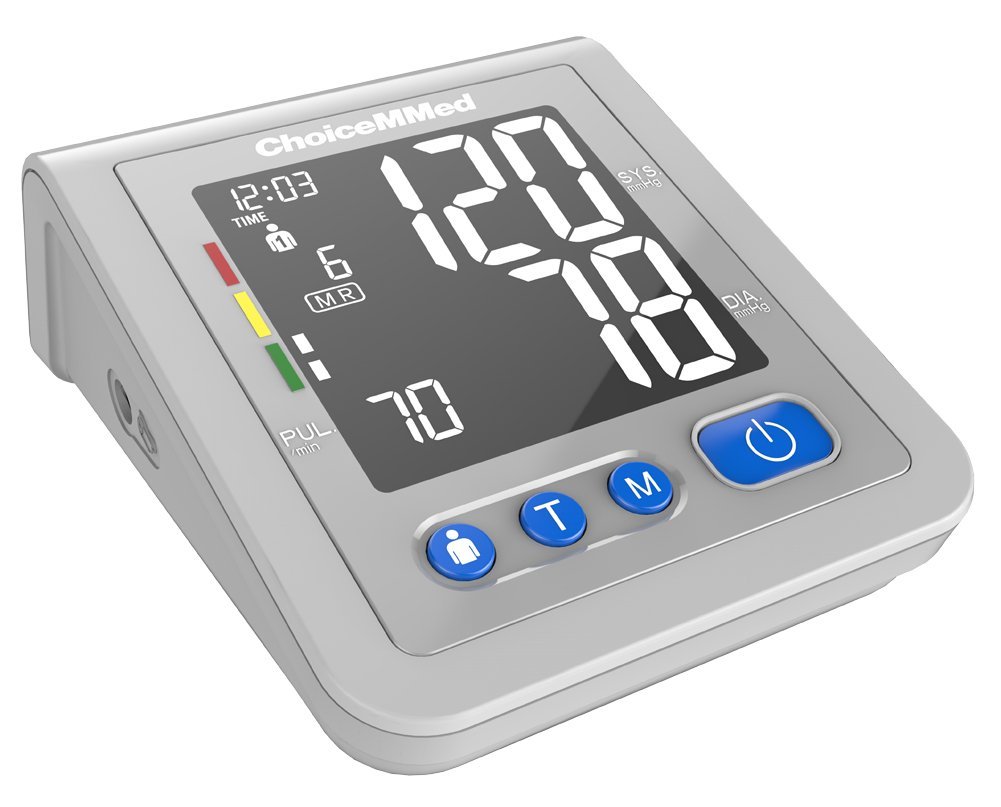
Image: The main display of the CHOICEMMED CBP1K2 monitor showing blood pressure and pulse readings.
Understanding Display Indicators and Features
- WHO Indicator: The display includes a color-coded indicator based on World Health Organization (WHO) blood pressure classification guidelines, helping you understand your readings at a glance.
- Arrhythmia Detection: An icon will appear on the display if an irregular heartbeat is detected during measurement. Consult your physician if this occurs frequently.
- Heart Rate Indication: Displays your pulse rate per minute.
- Intelligent Pressure: The device features intelligent inflation technology, which automatically adjusts the inflation level to your individual blood pressure, ensuring a comfortable and accurate measurement.

Image: Close-up of the monitor display highlighting the WHO blood pressure level indicator.

Image: An icon representing the intelligent pressure sensing feature of the blood pressure monitor.
Memory Function and User Selection
The CBP1K2 supports two users, each with 120 memory records, including date and time stamps. Use the USER button to switch between User 1 and User 2 before taking a measurement or reviewing past readings.

Image: The monitor display indicating the selection of one of two user profiles for memory storage.
Talking Function
The device features a voice broadcast function that announces measurement instructions and the recorded blood pressure readings. This feature is particularly helpful for users with visual impairments. Refer to the device settings for enabling or disabling this function.

Image: An icon representing the sound or voice broadcast feature of the blood pressure monitor.
Maintenance
- Cleaning: Wipe the monitor and cuff gently with a soft, dry cloth. Do not use abrasive cleaners or immerse the device in water.
- Storage: Store the device in a clean, dry place away from direct sunlight, extreme temperatures, and humidity.
- Battery Replacement: Replace all batteries with new ones when the low battery indicator appears on the display. Remove batteries if the device will not be used for an extended period.
- Cuff Care: Ensure the cuff is not twisted or sharply bent during storage.
Troubleshooting
| Problem | Possible Cause | Solution |
|---|---|---|
| Device does not power on. | Batteries are depleted or incorrectly inserted. AC adapter is not connected or faulty. | Check battery polarity and replace if necessary. Ensure AC adapter is securely connected to both the monitor and power outlet. |
| "E" or Error message displayed. | Cuff not applied correctly, movement during measurement, or air leakage. | Reapply the cuff correctly. Remain still and silent. Check cuff for damage or leaks. If the problem persists, contact support. |
| Inaccurate readings. | Incorrect cuff size, improper cuff placement, movement, or talking during measurement. | Ensure correct cuff size for your arm. Follow cuff application instructions carefully. Avoid movement and talking during measurement. Take multiple readings and average them. |
| No voice broadcast. | Talking function is disabled or volume is too low. | Check device settings to ensure the talking function is enabled and volume is adjusted appropriately. |
Specifications
| Model Name | CBP1K2 |
| Display Type | 4-inch Large LCD with Backlit and Big Font |
| Measurement Method | Oscillometric Method |
| Measurement Parameters | Systolic, Diastolic, Pulse Rate |
| Memory | 2 Users, 120 memories each with Date and Time |
| Special Features | Voice Broadcast, WHO Indicator, Arrhythmia Detection, Intelligent Pressure |
| Cuff Inflation | Intelligent, Ultra-silent design |
| Power Source | Battery Powered, Corded Electric (AC Adapter) |
| Safety Standards & Certifications | IEC, CE, USFDA |
| Item Weight | 680 g |
| Package Dimensions | 18.4 x 12 x 10.2 cm |
Warranty
The CHOICEMMED CBP1K2 Blood Pressure Monitor comes with a three-year warranty against any manufacturing defects. This warranty is subject to the terms and conditions specified on our website and the warranty card included with your product.
Please note that the warranty does not cover:
- Breakage of the BP monitor due to drops or impact.
- Water damage.
- Normal wear and tear.
- Consumable items such as batteries and the cuff.
Unauthorized repair attempts will void the warranty.
Support
For service issues or any queries regarding your CHOICEMMED CBP1K2 Blood Pressure Monitor, customers are required to send the product to our designated service center for repair. Our support department is committed to promptly addressing all customer inquiries.
Please refer to the warranty card or our official website for contact details and the address of the service center.
Disclaimer: This product is intended for tracking your health record and for monitoring purposes only. Any health-related information provided is for informational purposes only and should not be used to replace the advice of a healthcare professional, doctor, or your physician.

