
1. Introduction
This manual provides detailed instructions for the safe and efficient operation of your Ivation 13-Pint Desiccant Dehumidifier, Model IVADDH06. This compact and quiet unit is designed to remove moisture from small areas up to 270 square feet, making it suitable for various environments including homes, RVs, offices, crawl spaces, closets, and basements. Its desiccant rotor technology maintains efficiency even in colder conditions, providing consistent moisture removal.
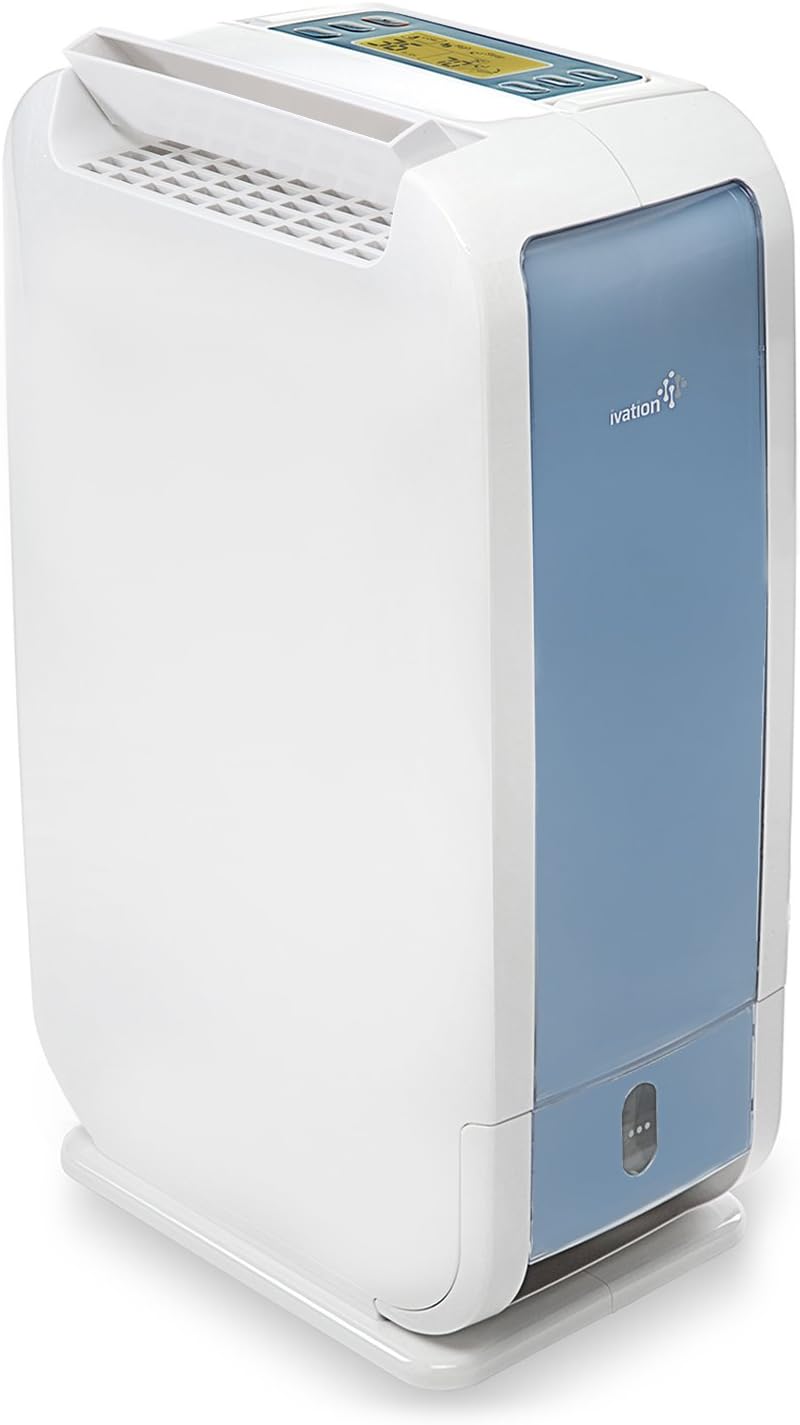
Figure 1: Ivation 13-Pint Desiccant Dehumidifier (Model IVADDH06)
The Ivation 13-Pint Desiccant Dehumidifier is a white, compact unit with a blue accent panel, designed for efficient moisture removal. It features a top-mounted control panel and a front-facing water reservoir.
2. Safety Information
Please read all safety instructions carefully before operating the dehumidifier to prevent injury or damage. Keep this manual for future reference.
- Ensure the unit is placed on a stable, level surface to prevent tipping.
- Maintain adequate clearance around the unit for proper airflow. A minimum of 8 inches on the sides and 24 inches above the top is recommended.
- Do not block air intake or exhaust vents.
- Do not operate the unit near flammable materials or in areas with excessive dust.
- Unplug the dehumidifier before cleaning, performing maintenance, or when not in use for extended periods.
- Do not immerse the unit, power cord, or plug in water or other liquids.
- Keep out of reach of children and pets.
- This unit features an anti-tilt safety shut-off. If the unit is accidentally tipped over, it will automatically power off to prevent accidents.

Figure 2: Anti-Tilt Safety Feature
The dehumidifier is equipped with an anti-tilt safety shut-off mechanism. If the unit is tilted beyond a safe angle, it will automatically power down to prevent potential hazards.
3. Package Contents
Verify that all items are present upon unpacking:
- Ivation 13-Pint Desiccant Dehumidifier
- Continuous Drain Hose
- User Manual (this document)
4. Product Features
The Ivation 13-Pint Desiccant Dehumidifier offers a range of features designed for effective and convenient moisture control:
- 13-Pint Desiccant Technology: Highly efficient desiccant rotor removes moisture, odors, and mold, performing well even in cooler temperatures (33°F to 104°F).
- Compact and Lightweight: Designed for portability with a convenient carry handle, suitable for spaces up to 270 sq ft.
- User-Friendly LCD Display: Digital interface for power control, humidity adjustment, fan speed selection, timer/sleep mode, vent swing, and screen brightness.
- Multiple Drainage Options: Features a 0.5-gallon (3.8-pint) removable water reservoir for manual emptying and includes a connection hose for continuous drainage.
- Quiet Operation: Engineered for low noise levels.
- Automatic Restart: The unit will automatically resume operation with previous settings after a power interruption.
- Washable Filter: Easy-to-clean, removable air filter for maintaining air quality and unit efficiency.
- Adjustable Swinging Air Vent: Directs airflow for targeted drying, useful for laundry.
- Auto-Shutoff: Automatically turns off when the water reservoir is full or when the desired humidity level is reached.

Figure 3: Compact Design and Applications
The dehumidifier's compact dimensions (6.85"D x 10.6"W x 17.35"H) make it suitable for various small areas such as homes, RVs, offices, crawl spaces, closets, and basements.

Figure 4: Performance in Cooler Temperatures
Desiccant technology allows this dehumidifier to collect significantly more water in cooler environments (e.g., 11.8 pints at 41°F) compared to traditional compressor dehumidifiers (e.g., 2.9 pints at 41°F).

Figure 5: Laundry Drying Function
The adjustable swinging air vent can be utilized to direct airflow, assisting in the drying of clothes in a laundry room or similar space.
5. Setup
5.1 Placement
Place the dehumidifier on a firm, level surface. Ensure there is at least 8 inches of clearance on all sides and 24 inches above the unit to allow for proper air circulation. Avoid placing the unit directly against walls or furniture that could obstruct airflow.
5.2 Power Connection
Plug the power cord into a grounded electrical outlet. Ensure the voltage matches the specifications listed on the unit's rating label.
5.3 Continuous Drainage Setup (Optional)
For continuous operation without manually emptying the water reservoir, you can set up the continuous drainage feature:
- Locate the circular knockout plug on the back of the unit, below the air intake vent.
- Gently remove the circular plug.
- Securely attach the included drain hose (with a 7/16" inner diameter) to the drainage outlet. Ensure the hose is firmly connected to prevent leaks.
- Direct the other end of the hose to a suitable drain, ensuring a continuous downward slope for gravity drainage.

Figure 6: Continuous Drainage Connection
To enable continuous drainage, remove the circular plug and securely attach the provided hose to the designated outlet on the back of the unit.
6. Operating Instructions
The dehumidifier features an intuitive control panel for easy operation.

Figure 7: Control Panel Overview
The digital control panel displays current humidity and temperature, and allows access to various settings including fan speed, timer, sleep mode, and vent swing.
6.1 Power On/Off
Press the ON/OFF button to turn the unit on or off.
6.2 Setting Desired Humidity
Press the Humidity button to cycle through desired humidity levels. The unit will operate until the set humidity is reached, then cycle on and off to maintain it.
6.3 Fan Speed
Press the MODE button to select between Low and High fan speeds. High speed provides faster dehumidification, while Low speed offers quieter operation.
6.4 Timer/Sleep Mode
Press the TIMER button to set an auto-off timer. Press and hold the TIMER button to activate Sleep Mode, which dims the display and reduces fan speed for quiet nighttime operation.
6.5 Vent Swing
Press the SWING button to activate or deactivate the oscillating air vent. This feature helps distribute dry air more evenly or can be used to target specific areas for drying.
6.6 Display Brightness
Press the DIM button to adjust the brightness of the LCD display.
6.7 Temperature Display
Press the °C/°F button to switch the temperature display between Celsius and Fahrenheit.
7. Maintenance
Regular maintenance ensures optimal performance and longevity of your dehumidifier.
7.1 Emptying the Water Reservoir
When the water reservoir is full, the unit will beep and automatically shut off. To empty:
- Gently pull out the water reservoir from the front of the unit.
- Carefully carry the reservoir to a sink or drain.
- Pour out the collected water.
- Slide the empty reservoir back into the unit until it clicks into place. The unit will then resume operation (if not in continuous drain mode).

Figure 8: Removable Water Reservoir
The dehumidifier features an easily removable water reservoir for convenient manual emptying.
7.2 Cleaning the Air Filter
The washable air filter should be cleaned regularly (e.g., every two weeks or as needed) to maintain efficiency:
- Ensure the dehumidifier is turned off and unplugged.
- Locate the filter cover on the back of the unit.
- Remove the filter cover and carefully pull out the filter.
- Wash the filter with warm, soapy water. Rinse thoroughly and allow it to air dry completely before reinserting.
- Reinsert the dry filter and replace the filter cover.

Figure 9: Washable, Removable Filter
The dehumidifier features a washable and removable air filter, located on the back of the unit, for easy cleaning and maintenance.
8. Troubleshooting
Refer to this section for common issues and their solutions.
| Problem | Possible Cause | Solution |
|---|---|---|
| Unit does not turn on. | No power; power cord not securely plugged in; water reservoir full or not properly seated; anti-tilt safety activated. | Check power connection. Ensure reservoir is empty and correctly inserted. Verify unit is on a level surface. |
| No water collected or insufficient dehumidification. | Humidity level set too high; room temperature too low; air filter clogged; air vents blocked; room size too large. | Lower desired humidity setting. Clean air filter. Ensure proper clearances around the unit. Confirm room size is within 270 sq ft. |
| Continuous drain hose not working. | Hose not securely attached; hose kinked or blocked; no downward slope for gravity drainage. | Ensure hose is firmly connected and free of kinks. Verify a continuous downward slope to the drain. |
| Unit is noisy. | Fan speed set to High; unit not on a stable surface; internal component issue. | Switch to Low fan speed. Ensure unit is on a stable, level surface. If noise persists, contact customer support. |
| Unit emits a slight odor. | Normal during initial operation (desiccant material). | This is normal and typically dissipates after initial use. Ensure good ventilation. |
| Unit produces warm air. | Normal operation of desiccant dehumidifiers. | Desiccant dehumidifiers naturally produce a small amount of warm air as part of the dehumidification process. This is not a malfunction. |
9. Specifications
| Brand | Ivation |
| Model Name | IVADDH06 |
| Dehumidification Capacity | 13 Pints per Day |
| Coverage Area | Up to 270 Square Feet |
| Water Tank Volume | 3.8 Pints (0.5 Gallons) |
| Product Dimensions (D x W x H) | 6.85" x 10.6" x 17.35" |
| Item Weight | 13.96 Pounds |
| Color | White |
| Number of Speeds | 2 (Low, High) |
| Operation Mode | Comfort, Continuous |
| Operating Temperature Range | 33°F to 104°F (1°C to 40°C) |
| Special Features | Automatic Restart, Continuous Draining, Digital Display, Quiet Operation, Removable Tank, Sleep Mode, Timer, Washable Filter, Adjustable Swinging Air Vent, Anti-Tilt Safety Shut-Off |
| Included Components | Dehumidifier, User Manual, Drain Hose |
10. Warranty and Support
For warranty information or technical support, please refer to the warranty card included with your product or visit the official Ivation website. Keep your purchase receipt as proof of purchase for any warranty claims.
Manufacturer: Ivation
UPC: 840102195569
ASIN: B07B8SCPZ4


