
Diablo V-Basic
Diablo V-Basic Ergonomic Office Chair User Manual
Model: V-Basic (White-Gray)
1. Introduction
Thank you for choosing the Diablo V-Basic Ergonomic Office Chair. This manual provides essential information for the safe assembly, proper operation, and effective maintenance of your new chair. Please read these instructions carefully before assembly and use, and retain them for future reference.
Safety Warnings
- Do not exceed the maximum weight capacity of 150 kg (330 lbs).
- Ensure correct assembly for stability and safety. Improper assembly can lead to injury.
- Exercise caution when operating adjustable mechanisms to prevent pinching or injury.
- Keep children and pets away during assembly.
- Use the chair only for its intended purpose as an office chair.
2. Setup and Assembly
The Diablo V-Basic chair is designed for straightforward assembly. All necessary tools are typically included. Follow these general steps:
- Attach Casters to Base: Insert the five casters into the openings at the end of each leg of the five-star aluminum base. Push firmly until they click into place.
- Insert Gas Lift: Place the gas lift cylinder into the central hole of the assembled five-star base. Do not remove the red cap from the gas lift until instructed.
- Attach Mechanism to Seat: Align the seat mechanism with the pre-drilled holes on the underside of the seat cushion. Secure it using the provided screws. Ensure the front of the mechanism faces the front of the seat.
- Attach Armrests: Secure the armrests to the sides of the seat cushion using the designated screws. Pay attention to the left and right armrest orientation.
- Attach Backrest: Connect the backrest to the seat mechanism or seat frame according to the specific design. Secure with screws.
- Assemble Headrest: Slide the headrest into the designated slots at the top of the backrest.
- Connect Seat to Base: Carefully place the assembled seat and backrest onto the gas lift cylinder, ensuring the central hole of the seat mechanism aligns with the top of the gas lift. Apply gentle downward pressure to secure.

Image: The stable five-star aluminum base with smooth-gliding casters, ready for the gas lift and seat assembly.
3. Operating and Adjustments
The Diablo V-Basic chair offers multiple adjustment options to customize your seating experience for optimal ergonomic support.
3.1 Seat Height Adjustment
To adjust the seat height, locate the lever on the right side, beneath the seat. While seated, pull the lever up to lower the seat. To raise the seat, stand up and pull the lever up. Release the lever at the desired height to lock it in place.
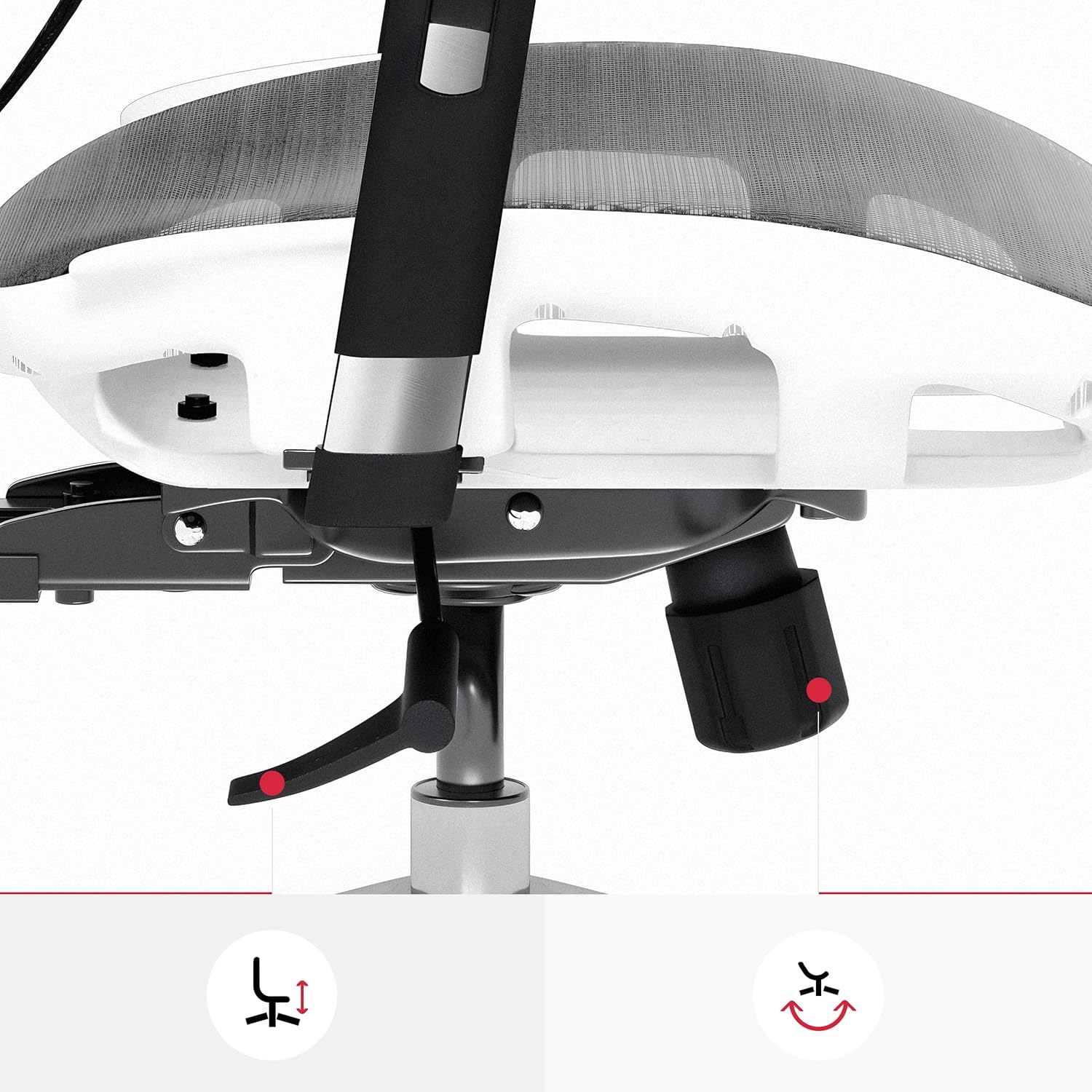
Image: The lever for seat height adjustment and the knob for tilt tension control are located beneath the seat.
3.2 Armrest Adjustments (3D)
The armrests are 3D adjustable, allowing for precise positioning to support your arms and shoulders.
- Height Adjustment: Press the button on the side of each armrest and move the armrest up or down to your preferred height. Release the button to lock.
- Forward/Backward Adjustment: Slide the armrest pad forward or backward to find the optimal position.
- Swivel Adjustment: Rotate the armrest pads left or right to angle them as needed.

Image: The armrests can be adjusted vertically, horizontally (forward/backward), and swiveled for personalized support.
3.3 Backrest Recline and Tilt Function
The chair features a recline function and adjustable tilt tension.
- Recline: To recline the backrest, lean back. The chair will follow your movement.
- Tilt Lock: Use the lever on the left side, beneath the seat, to lock the backrest in an upright position or unlock it for free movement.
- Tilt Tension: Adjust the round knob located beneath the seat, usually at the front, to increase or decrease the resistance of the recline function. Turn clockwise to increase tension, counter-clockwise to decrease.

Image: The backrest can recline, allowing for various seating angles to suit your preference.
3.4 Headrest Adjustment
The headrest can be adjusted to provide optimal neck and head support.
- Vertical Adjustment: Gently pull the headrest up or push it down to adjust its height.
- Tilt Adjustment: The headrest can also be tilted forward or backward to align with the curve of your neck.

Image: The headrest offers both vertical and tilt adjustments for personalized neck support.
4. Maintenance
Regular maintenance helps prolong the life and appearance of your Diablo V-Basic chair.
- Cleaning: For general cleaning, use a soft, damp cloth. For spot cleaning, use a mild soap solution and a clean cloth. Avoid harsh chemicals or abrasive cleaners, as these can damage the mesh fabric or aluminum components.
- Mesh Fabric: The breathable mesh fabric can be gently vacuumed to remove dust and debris.
- Casters: Periodically check the casters for accumulated hair or debris and clean them to ensure smooth movement and prevent floor damage.
- Fasteners: Occasionally check all screws and bolts to ensure they are tight. Retighten if necessary.
5. Troubleshooting
If you encounter any issues with your Diablo V-Basic chair, refer to the following common solutions:
- Chair Squeaks: Check all bolts and screws and tighten them. A small amount of silicone lubricant can be applied to moving parts if the squeaking persists.
- Chair Does Not Adjust Height: Ensure the gas lift lever is fully engaged. If the issue persists, the gas lift cylinder may need replacement.
- Casters Not Rolling Smoothly: Inspect casters for debris (hair, lint) and clean them thoroughly. Ensure they are properly inserted into the base.
- Chair Feels Unstable: Verify that all components are correctly assembled and all screws are securely tightened. Ensure the chair is on a flat, even surface.
6. Specifications
| Feature | Detail |
|---|---|
| Brand | Diablo |
| Model Number | V-Basic |
| Color | White-Gray |
| Product Dimensions (L x W x H) | 66 x 68 x 130 cm (26 x 26.8 x 51.2 inches) |
| Weight | 22 Kilograms (48.5 lbs) |
| Material | Mesh Fabric, Aluminum Frame |
| Special Features | Ergonomic, Height Adjustable, Reclinable, Rolling Casters |
| Maximum Load Capacity | 150 kg (330 lbs) |
| Recommended User Height | 150 cm - 200 cm (4'11" - 6'7") |
7. Warranty and Support
For warranty information or technical support, please refer to the documentation included with your purchase or contact Diablo customer service directly. Contact details can typically be found on the manufacturer's official website or through your retailer.
Related documentsV-Basic


Ask a question about this manual
Ask about setup, troubleshooting, compatibility, parts, safety, or missing instructions. Manuals+ will review the question and use this page’s manual context to help answer it.