
1. Introduction
Thank you for choosing the Remax RB-M7 Bluetooth Speaker. This manual provides essential information for setting up, operating, and maintaining your device. Please read it thoroughly before use to ensure proper functionality and to maximize your listening experience.
The Remax RB-M7 is a versatile portable speaker designed for high-fidelity audio playback and hands-free communication. It features Bluetooth 4.1 for stable wireless connection and an AUX input for wired devices, offering flexibility for various audio sources.

Figure 1.1: Front view of the Remax RB-M7 Bluetooth Speaker, showcasing its perforated design.
2. Safety Information
- Do not expose the speaker to extreme temperatures, humidity, or direct sunlight.
- Avoid dropping or subjecting the speaker to strong impacts.
- Keep the speaker away from water or other liquids.
- Do not attempt to disassemble or repair the speaker yourself. Refer to qualified service personnel.
- Use only the provided charging cable and a compatible 5V power adapter.
- Clean the speaker with a soft, dry cloth. Do not use abrasive cleaners or solvents.
3. Package Contents
Please check the package for the following items:
- 1 x Remax RB-M7 Bluetooth Speaker with Microphone
- 1 x USB Charging Cable
- 1 x Audio Cable (3.5mm AUX)
- 1 x User Manual (this document)
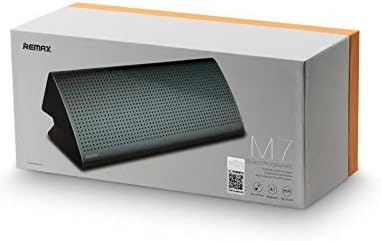
Figure 3.1: The Remax RB-M7 Bluetooth Speaker packaging, indicating included accessories.
4. Product Overview
Familiarize yourself with the speaker's components and controls:
- Power Button: Used to turn the speaker on/off.
- Micro USB Port: For charging the speaker.
- AUX Input (3.5mm): For wired audio connection.
- LED Indicators: Show power status, charging status, and Bluetooth pairing status.
- Microphone: For hands-free calling.
- Volume Controls: Integrated into the connected device or through specific speaker buttons (if available, refer to specific model for details).
- Integrated Hook: For convenient hanging.
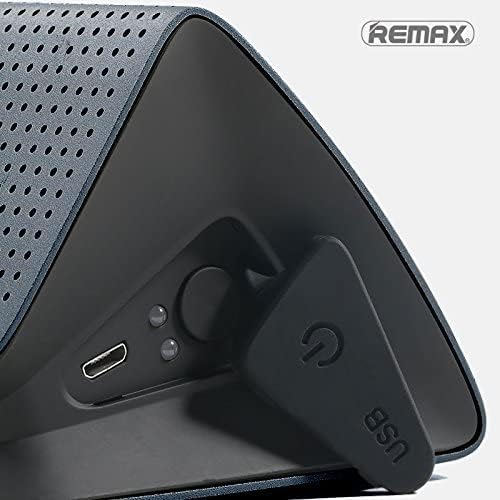
Figure 4.1: Detailed view of the speaker's rear panel, showing the Micro USB charging port, AUX input, and power button.
5. Setup
5.1 Charging the Speaker
- Connect the small end of the USB charging cable to the Micro USB port on the speaker.
- Connect the large end of the USB charging cable to a USB power adapter (5V) or a computer's USB port.
- The LED indicator will show the charging status. It typically takes about 4 hours for a full charge.
- Once fully charged, the LED indicator will change (e.g., turn off or change color). Disconnect the charging cable.
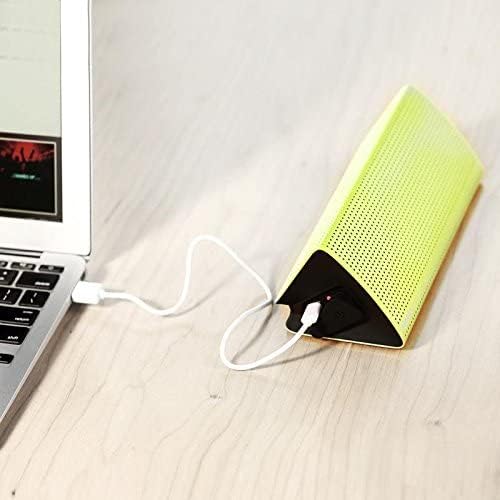
Figure 5.1: The speaker connected to a laptop via USB cable for charging.
5.2 Powering On/Off
- To power on: Press and hold the Power button until the LED indicator lights up and you hear an audible prompt.
- To power off: Press and hold the Power button until the LED indicator turns off and you hear an audible prompt.
5.3 Bluetooth Pairing
- Ensure the speaker is powered on and in Bluetooth pairing mode (the LED indicator will typically flash rapidly).
- On your mobile device (smartphone, tablet, laptop), enable Bluetooth.
- Search for available Bluetooth devices. You should see "RB-M7" or a similar name in the list.
- Select "RB-M7" to connect. Once paired, the LED indicator will stop flashing and remain solid, and you will hear a confirmation sound.
- The speaker will automatically connect to the last paired device when powered on, if it is within range.
5.4 AUX Connection
- Connect one end of the 3.5mm audio cable to the AUX input port on the speaker.
- Connect the other end of the 3.5mm audio cable to the headphone jack or audio output of your device (e.g., MP3 player, computer).
- The speaker will automatically switch to AUX mode.
6. Operating Instructions
6.1 Music Playback
- Once connected via Bluetooth or AUX, start playing music from your connected device.
- The speaker supports MP3, WAV, and WMA audio file formats.
- Control playback (play/pause, next/previous track) directly from your connected device.
6.2 Hands-free Calling
- When a call comes in while connected via Bluetooth, the speaker will ring.
- To answer a call: Press the Power button once.
- To end a call: Press the Power button once.
- To reject a call: Press and hold the Power button.
- The built-in microphone allows for clear hands-free conversations.
6.3 Volume Control
- Adjust the volume directly from your connected Bluetooth device or the audio source when using AUX.
7. Maintenance
- Cleaning: Use a soft, dry, lint-free cloth to wipe the speaker's surface. Do not use liquid or aerosol cleaners.
- Storage: Store the speaker in a cool, dry place away from direct sunlight and extreme temperatures when not in use for extended periods.
- Battery Care: To prolong battery life, avoid fully discharging the battery frequently. Charge the speaker regularly, even if not in frequent use.
8. Troubleshooting
| Problem | Possible Cause | Solution |
|---|---|---|
| Speaker does not turn on. | Battery is low or dead. | Charge the speaker for at least 30 minutes before attempting to power on. |
| Cannot pair with Bluetooth device. | Speaker is not in pairing mode; device Bluetooth is off; speaker is too far. | Ensure speaker is in pairing mode (flashing LED). Turn Bluetooth on your device. Move device closer to speaker (within 10 meters). |
| No sound from speaker. | Volume is too low; incorrect input mode; device not playing audio. | Increase volume on both speaker and connected device. Ensure correct mode (Bluetooth/AUX). Check if audio is playing on the source device. |
| Poor audio quality. | Interference; low battery; source audio quality. | Move speaker closer to device, away from other wireless devices. Charge speaker. Try a different audio source or file. |
9. Specifications
- Model: RB-M7
- Bluetooth Version: 4.1
- Connectivity: Bluetooth, 3.5mm AUX
- Compatible Devices: Laptop, Mobile, MP3 Players, Computer, Tablet
- Audio File Formats: MP3, WAV, WMA
- Transmission Distance: Up to 10 meters (without obstacles)
- Speaker Impedance: 4 Ohm
- Power Output: 5W x 2
- Battery Capacity: 2200 mAh Lithium-ion
- Charging Voltage: 5V
- Operating Voltage: 5V
- Charging Time: Approximately 4 hours
- Usage Time: Up to 6 hours (at maximum volume)
- Standby Time: Up to 100 hours
- Distortion: 0.005%
- Product Dimensions: 4.4 x 10.3 x 4.7 cm
- Product Weight: 960 grams
- Material: Metal
10. Warranty and Support
For warranty information and technical support, please refer to the warranty card included with your product or contact Remax customer service through their official website or authorized distributors. Keep your purchase receipt as proof of purchase for warranty claims.


