
Introduction
This manual provides detailed instructions for the installation, operation, and maintenance of your GoHawk TJ4-Q Motorcycle Speakers and Amplifier Audio Sound System. Please read this manual thoroughly before using the product to ensure proper function and longevity.
What's in the Box
Verify that all components are present in the package:
- 4 x Speakers
- 1 x Amplifier
- 1 x Wired Control
- 4 x Mounting Clamps
- 1 x DC Power Cord
- 2 x External Antennas (Bluetooth and FM)
- 1 x AUX Cable
- 1 x User Manual
- Mounting Screws and Fuse

Image: All components included in the GoHawk TJ4-Q system package.
Product Features
The GoHawk TJ4-Q system offers a range of features designed for outdoor audio:
- 4-Inch Full-Range Speakers: Four high-power speakers for clear audio.
- 1000W Amplifier: 4-channel amplifier for robust sound output.
- Bluetooth 5.0 Connectivity: Wireless audio streaming from compatible devices.
- Multiple Audio Inputs: 3.5mm AUX input, USB port, and SD card slot for MP3 files.
- FM Radio: Integrated FM radio tuner.
- Wired Control: External wired control for easy access to functions.
- Weatherproof Speakers: IP56 waterproof design for speakers (amplifier is not waterproof).
- Durable Construction: Speakers built with high-quality ABS material, amplifier with aluminum housing for heat dissipation.
- Adjustable Mounting: Supports 7/8"–1-1/4" bar sizes, compatible with Ape Hanger and crash bars.

Image: Overview of the system's main functionalities.
Installation
Follow these steps for proper installation of your GoHawk TJ4-Q system:
- Mounting the Speakers:
- Attach the larger bracket to the speaker with the loop facing outwards using the smaller screws.
- Secure the other side of the mounting bracket.
- Use the longer screws to fasten the bracket through the back, ensuring the screws face outwards.
- Place the rubber strips inside the clamps to prevent scratching and ensure a secure fit.
- Mount the speakers onto your motorcycle's handlebars, crash bars, or ATV/UTV roll cage. The clamps support bar sizes from 7/8" to 1-1/4".

Image: Speaker mounting hardware assembly.

Image: Speaker with 360-degree adjustable mounting bracket.
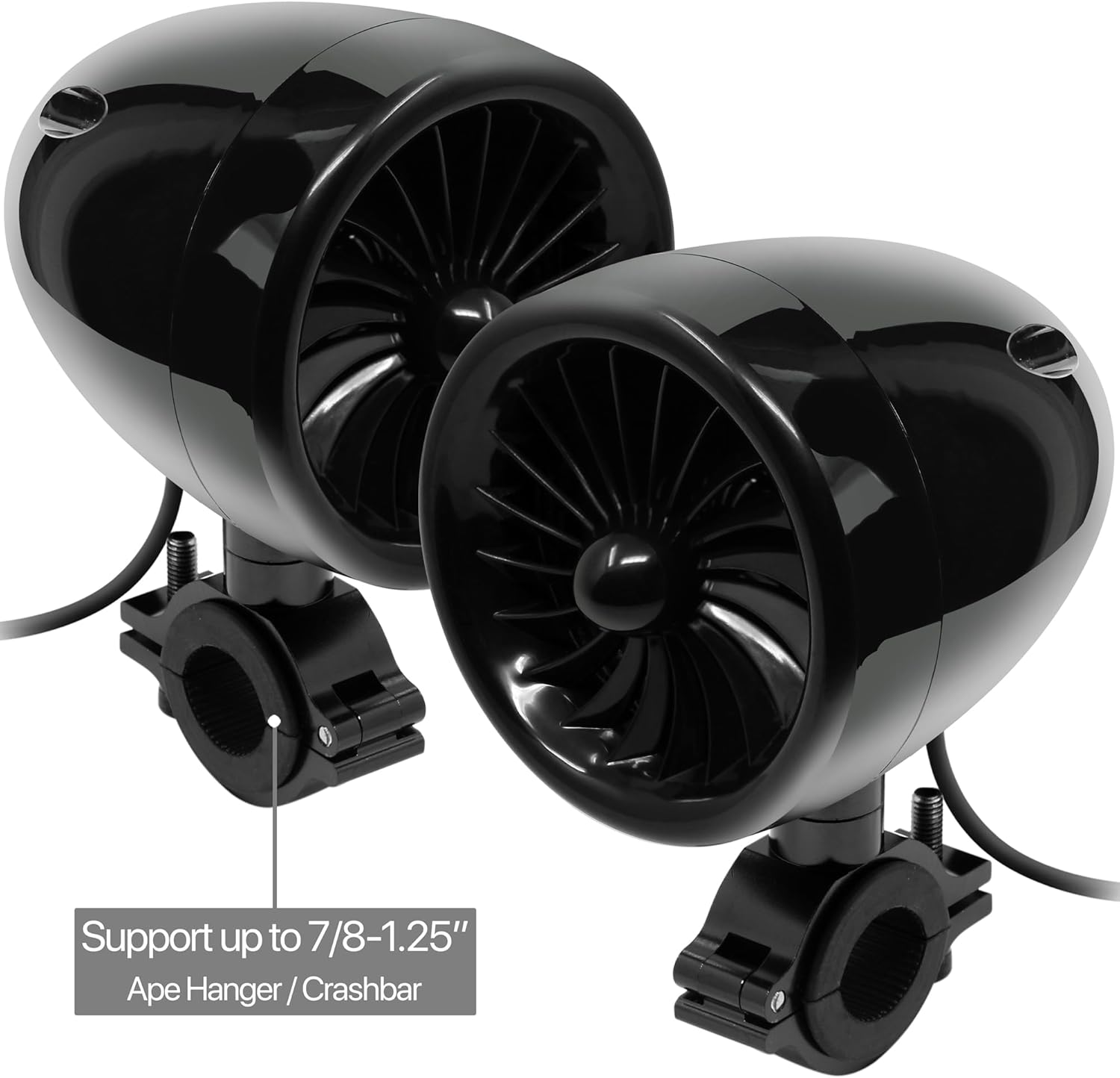
Image: Speakers mounted on a handlebar, compatible with various bar sizes.
- Mounting the Amplifier: Secure the amplifier in a dry, protected location. The amplifier is not waterproof.
- Connecting Antennas: Attach the Bluetooth and FM radio antennas to their respective ports on the amplifier.
Video: An unboxing and overview of the GoHawk TJ4-Q system components, demonstrating how to assemble the mounting brackets and connect the speakers to the amplifier. This video provides a visual guide for initial setup and installation steps.
Setup
Proper wiring is crucial for optimal performance:
- Power Connection: Connect the DC power cord to the amplifier's DC10-16V input. Connect the red wire to the positive (+) terminal of your 12V power source (e.g., vehicle battery) and the black wire to the negative (-) terminal.
- Speaker Connection: Plug each speaker's cable into the corresponding R-SP (Right Speaker) and L-SP (Left Speaker) RCA ports on the amplifier. Ensure correct left and right channel connections.
- Wired Control Connection: Plug the wired control cable into the 'RE' port on the amplifier.
- AUX Input (Optional): If using an external audio device via AUX, connect the 3.5mm AUX cable to the AUX port on the amplifier and to your device.

Image: Front panel of the amplifier with input ports and display.

Image: Rear panel of the amplifier with speaker outputs and power connections.
Operating Instructions
Use the wired control to manage your audio experience:
- Power On/Off: Press and hold the power button on the wired control.
- Mode Selection: Short press the power button to cycle through modes: Bluetooth, FM Radio, Auxiliary Input, USB, and SD Card.
- Volume Control: Use the '+' and '-' buttons to adjust the volume.
- Track/Station Navigation: Use the 'Previous' and 'Next' buttons to change tracks in Bluetooth/USB/SD mode or change stations in FM mode.
- Play/Pause: Press the play/pause button to control media playback.
- Bluetooth Pairing: In Bluetooth mode, the system will automatically enter pairing mode. Search for 'GoHawk' on your device and connect. A voice prompt will confirm successful pairing.
- FM Radio: In FM mode, the system will automatically scan and save available stations.
- USB/SD Playback: Insert a USB drive or SD card into the respective slot. The system will automatically detect and play MP3 files.
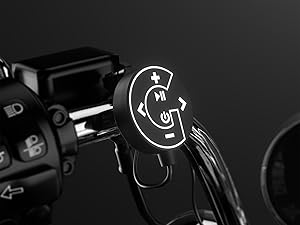
Image: Wired control unit for easy operation.
Maintenance
To ensure the longevity and performance of your audio system:
- Cleaning: Use a soft, damp cloth to clean the speakers and amplifier. Avoid harsh chemicals or abrasive cleaners.
- Weather Protection: While the speakers are IP56 waterproof, the amplifier is not. Ensure the amplifier is installed in a location protected from direct water exposure.
- Cable Inspection: Periodically check all cables and connections for wear, corrosion, or damage. Replace any damaged cables immediately.
- Fuse Replacement: If the system loses power, check the inline fuse on the power cable. Replace it with a fuse of the same rating (an extra fuse is provided).

Image: GoHawk speaker demonstrating its waterproof design.
Troubleshooting
If you encounter issues, refer to the following common problems and solutions:
- No Power:
- Check all power connections to ensure they are secure.
- Verify the vehicle's battery has sufficient charge.
- Inspect the inline fuse on the power cable and replace if blown.
- No Sound from Speakers:
- Ensure all speaker cables are securely connected to the amplifier.
- Check the volume level on both the wired control and your connected device.
- Confirm the correct input mode (Bluetooth, AUX, FM, USB/SD) is selected.
- Bluetooth Pairing Issues:
- Ensure the system is in Bluetooth mode.
- Turn off and on your device's Bluetooth, then try pairing again.
- Move your device closer to the amplifier to ensure it's within the 100-meter range.
- Distorted Sound:
- Reduce the volume on both the system and your connected device.
- Check speaker wires for any damage or loose connections.
- Ensure the power supply is stable (12V).
- FM Radio Reception Poor:
- Ensure the FM antenna is properly connected and extended.
- Relocate the vehicle to an area with better signal reception.
Specifications
| Feature | Specification |
|---|---|
| Brand | GoHawk |
| Model Number | TJ4-Q |
| Speaker Maximum Output Power | 1000 Watts |
| Frequency Response | 20 KHz |
| Connectivity Technology | Bluetooth |
| Bluetooth Range | 100 Meters |
| Audio Output Mode | Stereo |
| Mounting Type | Handlebar Mount |
| Enclosure Material | Aluminum (Amplifier) |
| Speaker Type | Outdoor |
| Is Waterproof | True (Speakers Only) |
| Control Method | Push Button (Wired Control) |
| Speaker Size | 4 Inches |
| Input Voltage | 12 Volts |
| Number of Audio Channels | 4.0 |
| Impedance | 4 Ohms |
| Signal-to-Noise Ratio | 98 dB |
| Item Weight | 6 Pounds |
| Compatible Devices | MP3 Player, Smartphone |
| Compatible with Vehicle Type | ATV, Motorcycle, UTV |
Warranty
The GoHawk TJ4-Q system comes with a 1-Year Limited Parts Warranty. This warranty covers defects in materials and workmanship under normal use. Please retain your proof of purchase for warranty claims. For specific terms and conditions, refer to the warranty card included in your package or contact customer support.
Support
For technical assistance, troubleshooting, or warranty inquiries, please contact GoHawk customer support:
- Website: GoldenHawkUSA.com
- Refer to the contact information provided in your product packaging.


