
Introduction
Welcome to the VTech Kidi Star Karaoke Machine experience! This manual provides essential information for setting up, operating, and maintaining your new karaoke machine. Designed for aspiring young singers, this machine offers a variety of interactive features to enhance musical creativity and performance.
Key features include:
- Music Magic Mode: Reduces the main vocal track of included songs or external music.
- MP3/Mobile Device Connectivity: Connect your own devices to play favorite tunes.
- Built-in Content: Six games, five voice-changing effects, fun sound effects, and eight original songs.
- Disco Light: A 180-degree twistable disco light for colorful effects.
- Built-in Recorder: Record performances for up to five minutes.
What's in the Box
Your VTech Kidi Star Karaoke Machine package includes:
- VTech Kidi Star Karaoke Machine (Pink/Purple) main unit
- Microphone (wired)
- Adjustable stand components
- Audio cable for MP3/mobile device connection
- Instruction Manual

Figure 1: Product packaging illustrating the included components.
Setup
- Battery Installation: The main unit requires 4 AA batteries (not included). The microphone may require 1 AAA battery (included). Open the battery compartment on the back of the main unit and the microphone, insert batteries according to polarity, and secure the covers.
- Stand Assembly: Assemble the adjustable stand by connecting the base, extension poles, and microphone holder. Ensure all parts click securely into place. The stand height can be adjusted to suit the user.
- Microphone Connection: Plug the wired microphone into the designated microphone jack on the main unit.
- Power Connection: Connect the karaoke machine to a power outlet using the provided power adapter.
- Optional Device Connection: To play music from an external device, connect your MP3 player or mobile device to the karaoke machine using the included audio cable.
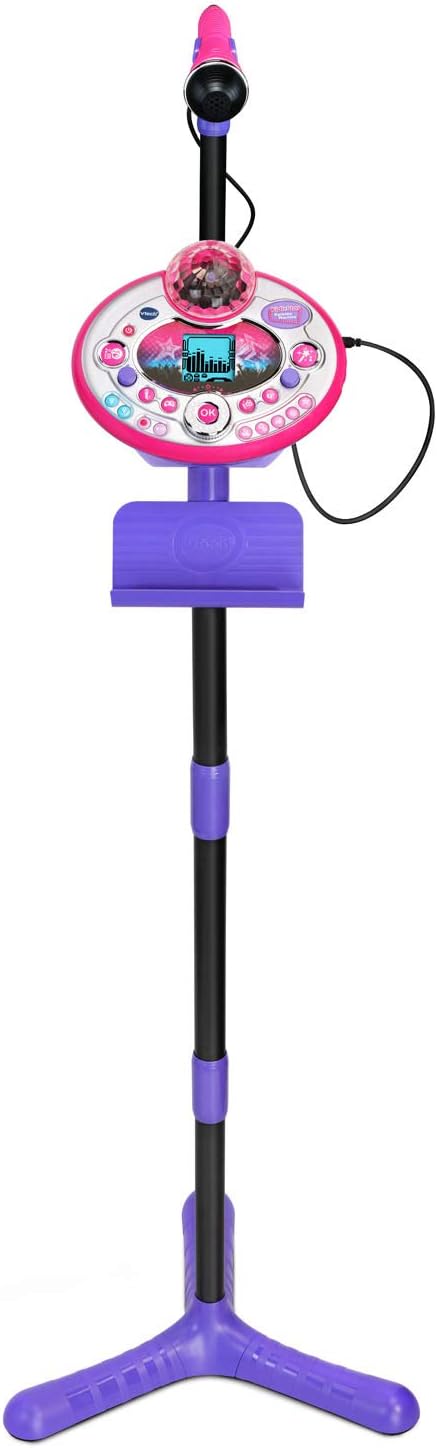
Figure 2: The VTech Kidi Star Karaoke Machine fully assembled.
Operating Instructions
Familiarize yourself with the controls and features of your Kidi Star Karaoke Machine:
- Power On/Off: Press the Power Button (usually marked with a circle and vertical line) to turn the machine on or off.
- Volume Control: Use the Volume Knobs to adjust the overall sound level and microphone volume independently.
- Music Magic Mode: Activate Music Magic Mode to reduce the main vocal track of songs, allowing you to sing lead.
- Voice Changer: Experiment with the Voice Changer button to apply five different fun voice effects.
- Disco Light: Twist the Disco Light 180 degrees for dynamic, colorful light effects that sync with your performance.
- Built-in Games: Select from six engaging built-in games for interactive fun.
- Sound Effects: Add audience sounds like applause, cheering, and laughter to simulate a live concert experience.
- Recording: Use the Record Button to capture your singing for up to five minutes. Play back your recordings to review your performance.

Figure 3: Detailed view of the control panel and microphone.
Maintenance
- Cleaning: Wipe the machine with a slightly damp cloth. Do not use harsh chemicals or abrasive cleaners.
- Battery Care: Remove batteries if the machine will not be used for an extended period. Replace all batteries at the same time with new ones of the same type and brand.
- Storage: Store the karaoke machine in a cool, dry place away from direct sunlight and extreme temperatures.
Troubleshooting
| Problem | Solution |
|---|---|
| No power | Check battery installation and ensure the power adapter is securely plugged in. Replace batteries if necessary. |
| No sound from microphone | Ensure the microphone is securely plugged in and its volume knob is turned up. Check microphone battery. |
| No sound from external device | Verify the audio cable is correctly connected to both the karaoke machine and the external device. Ensure the external device's volume is turned up. |
| Disco light not working | Check if the disco light feature is activated. Ensure batteries are fresh. |
Specifications
- Product Dimensions: 50.37 x 14.57 x 16.7 inches
- Item Weight: 3.52 ounces
- Item Model Number: 80-165800
- Manufacturer Recommended Age: 5 - 9 years
- Batteries: Main unit: 4 AA batteries (not included). Microphone: 1 AAA battery (included).
- Release Date: July 1, 2018
- Manufacturer: VTech
- Color: Pink/Purple
- Special Feature: Voice Changer
- Recommended Uses: Karaoke, Singing
Warranty and Support
For warranty information, technical support, or replacement parts, please refer to the official VTech website or contact VTech customer service directly. Keep your purchase receipt for warranty claims.


