
Introduction
The Humanscale M8 Dual Monitor Arm with Crossbar is designed to enhance your workspace ergonomics and efficiency. This robust and adaptable monitor arm can support a wide range of monitors, making it ideal for both single and dual-monitor setups. Its advanced mechanical spring system replaces traditional gas cylinders, offering superior durability and smooth, effortless adjustments. The M8 is engineered to provide a full range of dynamic adjustability, ensuring optimal viewing and a clutter-free desk environment.

Figure 1: Humanscale M8 Dual Monitor Arm with Crossbar (Black)
Setup and Installation
The M8 Dual Monitor Arm features an Integrated Bolt-Through Mount and Base for secure attachment to your desk. Follow these general steps for installation:
- Prepare Your Workspace: Clear the area where the monitor arm will be installed. Ensure your desk has a suitable hole for the bolt-through mount.
- Secure the Base: Insert the bolt-through mount through the desk hole and secure it from underneath using the provided hardware. Tighten firmly to prevent wobbling.
- Attach the Arm: Connect the monitor arm to the secured base. Ensure all connections are tight and stable.
- Mount the Monitors: The M8 features a quick release ball joint for easy monitor installation. Attach your VESA-compatible monitors (75mm and 100mm VESA plates supported) to the crossbar. The crossbar accommodates two monitors, each weighing up to 20 lbs (40 lbs total).
- Cable Management: Utilize the integrated cable management system to route and conceal monitor cables, maintaining a clean and organized workspace.
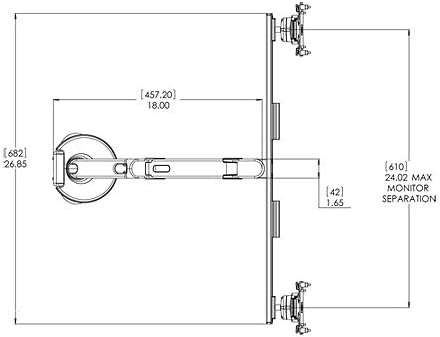
Figure 2: Technical dimensions of the M8 Dual Monitor Arm, showing maximum monitor separation.
Video 1: Official Humanscale video demonstrating monitor arm features and adjustments.
Operating the Monitor Arm
The M8 Monitor Arm allows users to effortlessly retract, swivel, rotate, or reposition monitors up or down to fit any body or any task. This dynamic adjustability is crucial for creating an ergonomic workstation.
- Height Adjustment: The arm offers 11.5 inches of dynamic height adjustment. Adjust the monitor height so the top line of text is at or slightly below eye level.
- Depth Adjustment: Enjoy 22 inches of depth adjustment. Position the monitor at arm's length away for optimal viewing distance.
- Tilt and Swivel: Tilt the top of the monitor slightly away from you until your line of sight is perpendicular to the screen. Swivel the monitors as needed for collaborative work or to adjust viewing angles.
- Rotation: Rotate the monitor from landscape to portrait orientation for different tasks, such as document viewing or coding.
- 180-degree Stop Mechanism: The arm includes a 180-degree stop mechanism to prevent wall damage from over-rotation, especially useful in cubicle environments.
Properly positioning your monitor increases viewing safety and comfort, minimizing potential health risks such as neck and shoulder strain, eye fatigue, and headaches. The full lateral movement of the arm also facilitates quick and easy information sharing in multi-user workstations.
Maintenance
The Humanscale M8 Monitor Arm is designed for durability and minimal maintenance. To ensure its longevity and optimal performance:
- Cleaning: Wipe down the arm and base with a soft, damp cloth. Avoid using harsh chemicals or abrasive cleaners, which may damage the finish.
- Cable Management: Periodically check the integrated cable management system to ensure cables are securely routed and not pinched.
- Joints and Fasteners: While designed for long-term stability, occasionally check that all fasteners and joints are secure. Do not overtighten.
Troubleshooting
If you encounter any issues with your Humanscale M8 Monitor Arm, consider the following common solutions:
- Monitor Sagging/Not Holding Position: The M8 features counterbalance adjustment with simple hex screw adjustment. Use the provided hex key to adjust the tension until the monitor holds its desired position.
- Difficulty Adjusting: Ensure no cables are snagged or obstructing movement. Check that the arm is not overloaded beyond its weight capacity (up to 40 lbs total for two monitors, 8-40 lbs for single).
- Wobbling: Verify that the bolt-through mount is securely fastened to the desk and that all arm connections are tight.
For persistent issues, refer to the detailed specification sheet or contact Humanscale customer support.
Specifications
| Feature | Detail |
|---|---|
| Brand | Humanscale |
| Model | M8BB1C |
| Material | Metal (predominantly steel and recycled aluminum) |
| Color | Black |
| Compatible Devices | PC (Monitors) |
| Mount Type | Integrated Bolt-Through Mount and Base |
| Monitor Capacity (Single) | 8 to 40 lbs |
| Monitor Capacity (Dual with Crossbar) | Up to 20 lbs each (40 lbs Total) |
| Dynamic Height Adjustment | 11.5 inches |
| Depth Adjustment | 22 inches |
| Item Weight | 9 Pounds |
| VESA Support | 75mm and 100mm VESA plates |
| Special Features | Integrated Cable Management, 180-degree Stop Mechanism, Quick Release Ball Joint |

Figure 3: Humanscale M8 Monitor Arm Specification Sheet, detailing features and sustainability.
Warranty and Support
The Humanscale M8 Dual Monitor Arm comes with a Humanscale Limited 15-Year Warranty for 24/7 use on all parts. This warranty covers defects in materials and workmanship under normal use.
For warranty claims, technical support, or additional information, please visit the official Humanscale website or contact their customer service department. Keep your purchase receipt as proof of purchase.


