
1. Introduction
This manual provides essential information and instructions for the safe and efficient use of your Nokia 8 Sirocco TA-1005 smartphone. Please read this guide thoroughly before operating your device to ensure optimal performance and longevity. This device is designed for use with GSM, 3G, and 4G LTE networks. Compatibility with CDMA networks, including Verizon, Sprint, and US Cellular, is not supported. Verify network compatibility with your service provider prior to use.
2. What's in the Box
Upon unboxing your Nokia 8 Sirocco TA-1005, verify that all components are present:
- Nokia 8 Sirocco TA-1005 Device
- USB Type-C Cable
- Power Adapter
- Headset
- SIM Ejector Tool
- Quick Start Guide
- Safety and Warranty Information
3. Device Layout
Familiarize yourself with the physical components of your Nokia 8 Sirocco TA-1005.
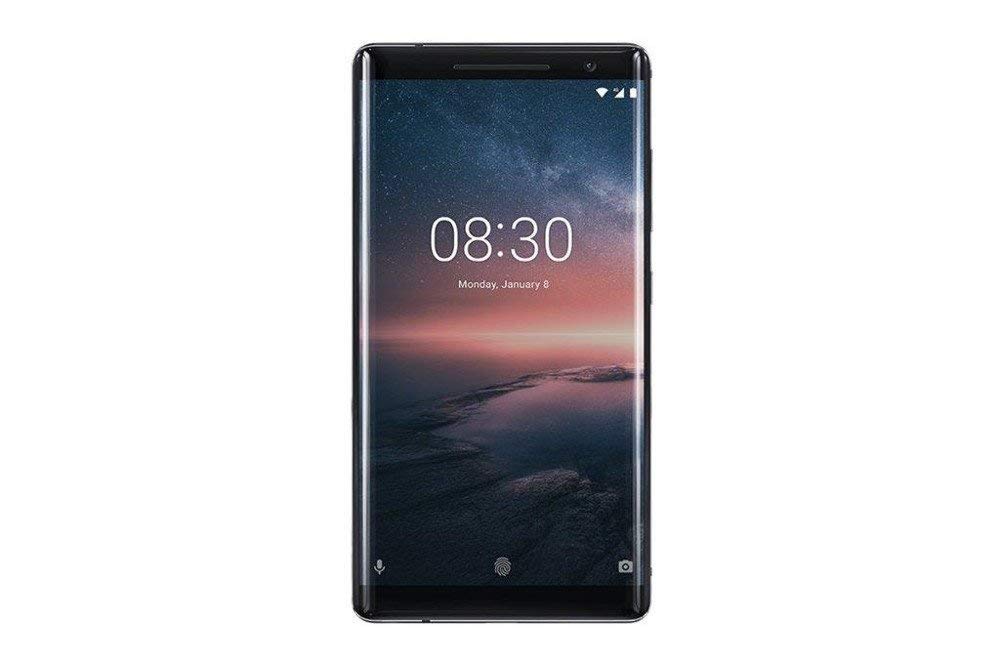
Figure 3.1: Rear view of the Nokia 8 Sirocco TA-1005. This image displays the dual camera setup with ZEISS optics, the circular fingerprint sensor below the camera, and the Nokia logo centrally placed. The 'androidone' branding is visible towards the bottom.
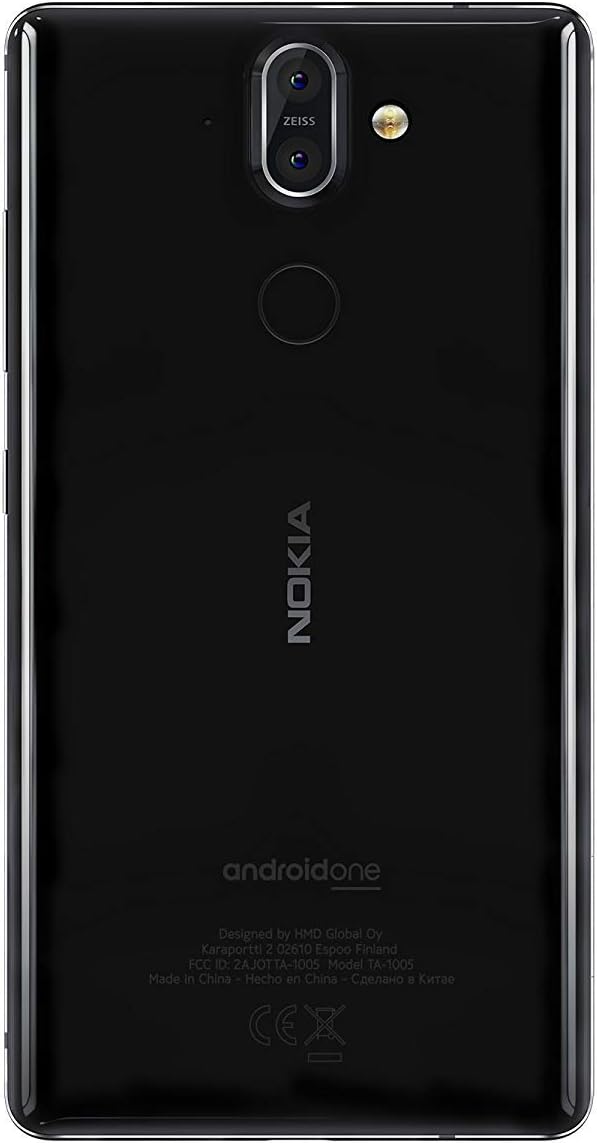
Figure 3.2: Front view of the Nokia 8 Sirocco TA-1005. The image highlights the 5.5-inch P-OLED curved display, the front-facing camera at the top, and the on-screen navigation buttons. The device features minimal bezels.

Figure 3.3: Side view of the Nokia 8 Sirocco TA-1005. This image illustrates the slim profile of the device, with the power button and volume rocker located on the right side for easy access.
Key Components:
- Front Camera: Located at the top of the display.
- Earpiece: For calls, located above the display.
- Display: 5.5-inch P-OLED capacitive touchscreen.
- Volume Buttons: On the right side, to adjust audio levels.
- Power/Lock Button: On the right side, to power on/off or lock/unlock the screen.
- USB Type-C Port: At the bottom, for charging and data transfer.
- Microphone: Located at the bottom and top.
- Speaker: Located at the bottom.
- SIM/Memory Card Tray: On the side, for inserting SIM cards.
- Rear Cameras: Dual cameras with ZEISS optics on the back.
- Flash: Dual-tone flash next to the rear cameras.
- Fingerprint Sensor: On the back, below the rear cameras.
4. Setup
4.1. Inserting the SIM Card
- Locate the SIM card tray on the side of your device.
- Insert the SIM ejector tool into the small hole on the tray to open it.
- Place your Nano-SIM card(s) into the designated slot(s) on the tray, ensuring the gold contacts face downwards.
- Carefully push the tray back into the device until it clicks into place.
Note: This device does not support external memory cards.
4.2. Powering On and Off
- To Power On: Press and hold the Power/Lock button until the Nokia logo appears.
- To Power Off: Press and hold the Power/Lock button until the power options menu appears, then select "Power off".
4.3. Initial Setup
Upon first power-on, the device will guide you through the initial setup process. This includes selecting your language, connecting to a Wi-Fi network, setting up your Google account, and configuring security features like fingerprint unlock or a PIN/pattern.
5. Operating Instructions
5.1. Making Calls
- Open the "Phone" application.
- Enter the phone number using the dial pad or select a contact from your address book.
- Tap the call icon to initiate the call.
5.2. Sending Messages
- Open the "Messages" application.
- Tap the "Start chat" or "New message" icon.
- Enter the recipient's number or select from contacts.
- Type your message in the text field.
- Tap the send icon.
5.3. Using the Camera
- Open the "Camera" application.
- Frame your subject on the screen.
- Tap the shutter button to take a photo.
- Switch between photo and video modes, or access advanced settings like portrait mode or panorama, as desired.
5.4. Internet Connectivity
- Wi-Fi: Go to Settings > Network & internet > Wi-Fi. Turn Wi-Fi on and select an available network. Enter the password if required.
- Mobile Data: Go to Settings > Network & internet > Mobile network. Ensure "Mobile data" is enabled.
5.5. Security Features
Your Nokia 8 Sirocco TA-1005 offers various security options:
- Fingerprint Unlock: Register your fingerprints via Settings > Security & Location > Fingerprint.
- Screen Lock: Set a PIN, pattern, or password via Settings > Security & Location > Screen lock.
6. Maintenance
6.1. Cleaning the Device
Use a soft, lint-free cloth to clean your device. Avoid using harsh chemicals or abrasive materials, which can damage the screen or finish.
6.2. Battery Care
- Charge your device using only Nokia-approved chargers and cables.
- Avoid exposing the device to extreme temperatures.
- Do not allow the battery to fully discharge frequently.
6.3. Software Updates
Regularly check for and install software updates to ensure your device has the latest features, security patches, and performance improvements. Go to Settings > System > System update.
7. Troubleshooting
If you encounter issues with your device, refer to the following common solutions:
| Problem | Solution |
|---|---|
| Device does not turn on | Ensure the battery is charged. Connect to a charger for at least 30 minutes. If unresponsive, perform a force restart by holding the Power button for 10-15 seconds. |
| Poor network signal | Check SIM card insertion. Move to an area with better network coverage. Restart the device. Verify network settings in Settings > Network & internet > Mobile network. |
| Applications are crashing | Clear the app's cache (Settings > Apps & notifications > [App Name] > Storage & cache > Clear cache). Update the app from the Google Play Store. If the issue persists, uninstall and reinstall the app. |
| Battery drains quickly | Reduce screen brightness. Close unused background apps. Disable Wi-Fi, Bluetooth, and GPS when not in use. Check battery usage in Settings > Battery to identify power-consuming apps. |
| Device is unresponsive | Perform a force restart by holding the Power button for 10-15 seconds. If the issue continues, consider a factory reset (Settings > System > Reset options > Erase all data (factory reset)). Warning: A factory reset will erase all data on your device. Back up important data before proceeding. |
8. Specifications
Detailed technical specifications for the Nokia 8 Sirocco TA-1005:
| Feature | Detail |
|---|---|
| Model Name | 8 Sirocco |
| Model Number | TA-1005 |
| Operating System | Android 8.0 (Oreo) |
| Processor | Qualcomm MSM8998 Snapdragon 835, Octa-core (4x2.5 GHz Kryo & 4x1.8 GHz Kryo) |
| GPU | Adreno 540 |
| RAM | 6 GB |
| Internal Storage | 128 GB |
| Display | 5.5 inches, P-OLED capacitive touchscreen, 1440 x 2560 pixels, Corning Gorilla Glass 5 |
| Rear Camera | 12MP Wide (f/1.7) + 13 MP Tele (f/2.6), dual-tone flash |
| Front Camera | 5MP |
| Battery Capacity | 3250 mAh |
| Charging | Fast Charging Support |
| Connectivity | Wi-Fi 802.11a/b/g/n, Bluetooth, USB Type-C |
| Dimensions | 43.36 x 43.17 x 0.75 cm |
| Weight | 181 g |
| SIM Type | Nano-SIM |
| Network Support | 2G GSM, 3G, 4G LTE (Note: Not compatible with CDMA networks) |
9. Safety and Warranty Information
9.1. Safety Guidelines
- Do not use the device in prohibited areas, such as aircraft or hospitals.
- Avoid exposing the device to water or excessive moisture.
- Use only original or approved accessories.
- Do not attempt to disassemble or repair the device yourself.
- Dispose of the device and its battery responsibly according to local regulations.
9.2. Warranty Information
Your Nokia 8 Sirocco TA-1005 is covered by a limited manufacturer's warranty. Please refer to the separate warranty document included in your product packaging or visit the official Nokia support website for detailed terms and conditions. Keep your proof of purchase for warranty claims.


