
Introduction
This manual provides comprehensive instructions for the safe and efficient use of your EFM TWS True Wireless Stereo HD Earbuds. Please read this manual thoroughly before using the product and retain it for future reference. These earbuds are designed to deliver high-definition audio with the convenience of true wireless connectivity.
Safety Information
- Hearing Protection: Avoid using earbuds at high volume levels for extended periods to prevent hearing damage.
- Driving Safety: Do not use earbuds while driving or cycling, as this may distract you and create a hazard.
- Water and Moisture: Keep the earbuds and charging case away from water, rain, and other liquids.
- Temperature: Do not expose the product to extreme temperatures (below 0°C or above 45°C).
- Disassembly: Do not attempt to disassemble or modify the product. This will void the warranty and may cause damage.
- Choking Hazard: This product contains small parts and is not suitable for children under 3 years old.
Package Contents
Please check that all items listed below are present in your package:
- EFM TWS True Wireless Stereo HD Earbuds (Left and Right)
- Portable Charging Case
- USB Charging Cable
- Multiple Sizes of Ear Cushions (Included components: Ear Cushions)
- User Manual (this document)
Product Overview
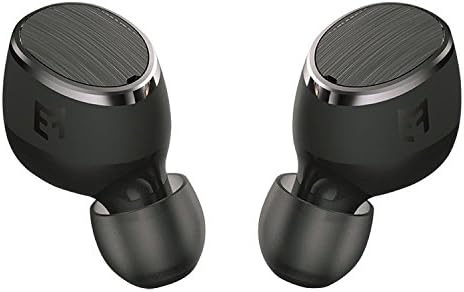
Image: A pair of EFM TWS True Wireless Stereo HD Earbuds, black in color, shown from a slightly angled front view. Each earbud features a metallic-brushed finish on the outer surface with the EFM logo subtly visible, and a soft silicone ear tip.
The EFM TWS True Wireless Stereo HD Earbuds are designed for comfort and high-quality audio. Key components include:
- Touch Control Area: Located on the outer surface of each earbud for managing playback, calls, and voice assistant.
- LED Indicator: Provides status updates for pairing, connection, and battery.
- Microphone: Integrated for hands-free calling.
- Charging Contacts: On the stem of each earbud, for charging within the case.
- Silicone Ear Tips: Interchangeable for a secure and comfortable fit.
Setup
1. Charging the Earbuds and Charging Case
Before first use, fully charge both the earbuds and the charging case.
- Place the earbuds into the charging case. Ensure the charging contacts align.
- Connect the USB charging cable to the charging port on the case and to a USB power source (e.g., computer, wall adapter).
- The LED indicators on the case and/or earbuds will show charging status. Refer to the LED indicator section (if available in a more detailed manual) for specific light patterns.
- Once fully charged, disconnect the charging cable.
2. Pairing with Your Device (Bluetooth)
The earbuds use Bluetooth for wireless connection.
- Initial Pairing:
- Remove both earbuds from the charging case. They will automatically power on and enter pairing mode. The LED indicator on one earbud may flash to indicate pairing mode.
- On your device (smartphone, tablet, etc.), go to the Bluetooth settings.
- Search for available devices and select "EFM TWS Earbuds" (or similar name).
- Once connected, the LED indicator will stop flashing, and you may hear an audible confirmation.
- Reconnection: After initial pairing, the earbuds will automatically connect to the last paired device when removed from the charging case, provided Bluetooth is enabled on the device.
Operating Instructions
Power On/Off
- Power On: Remove earbuds from the charging case. They will power on automatically. Alternatively, press and hold the touch control area on both earbuds for approximately 3 seconds.
- Power Off: Place earbuds back into the charging case. They will power off automatically. Alternatively, press and hold the touch control area on both earbuds for approximately 5 seconds.
Music Playback (Touch Control)
- Play/Pause: Single tap on either earbud's touch control area.
- Next Track: Double tap on the right earbud's touch control area.
- Previous Track: Double tap on the left earbud's touch control area.
- Volume Up: Triple tap on the right earbud's touch control area.
- Volume Down: Triple tap on the left earbud's touch control area.
Call Management (Touch Control)
- Answer/End Call: Single tap on either earbud's touch control area during an incoming call or active call.
- Reject Call: Press and hold the touch control area on either earbud for approximately 2 seconds during an incoming call.
Voice Assistant (Touch Control)
- Activate Voice Assistant: Press and hold the touch control area on either earbud for approximately 2 seconds (when not on a call).
Maintenance
- Cleaning: Use a soft, dry, lint-free cloth to clean the earbuds and charging case. Do not use abrasive cleaners, alcohol, or chemical solvents.
- Ear Tips: Remove ear tips periodically and clean them with a damp cloth. Ensure they are completely dry before reattaching.
- Charging Contacts: If charging issues occur, gently clean the charging contacts on both the earbuds and the case with a dry cotton swab.
- Storage: When not in use, store the earbuds in their charging case to protect them and keep them charged. Store in a cool, dry place.
- Battery Care: To prolong battery life, avoid fully discharging the earbuds and charging case frequently. Charge them regularly, even if not in constant use.
Troubleshooting
If you encounter issues with your EFM TWS Earbuds, please refer to the following common solutions:
| Problem | Solution |
|---|---|
| Earbuds not pairing with device. |
|
| Only one earbud is working. |
|
| Earbuds not charging. |
|
| Low volume or poor sound quality. |
|
Factory Reset
If issues persist, a factory reset may resolve them. The exact procedure can vary, but a common method is:
- Forget "EFM TWS Earbuds" from your device's Bluetooth list.
- Place both earbuds into the charging case.
- While in the case, press and hold the touch control area on both earbuds for approximately 10-15 seconds until the LED indicators flash rapidly or change color, indicating a reset.
- Remove earbuds and attempt to pair again as per the "Initial Pairing" instructions.
Specifications
| Feature | Detail |
|---|---|
| Brand | EFM |
| Model | TWS True Wireless Stereo HD Earbuds |
| Connectivity Technology | Wireless (Bluetooth) |
| Wireless Communication Technology | Bluetooth |
| Form Factor | In Ear |
| Control Method | Touch |
| Colour | Black |
| Material | Plastic |
| Included Components | Ear Cushions |
| Headphones Jack | USB (for charging case) |
Warranty and Support
EFM products are covered by a manufacturer's warranty. For detailed warranty information, terms, and conditions, please refer to the official EFM website or the warranty card included with your product. For technical support or service inquiries, please contact EFM customer service through their official channels.
Please retain your proof of purchase for warranty claims.