
Sharp PN-B501
Sharp PNB501 50-Inch Monitor User Manual
Model: PN-B501
Introduction
Thank you for choosing the Sharp PNB501 50-inch monitor. This display is designed for high-quality visual performance, featuring a 1920x1080 resolution, a 5000:1 contrast ratio, and a built-in System-on-Chip (SoC) for enhanced functionality. This manual provides essential information for the proper installation, operation, and maintenance of your monitor. Please read it thoroughly before use and keep it for future reference.

Figure 1: Front view of the Sharp PNB501 50-inch monitor, showcasing its sleek design.
Setup
Follow these steps to set up your Sharp PNB501 monitor. Ensure all components are present and undamaged before proceeding.
1. Unpacking and Placement
- Carefully remove the monitor from its packaging. Retain all packaging materials for future transport or storage.
- Place the monitor on a stable, flat surface or mount it securely using a compatible VESA mount (sold separately). Ensure adequate ventilation around the display.
2. Connecting Cables
The PNB501 features various input ports for versatile connectivity.
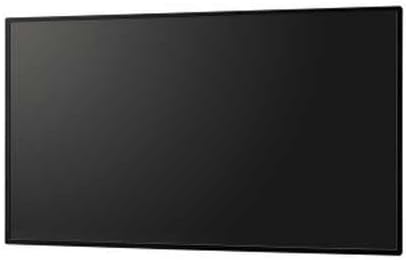
Figure 2: Rear view of the monitor, highlighting the various input and output ports.
- Power Connection: Connect the power cord to the monitor's AC inlet and then to a grounded electrical outlet.
- Video Input: Connect your video source (e.g., PC, media player) to the monitor using a DisplayPort cable (Display Port x 1 Mini) or other available video inputs.
- Audio Connection: If your video source does not transmit audio via the video cable, connect an audio cable from your source to the monitor's audio input.
- Network Connection: For network features or SoC functionality, connect an Ethernet cable to the LAN port.
3. Initial Power-On
- Press the power button on the monitor or remote control.
- The monitor will display the Sharp logo and then search for an active input signal.
- If no signal is detected, ensure your source device is powered on and the correct input is selected on the monitor.
Operating Instructions
This section covers the basic operation of your Sharp PNB501 monitor.
1. Power On/Off
- To turn on the monitor, press the Power button on the monitor's control panel or the remote control.
- To turn off the monitor, press the Power button again. The monitor will enter standby mode.
2. Input Selection
To switch between different video sources:
- Press the Input or Source button on the remote control or monitor.
- Use the navigation buttons to select the desired input (e.g., DisplayPort, HDMI).
- Press Enter or OK to confirm your selection.
3. Menu Navigation
Access and adjust monitor settings using the On-Screen Display (OSD) menu:
- Press the Menu button to open the OSD.
- Use the Up/Down or Left/Right navigation buttons to browse through menu options (e.g., Picture, Audio, System).
- Press Enter or OK to select a sub-menu or adjust a setting.
- Use the navigation buttons to change values or select options.
- Press Menu again or Exit to close the OSD.
Maintenance
Proper maintenance ensures the longevity and optimal performance of your Sharp PNB501 monitor.
1. Cleaning the Screen
- Always turn off and unplug the monitor before cleaning.
- Use a soft, lint-free cloth slightly dampened with water or a specialized screen cleaning solution.
- Gently wipe the screen surface. Avoid applying excessive pressure.
- Do not use abrasive cleaners, alcohol, benzene, or thinners, as these can damage the screen surface.
2. Cleaning the Cabinet
- Wipe the monitor cabinet with a soft, dry cloth.
- For stubborn dirt, use a cloth lightly dampened with a mild, non-abrasive detergent solution, then wipe dry.
3. Storage
- If storing the monitor for an extended period, place it in its original packaging to protect it from dust and physical damage.
- Store in a cool, dry place away from direct sunlight and extreme temperatures.
Troubleshooting
This section provides solutions to common issues you might encounter with your Sharp PNB501 monitor. If the problem persists, please contact customer support.
No Power
- Ensure the power cord is securely connected to both the monitor and a working electrical outlet.
- Check if the power outlet is active by plugging in another device.
- Press the power button firmly on the monitor or remote control.
No Signal / Blank Screen
- Verify that the video cable (e.g., DisplayPort) is securely connected to both the monitor and the source device.
- Ensure the source device (e.g., computer) is powered on and outputting a signal.
- Use the monitor's input selection feature to ensure the correct input source is chosen.
- Try connecting a different video source or cable to rule out a faulty component.
Poor Picture Quality
- Check the resolution settings on your source device. Ensure it is set to the monitor's native resolution (1920x1080).
- Adjust picture settings (brightness, contrast, sharpness) via the OSD menu.
- Ensure the video cable is not damaged or excessively long.
No Audio
- Increase the volume on the monitor and the source device.
- Check if the audio cable is properly connected (if not using audio over DisplayPort).
- Ensure the audio output on your source device is not muted or set to an incorrect output.
Specifications
Detailed technical specifications for the Sharp PNB501 monitor:
| Feature | Specification |
|---|---|
| Brand | Sharp |
| Model Number | PN-B501 |
| Screen Display Size | 49.5 Inches |
| Screen Resolution | 1920x1080 (FHD 1080p) |
| Aspect Ratio | 16:9 |
| Screen Surface Description | Glossy |
| Item Weight | 49 pounds |
| Product Dimensions (LxWxH) | 44.21 x 2.76 x 25.47 inches |
| Number of Processors | 4 (Built-in SoC) |
| Manufacturer | SHARP ELECTRONICS CORPORATION |
| Date First Available | March 2, 2018 |
Warranty and Support
Sharp stands behind the quality of its products. For specific warranty terms and conditions, please refer to the warranty card included with your product or visit the official Sharp website. General support information is provided below.
Customer Support
If you require technical assistance, have questions about your product, or need to arrange for service, please contact Sharp customer support. You can often find contact information on the official Sharp website or through the retailer where you purchased the product.
For additional resources and product information, you may visit the official Sharp store page:
Visit the Sharp Store on Amazon
Please note that return policies, such as the 30-day easy returns, are typically handled by the retailer.
Related documentsPN-B501


Ask a question about this manual
Ask about setup, troubleshooting, compatibility, parts, safety, or missing instructions. Manuals+ will review the question and use this page’s manual context to help answer it.