
Introduction
This digital thermometer allows you to monitor temperature in two locations simultaneously, along with the percentage of humidity. It features a clear display for easy reading and functions for recording maximum/minimum values and setting temperature alarms.
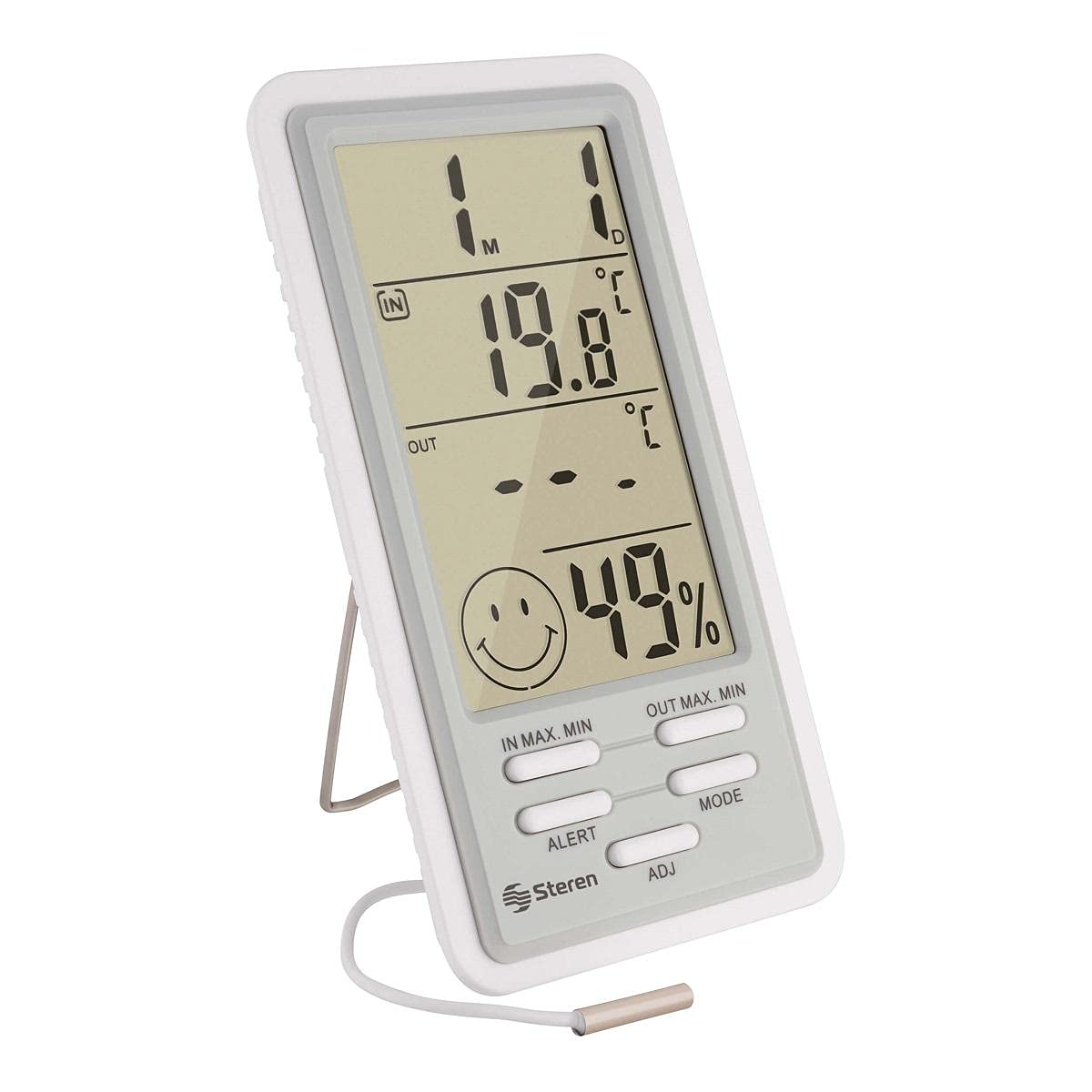
Image: Front view of the Steren TER-150 Digital Thermometer, displaying indoor temperature (19.8°C), outdoor temperature (---), and humidity (49%). The device has buttons for IN MAX. MIN, OUT MAX. MIN, ALERT, MODE, and ADJ, along with the Steren logo.
Setup
1. Battery Installation
The thermometer requires one AAA battery (included for testing). To install or replace the battery:
- Locate the battery compartment cover on the back of the device.
- Slide or unclip the cover to open it.
- Insert one AAA battery, ensuring the correct polarity (+/-) as indicated inside the compartment.
- Replace the battery compartment cover.
2. Sensor Placement
The thermometer features two temperature sensors: one integrated into the main unit for indoor readings and an external sensor with a 2-meter cable for outdoor or remote readings.
- Indoor Sensor: The main unit measures the temperature of its immediate surroundings. Place the unit in your desired indoor location.
- Outdoor/Remote Sensor: Extend the 2-meter cable sensor to the area where you wish to measure external or remote temperature. Ensure the sensor tip is protected from direct sunlight and precipitation for accurate readings.
Operating Instructions
Display Overview
The LCD screen simultaneously displays indoor temperature, outdoor temperature, and humidity percentage. It also shows maximum/minimum records, alarm status, and time/date.
Temperature and Humidity Measurement
- Indoor Temperature: Measured by the sensor within the main unit. Range: -10 to 50 °C (14 to 122 °F).
- Outdoor Temperature: Measured by the external wired sensor. Range: -50 to 90 °C (-58 to 194 °F).
- Humidity: Measured by a dedicated sensor within the main unit. Range: 10 to 99% non-condensing.
Button Functions
- MODE: Press to cycle through display modes (e.g., time, date, alarm settings).
- ADJ (Adjust): Used to adjust values when setting time, date, or alarm thresholds.
- IN MAX. MIN: Press to view the maximum and minimum indoor temperature recorded since the last reset. Press again to cycle through max, min, and current indoor temperature.
- OUT MAX. MIN: Press to view the maximum and minimum outdoor temperature recorded since the last reset. Press again to cycle through max, min, and current outdoor temperature.
- ALERT: Used to set temperature alarms. Press to activate/deactivate the alarm function. Hold to enter alarm setting mode.
Setting Temperature Units (°C/°F)
To switch between Celsius (°C) and Fahrenheit (°F), locate the small switch or button, usually on the back or side of the unit, and toggle it to your preferred unit.
Setting Temperature Alarms
The device allows you to set a maximum and minimum temperature threshold. If the temperature goes outside this range, an alarm will sound.
- Press and hold the ALERT button until the alarm setting mode is activated.
- Use the MODE button to select between setting the upper or lower temperature limit.
- Use the ADJ button to adjust the desired temperature value.
- Press ALERT again to confirm and exit the setting mode.
Maintenance
Cleaning
To clean the thermometer, wipe it with a soft, dry cloth. Do not use abrasive cleaners or immerse the unit in water. The product instructions specify "No empapar" (Do not soak).
Battery Replacement
When the display becomes dim or the unit stops functioning, replace the AAA battery as described in the "Battery Installation" section under Setup.
Troubleshooting
| Problem | Possible Cause | Solution |
|---|---|---|
| No display or dim display | Low or dead battery; incorrect battery installation. | Replace the AAA battery, ensuring correct polarity. |
| Inaccurate temperature readings | Sensor exposed to direct sunlight, heat sources, or moisture; sensor cable damaged. | Relocate the sensor to a shaded, dry area. Check the sensor cable for damage. |
| Outdoor temperature not displayed (---) | External sensor not connected or damaged. | Ensure the external sensor cable is securely plugged into the unit. Inspect the cable for visible damage. |
| Alarm not sounding | Alarm function deactivated; alarm thresholds not set correctly. | Activate the alarm using the ALERT button. Verify alarm temperature settings. |
Specifications
- Model Number: TER-150
- Indoor Temperature Range: -10 to 50 °C (14 to 122 °F)
- Outdoor Temperature Range: -50 to 90 °C (-58 to 194 °F)
- Humidity Range: 10 to 99% (non-condensing)
- Power Supply: 1 x AAA battery (1.5V)
- Battery Cell Type: Zinc-carbon
- Display Style: Digital LCD
- Special Features: Large display, Max/Min record, Temperature alarm, Clock, Date
- Included Components: Thermometer unit, 2-meter wired sensor, 1 x AAA test battery, Instruction manual
- Product Dimensions: 30 x 25 x 20 cm (approximate, based on packaging dimensions)
- Weight: 1 kg (approximate, based on shipping weight)
- Material: Plastic
Warranty Information
STEREN products are 100% original. This product comes with a warranty covering all its components and workmanship against any manufacturing defects and malfunctions from the date of delivery.

Image: Steren warranty details, confirming product originality and coverage for manufacturing defects and malfunctions from the delivery date.
Support
For further assistance, technical support, or warranty claims, please contact STEREN customer service. You can find more information and contact details on the official STEREN website.
Visit the Steren Official Store for product information and support resources.
