
1. Product Overview
The Fastrack Analog-Digital Men's Watch Model NT38035SL04 combines classic analog timekeeping with modern digital functionalities. This watch features a robust design suitable for various occasions.
Key Features:
- Time Display: Combines analog hands with a digital interface for enhanced functionality.
- Rugged Grey Dial: Features bold numerals and a layered design.
- Perforated Leather Strap: A breathable brown leather strap designed for comfort.
- Multi-Function Features: Includes day-date display, stopwatch, and alarm modes.
- 50M Water Resistance: Designed to withstand splashes, rain, and brief immersion.

Figure 1: Front view of the Fastrack Analog-Digital Men's Watch, showcasing the black dial and brown perforated leather strap.
2. Initial Setup
Before using your watch, please ensure it is properly set up. This section guides you through the basic adjustments.
2.1 Setting Analog Time
- Pull out the crown (located on the right side of the watch case) to the first click position.
- Rotate the crown to adjust the hour and minute hands to the desired time.
- Push the crown back into its normal position to start the analog timekeeping.
2.2 Setting Digital Time and Date
The digital display can be adjusted using the pushers on the watch case. Refer to the specific pusher functions for your model.
- Press the 'MODE' button (usually bottom-left) repeatedly until the digital time setting mode is displayed (often indicated by flashing digits).
- Use the 'RESET' button (usually top-left) to select the digit or setting you wish to change (e.g., hours, minutes, year, month, day).
- Use the 'START' button (usually top-right) to increase the selected value.
- Once all settings are correct, press the 'MODE' button to exit the setting mode.
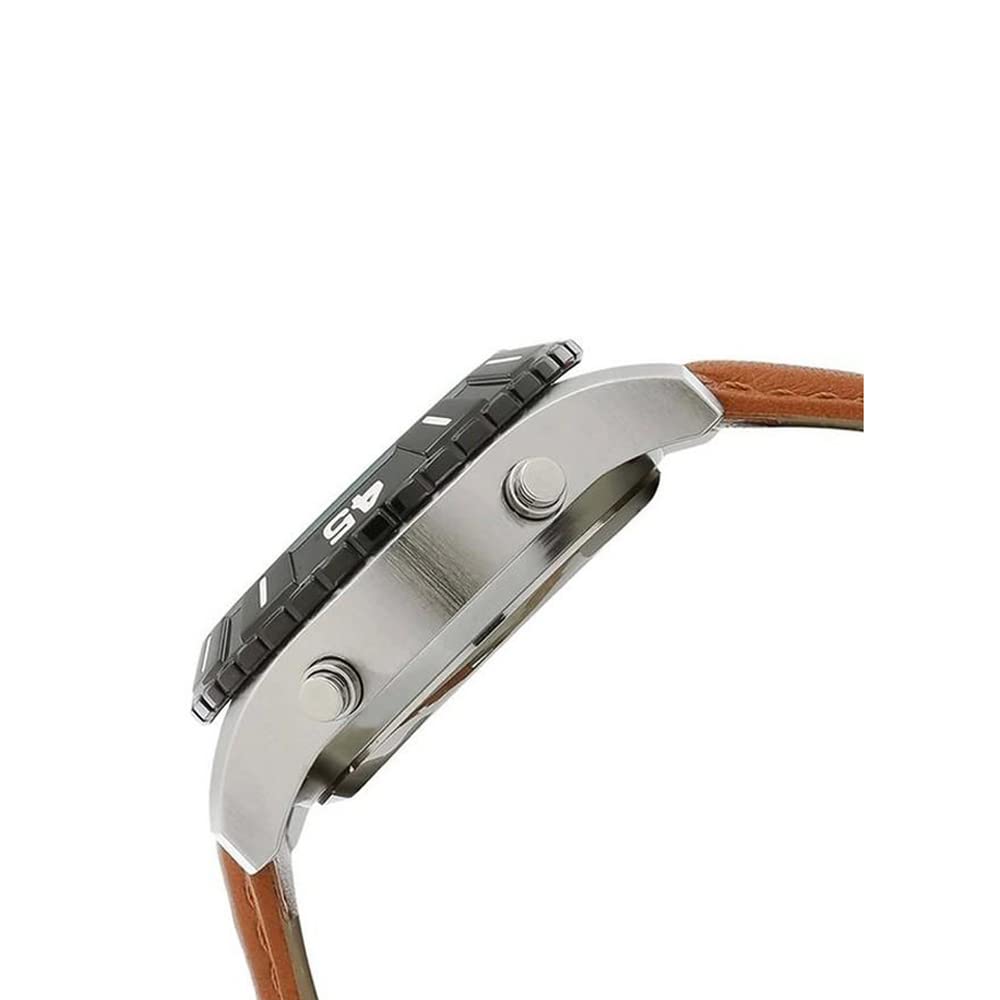
Figure 2: Side view of the watch, showing the crown and pushers used for setting time and accessing functions.
3. Operating Instructions
Your Fastrack watch offers multiple functions accessible via the digital display.
3.1 Mode Selection
Press the 'MODE' button (typically on the bottom-left) to cycle through the available digital modes:
- Time Display (Hour, Minute, Second, Day, Date)
- Stopwatch
- Alarm
3.2 Using the Stopwatch
- Navigate to the Stopwatch mode using the 'MODE' button.
- Press the 'START' button (typically top-right) to begin timing.
- Press 'START' again to pause the stopwatch.
- Press the 'RESET' button (typically top-left) to reset the stopwatch to zero.
3.3 Setting and Using the Alarm
- Navigate to the Alarm mode using the 'MODE' button.
- Press 'RESET' to select the hour or minute digits for adjustment.
- Use 'START' to change the selected value.
- Once the alarm time is set, press 'MODE' to confirm.
- To activate/deactivate the alarm, press 'START' while in Alarm mode (a small alarm icon usually indicates activation).
3.4 Using the Backlight
Press the 'LIGHT' button (typically bottom-right) to illuminate the digital display for a few seconds in low-light conditions.
4. Maintenance and Care
Proper care will ensure the longevity and performance of your Fastrack watch.
4.1 Water Resistance
This watch is rated for 50 meters (5 ATM) water resistance. This means it is suitable for short periods of recreational swimming, showering, or washing hands. It is not suitable for diving, snorkeling, or high-impact water sports. Do not operate the crown or pushers while the watch is wet or submerged.
4.2 Cleaning
- Wipe the watch case and crystal with a soft, dry cloth.
- For the leather strap, avoid prolonged exposure to water, direct sunlight, and harsh chemicals. Clean with a slightly damp cloth and allow to air dry.
4.3 Battery Replacement
When the watch battery runs low, the digital display may dim or the watch may stop functioning. Battery replacement should be performed by a qualified watch technician to maintain water resistance and ensure proper function.
5. Troubleshooting
If you encounter any issues with your watch, refer to the following common problems and solutions.
| Problem | Possible Cause | Solution |
|---|---|---|
| Analog hands not moving | Dead battery; Crown pulled out | Push crown back in; Replace battery (professional service recommended) |
| Digital display is blank or dim | Low battery | Replace battery (professional service recommended) |
| Digital time is incorrect | Incorrect setting | Refer to Section 2.2 to reset the digital time. |
| Water inside the watch | Water resistance compromised; Crown/pushers operated underwater | Immediately take the watch to a service center. Avoid further exposure to water. |
6. Specifications
| Feature | Detail |
|---|---|
| Brand | Fastrack |
| Model Number | NT38035SL04 |
| Display Type | Analog-Digital |
| Movement | Quartz |
| Water Resistance | 50 Meters (5 ATM) |
| Case Material | Brass (implied by product description) |
| Strap Material | Leather |
| Item Weight | 109 g |
| Product Dimensions | 14 x 7 x 10 cm |
| Batteries | 1 Lithium Metal battery (included) |
7. Warranty and Support
Your Fastrack watch is covered by a manufacturer's warranty. For service or support, please contact the manufacturer directly.
7.1 Manufacturer Warranty
This watch comes with a 2-year manufacturer warranty from the date of purchase. Please retain your proof of purchase for warranty claims.
7.2 Manufacturer Contact Information
Manufacturer: Titan Company Limited
Address: Sipcot Industrial Complex, Hosur, Tamil Nadu - 635129, India
Telephone: +91-(0)4344-664199

Figure 3: Back view of the watch, showing the case back and the buckle clasp of the leather strap.