
1. Product Overview
The Aquatic AV AQ-MP-5UBT-HS is a high-performance digital media receiver designed specifically for Harley-Davidson 1998-2013 touring motorcycles. This unit offers a comprehensive audio experience with modern connectivity options while maintaining compatibility with existing factory controls and mounting. It is built to withstand harsh conditions, featuring waterproof, UV protected, and salt/fog resistant properties.
Key Features:
- Bluetooth Connectivity: Seamlessly stream audio from your smartphone or other Bluetooth-enabled devices.
- SiriusXM Ready: Integrated SiriusXM receiver (SXV300V1 tuner included) for access to over 170 satellite radio stations (subscription sold separately).
- USB Input: Play MP3 media and charge your devices via the internal USB port.
- AM/FM Radio: Enjoy local radio with 30 pre-set memory slots.
- Powerful Amplifier: Features a 288W amplifier for robust sound output.
- RCA Pre-outs: High-quality 4V RCA (phono) pre-outs for connecting external amplifiers or powered subwoofers.
- Harley-Davidson Handlebar Control Compatibility: Control music directly using your motorcycle's existing handlebar controls.
- 3" LCD Display: View track information, songs, artists, playlists, and genres clearly.
- Durable Design: Waterproof, UV protected, and salt/fog resistant for reliability in various environments.
2. Setup and Installation
The AQ-MP-5UBT-HS is designed for a straightforward "plug and play" installation, utilizing your existing Harley-Davidson factory stereo mounting bracket and wiring connections. No complex wiring modifications are typically required.
2.1 Unpacking and Inspection
Carefully remove all components from the packaging. Inspect the unit and accessories for any signs of damage. Ensure all listed items are present before proceeding with installation.

Figure 1: Front view of the Aquatic AV AQ-MP-5UBT-HS Digital Media Receiver.
2.2 Installation Steps
- Remove Existing Stereo: Carefully remove your motorcycle's existing factory stereo unit. Refer to your motorcycle's service manual for specific instructions.
- Connect Wiring: Connect the AQ-MP-5UBT-HS to the motorcycle's existing wiring harness. The unit is designed for direct compatibility, minimizing the need for adapters.
- Install SiriusXM Tuner (SXV300V1): If using SiriusXM, connect the SXV300V1 tuner to the designated port on the media receiver. Ensure a secure connection.
- Secure the Unit: Mount the AQ-MP-5UBT-HS using the factory stereo mounting bracket. Ensure it is firmly secured to prevent movement during operation.
- Attach Faceplate: The faceplate is removable. Align the faceplate with the main unit and press firmly until it clicks into place.

Figure 2: The removable faceplate allows for easy access and security.

Figure 3: Internal compartment for safely storing and charging a smartphone or MP3 player via USB.
3. Operating Instructions
3.1 Power On/Off
- Press the POWER/MODE button to turn the unit on or off.
3.2 Source Selection
- Press the MODE button repeatedly to cycle through available sources: FM, AM, SiriusXM, Bluetooth, USB, AUX.
3.3 Bluetooth Operation
- Pairing: With the unit powered on, select Bluetooth mode. On your smartphone, search for available Bluetooth devices and select "Aquatic AV". Enter the PIN (if prompted, usually "0000").
- Streaming Audio: Once paired, you can play audio from your smartphone. Use the unit's controls or your handlebar controls to play/pause, skip tracks, and adjust volume.
3.4 USB Media and Charging
- Connect your USB device (e.g., flash drive with MP3s, smartphone for charging) to the internal USB port.
- The unit will automatically switch to USB mode and begin playing compatible audio files.
- Your connected device will also charge via the USB port.
3.5 AM/FM Radio
- Select FM or AM mode.
- Use the TUNE +/- buttons to manually tune to a station or press and hold to auto-seek.
- To save a preset, tune to the desired station, then press and hold one of the preset buttons (1-6) until you hear a confirmation beep.
3.6 SiriusXM Radio
- Select SiriusXM mode.
- Tune to channels using the TUNE +/- buttons or select from saved presets.
- Note: A SiriusXM subscription is required and sold separately.
3.7 Audio Controls
- Volume: Rotate the main knob to adjust the volume level.
- EQ/Balance/Fader: Press the AUDIO MENU button to access equalizer, balance, and fader settings. Use the main knob to adjust.
- XBS (Extra Bass System): Press the XBS button to activate or deactivate the extra bass feature.
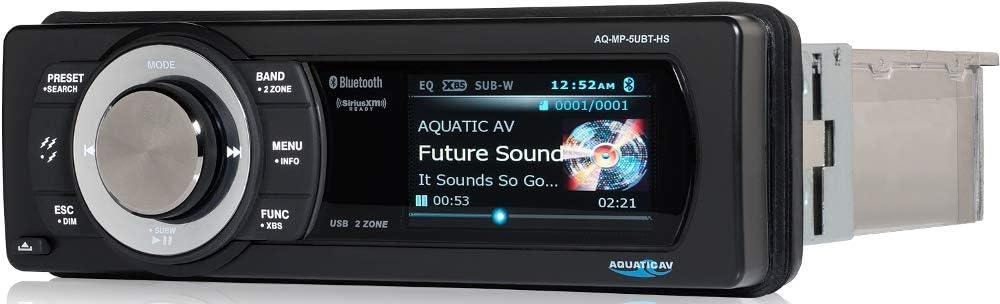
Figure 4: The 3" LCD display shows current track information and settings.
4. Maintenance
To ensure the longevity and optimal performance of your Aquatic AV AQ-MP-5UBT-HS, follow these maintenance guidelines:
- Cleaning: Use a soft, damp cloth to clean the unit's surface. Avoid abrasive cleaners or solvents that could damage the finish or waterproof seals.
- Faceplate Care: When removing the faceplate, handle it carefully to avoid scratching the display. Store it in a protective pouch when not in use.
- Connection Checks: Periodically check all wiring connections to ensure they are secure and free from corrosion, especially in marine or high-humidity environments.
- UV Protection: While the unit is UV protected, prolonged exposure to direct sunlight can still affect its appearance over time. Consider using a motorcycle cover when parked for extended periods.
5. Troubleshooting
If you encounter issues with your AQ-MP-5UBT-HS, refer to the following common problems and solutions:
| Problem | Possible Cause | Solution |
|---|---|---|
| No Power | Loose power connection; Blown fuse; Motorcycle ignition off. | Check power wiring and fuse. Ensure motorcycle ignition is on. |
| No Sound | Volume too low; Mute activated; Incorrect source selected; Speaker wiring issue. | Increase volume. Check if mute is active. Verify correct audio source. Inspect speaker connections. |
| Bluetooth Not Connecting | Unit not in pairing mode; Device too far; Previous connection interference. | Ensure unit is in Bluetooth pairing mode. Bring device closer. Forget previous Bluetooth connections on your device and re-pair. |
| Poor Radio Reception | Antenna not connected; Weak signal area; Interference. | Check antenna connection. Try tuning to a stronger station. Move away from sources of electrical interference. |
| Handlebar Controls Not Working | Incorrect wiring; Compatibility issue. | Verify all wiring for handlebar controls is correctly connected. Ensure your motorcycle model is within the 1998-2013 compatibility range. |
6. Specifications
| Model Number | AQ-MP-5UBT-HS + SXV300V1 (SiriusXM Tuner) |
| Brand | Aquatic AV |
| Compatibility | Harley-Davidson 1998-2013 Touring Motorcycles |
| Power Output | 288 Watts (Amplifier) |
| Connectivity Technology | Bluetooth, RCA, USB |
| Special Features | SiriusXM Ready, Waterproof, UV Protected, Salt/Fog Resistant |
| Display | 3" LCD Display |
| Audio Output Mode | Stereo |
| Surround Sound Channel Configuration | 4.0 |
| Item Weight | 6.64 pounds |
| Package Dimensions | 16.5 x 12 x 5 inches |
7. Warranty and Support
For warranty information, please refer to the documentation included with your product or visit the official Aquatic AV website. If you require technical assistance, troubleshooting beyond this manual, or have questions regarding your product, please contact Aquatic AV customer support directly.
Contact details for support can typically be found on the manufacturer's website or in the product packaging.


