
Introduction
Thank you for choosing the Black+Decker PC5000 Electric Pressure Cooker. This manual provides essential information for the safe and efficient operation of your appliance. Please read all instructions carefully before first use and retain for future reference.
Important Safety Instructions
WARNING: To reduce the risk of fire, electric shock, or injury, always follow basic safety precautions.
- Read all instructions before operating the appliance.
- Do not touch hot surfaces. Use handles or knobs.
- Close supervision is necessary when the appliance is used by or near children.
- Do not immerse the cord, plugs, or heating unit in water or other liquid.
- Unplug from outlet when not in use and before cleaning. Allow to cool before putting on or taking off parts.
- Do not operate any appliance with a damaged cord or plug, or after the appliance malfunctions or has been damaged in any manner.
- Do not use outdoors.
- Extreme caution must be used when moving an appliance containing hot liquids.
- Always check the pressure release valve and float valve for clogging before use.
- Do not open the pressure cooker until the unit has cooled and all internal pressure has been released.
Product Overview
Familiarize yourself with the components of your Black+Decker PC5000 Electric Pressure Cooker.

Figure 1: Front view of the Black+Decker PC5000 Electric Pressure Cooker. This image displays the main unit with its stainless steel body, black control panel, and black lid with handle. The control panel features a central dial and indicator lights.
Main Components:
- Lid: Features a safety lock, pressure release valve, and float valve.
- Main Unit: Houses the heating element and control panel.
- Inner Pot: Removable, non-stick cooking pot.
- Control Panel: For setting cooking functions and time.
- Handles: For safe handling and transport.

Figure 2: Close-up view of the lid and handle assembly of the Black+Decker PC5000 Electric Pressure Cooker. This image highlights the ergonomic design of the black handle and the stainless steel lid, showing the secure fit and components like the pressure release valve.
Setup
- Unpack: Carefully remove all packaging materials and accessories.
- Initial Cleaning: Before first use, wash the inner pot, sealing ring, and lid (excluding the main unit) with warm, soapy water. Rinse thoroughly and dry completely. Wipe the exterior of the main unit with a damp cloth.
- Placement: Place the pressure cooker on a stable, level, heat-resistant surface, away from heat sources and water. Ensure adequate ventilation around the unit.
- Insert Inner Pot: Place the clean, dry inner pot into the main unit. Ensure it sits correctly and is level.
- Connect Power: Plug the power cord into a grounded electrical outlet. The unit will typically beep and enter standby mode.
Operating Instructions
Control Panel Overview:
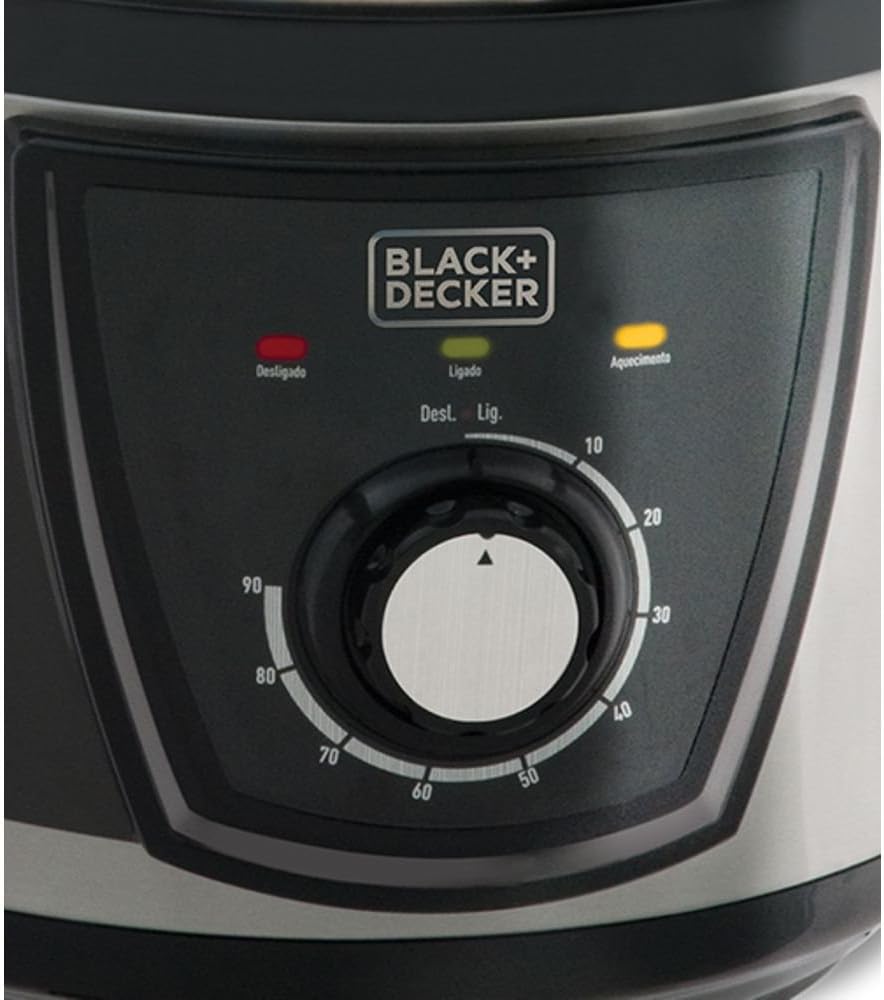
Figure 3: Detailed view of the Black+Decker PC5000 Electric Pressure Cooker's control panel. This image shows the central rotary dial for time selection, along with indicator lights for 'Desligado' (Off), 'Ligado' (On), and 'Aquecimento' (Heating), and various menu options.
- Central Dial: Used to select cooking time.
- Indicator Lights: 'Desligado' (Off), 'Ligado' (On), 'Aquecimento' (Heating) indicate the current status of the appliance.
- Menu Options: Pre-set functions for various food types (e.g., Rice, Meat, Beans).
Basic Cooking Steps:
- Prepare Ingredients: Place desired ingredients and liquid into the inner pot. Do not fill above the MAX fill line.
- Close Lid: Place the lid on the cooker, aligning the arrow on the lid with the arrow on the main unit. Rotate the lid clockwise until it locks into place.
- Set Pressure Release Valve: Ensure the pressure release valve is in the 'Sealing' position.
- Select Cooking Program: Use the central dial or menu buttons to select the desired cooking program and time.
- Start Cooking: The cooker will begin to preheat. Once pressure is reached, the cooking timer will start.
- Pressure Release: Once cooking is complete, the cooker will beep. You can choose between:
- Natural Release: Allow the pressure to dissipate naturally. This can take 10-30 minutes or more.
- Quick Release: Carefully turn the pressure release valve to the 'Venting' position. Caution: Hot steam will be released. Keep hands and face clear.
- Open Lid: Once the float valve has dropped, indicating all pressure is released, rotate the lid counter-clockwise and lift it off.
Maintenance
Cleaning:
- Always unplug the appliance and allow it to cool completely before cleaning.
- Inner Pot: Wash with warm, soapy water and a non-abrasive sponge. It is dishwasher safe.
- Lid: Remove the sealing ring and wash the lid, sealing ring, and float valve with warm, soapy water. Ensure all parts are thoroughly rinsed and dried.
- Main Unit: Wipe the exterior with a damp cloth. Never immerse the main unit in water or any other liquid.
- Condensation Collector: Empty and clean the condensation collector after each use.
Storage:
Store the cleaned and dried pressure cooker in a cool, dry place. For optimal sealing ring longevity, store the lid inverted on the inner pot to prevent compression.
Troubleshooting
| Problem | Possible Cause | Solution |
|---|---|---|
| Pressure not building | Lid not properly closed; Sealing ring not in place; Pressure release valve in 'Venting' position; Insufficient liquid. | Ensure lid is locked; Check sealing ring position; Turn valve to 'Sealing'; Add more liquid. |
| Lid won't open after cooking | Internal pressure not fully released. | Ensure float valve has dropped. If not, perform quick release or wait for natural release. Do not force open. |
| Food is undercooked | Insufficient cooking time; Not enough liquid. | Increase cooking time; Ensure minimum liquid requirements are met. |
| Steam leaking from lid | Sealing ring damaged or improperly installed; Food debris on sealing ring or rim. | Inspect and reposition sealing ring; Clean sealing ring and lid rim. Replace if damaged. |
Specifications
- Model: PC5000
- Capacity: 1 Liters
- Material: Stainless Steel
- Color: Black
- Control Method: Touch/Dial
- ASIN: B07B4GKPK2
- EAN: 7896525085430
Warranty and Support
This Black+Decker appliance is covered by a limited warranty. For detailed warranty information, product registration, or technical support, please refer to the warranty card included with your purchase or visit the official Black+Decker website. Do not attempt to repair the appliance yourself; contact authorized service personnel for assistance.


