
1. Introduction
This user manual provides detailed instructions for the safe and efficient operation of your Portronics SoundDrum 10W Portable Bluetooth Speaker (Model POR-871). Please read this manual thoroughly before using the device and retain it for future reference.
The SoundDrum speaker is designed to deliver a powerful audio experience with its 10W stereo output, Bluetooth connectivity, built-in microphone, FM radio, and multiple playback options including Aux-in and USB. Its portable and water-resistant design makes it suitable for various environments.
2. Safety Information
- Do not expose the speaker to extreme temperatures or direct sunlight for extended periods.
- Keep the device away from water and other liquids. While it has an IPX6 rating for splash resistance, it is not designed for submersion.
- Do not attempt to disassemble, repair, or modify the speaker. This may void the warranty and cause damage.
- Use only the provided charging cable or a certified equivalent.
- Keep out of reach of children.
- Avoid dropping or subjecting the speaker to strong impacts.
3. Package Contents
Please check the box for the following items:
- Portronics SoundDrum 10W Portable Bluetooth Speaker
- Charging Cable
- User Manual
4. Product Overview
4.1 Speaker Components


4.2 Control Buttons
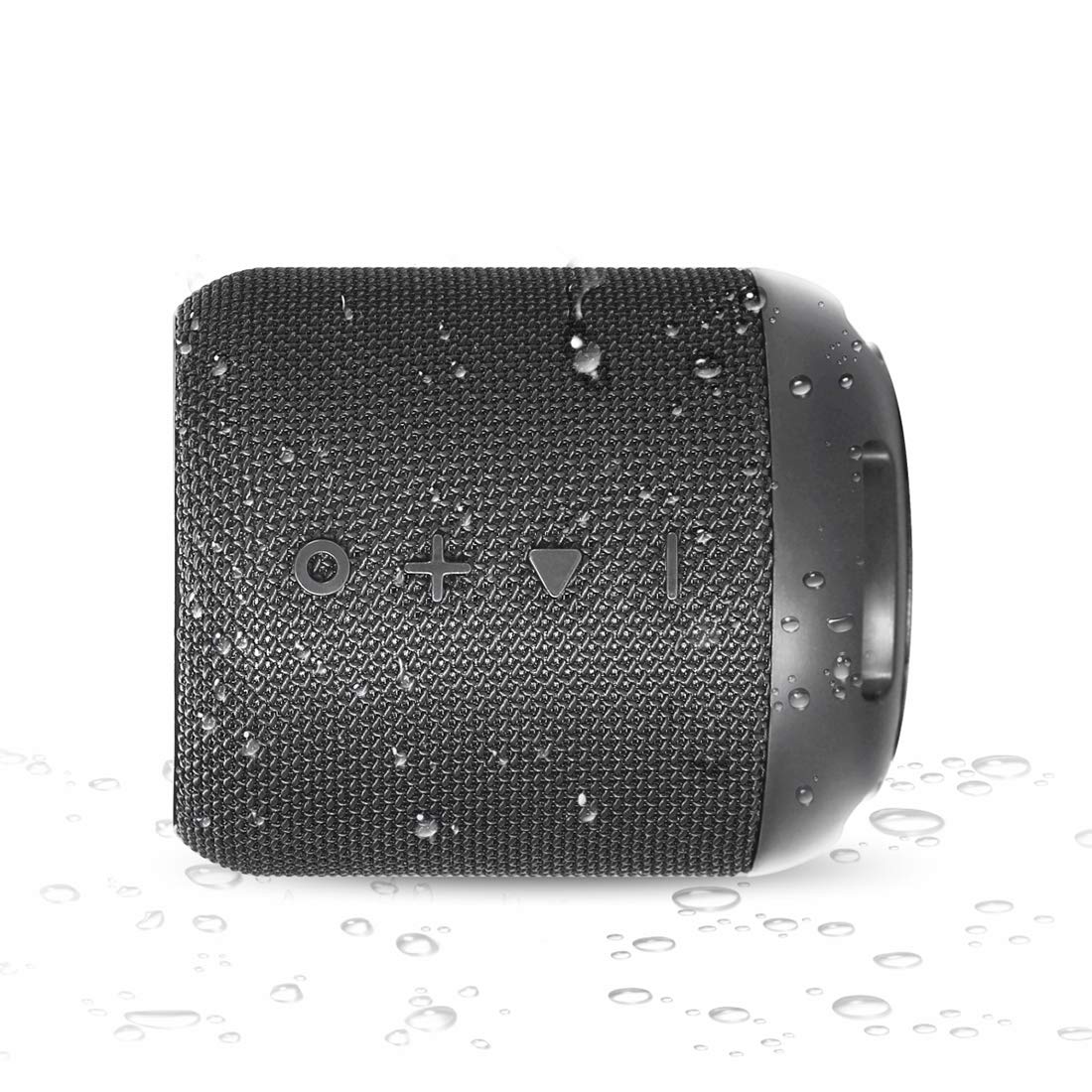
- Multifunction Button (O): Press to change modes (Bluetooth, FM, Aux, USB). Long press to power on/off.
- Volume Up (+): Short press to increase volume. Long press for next track.
- Play/Pause (▶): Press to play or pause audio. During a call, press to answer/end. Long press to reject a call.
- Volume Down (-): Short press to decrease volume. Long press for previous track.
4.3 Ports and Indicators

- USB Port: For playing audio from a USB flash drive.
- AUX Port: 3.5mm audio input for wired connection.
- DC 5V Charging Port: Micro USB port for charging the speaker.
- LED Indicator: Displays charging status and connection mode.
5. Setup
5.1 Charging the Speaker
- Connect the provided charging cable to the DC 5V port on the speaker.
- Connect the other end of the charging cable to a USB power adapter (not included) or a computer's USB port.
- The LED indicator will illuminate during charging. It will turn off once the speaker is fully charged.
- A full charge typically takes approximately 7 hours.
5.2 Power On/Off
- To power on, long press the Multifunction button (O) until you hear an audible prompt.
- To power off, long press the Multifunction button (O) again until you hear an audible prompt.
6. Operating Instructions
6.1 Bluetooth Pairing
- Ensure the speaker is powered on and in Bluetooth mode (indicated by a flashing blue LED). If not, short press the Multifunction button (O) to cycle through modes until Bluetooth mode is active.
- Enable Bluetooth on your mobile device (smartphone, tablet, laptop).
- Search for "SoundDrum" in the list of available Bluetooth devices.
- Select "SoundDrum" to pair. Once successfully paired, the LED indicator will stop flashing and remain solid blue, and you will hear a confirmation tone.
- The speaker will automatically connect to the last paired device when powered on, if within range.

6.2 Auxiliary Input (AUX)
- Connect one end of a 3.5mm audio cable (not included) to the AUX port on the speaker.
- Connect the other end of the cable to the audio output jack of your device.
- The speaker will automatically switch to AUX mode, or you can press the Multifunction button (O) to select AUX mode.
6.3 USB Playback
- Insert a USB flash drive containing MP3 audio files into the USB port.
- The speaker will automatically detect the USB drive and begin playing music. If not, press the Multifunction button (O) to select USB mode.
6.4 FM Radio
- Press the Multifunction button (O) to switch to FM radio mode.
- Long press the Play/Pause button (▶) to automatically scan and save available FM stations.
- Use the Volume Up (+) and Volume Down (-) buttons (short press) to switch between saved stations.

6.5 Hands-Free Calling
- When connected via Bluetooth, incoming calls will be announced through the speaker.
- Press the Play/Pause button (▶) to answer an incoming call.
- Press the Play/Pause button (▶) again to end the call.
- Long press the Play/Pause button (▶) to reject an incoming call.
6.6 Volume and Track Control
- Volume Adjustment: Short press the Volume Up (+) or Volume Down (-) buttons.
- Track Navigation: Long press the Volume Up (+) button for the next track, and long press the Volume Down (-) button for the previous track.
7. Maintenance
- Cleaning: Use a soft, dry cloth to clean the speaker. Do not use abrasive cleaners or solvents.
- Water Resistance: The speaker is IPX6 water-resistant, meaning it is protected against powerful water jets. Ensure the rubber flap covering the ports is securely closed to maintain water resistance. Do not submerge the speaker in water.
- Storage: Store the speaker in a cool, dry place when not in use. Avoid storing it in areas with high humidity or extreme temperatures.
- Battery Care: To prolong battery life, fully charge the speaker before first use and at least once every three months if not used regularly.

8. Troubleshooting
| Problem | Possible Solution |
|---|---|
| Speaker does not power on. | Ensure the speaker is charged. Connect it to a power source using the charging cable. |
| Cannot pair via Bluetooth. |
|
| No sound from the speaker. |
|
| FM radio reception is poor. | Try repositioning the speaker to improve signal reception. Ensure you have performed an auto-scan for stations. |
| Short battery life. | Ensure the speaker is fully charged. Battery life can vary based on volume level and usage. |
9. Specifications
| Feature | Detail |
|---|---|
| Model Name | SoundDrum |
| Item Model Number | POR-871 |
| Wireless Communication Technology | Bluetooth 4.2 |
| Speaker Output Power | 10 Watts (2x5W) |
| Impedance | 4 Ohms |
| Aux In | 3.5mm |
| Built-in Battery | 1800mAh Lithium-ion |
| Playtime | 6-7 Hours (approx.) |
| Charging Time | 7 Hours (approx.) |
| Water Resistance | IPX6 |
| Product Dimensions | 7.9D x 7.9W x 9.5H Centimeters |
| Item Weight | 300 Grams |
| Included Components | Speaker, Charging Cable, User Manual |
10. Warranty and Support
The Portronics SoundDrum 10W Portable Bluetooth Speaker (Model POR-871) comes with a 1-Year Limited Warranty from the date of purchase.
This warranty covers manufacturing defects. It does not cover damage caused by misuse, accidents, unauthorized modifications, or normal wear and tear.
For warranty claims, technical support, or any inquiries, please contact Portronics customer service:
- Manufacturer/Importer: Portronics Digital Pvt Limited
- Address: B76 Wazirpur Industrial Area, Delhi -52
- Contact Number: 9555245245
Please retain your purchase receipt as proof of purchase for warranty services.